Просмотр новости
Найдите то, что Вас интересует
 Спутники
 РН
РН SpaceX
 Роскосмос
 NASA
NASA
СпутникиРНSpaceXРоскосмосNASAFirefox recently rolled out a set of New Tab widgets timed to the 2026 FIFA World Cup. As we covered earlier this week, the update brings live sports tracking, a checklist, a timer, and other tools directly to your homepage, essentially turning the New Tab page into a personal dashboard. Not everyone wants that, though. […]
The post Here’s how to turn off Firefox widgets on the New Tab page appeared first on PiunikaWeb.
Firefox recently rolled out a set of New Tab widgets timed to the 2026 FIFA World Cup. As we covered earlier this week, the update brings live sports tracking, a checklist, a timer, and other tools directly to your homepage, essentially turning the New Tab page into a personal dashboard.
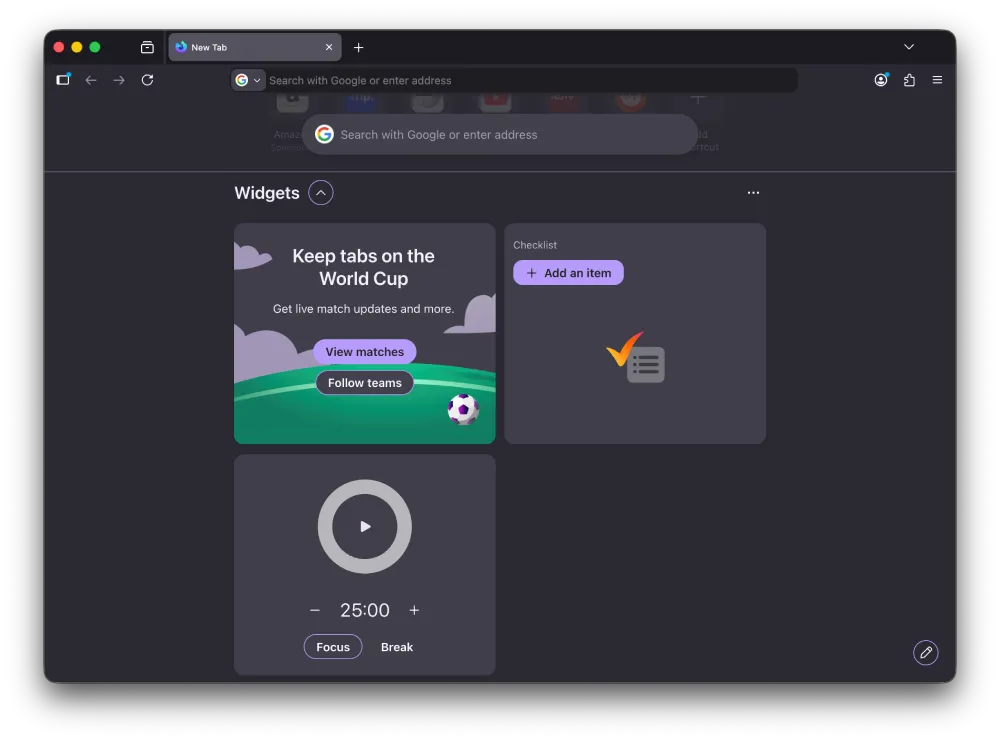
Not everyone wants that, though. If you’d rather keep your New Tab clean and minimal, disabling the widgets takes just a few clicks.
Before we dive in, it’s also worth noting that you don’t have to remove all of them. Firefox lets you toggle individual widgets, so if the football widget is the one you actually want, you can keep that and ditch the others.
Here’s how to do itOpen Firefox and go to a new tab. In the bottom-right corner of the page, you’ll see a Customize button with a pencil icon — click that.
A panel slides open on the right side of the screen. You’ll see options for Wallpapers, Shortcuts, and Widgets, each with its own toggle. To turn off all widgets at once, just flip the Widgets toggle off. That removes the entire section from your New Tab page.
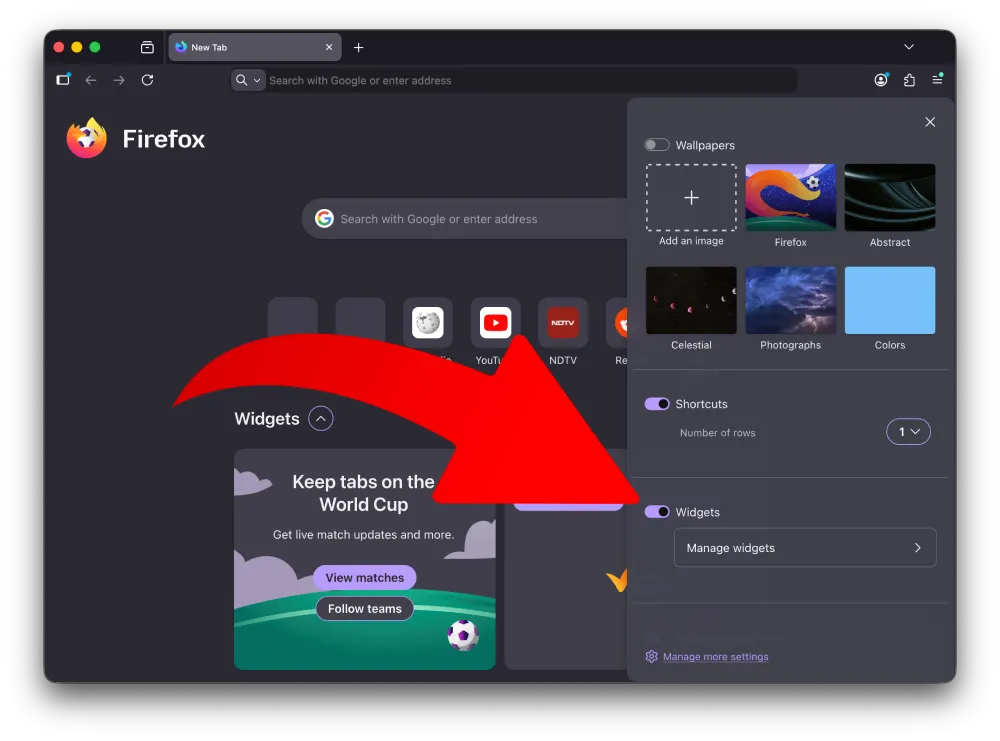
If you want more control, click Manage widgets under that same toggle. That takes you to a secondary screen listing each widget individually: Timer, Lists, and Sports are the three currently available. Each one has its own toggle, so you can switch off just the ones you don’t want. Disabling Sports removes the World Cup widget specifically, while leaving the checklist or timer in place if you use those.
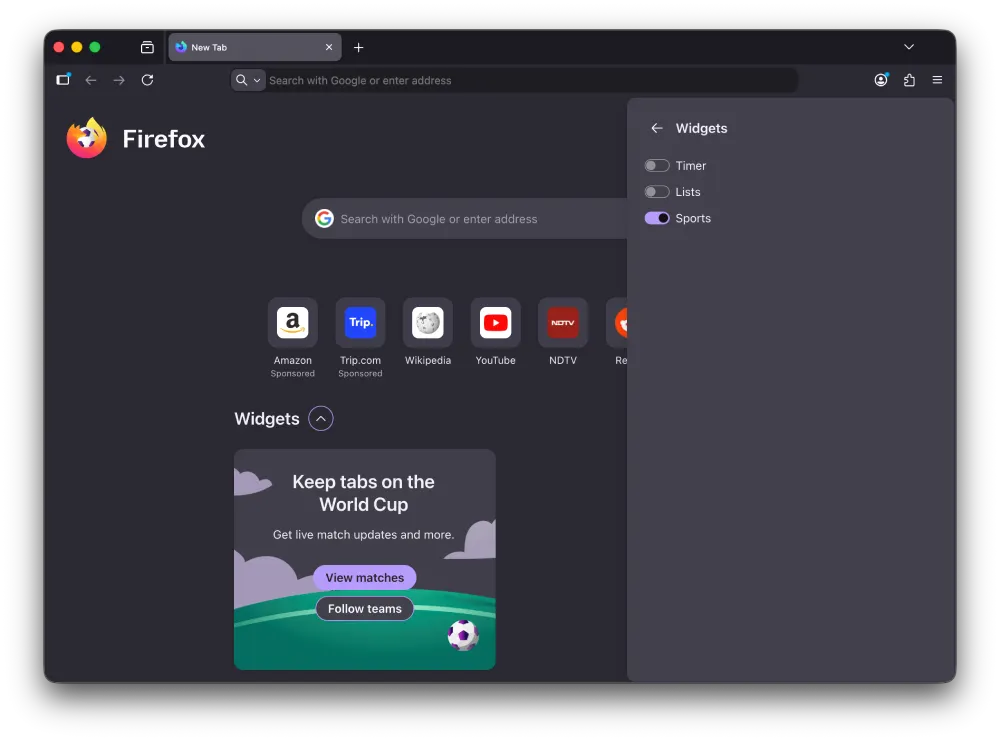
Once you’re done, click the X at the top of the panel or click anywhere outside it to close. The New Tab page updates immediately to reflect whatever you left enabled.
That’s really all there is to it. The Customize panel also lets you swap out wallpapers and adjust how many rows of shortcuts appear, so it’s worth a look even if the widgets aren’t what brought you there.

We stand out from the tech-media crowd because we break news stories; we mainly bring you stuff that you won’t find anywhere in the mainstream tech media. Our stories have been picked up by some of the world’s most popular websites and media outlets—more info is available here.
| # | Наименование новости | Тональность | Информативность | Дата публикации |
|---|---|---|---|---|
| 1 | How to fix Google Chrome New Tab Page’s huge gap between search bar & shortcuts | 0 | 17.84 | 19-06-2026 |
| 2 | Chrome now lets you quickly remove the Tab Search icon without messing with flags | 0 | 15.97 | 03-06-2026 |
| 3 | Firefox for Android finally gets Tab Groups, with iOS support coming later | 0 | 17.44 | 22-07-2026 |
| 4 | Here’s how to disable the new bottom bar on Chrome for Android | 0 | 15.23 | 05-08-2026 |
| 5 | How to restore Microsoft Edge Sidebar app list and Collections | 0 | 17.74 | 12-06-2026 |
| 6 | Your Galaxy Watch browser just learned a trick nobody really asked for | 0 | 18.68 | 20-07-2026 |
| 7 | Opera Neon shares simple guide to let Cursor and Codex control the browser | 0 | 16.34 | 23-06-2026 |
| 8 | 7 Days: Firefox follows Chrome, man loses 25 years of data, Samsung threatens data deletion | 0 | 5 | 19-07-2026 |
| 9 | Apple Adds AI Tab Organization, Password Fixing, Custom Extensions, and Page Monitoring to Safari | 0 | 6.92 | 10-06-2026 |
| 10 | Firefox tracks you with “privacy preserving” feature | 0 | 8.06 | 25-09-2024 |