Просмотр новости
Найдите то, что Вас интересует
 Спутники
 РН
РН SpaceX
 Роскосмос
 NASA
NASA
СпутникиРНSpaceXРоскосмосNASAGoogle is constantly experimenting with new features and UI tweaks across its suite of products. Just earlier this month, we highlighted Chrome’s tests on the floating Everywhere Omnibox that brings AI search directly to your desktop. Now, it appears the Google Chrome New Tab Page (NTP) is the subject of yet another UI experiment, and […]
The post How to fix Google Chrome New Tab Page’s huge gap between search bar & shortcuts appeared first on PiunikaWeb.
Google is constantly experimenting with new features and UI tweaks across its suite of products. Just earlier this month, we highlighted Chrome’s tests on the floating Everywhere Omnibox that brings AI search directly to your desktop. Now, it appears the Google Chrome New Tab Page (NTP) is the subject of yet another UI experiment, and not everyone is a fan.
Over the past few days, some Google Chrome users have reported a sudden, jarring shift on their New Tab Page. The grid of website shortcuts, which traditionally sits snugly below the central Google search bar, has been pushed significantly lower.
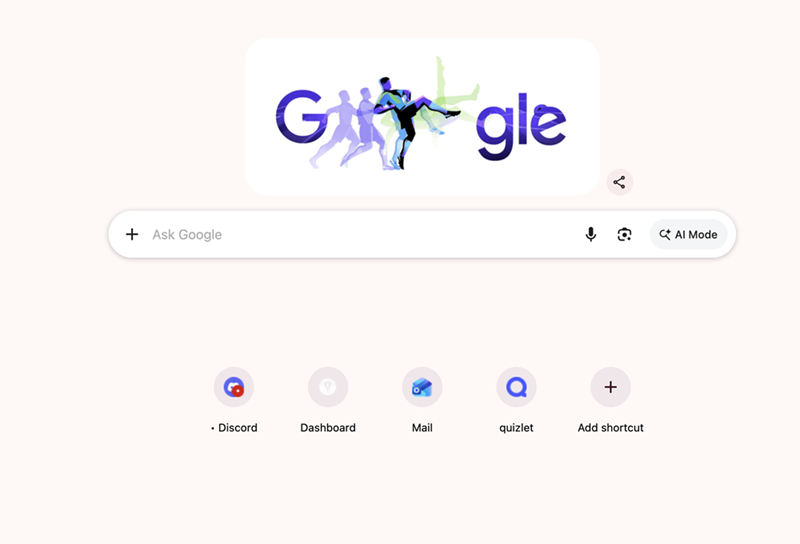
This shift creates a massive, awkward block of whitespace right in the middle of the screen. While this UI tweak doesn’t actually break any browser functionality, it’s undeniably an eyesore for those accustomed to the classic, compact layout.
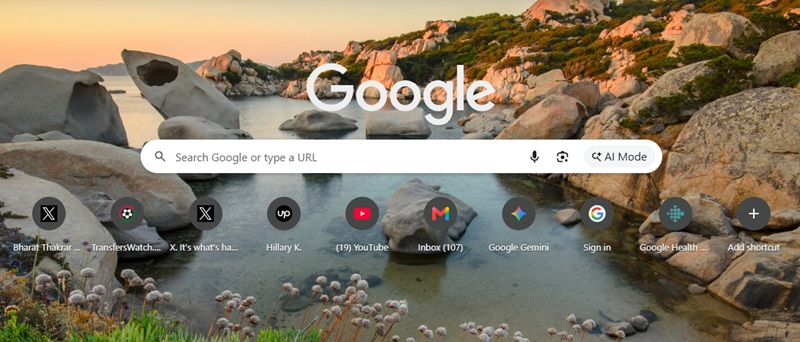
If your Google Chrome still looks completely normal, you aren’t alone. This appears to be a limited server-side A/B test. Despite checking across Chrome Stable, Beta, and Canary builds, we couldn’t replicate the lowered shortcuts on our end.
Here’s how mine looks as of this writing:
Fortunately, if you have been swept up in this visual test and are stuck with the unusually gappy layout, there is a quick workaround. The culprit appears to be a specific Chrome flag. Here is how to fix it:
chrome://flags into your Chrome address bar and hit Enter.Interestingly, while the “NTP ComposeBox” flag is present on my end, enabling or disabling it didn’t change anything about my New Tab Page layout in Google Chrome. This further confirms that Google is selectively rolling out this UI change. However, for those actively affected by the lowered shortcuts, disabling this flag has proven successful in reverting the layout back to normal.

We stand out from the tech-media crowd because we break news stories; we mainly bring you stuff that you won’t find anywhere in the mainstream tech media. Our stories have been picked up by some of the world’s most popular websites and media outlets—more info is available here.
| # | Наименование новости | Тональность | Информативность | Дата публикации |
|---|---|---|---|---|
| 1 | Chrome now lets you quickly remove the Tab Search icon without messing with flags | 0 | 15.97 | 03-06-2026 |
| 2 | Here’s how to disable the new bottom bar on Chrome for Android | 0 | 15.23 | 05-08-2026 |
| 3 | Chrome for Android is getting smarter text selection tools as desktop gains vertical tabs upgrade | 0 | 17.49 | 23-07-2026 |
| 4 | Here’s how to turn off Firefox widgets on the New Tab page | 0 | 18.04 | 11-06-2026 |
| 5 | Google Chrome tests sending users straight to AI Mode instead of Search, but no plans to change [U] | 0 | 9.13 | 05-06-2026 |
| 6 | Here’s how to disable the Ask Gemini right-click option in Google Chrome | 0 | 18.88 | 29-05-2026 |
| 7 | Chrome for Android now lets you set a custom New Tab Page background | 0 | 8.74 | 30-07-2026 |
| 8 | Brave app’s “Get back to your most recent tab” pop-up is annoying — here’s how to disable it | 0 | 17.26 | 10-06-2026 |
| 9 | Chrome to Block Policy-Abusing Extensions on Personal Devices | 0 | 11.38 | 04-08-2026 |
| 10 | Google Chrome to start getting security updates twice a week | 0 | 15.62 | 31-07-2026 |