Просмотр новости
Найдите то, что Вас интересует
 Спутники
 РН
РН SpaceX
 Роскосмос
 NASA
NASA
СпутникиРНSpaceXРоскосмосNASAFind out how secure WordPress really is, what puts websites at risk and the simple steps you can take to protect yours.
The post Is WordPress Secure? What You Need to Know appeared first on TeamUpdraft.
Yes, WordPress is secure. The core software has a strong security record and is actively maintained, but keeping your website secure depends on how you manage it.
WordPress has a reputation for being a frequent target for hackers, but that’s largely because it’s the most widely used content management system in the world. In most cases, successful attacks don’t exploit WordPress itself. They target outdated plugins and themes, weak passwords or poorly maintained websites.
The good news is that improving your website’s security doesn’t have to be complicated. A few simple habits, such as keeping your software up to date, using strong login credentials and installing trusted security tools, can dramatically reduce your risk.
In this guide, we’ll explain how secure WordPress really is, what the biggest security risks are and the practical steps you can take to better protect your website. Whether you’re launching your first WordPress site or looking to strengthen an existing one, you’ll come away with a clearer understanding of how to keep it secure.
The short answer is yes, WordPress is secure. The core software is developed with security in mind and is regularly updated to address newly discovered vulnerabilities. In fact, Patchstack’s State of WordPress Security report found that 91% of newly disclosed vulnerabilities in 2025 affected plugins, while only six low-priority vulnerabilities were reported in WordPress core
WordPress also benefits from having a dedicated security team and a large community of developers and researchers who help identify and report potential vulnerabilities. Minor security releases can even be installed automatically, helping many websites stay protected without requiring manual updates.
So why does WordPress sometimes get a reputation for being insecure? In most cases, the issue isn’t WordPress itself. Security incidents are far more likely to involve outdated plugins or themes, weak passwords, poorly configured hosting environments or websites that haven’t been maintained.
One of WordPress’ biggest strengths is its flexibility. With thousands of plugins and themes available, you can build almost any type of website without writing code. The trade-off is that every plugin or theme you install becomes another piece of software that needs to be kept up to date. Choosing reputable developers, removing unused plugins and installing updates promptly all play an important role in keeping your website secure.
Ultimately, WordPress security isn’t about trusting the platform alone. It’s about combining a secure foundation with good maintenance, sensible security practices and reliable tools to protect your website over time.
Section titled The real culprits behind website security breaches
If WordPress core is secure, why do WordPress websites still get hacked?
In most cases, the problem isn’t WordPress itself. Security breaches are far more likely to involve outdated plugins or themes, weak passwords, poorly configured hosting or websites that aren’t regularly maintained. Understanding these risks is the first step towards protecting your site.
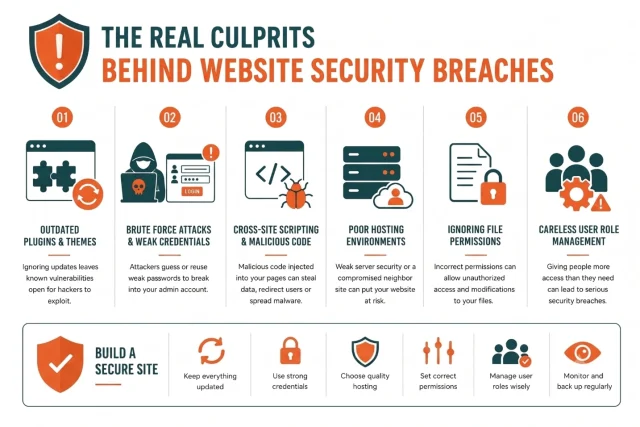
Outdated plugins and themes are one of the most common causes of WordPress security vulnerabilities. Developers regularly release updates to fix bugs, introduce new features and, most importantly, patch security issues. Delaying these updates can leave your website exposed to vulnerabilities that attackers already know how to exploit.
Industry research consistently shows that most reported WordPress vulnerabilities originate from third-party plugins rather than WordPress core. That’s why it’s important to install plugins from reputable developers, keep them up to date and remove any that are no longer maintained or needed.
Before installing a new plugin or theme, check when it was last updated, whether it’s compatible with the latest version of WordPress and how actively it’s maintained. A well-supported plugin is far less likely to introduce security risks than one that has been abandoned.
A brute force attack is when automated bots repeatedly try different username and password combinations until they find one that works. Because the default WordPress login URL is easy to find, websites with weak or commonly used credentials are frequent targets.
Using a strong, unique password is one of the simplest ways to reduce your risk. It’s also a good idea to avoid generic usernames such as admin, enable two-factor authentication (2FA) and limit repeated login attempts to make automated attacks much harder.
Password reuse is another common security risk. If you use the same password across multiple accounts and one of those services is compromised, attackers may try those stolen credentials on your WordPress login page. This type of attack, known as credential stuffing, is one of the reasons security experts recommend using a password manager to generate and store unique passwords for every account.
Cross-site scripting is a technical term for a very common problem on the internet. It occurs when a vulnerable extension allows an attacker to inject malicious code into your web pages. When a legitimate visitor loads that compromised page, the malicious code executes directly in their browser.
This can easily lead to stolen session cookies, redirected traffic or unwanted file downloads. This type of vulnerability usually stems from amateur developers failing to properly clean or sanitize the data users input into contact forms.
While the mechanics sound highly technical, the solution on your end is quite simple. You just need to ensure you only install add-ons from highly reputable sources and keep them updated to their latest versions constantly.
Your website is only as secure as the physical server it lives on. If you choose the absolute cheapest shared hosting plan available on the market, you are sharing server space with hundreds of other random websites. If one of those neighboring sites gets compromised due to poor security practices, the infection can sometimes spread across the entire server and infect your clean files.
Good WordPress hosting providers implement strict server-level security measures to prevent this cross-contamination. They actively monitor network traffic, block malicious IP addresses and isolate individual hosting accounts from one another. Skimping on web hosting to save a few dollars a month can end up costing you significantly more if you have to hire a professional developer to clean up a messy malware infection.
Every file and folder on your website server has specific permission settings that dictate who can read, write or execute them. When these permissions are set too loosely, you essentially give anyone on the internet the ability to modify your core files. Many novice users accidentally change these settings while trying to fix a minor error and inadvertently open massive security holes.
Understanding file permissions can feel overwhelming for beginners. The correct settings require a delicate balance between allowing your software to function properly and blocking unauthorized access. Fortunately, you do not have to learn complex server commands to fix this issue if you use the right protective tools.
As your website grows, you will likely invite other people to help you manage it. You might hire a freelance writer, a graphic designer or an SEO specialist. Giving all these individuals full administrator access is one of the most dangerous mistakes you can make as a site owner.
If a guest writer’s personal computer gets infected with malware, hackers can steal their login credentials. If that writer has administrator privileges, the hackers now own your website. You must always assign the lowest possible user role necessary for a person to complete their specific job.
Yes. A fresh WordPress installation is designed with security in mind and includes a range of built-in protections. Regular security updates, responsible vulnerability disclosure and ongoing development all help keep WordPress core secure.
However, very few websites remain in their default state for long. Most site owners install themes and plugins, create user accounts and connect third-party services to add new functionality. While these additions are one of WordPress’ biggest strengths, they also increase the number of areas that need to be managed and kept up to date.
That’s why WordPress security isn’t something you set up once and forget. Keeping your software updated, using strong login credentials, choosing reputable plugins and themes, and following WordPress security best practices all play an important role in protecting your website.
The good news is that most of these measures are straightforward to implement. In the next section, we’ll look at some of the most effective ways to improve your WordPress site’s security.
Now that we know where the risks lie, let us take action. You do not need to be a coding genius to secure your WordPress site. You just need to follow a few straightforward best practices.
This is the single most important thing you can do for your website security. You must keep your WordPress core, your themes and your plugins updated to their latest versions. Updates do not just bring new features. They contain critical security patches that protect you from known threats.
I recommend logging into your WordPress dashboard at least once a week to run updates. Better yet, enable automatic updates for plugins and themes you trust. If you are no longer using a specific plugin or theme, do not just deactivate it. Delete it completely. Inactive code can still be exploited by a determined attacker.
By default, every WordPress login page is located at the exact same URL. Hackers know this. They point their automated scripts directly at that default URL and start guessing passwords. You can stop a massive percentage of attacks simply by moving your login page to a custom, secret address. You should also limit the number of failed login attempts allowed from a single IP address.
If someone tries to guess your password three times and fails, lock them out temporarily. This makes brute force attacks mathematically impossible to execute.
Exposed admin pages are the easiest way in for brute force attacks. AIOS hides your login, adds two-factor authentication and blocks repeated login attempts automatically.
Section titled Step 3. Enforce strong passwords and two-factor authentication
We have already discussed why weak passwords are a massive liability. You need to enforce strong password policies for yourself and any other users who have access to your dashboard.
Use a password manager to generate long, random combinations of letters, numbers and symbols. However, even the strongest password can be stolen. That is why two-factor authentication is so important. With two-factor authentication enabled, you need a password and a unique code from your mobile device to log in.
Even if a hacker steals your password, they cannot access your site without your physical phone. Security plugins like AIOS make setting this up incredibly simple.
Do not choose your hosting provider based solely on price. Look for a managed WordPress host that prioritizes security. A good host will offer automatic daily backups, free SSL certificates and server-level malware scanning. They should also isolate your website from other users on their network.
If you are serious about your business, investing in quality hosting is the best decision you can make. It solves many security headaches before they even begin.
An SSL certificate encrypts the data sent between your website and your visitors. This is crucial for protecting sensitive information like login credentials, credit card numbers and personal details. You can easily tell if a site has an SSL certificate by looking for the padlock icon in your browser address bar.
Most modern hosting providers offer free SSL certificates. Installing one is non-negotiable for security and user trust. Furthermore, search engines actively penalize websites that do not use encryption, so it is vital for your visibility as well.
Even if you follow WordPress security best practices, it’s not practical to monitor your website around the clock. A WordPress security plugin can help automate many of the tasks involved in protecting your site, such as monitoring for suspicious activity, strengthening your login page and helping defend against common attacks.
When choosing a security plugin, look for features such as a web application firewall (WAF), brute force protection, two-factor authentication, file integrity monitoring and malware scanning. The right combination of features will depend on your website and how you manage it, but using a trusted security plugin can add an important extra layer of protection alongside regular updates and good security practices.
A security plugin shouldn’t replace good website maintenance – it should reinforce it. Keeping WordPress updated, using strong authentication and taking regular backups are still essential. A good security plugin simply helps automate those best practices and alerts you when something needs your attention
Do not wait for a security breach to take action. AIOS provides comprehensive firewall protection, login security and file monitoring to keep your website completely safe.
Even if you follow every security best practice, there’s always a chance something could go wrong. A plugin update might fail, your hosting server could experience an issue or your website could be compromised despite your precautions.
Regular backups give you a safety net. If the unexpected happens, you’ll have a recent backup of your WordPress site that you can restore and get your website back online much more quickly.
Tools like UpdraftPlus make the process easy by creating automatic backups of your files and database and storing them securely in remote locations such as Google Drive, Dropbox or Amazon S3. That means you don’t have to remember to back up your website manually, and if you ever need to recover your site, you’ll have everything you need ready to go.
No security measure can eliminate risk completely. That’s why we always encourage website owners to think about recovery as well as prevention. Having a recent backup means that if the worst does happen, you’re in a much stronger position to get your site back online quickly.
Once you’ve covered the basics, there are a few additional steps you can take to further strengthen your WordPress site’s security. These measures aren’t essential for every website, but they can provide an extra layer of protection, particularly for business websites or sites with multiple users.
Every WordPress installation uses a database prefix to organise its tables. Changing the default prefix won’t stop a determined attacker on its own, but it can make automated attacks that rely on common WordPress defaults slightly less effective.
This should be viewed as an additional security measure rather than a replacement for regular updates, strong passwords and a well-maintained security plugin.
By default, WordPress allows administrators to edit theme and plugin files directly from the dashboard. While this can be useful during development, it also creates an additional risk if an attacker gains access to an administrator account.
Disabling the built-in file editor prevents changes being made through the WordPress dashboard. Anyone who needs to edit theme or plugin files will instead need to use SFTP, SSH or their hosting control panel, providing an extra safeguard against unauthorised changes.
Some themes and plugins expose your WordPress version number in the page source. While hiding it won’t prevent targeted attacks, it can reduce information available to automated bots looking for websites running outdated versions of WordPress.
Like changing the database prefix, this is best treated as a small improvement rather than a primary security measure.
Yes, WordPress is secure. It’s used by millions of websites around the world, and the core software is actively maintained by a dedicated team of developers and security researchers. Most successful attacks don’t happen because WordPress is insecure. They happen because websites aren’t kept up to date or basic security measures have been overlooked.
The good news is that protecting your website doesn’t have to be complicated. Keeping WordPress, your plugins and your themes up to date, using strong passwords, choosing trusted tools, taking regular backups and following a few simple security best practices can go a long way towards keeping your website safe.
If you’d like an extra layer of protection, keeping your website secure is much easier with the right tools. A security plugin like AIOS can help protect your login page, block common attacks and monitor your website for suspicious activity, while regular backups mean you can quickly recover if something unexpected does happen.
No website can ever be 100% risk-free, but with a little ongoing maintenance and the right tools, WordPress is one of the most secure and reliable platforms you can build your website on.
For most websites, the biggest security risk isn’t WordPress itself, it’s outdated plugins and themes. When security vulnerabilities are discovered, developers release updates to fix them. Websites that delay installing those updates are much more likely to become targets for automated attacks, so keeping your WordPress core, plugins and themes up to date is one of the most effective ways to protect your site.
Can WordPress sites be hacked?Any website can be compromised if it isn’t properly maintained, and WordPress is no exception. However, WordPress core has a strong security record. Most successful attacks exploit outdated software, weak passwords or poor security practices rather than vulnerabilities in WordPress itself.
Does WordPress have built-in security?Yes. WordPress includes several built-in security features, including regular security updates, password hashing and user roles with different permission levels. While these provide a strong foundation, they work best alongside regular updates, secure hosting, strong passwords and a trusted security plugin.
Are free WordPress plugins safe to use?Many free plugins in the official WordPress Plugin Directory are well maintained and safe to use. Before installing one, check when it was last updated, whether it’s compatible with your version of WordPress, how many active installations it has and what recent reviews say. It’s also worth checking that the developer actively maintains and supports the plugin.
Do I still need a security plugin if my hosting provider offers security features?Hosting providers often protect the server your website runs on, but they don’t always monitor activity inside WordPress itself. A WordPress security plugin can add features such as login protection, two-factor authentication, firewall rules and file integrity monitoring, helping provide an additional layer of protection.
Is WordPress secure enough for ecommerce websites?Yes. Thousands of ecommerce websites run securely on WordPress using plugins such as WooCommerce. If you’re handling customer accounts or payments, it’s especially important to keep your software updated, use HTTPS, enable two-factor authentication and take regular backups.
What should I do if my WordPress site gets hacked?Start by contacting your hosting provider, as they may be able to help identify and isolate the issue. If you have a clean backup, restore your website to a version from before the attack, then update WordPress, change all passwords, remove any malicious files and investigate how the attacker gained access so you can prevent it from happening again.
How secure is WordPress?WordPress is very secure when it’s properly maintained. The core software is regularly updated by a dedicated security team, but keeping WordPress, your plugins and your themes up to date is just as important. Using strong passwords, enabling two-factor authentication, choosing trusted plugins and taking regular backups will go a long way towards protecting your website.
| # | Наименование новости | Тональность | Информативность | Дата публикации |
|---|---|---|---|---|
| 1 | Best plugin to secure WordPress pages | 0 | 8.26 | 14-07-2026 |
| 2 | How WordPress Sites Get Hacked (And How to Stop Each Attack) | 0 | 5.05 | 15-07-2026 |
| 3 | What’s the best way to backup WordPress | 0 | 6.57 | 31-07-2026 |
| 4 | How to safely delete a WordPress site without losing data | 0 | 5.75 | 29-07-2026 |
| 5 | How to optimize images for WordPress | 0 | 7 | 22-07-2026 |
| 6 | How to duplicate a WordPress site: Best plugins compared | 0 | 5.59 | 07-07-2026 |
| 7 | Best WordPress themes for travel blogs and explorers | 0 | 6.78 | 10-08-2026 |
| 8 | How to improve LCP in WordPress and pass Core Web Vitals | 0 | 6.38 | 08-07-2026 |
| 9 | Cybersecurity for WordPress: Protecting Websites from Next-Gen Threats #wordpress #internet #cybersecurity | 0 | 14.4 | 15-06-2026 |
| 10 | How to restore the default WordPress dashboard | 0 | 5.85 | 04-08-2026 |