Просмотр новости
Найдите то, что Вас интересует
 Спутники
 РН
РН SpaceX
 Роскосмос
 NASA
NASA
СпутникиРНSpaceXРоскосмосNASAUse the 3CX MCP Server to turn useful call transcripts [...]
The post Turn 3CX Call Transcripts into AI Agent Knowledge appeared first on 3CX.


Companies already have useful knowledge inside their 3CX call transcripts. The challenge is turning those conversations into information an AI Agent can use.
With the 3CX MCP Server, you can use an AI client such as ChatGPT or Claude to review selected transcripts, extract useful information and save it as a Markdown ( .md) file. Once reviewed, that file can be added as a Knowledge Source for a 3CX AI Agent, helping it answer future calls and chats using information based on real customer conversations.
Read on to see how to extract the right information, turn it into a Knowledge Source and keep it accurate over time.
Start with the 3CX MCP ServerConnect an AI client such as ChatGPT or Claude to your 3CX MCP Server and use it to review selected call transcripts. From there, you can extract the information that matters to your team and organise it into a Markdown file.
See Connect ChatGPT or Claude to the 3CX MCP Server for setup guidance, and 3CX MCP Tools and Permission Levels for details on the available tools and access permissions.
The generated file can include:
Markdown is the recommended format because it keeps headings and related information clearly structured. Text, PDF and CSV files can also be used where appropriate.
Use a Clear PromptTell the AI tool which calls to review, what to leave out and what to extract. Example prompt:
Turn the Collected Data into a Knowledge Source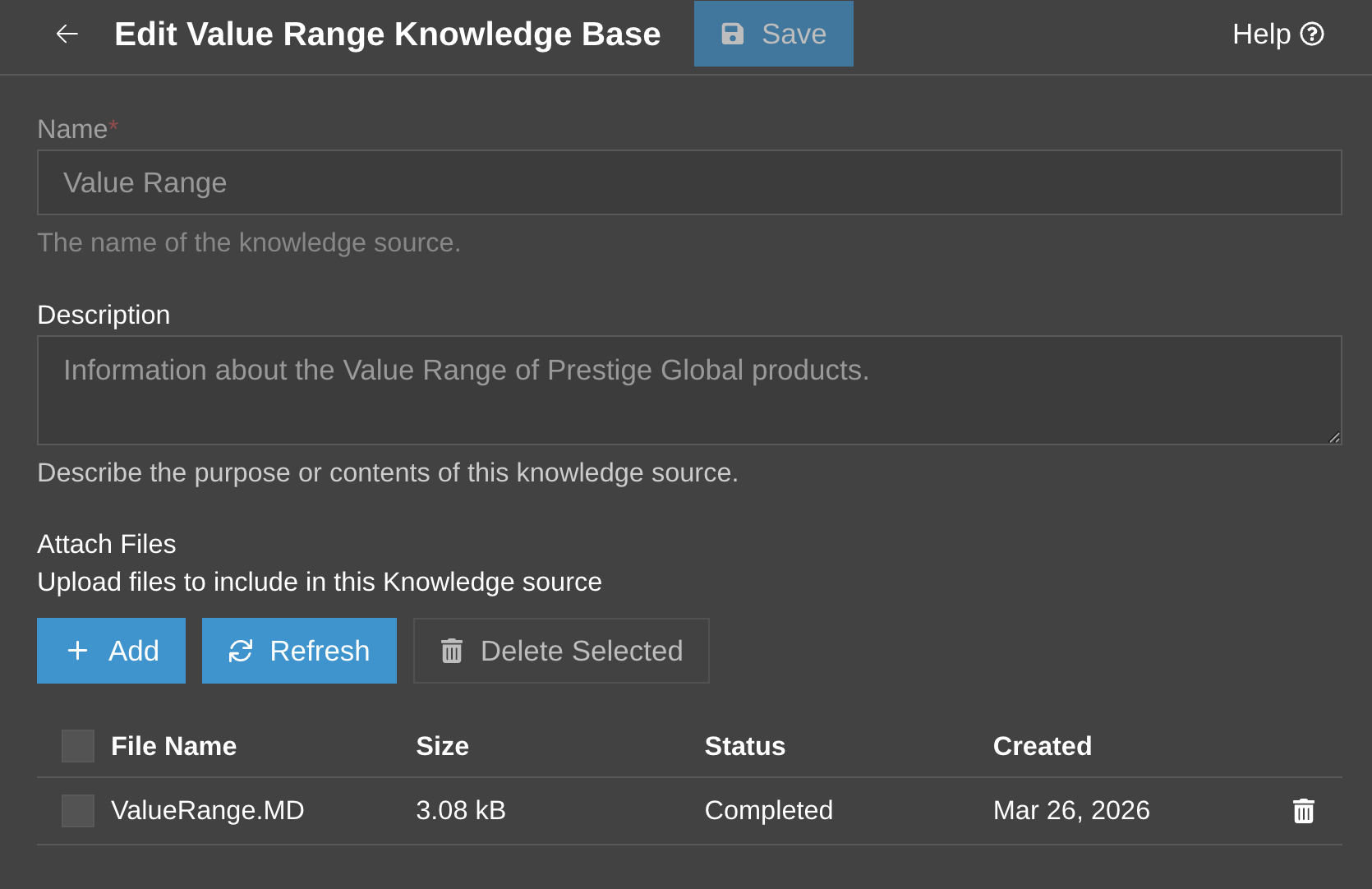
Once the Markdown file has been reviewed, add it as a Knowledge Source for your 3CX AI Agent. The Agent can then use this company information during calls and chats. The Knowledge Sources page also gives authorised users one place to manage and update these files.
Recommendations for your Knowledge Source files:
For example, a Sales team could create separate Knowledge Source files for:
Test the AI Agent with real questions based on the information in the Knowledge Source. Its answers should match the reviewed files and stay within what the Agent is expected to handle. For example, a Sales AI Agent could be asked about common objections, product explanations, qualification questions or points that need human follow-up.
If an answer is wrong, unclear or missing, update the Knowledge Source rather than relying on the raw transcript as final guidance.
Keep the source focused and easy to maintain. Start with one team and a selected set of useful calls rather than trying to include every transcript. Before adding or updating a file:
Review recent calls periodically and add useful new questions, answers and examples as they appear.
Join the DiscussionJoin the 3CX discussion in our dedicated Partner or Customer Forums. Follow us on X and LinkedIn to stay-up-to date on latest news and feature releases.
| # | Наименование новости | Тональность | Информативность | Дата публикации |
|---|---|---|---|---|
| 1 | Choose OpenAI or xAI Grok to Power 3CX AI Agents | 0 | 5.92 | 17-09-2026 |
| 2 | Use 3CX Trials to Build, Test and Convert Customer Systems | 0 | 3.99 | 21-09-2026 |
| 3 | 3CX Licensing: Size the System, Not the User Count | 0 | 4.98 | 25-09-2026 |
| 4 | 3CX Backup & Recovery: Be Ready Before You Need It | 0 | 7.77 | 14-09-2026 |
| 5 | Watch! What’s New in 3CX V20 Update 10 Alpha 2 | 0 | 11.85 | 16-09-2026 |
| 6 | 3CX Android V5.8 BETA: Queue Management & Outbound Number Choice | 0 | 7.37 | 22-09-2026 |
| 7 | Manage 3CX Browser and PWA Permissions Centrally | 0 | 5.38 | 24-09-2026 |
| 8 | ИИ-агенты в инвестициях: собираем Telegram-ассистента и торгового робота на MCP Т-Инвестиций | 0 | 14.39 | 26-09-2026 |
| 9 | 3CX Extends Push Expiry From 7 to 14 Days | 0 | 14.01 | 18-09-2026 |
| 10 | Доверить сервер ИИ-агенту и не пожалеть: как спать спокойно без SSH | 0 | 12.58 | 26-09-2026 |