Просмотр новости
Найдите то, что Вас интересует
 Спутники
 РН
РН SpaceX
 Роскосмос
 NASA
NASA
СпутникиРНSpaceXРоскосмосNASASet microphone, camera and notification permissions cen [...]
The post Manage 3CX Browser and PWA Permissions Centrally appeared first on 3CX.


When deploying 3CX across multiple managed devices, browser permission prompts for the microphone, camera and notifications can add extra steps for users during setup.
Our new technical guide explains how administrators can manage these permissions centrally across Windows, macOS and ChromeOS. The same policies apply whether users access the 3CX Web Client in the browser or through the installed PWA.
Read on for an overview of the available management options, or follow the full guide for step-by-step deployment instructions.
Manage Permissions Across Your Devices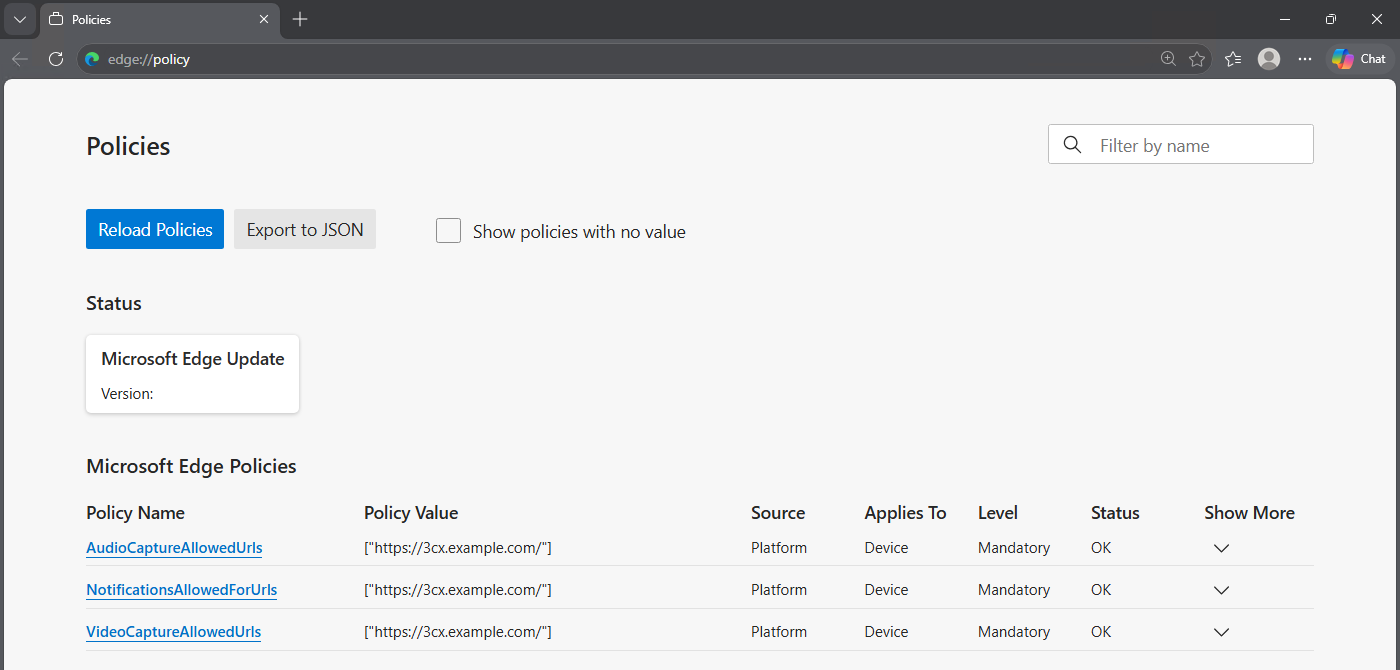
3CX uses the browser permission model whether a user works in a browser tab or an installed PWA window. How these permissions are managed depends on the operating system and browser in use:
The policies use the exact HTTPS origin URL of the 3CX system, allowing administrators to apply the required permissions centrally rather than configuring each device individually.
Follow the Deployment GuideConfigure 3CX Browser and PWA Permissions guide brings the full deployment process together, including:
Start with a test user or group, confirm that the browser policies are applied correctly and then roll out the configuration across your managed devices.
Join the DiscussionJoin the 3CX discussion in our dedicated Partner or Customer Forums. Follow us on X and LinkedIn to stay-up-to date on latest news and feature releases.
| # | Наименование новости | Тональность | Информативность | Дата публикации |
|---|---|---|---|---|
| 1 | 3CX Licensing: Size the System, Not the User Count | 0 | 4.98 | 25-09-2026 |
| 2 | 3CX Extends Push Expiry From 7 to 14 Days | 0 | 14.01 | 18-09-2026 |
| 3 | 3CX Backup & Recovery: Be Ready Before You Need It | 0 | 7.77 | 14-09-2026 |
| 4 | 3CX Android V5.8 BETA: Queue Management & Outbound Number Choice | 0 | 7.37 | 22-09-2026 |
| 5 | Use 3CX Trials to Build, Test and Convert Customer Systems | 0 | 3.99 | 21-09-2026 |
| 6 | Watch! What’s New in 3CX V20 Update 10 Alpha 2 | 0 | 11.85 | 16-09-2026 |
| 7 | Choose OpenAI or xAI Grok to Power 3CX AI Agents | 0 | 5.92 | 17-09-2026 |
| 8 | Turn 3CX Call Transcripts into AI Agent Knowledge | 0 | 4.7 | 15-09-2026 |
| 9 | Shared Parking Gets Department-Specific Music on Hold | 0 | 13.37 | 23-09-2026 |
| 10 | U.S. Privacy Litigation Update: September 2025 Decisions | 0 | 16.45 | 21-10-2025 |