Просмотр новости
Найдите то, что Вас интересует
 Спутники
 РН
РН SpaceX
 Роскосмос
 NASA
NASA
СпутникиРНSpaceXРоскосмосNASA
I ditched dedicated dashboard apps for Android Auto on my desk

Published Aug 4, 2026, 8:00 AM EDT
Dhruv Bhutani has covered the Android ecosystem since 2010, with a focus on smartphones, connected devices, and home networking. His reporting is informed by hands-on experience reviewing hundreds of smartphones and testing a wide range of smart home and audio products over more than a decade. He has attended Mobile World Congress eight times since 2011 and IFA Berlin five times, alongside regular coverage of launch events and industry briefings from companies including Google, Xiaomi, Oppo, and Qualcomm. This on-ground access and long-term exposure to product cycles inform how he evaluates hardware, software direction, and ecosystem shifts.
First-Hand Experience
Reviewed and tested hundreds of smartphones since 2009
Tested smart home, audio, and connected devices across multiple categories
Attended Mobile World Congress (8 times, first in 2011)
Attended IFA Berlin (5 times)
Covered industry events including Qualcomm Summit and launch events from Google, Xiaomi, Oppo, and Vivo
Career History
CNET — Freelance Editor
May 2024 – Present
Android Police — Freelance Editor
July 2023 – Present
Android Authority — Contributor
November 2022 – Present
Android Authority — Editor
January 2019 – October 2022
FoneArena — Editor
February 2010 – January 2018
PhoneReport.info — International Correspondent
February 2010 – May 2011
Nokia Mobile Talk — Writer
June 2009 – October 2009
I spend most of my day at my desk, so I like the idea of having a dedicated dashboard near my monitor. Be it to control music playback, control the lights in my study, or show upcoming calendar appointments.
While I have a tablet sitting near my keyboard, I wanted something geared towards quick access instead of a full-fledged app drawer. Something that takes the Android Auto-style approach.
That thought got me thinking. Why not use Android Auto as a dashboard? Using an open source app called Open HeadUnit, I've been running Android Auto on spare phones and tablets mounted to a fixed charger or a MagSafe dock.
It's become the perfect desk companion for everyday interactions without the distractions that come with a full-fledged tablet.
Android Auto turned out to be the dashboard I was looking for The distraction-free design works great on a deskI had a few simple requirements when I started looking at dashboard options.
I wanted essential information such as incoming emails, messages, and calendar appointments to show up. Weather would be a nice-to-have. If the dashboard can handle smart home controls, it's borderline perfect.
What I didn't want was an extension of my computer with system stats and news feeds. I have enough ways to get that information.
Android Auto handles all of my requirements with minimal caveats.
Turns out, the philosophy behind building an interface that's intentionally simple because it's built to minimize distractions while driving translates beautifully to a desk.
All I did was install an app called Open HeadUnit. You might remember it as Headunit Revived. The app offers a few modes.
You can pair it with another phone using USB or Wi-Fi to act as a remote front end for Android Auto, or you can use it in self mode to trigger Android Auto on the device.
I use it over USB for a reliable connection between my phone and the tablet on my desk. One tap of a button and I have the full-fledged Android Auto setup running on my desk.
Coming to the experience of using Android Auto on a desk, here's where it gets interesting. The map that occupies most of the display isn't all that useful. However, everything else around it is exactly what I need.
For example, media controls that are always available let me control the music playing back over my streamer. I can pause, skip, or play a track again without reaching for my oh-too-distracting phone.
The notification system is equally useful. Instead of mirroring every notification, I only get the critical ones. Moreover, unlike my phone, if I get an Instagram message, I'm not tempted to reply because I can't. There's no Instagram app on Android Auto.
Meanwhile, essential information like calendar reminders, messages, and important alerts show up when needed. It's neat and non-intrusive.
The feature that ties this together is the voice controls. I can ask it to start playing a track, reply to a message, or make a call without breaking my flow.
Since Gemini taps into Google Home, I use it to control my smart home. It's very convenient.
If you like using Focus modes and the Do Not Disturb feature, you'll love using Android Auto as a dashboard.
If you're trying to cut down on the noise around you, be it through incessant notifications or distractions, Android Auto is a shoo-in. The dashboard isn't designed to launch everyday distractions like Reddit and Instagram.
 Quiz
Quiz
8 Questions · Test Your Knowledge
Android Auto triviaFrom launch day to the latest features — how well do you really know Google's in-car platform?
HistoryFeaturesCompatibilityNavigationApps
Begin
In what year was Android Auto first announced by Google?
A2012B2013C2014D2015
Correct! Android Auto was announced at Google I/O in 2014 alongside Android TV and Android Wear. It was part of Google's push to extend the Android ecosystem beyond smartphones into cars, wearables, and living rooms.
Not quite. Android Auto was unveiled at Google I/O in 2014, the same event that introduced Android Wear and Android TV. Google was making a big play to put Android into every screen in your life.
Continue
Which car manufacturer was the first to ship a production vehicle with built-in Android Auto support?
AToyotaBFordCHyundaiDVolkswagen
Correct! Hyundai was the first automaker to ship a production car with Android Auto support, arriving in 2015 with the Sonata. It gave Google a crucial foothold in the automotive market right at launch.
Not quite. Hyundai holds the honour of being the first to ship Android Auto in a production vehicle — the 2015 Sonata. This early partnership helped establish Android Auto as a serious contender in the in-car infotainment space.
Continue
What is the name of the feature that allows Android Auto to work without a physical cable connection to the car?
AAuto ConnectBWireless AutoCAndroid Auto WirelessDWi-Fi Link
Correct! The feature is simply called Android Auto Wireless. It uses Wi-Fi to mirror your phone's Android Auto interface to the car's screen, eliminating the need for a USB cable while still requiring Bluetooth to initiate the connection.
Not quite. The feature is officially called Android Auto Wireless. It pairs over Bluetooth first and then switches to a Wi-Fi connection for the actual data stream, giving you a cable-free experience in supported vehicles.
Continue
Which of the following navigation apps was NOT officially supported on Android Auto at launch in 2015?
AGoogle MapsBWazeCSygicDTomTom Go
Correct! Waze was not available on Android Auto at launch. Despite both being Google-owned products, Waze only gained official Android Auto support in 2019, several years after the platform debuted. Google Maps was a day-one feature.
Not quite. Waze is the odd one out here. Even though Google acquired Waze back in 2013, it took until 2019 for Waze to become officially available on Android Auto. Google Maps, however, was a core feature from day one.
Continue
What is the minimum Android version required to run Android Auto on a phone as of its standalone app era?
AAndroid 5.0 LollipopBAndroid 6.0 MarshmallowCAndroid 7.0 NougatDAndroid 8.0 Oreo
Correct! Android 6.0 Marshmallow is the minimum version required to run the Android Auto app. This requirement tied into the permission and notification access features that Marshmallow introduced, which Android Auto depends on heavily.
Not quite. Android 6.0 Marshmallow is the minimum required version. Google needed the more granular permissions and notification listener improvements that Marshmallow brought in order to make Android Auto function reliably and safely.
Continue
Which messaging app was among the first third-party apps to be supported on Android Auto at launch?
ATelegramBSignalCWhatsAppDSkype
Correct! WhatsApp was one of the earliest third-party messaging apps supported on Android Auto. Its massive global user base made it a priority integration, allowing drivers to send and receive messages hands-free using voice commands.
Not quite. WhatsApp was among the first third-party messaging apps to land on Android Auto. Given its enormous global popularity, it was a natural early partner, letting users interact with messages safely through voice while driving.
Continue
What major redesign did Android Auto receive in 2022 that changed its visual layout significantly?
AMaterial You overhaulBSplit-screen Coolwalk updateCDashboard View redesignDFullscreen Maps mode
Correct! The Coolwalk update introduced a split-screen layout to Android Auto, allowing multiple apps to appear on screen simultaneously. It was a major departure from the previous single-app full-screen approach and made better use of wider car displays.
Not quite. The answer is the Coolwalk update, which Google rolled out in 2022. It brought a split-screen interface so drivers could see navigation and media controls at the same time, a much-requested improvement for wider infotainment screens.
Continue
Google discontinued the phone-screen version of Android Auto in 2023, replacing it with what product for direct phone use?
AAndroid DashboardBGoogle Drive ModeCAndroid Driving ModeDGoogle Assistant Driving Mode
Correct! Google replaced the phone-screen Android Auto experience with Google Assistant Driving Mode. This simplified interface was built directly into Google Maps and used Google Assistant for voice interactions, though it too was later quietly wound down.
Not quite. Google Assistant Driving Mode was the replacement for the phone-screen version of Android Auto. It integrated into Google Maps and leaned heavily on voice commands via Google Assistant, though it never quite matched the original's popularity with users.
See My Score
Challenge Complete
Your Score/ 8
Thanks for playing!
Try Again
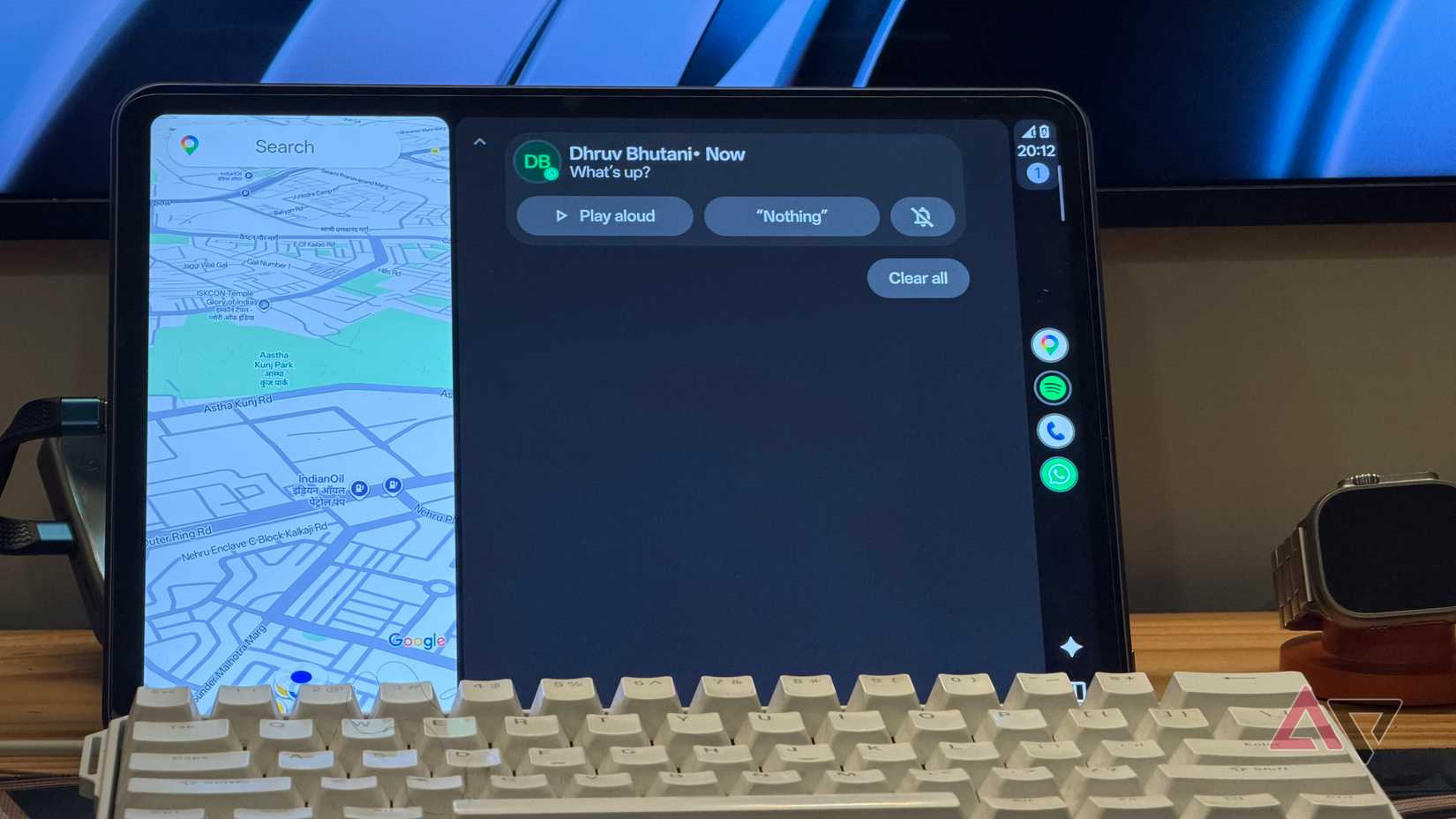
Earlier in this article, I mentioned that there's one caveat to using Android Auto as a dashboard. That's Google Maps. There's no escaping the persistent map widget on the dashboard.
It makes sense since Android Auto is designed for in-car use. On my desk, I'd happily replace it with a clock or weather information. But that's something you can't change. Thankfully, you can tuck it away partially.
Despite that, this is a setup I've grown rather fond of. I'm not looking for a productivity dashboard. I need a way to control media playback and keep tabs on my calendar. If I can sneak a peek at incoming messages and control my smart lights, that's even better.
The hardware helps too. When I'm on my treadmill, I usually mount a phone to a MagSafe mount. Plus, I have a large Android tablet in front of me with a screen size that rivals most in-car units. It's a great user experience.
The best dashboard that was never meant to be a dashboardThis isn't the only dashboard solution. It's a common problem for enthusiasts, and they've made multiple attempts to solve it.
Some target stats, while others toss in a full Kanban board. Most tend to be an extension of the desktop. Rarely do dashboards target simplicity.
I know Android Auto isn't designed for the desk, and it's not someplace where Google expected it to be used. But combined with Open HeadUnit, it's solved my dashboard problem, and better than most other solutions.
| # | Наименование новости | Тональность | Информативность | Дата публикации |
|---|---|---|---|---|
| 1 | I loaded my Android Auto dashboard with these apps; my car display finally feels useful | 0 | 7.16 | 31-07-2026 |
| 2 | Why I permanently abandoned wireless Android Auto for a simple USB cable | 0 | 8.1 | 14-08-2026 |
| 3 | I use Android Auto daily, and these tips have completely changed my experience | 0 | 6.94 | 17-08-2026 |
| 4 | 4 things my Android Auto does automatically that I used to do manually | 0 | 13.96 | 31-07-2026 |
| 5 | Android Auto's new update solves the one problem that made waiting in my car unbearable | 0 | 7.06 | 11-08-2026 |
| 6 | I rely on these Android Auto safety features way more than the new speedometer | 0 | 5.76 | 08-08-2026 |
| 7 | Android Auto is still the best in-car entertainment experience despite its foibles | 0 | 10.76 | 24-07-2026 |
| 8 | Re: Re: Re: Android auto hijacking wifi | 0 | 6.23 | 27-07-2026 |
| 9 | I think Android Auto is great, but these 3 apps unlocked its true potential | 0 | 10.4 | 17-08-2026 |
| 10 | Re: Re: Android auto hijacking wifi | 0 | 5.99 | 26-07-2026 |