Просмотр новости
Найдите то, что Вас интересует
 Спутники
 РН
РН SpaceX
 Роскосмос
 NASA
NASA
СпутникиРНSpaceXРоскосмосNASA
Your Prime Day Readiness Plan for Amazon Sellers Starts Now
Prime Day is officially moving up the calendar.
Your Prime Day Readiness Plan for Amazon Sellers Starts Now
Prime Day is officially moving up the calendar.
Amazon has confirmed that Prime Day 2026 is now June 23-26 across 26 countries, including the United States. Translation for Amazon sellers: the prep window just got shorter, the margin for error got thinner, and “we’ll deal with it next week” is now officially a dangerous business strategy.
Prime Day has never been a casual little shopping moment. It's an industry-wide eCommerce sprint with the energy of Black Friday, the timing of summer, and the operational chaos of a group text where everyone keeps replying “just seeing this.”
Adobe reported that Prime Day 2024 drove $14.2 billion in online spending across U.S. retailers, setting a new record at the time. In 2025, Adobe reported that the Prime Day event drove $24.1 billion in online spend across U.S. retailers from July 8–11, making it an even bigger summer commerce benchmark.
That kind of traffic can be amazing for Amazon sellers!
It can also expose every weak spot in your operation.
Inventory gaps. Listing issues. Review problems. Buy Box surprises. Fee creep. Return spikes. Supplier delays. Products that sell beautifully but somehow leave your margins looking like they were assembled during a fire drill.
That’s why Prime Day readiness is not just about running deals. It’s about protecting profit before, during, and after the event.
When Prime Day happens in July, sellers usually have a little more runway after Q2 starts. There is more time to review inventory, evaluate spring sales trends, clean up listings, monitor review velocity, and prepare promo strategy.
With Prime Day 2026 being June 23-26, that runway gets shorter... a LOT shorter!
And for FBA sellers, shorter runway matters because inventory planning is not instant. You cannot magically teleport units into Amazon fulfillment centers because your spreadsheet suddenly developed ambition.
June Prime Day creates three major pressure points:
1. Inventory decisions need to happen earlierSellers need to know which SKUs are worth pushing, which ones need replenishment, which ones are at risk of stocking out, and which ones might tie up cash if demand underperforms.
This is where RestockPro becomes especially valuable. RestockPro helps Amazon FBA sellers streamline forecasting, reordering, purchase orders, shipments, item labels, and inventory visibility so they can stay in stock without overstocking.
In Prime Day terms, that means fewer “wait, where is that inventory?” moments. Which is great, because panic is not a replenishment strategy.
2. Reviews and ratings need to be ready before traffic spikesPrime Day shoppers compare quickly. They scan price, reviews, ratings, delivery speed, and trust signals with the patience of someone trying to skip a YouTube ad.
If your product detail pages have weak review volume, recent negative reviews, or unanswered reputation issues, this event may amplify the problem.
FeedbackFive helps sellers automate Amazon feedback and review requests, monitor reviews, analyze rating trends, and receive alerts when new ratings appear.
That makes review readiness a pre-event priority, not a post-event cleanup project.
3. Profit protection needs real-time visibilityPrime Day is not just about selling more. It's about selling more profitably.
That means monitoring fees, Buy Box ownership, return patterns, inventory risk, listing changes, and SKU-level performance. SellerPulse helps sellers analyze profitability, returns, Buy Box ownership, FBA fees, inventory planning, and listing alerts so they can act quickly when something changes.
Because during Prime Day, small issues don't stay small for long. They put on a tiny cape and start flying directly at your margins.
The Last-Mile Prime Day Readiness PlanThink of this as your final operational sweep before the big traffic wave hits.
Not a vague “make sure everything looks good” sweep.
A real one.
The kind where you check inventory, review readiness, profit signals, listings, promos, alerts, and post-event recovery before shoppers show up with carts, coupons, and extremely high expectations.
Step 1: Prioritize the SKUs That Actually MatterNot every SKU deserves equal Prime Day attention.
Some products are proven winners. Some are seasonal opportunities. Some are margin traps wearing a “best seller” costume. Some are inventory liabilities that look fine until you remember storage fees, ad spend, prep costs, and returns exist.
Start by segmenting your catalog into four groups.
1. Prime Day Push SKUsThese are your strongest candidates for traffic, promos, and operational focus. They usually have:
These are the products where you want to be ready to lean in.
2. Protect-at-All-Costs SKUsThese are strong performers where stockouts would be especially painful. They may not all be part of a major promo, but they matter to your revenue and ranking.
For these SKUs, confirm inventory position, supplier timing, FBA availability, and reorder plans.
RestockPro can help sellers evaluate what to restock and when, while also keeping track of inventory across local stock, suppliers, prep centers, and Amazon FBA.
3. Watchlist SKUsThese are products with opportunity, but also risk. Maybe demand is growing, but reviews are thin. Maybe sales are good, but returns are trending up. Maybe margin looks okay until fees and ad spend join the party like uninvited guests.
These SKUs need close monitoring, not blind promotion.
4. Do-Not-Force-It SKUsSome products should not be pushed just because Prime Day exists.
If inventory is tight, margins are weak, reviews are shaky, or the listing needs work, forcing traffic may create more problems than profit.
Prime Day can reward smart sellers. It can also punish wishful thinking in real time.
Step 2: Confirm Inventory Before Demand Starts YellingPrime Day inventory planning should answer three questions:
That third question is where sellers often get burned.
Stock out too early, and you may lose sales momentum, ad efficiency, and ranking. Overstock, and you may trap cash in inventory that sits after the event like leftover party dip nobody wants to make eye contact with.
Check Your FBA Inventory Position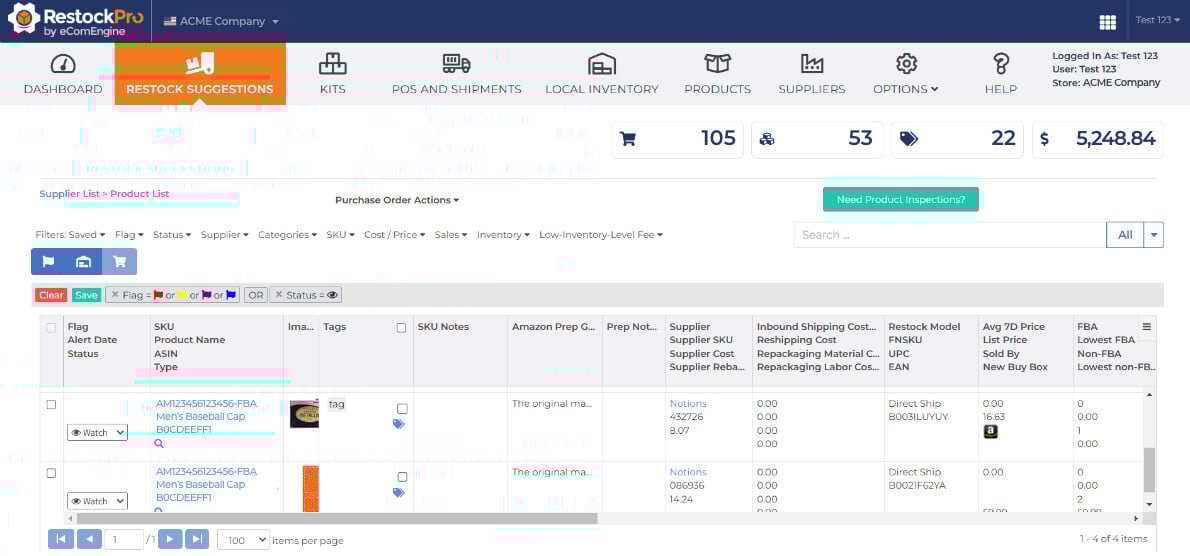
Review current FBA stock, inbound shipments, supplier timelines, prep center timelines, and any replenishment constraints.
Focus especially on:
RestockPro includes stocking recommendations and inventory visibility designed to help FBA sellers stay in stock without overstocking, while also factoring in data such as historical days of supply and inventory-related fees.
Build a “No Surprises” Replenishment ViewFor each priority SKU, document:
This does not need to be fancy. It needs to be usable.
A clean plan beats a beautiful spreadsheet nobody trusts.
Prime Day shoppers are not just looking for deals. They are looking for confidence.
A low price can get attention. Reviews help close the sale.
Before Prime Day, review your priority ASINs and look for trust gaps:
FeedbackFive allows sellers to automate review requests, monitor reviews, analyze review data, and receive alerts when new ratings come in.
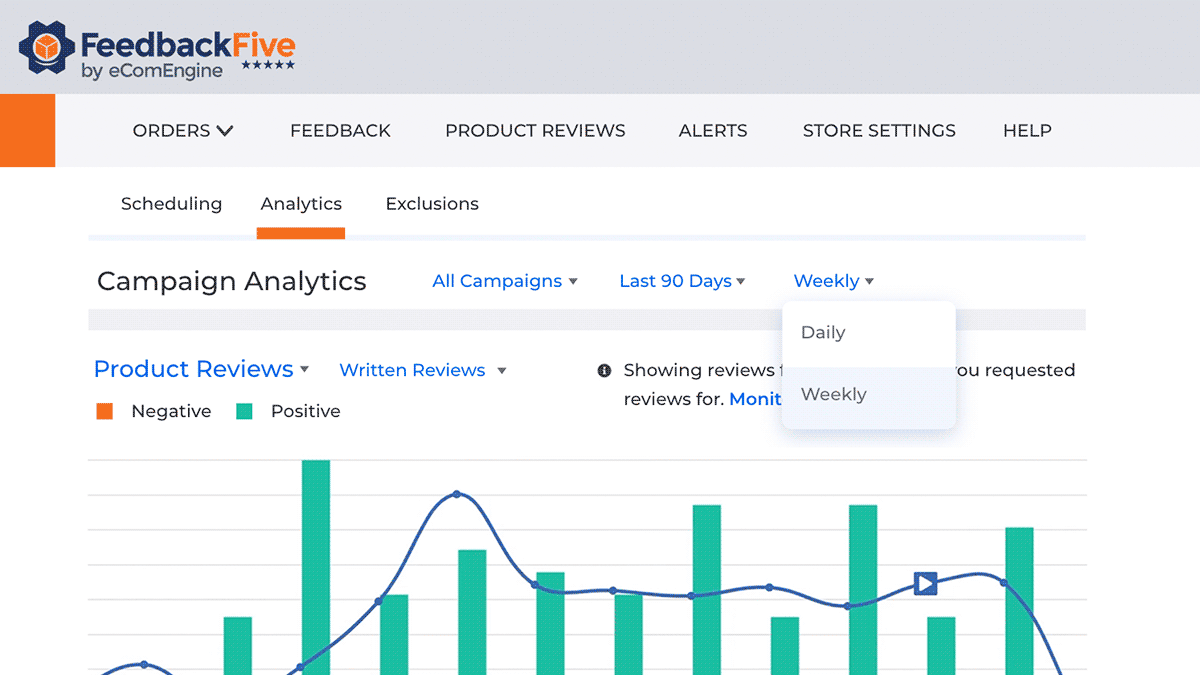
That matters before Prime Day because review growth is not something you “turn on” the morning of the event and expect instant magic.
That would be like planting tomatoes at lunch and getting annoyed you do not have salsa by dinner.
Automate Review Requests Before the RushFeedbackFive can help sellers automate Amazon review requests in a way that supports ongoing reputation growth. Its automated Amazon Review Request feature helps sellers gather valuable feedback without manually chasing every order.
The goal is not to manipulate reviews. The goal is to build a consistent, compliant review request process so every eligible order has a better chance of contributing to your long-term trust signals.
Monitor Negative Review ThemesBefore traffic spikes, look for recurring complaints.
If customers mention confusing instructions, poor packaging, missing parts, sizing issues, unclear photos, or misunderstood use cases, that is not just a review problem. That is a conversion problem.
Fix what you can before Prime Day.
Update listing copy. Improve images. Clarify bullets. Adjust packaging inserts if appropriate. Make sure the listing sets the right expectation before shoppers buy.
Because fewer surprises for buyers usually means fewer surprises for your support team. Everyone wins. Especially the person who doesn't want to answer 47 versions of “I thought this came with batteries.”
Step 4: Audit Listings Like a Shopper in a HurryPrime Day shoppers move fast.
Your listing has seconds to answer:
Before Prime Day, review your priority listings with fresh eyes.
Prime Day Listing Audit ChecklistMake sure each priority listing has:
This is where SellerPulse can help protect the operational side of listing readiness. It provides listing monitoring and alerts, including issues related to Buy Box status, suppressed listings, hijacker activity, content changes, returns, inventory, and FBA fees.
A listing issue on a normal Tuesday is annoying.
A listing issue during Prime Day is annoying with a megaphone.
Step 5: Set Profit Guardrails Before the Event StartsPrime Day can create a dangerous illusion: revenue goes up, so everything must be working.
Not always.
Revenue is loud. Profit is quieter. You have to look for it.
Before Prime Day, define your guardrails for each priority SKU.
Know Your Minimum Acceptable MarginFor each promoted or high-priority product, confirm:
This is especially important if you are stacking discounts, coupons, ads, and aggressive pricing.
A Prime Day promo that drives volume but quietly drains profit is not a win. It is a very busy way to become less happy.
Watch SKU-Level Profitability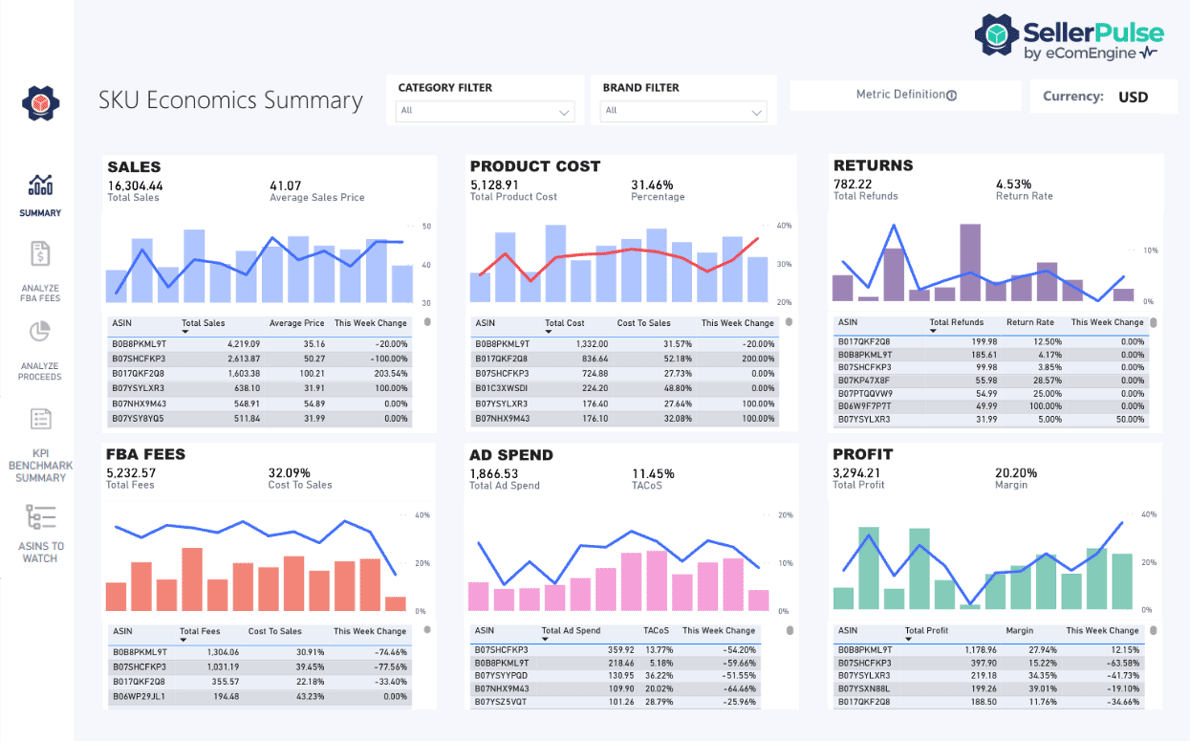
SellerPulse helps sellers monitor SKU-level profitability, FBA fees, proceeds, sales, product cost, Buy Box status, returns, and inventory insights.
That kind of visibility is critical when sales velocity changes quickly. If fees shift, returns spike, Buy Box ownership changes, or a listing issue affects performance, sellers need to know before the post-event report turns into a crime scene.
Step 6: Build a Prime Day Monitoring PlanDuring Prime Day, your job is not to stare at dashboards every second like they owe you money.
Your job is to monitor the right signals at the right cadence.
What to Monitor During Prime DayAt minimum, keep an eye on:
Together, RestockPro, SellerPulse, and FeedbackFive form a practical Prime Day readiness stack:
RestockPro: Plan inventory and replenishment.
SellerPulse: Monitor profitability, Buy Box, fees, returns, listings, and inventory risk.
FeedbackFive: Build review momentum and monitor reputation.
That is the kind of stack sellers need when Prime Day moves faster than your inbox can emotionally process.
Step 7: Prepare Your Post-Prime-Day Recovery PlanThe work does not end when Prime Day ends.
That is when the second wave begins.
After the event, sellers need to evaluate what happened, protect reputation, replenish intelligently, and turn Prime Day data into better decisions for Q3 and Q4.
Review Performance by SKULook beyond top-line revenue.
For each priority SKU, review:
The goal is to identify what actually worked.
Not what felt exciting in the moment. Not what had the biggest sales spike. What actually protected profit.
Watch for Return and Review SignalsPrime Day volume can create delayed feedback.
A product may sell well during the event, then generate returns or negative reviews afterward if expectations were not clear.
Use FeedbackFive to monitor review trends and alerts. Use SellerPulse to watch return patterns and profitability signals. Then use those insights to improve listings, adjust reorder decisions, and plan future promotions with fewer blind spots.
Replenish Based on RealityAfter Prime Day, sellers often face one of two problems:
They sold through faster than expected and need to replenish quickly.
Or they overestimated demand and need to manage remaining inventory carefully.
RestockPro helps sellers make replenishment decisions using forecasting, restock suggestions, purchase order management, and inventory visibility across different stages of the FBA workflow.
In other words, don't let Prime Day become a one-week sales spike followed by six weeks of inventory confusion.
That is not a strategy. That's a sequel nobody asked for.
A Simple Prime Day Prep Timeline for Amazon SellersSince Amazon has confirmed June 23-26 for Prime Day 2026, sellers should use a relative readiness timeline.
Right Now: Prioritize and Pressure-TestPrime Day rewards preparation.
Yes, shoppers want deals. But sellers need more than discounts to win profitably.
They need inventory in the right place. Listings that convert. Reviews that build trust. Alerts that catch problems early. Profit visibility that separates healthy growth from high-volume margin leakage.
Amazon reported that Prime Day 2025 was its biggest Prime Day event ever, with independent sellers also reaching record sales and a record number of items sold.
That is exciting!
It is also a reminder that Prime Day is not small-business casual.
It's a high-traffic, high-pressure, high-opportunity event where operational readiness matters.
So yes, get excited.
But also get your inventory right. Get your review strategy moving. Get your alerts in place. Get your margin guardrails set.
Your future self will thank you.
Probably with coffee and more profit in your account.
Possibly with fewer emergency spreadsheets.
Q: When is Prime Day 2026?
Amazon has confirmed that Prime Day 2026 will take place June 23-26, 2026.
Q: Why does June Prime Day matter for Amazon sellers?
June Prime Day gives sellers less time to prepare inventory, optimize listings, build review momentum, and set profit guardrails. Sellers should begin readiness planning earlier instead of waiting for final event dates.
Q: What should Amazon sellers do first to prepare for Prime Day?
Start by identifying your priority SKUs, reviewing inventory position, checking review health, auditing listings, and defining minimum acceptable profit margins before promotions begin.
Q: How can Amazon sellers avoid stocking out during Prime Day?
Sellers can reduce stockout risk by reviewing days of supply, inbound inventory, supplier timelines, historical demand, and replenishment needs early. Tools like RestockPro help FBA sellers forecast demand, manage purchase orders, and make smarter restocking decisions.
Q: Why are reviews important before Prime Day?
Reviews help shoppers make faster buying decisions. Before Prime Day traffic increases, sellers should monitor review trends, automate eligible review requests, and address recurring customer concerns that could affect conversion.
Q: How can sellers protect profit during Prime Day?
Sellers should define minimum margin thresholds, monitor SKU-level profitability, watch FBA fees, track Buy Box ownership, review ad efficiency, and watch for return trends. SellerPulse helps sellers monitor profitability, returns, Buy Box ownership, FBA fees, inventory, and listing alerts.
Q: What tools should Amazon sellers use for Prime Day readiness?
A strong Prime Day readiness stack includes RestockPro for inventory planning, SellerPulse for operational analytics and alerts, and FeedbackFive for review automation and reputation monitoring.
Q: What should sellers do after Prime Day?
After Prime Day, sellers should review SKU-level profit, analyze returns, monitor new reviews, evaluate remaining inventory, replenish strategically, and use performance insights to improve Q3 and Q4 planning.
| # | Наименование новости | Тональность | Информативность | Дата публикации |
|---|---|---|---|---|
| 1 | Prime Day Is in June: The Last-Mile Readiness Plan Amazon Sellers Need Now | 5 | 7 | 15-06-2026 |
| 2 | The Prime Day Profit Scorecard: 10 Metrics Amazon Sellers Should Watch Daily | 0 | 5 | 24-06-2026 |
| 3 | Prime Day Review Strategy: Turn the Traffic Spike Into Long-Term Trust | 0 | 5 | 22-06-2026 |
| 4 | Prime Day Is Over. Which SKUs Actually Earned Their Keep? | 0 | 7 | 02-07-2026 |
| 5 | Amazon Prime Day Report [Day 2]: Everyday Essentials, World Cup Merch Drive Sales; Oura Ring, Sony, Lenovo Lead Brands Marked 50% Off | 0 | 5 | 24-06-2026 |
| 6 | Prime Day 2026: How to save big by loading your carts now | 5 | 6 | 22-06-2026 |
| 7 | Prime Day 2026: How to save big by loading your carts now | 5 | 7 | 22-06-2026 |
| 8 | Amazon Seller Profitability Visibility: How to Spot Profit Leaks Before They Drain Your Cash | 0 | 5 | 11-05-2026 |
| 9 | Coleman's viral cooler is on sale ahead of Prime Day | 2 | 5 | 09-06-2026 |
| 10 | We uncovered the best hidden gems of Prime Day 2026 | 2 | 5 | 25-06-2026 |