Просмотр новости
Найдите то, что Вас интересует
 Спутники
 РН
РН SpaceX
 Роскосмос
 NASA
NASA
СпутникиРНSpaceXРоскосмосNASA
After the FBA Deadline: Your Prime Day Inventory Triage Plan
Prime Day inventory planning has a funny way of turning even the calmest Amazon seller into a spreadsheet detective with nine tabs open, three supplier emails half-written, and one very suspicious ASIN that suddenly thinks it’s the Beyoncé of your catalog.
After the FBA Deadline: Your Prime Day Inventory Triage Plan
Prime Day inventory planning has a funny way of turning even the calmest Amazon seller into a spreadsheet detective with nine tabs open, three supplier emails half-written, and one very suspicious ASIN that suddenly thinks it’s the Beyoncé of your catalog.
The FBA deadline has passed. The big shipments are either on their way, checked in, delayed, partially received, or sitting in that delightful mystery zone known as “Amazon says it’s fine, but your gut says it is absolutely not fine.”
This is where a lot of sellers make the classic Prime Day mistake: they plan for the best case and pray.
Bold? Sure.
A plan? Not so much.
After the FBA deadline, your job is no longer to build the perfect Prime Day inventory plan from scratch. Your job is triage. That means identifying what is ready, what is risky, what needs a backup plan, and where your cash is most likely to get trapped if demand does not behave like the beautiful hockey-stick chart everyone secretly wants.
The good news? You do not need to guess your way through the next few weeks. With the right scenario planning and the right FBA inventory management tool, you can protect cash, reduce stockout risk, and still capture the Prime Day upside without turning your replenishment strategy into a ceremonial rain dance.
That is exactly where RestockPro comes in.
Why Prime Day Inventory Triage Matters After the FBA DeadlineOnce the FBA inventory deadline passes, sellers often feel like the inventory story is already written.
But it is not.
The post-deadline window is where smart sellers shift from “send inventory” mode to “monitor, prioritize, and protect margin” mode.
At this stage, every ASIN needs to answer a few uncomfortable but very necessary questions:
Because Prime Day does not just create a sales spike. It creates distortion.
Some products move faster than expected. Some products underperform despite great discounts. Some SKUs get lifted by halo traffic. Others sit quietly in the corner like they were not invited to the party.
And when inventory gets distorted, the financial impact can be massive. IHL Group has estimated that inventory distortion, driven by overstocks and out-of-stocks, costs retailers globally around $1.7 trillion a year. That is not a rounding error. That is a "somebody please check the dashboard before we reorder another pallet" kind of problem.
For Amazon sellers, the same issue shows up in very practical ways:
Prime Day rewards sellers who can move quickly. But moving quickly without visibility is how you end up with either empty shelves or an expensive stack of “what were we thinking?”
The Goal Is Not Perfect Forecasting. It Is Better Decision-Making.Let’s be honest: no one can forecast Prime Day perfectly.
Not you. Not your supplier. Not your cousin who “knows Excel.” Not even that one seller in a Facebook group who claims they predicted demand down to the unit. We’re all happy for Gary, but Gary is not your inventory strategy.
The real goal is not perfection. The goal is better decision-making under pressure.
That means building scenarios instead of relying on one forecast. Your Prime Day inventory triage plan should look at three likely outcomes:
Scenario 1: Conservative DemandThis is your “traffic was good, but not bananas” forecast.
In this scenario, sales lift is moderate. Your promoted ASINs perform, but not dramatically. Non-promoted products may see some halo effect, but nothing that changes your entire inventory outlook.
This scenario helps you avoid overreacting. If conservative demand is most likely, you may not need emergency replenishment or aggressive supplier orders. You may need to protect cash and avoid creating a post-Prime Day overstock problem.
Scenario 2: Expected DemandThis is your most realistic forecast based on current sales velocity, recent trends, promotional plans, lead times, and inventory already available at FBA.
This is the plan you monitor most closely. Your expected demand scenario should guide how you prioritize ASINs, watch days of supply, and evaluate whether reorder recommendations still make sense as Prime Day approaches.
Scenario 3: Upside DemandThis is the “great problem to have” scenario.
Traffic spikes. Your deal performs. Sponsored ads drive more volume than expected. Your hero ASIN starts moving like it heard there was free guacamole at the finish line.
Upside demand is exciting, but it can also create real risk. If you sell through too early, you lose sales, momentum, ranking potential, and customer visibility during one of the most active shopping events of the year.
The point of upside planning is not to over-order everything. It is to know which ASINs deserve a backup plan and which ones should be allowed to sell through without triggering a panic buy.
What to Check First in Your Prime Day Inventory TriageAfter the FBA deadline, your first step is not to reorder more inventory. Your first step is to understand what you actually have to work with.
Here is where to focus.
1. Confirm What Inventory Is Actually AvailableThere is a big difference between inventory you shipped, inventory Amazon received, and inventory customers can actually buy.
Prime Day planning should be based on available inventory, not wishful inventory.
Start by checking:
This is especially important for promoted ASINs. If an item is central to your Prime Day plan, you need to know whether the inventory is ready to support the demand you are hoping to capture.
A product cannot win Prime Day if it is stuck in receiving limbo wearing a tiny invisibility cloak.
RestockPro Tip
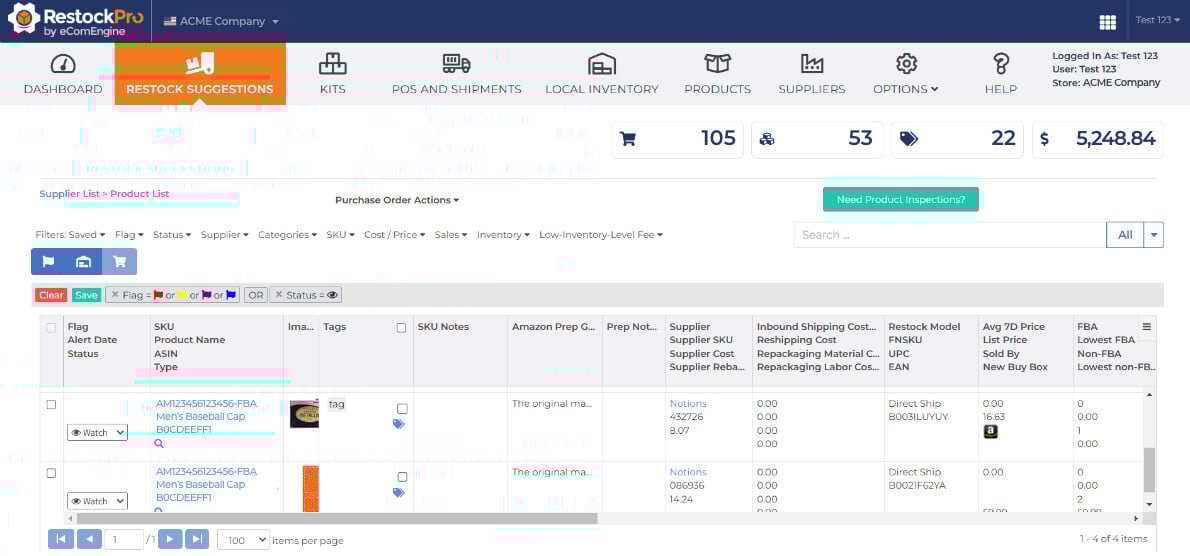
Use RestockPro to monitor FBA inventory levels and understand where your products stand across the replenishment cycle. Instead of bouncing between disconnected spreadsheets, supplier notes, and Seller Central screens, RestockPro helps you keep a clear view of what to reorder, when to reorder, and which inventory decisions deserve immediate attention.
Prime Day Inventory Moves Fast. Your Forecast Should, Too.
Monitor FBA inventory, restock smarter, and protect your cash with RestockPro.
Not every product deserves the same level of Prime Day attention.
Some ASINs are true revenue drivers. Some are margin protectors. Some are seasonal winners. Some are there because they technically exist and no one has had the heart to retire them yet.
For post-FBA deadline triage, group your products into practical categories:
Priority 1: Prime Day Hero ASINsThese are promoted, proven, or strategically important products. They may include deal ASINs, high-velocity products, top-margin items, or SKUs tied to ad campaigns.
These deserve the closest monitoring.
Priority 2: Supporting ASINsThese products may benefit from increased traffic but are not the stars of the show. They still matter, but they should not drain your cash or attention away from your strongest opportunities.
Priority 3: Risky or Low-Confidence ASINsThese are products with inconsistent sales, thin margins, long lead times, weak conversion, or too much inventory already on hand.
For these products, your Prime Day strategy may be less about chasing upside and more about avoiding an expensive overstock hangover.
3. Compare Days of Supply Against Your Prime Day ScenariosDays of supply is one of the most useful inventory metrics during Prime Day triage because it helps translate raw units into actual decision-making.
Instead of asking, “Do we have 500 units?” ask, “How long will 500 units last if demand increases?”
That is a much better question.
For each key ASIN, compare current available inventory against conservative, expected, and upside demand scenarios.
You are looking for three warning signs:
The rebound period matters. Some sellers focus so heavily on the event itself that they forget sales do not magically stop when Prime Day ends. If your best ASIN sells out during the event and stays unavailable afterward, you may lose momentum right when shoppers are still active.
That is like hosting a huge party, getting everyone excited, and then locking the snack cabinet at 8:17 p.m. Bold choice. Not recommended.
RestockPro Tip
RestockPro helps Amazon sellers use forecasting and restock suggestions to determine what to replenish and when. After the FBA deadline, that visibility becomes even more important because you need to balance event demand, supplier lead times, Amazon receiving timelines, and cash flow.
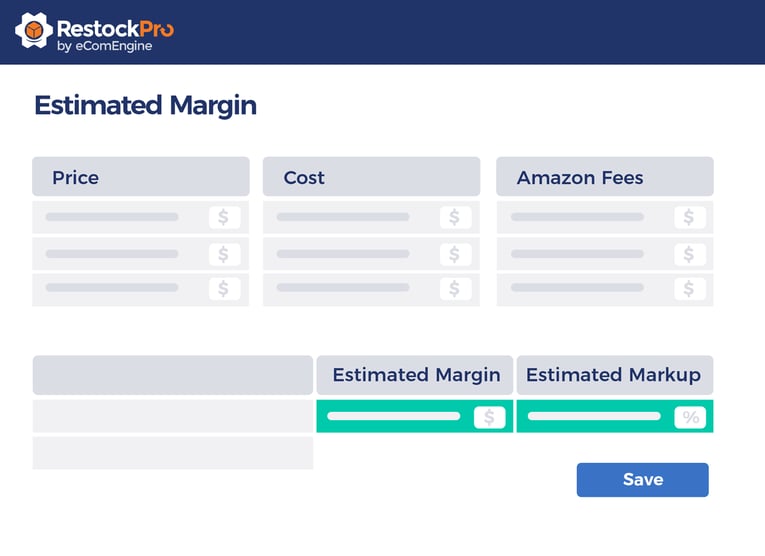
Prime Day inventory triage is not only about avoiding stockouts. It is also about protecting cash.
That part is easy to overlook because stockouts feel urgent and overstocks feel like tomorrow’s problem.
Unfortunately, tomorrow has a habit of showing up with storage fees, aging inventory, lower margins, and a very judgmental look on its face.
After the FBA deadline, review:
Inventory planning should support growth, not handcuff it. A strong Prime Day does not help as much if too much of your profit gets trapped in inventory you did not need.
 5. Recheck Supplier Lead Times and Reorder Windows
The FBA deadline may have passed, but supplier planning is not over.
If an ASIN overperforms, you may need to prepare the next reorder quickly. If an ASIN underperforms, you may need to pause or reduce a planned purchase order. If a supplier is already running behind, you need to know that before your forecast quietly turns into fiction.
Review:
This is where a scenario-based forecast becomes especially valuable. You are not just asking, “What do we need for Prime Day?” You are asking, “What decision will we need to make next if demand breaks high, low, or sideways?”
Sideways is not a technical term, but Amazon sellers know exactly what it means.
6. Align Inventory With Advertising and PromotionsInventory and advertising should be best friends.
Not “we met once at a networking event” friends. Actual friends.
If ad campaigns are pushing traffic to ASINs with limited inventory, you may burn budget accelerating a stockout. If you have strong inventory coverage on profitable products but no visibility strategy, you may miss a chance to capture demand.
After the FBA deadline, compare your inventory position with:
If a promoted ASIN has limited days of supply, you may need to adjust campaign budgets, shift spend to better-covered products, or prepare for a controlled sell-through. If a well-stocked product has strong margin and healthy conversion, it may deserve more attention.
The best Prime Day plans do not treat inventory and advertising as separate conversations. They connect the two before the money starts moving fast.
7. Identify Your “Do Not Panic” Rules Before the Event StartsPrime Day can make reasonable people do unreasonable things.
A product sells faster than expected, and suddenly everyone wants to reorder. A campaign spends quickly, and someone wants to pause everything. A slow-moving SKU gets a few sales, and now it is apparently the next empire.
This is why you need decision rules before the event begins.
Create simple rules for your team, such as:
These rules do not need to be complicated. They just need to prevent emotional decision-making while everyone is staring at sales reports like they are waiting for election results.
Where RestockPro Fits Into Prime Day Inventory TriageRestockPro should be the hero of your post-FBA deadline workflow because this is exactly when FBA inventory management gets messy.
You are not simply checking whether you have inventory. You are trying to understand what your inventory means.
RestockPro helps Amazon FBA sellers:
That matters because Prime Day is not the time to manage inventory from ten spreadsheets, three sticky notes, and one very confident guess.
With RestockPro, sellers can bring structure to the chaos. You can prioritize the right ASINs, keep an eye on inventory risk, and make restocking decisions based on actual data instead of “I feel like we’re probably okay,” which is not a metric, no matter how convincing it sounds in a meeting.
Your Post-FBA Deadline Prime Day Inventory ChecklistUse this checklist to guide your triage process.
Check Inventory Availability
Confirm FBA inventory is received, available, and properly assigned to active listings. Watch for reserved inventory, receiving delays, stranded inventory, or listing suppression issues.
Review Promoted ASIN Coverage
Look closely at products tied to deals, discounts, coupons, and ad campaigns. These ASINs should be monitored more frequently because they are more likely to experience demand spikes.
Build Three Demand Scenarios
Create conservative, expected, and upside forecasts for your most important SKUs. Use these scenarios to guide reorder decisions, budget shifts, and sell-through expectations.
Monitor Days of Supply
Translate units into time. Identify which products may sell out too soon, which have enough coverage, and which may leave you overstocked after the event.
Protect Cash Flow
Avoid tying up cash in unnecessary reorders. Prioritize inventory investments based on demand, margin, lead time, and strategic importance.
Review Supplier Readiness
Confirm supplier lead times, MOQs, production capacity, open POs, and backup replenishment options.
Connect Inventory and Ads
Make sure your advertising strategy supports your inventory reality. Push products that are profitable and well-covered. Be careful with products at risk of stocking out too early.
Set Action Rules
Decide in advance when to reorder, pause, shift budget, or let a product sell through.
The smartest Prime Day sellers are not just chasing more sales. They are protecting profit.
Yes, revenue matters. Of course it does. We all enjoy the dopamine confetti of a strong sales dashboard.
But Prime Day success should not be measured by top-line sales alone. It should be measured by whether you captured demand, protected margin, avoided preventable stockouts, reduced excess inventory risk, and kept enough cash available for what comes next.
Because after Prime Day, you still have a business to run.
Your inventory decisions now can affect your cash position, sales rank, ad efficiency, supplier planning, and Q3/Q4 readiness. That is why post-FBA deadline triage is so important.
It gives you a chance to stop guessing, start prioritizing, and manage Prime Day like the high-stakes retail event it is.
Not with panic.
Not with prayer.
Not with a spreadsheet named “FINAL_final_REALfinal_v7.”
With visibility, scenarios, and smarter restocking decisions.
Monitor Prime Day Inventory With RestockProPrime Day can move fast. Your inventory strategy should be able to keep up.
RestockPro helps Amazon FBA sellers forecast demand, monitor inventory, manage purchase orders, track suppliers, and make smarter replenishment decisions before, during, and after major sales events.
Whether your Prime Day plan is right on track or currently held together with coffee and optimism, RestockPro gives you the visibility you need to protect cash, avoid stockouts, and focus on the SKUs that matter most.
Q: What should Amazon sellers check after the Prime Day FBA deadline?
After the Prime Day FBA deadline, Amazon sellers should confirm which inventory has been received, which units are available for sale, which products are still inbound or reserved, and whether any listings are stranded or suppressed. Sellers should also review days of supply, promoted ASIN coverage, supplier lead times, and cash flow before making additional replenishment decisions.
Q: How can I avoid stocking out during Prime Day?
To reduce Prime Day stockout risk, monitor available FBA inventory, compare days of supply against multiple demand scenarios, and prioritize your highest-value ASINs. Sellers should pay special attention to promoted products, high-margin SKUs, and items supported by advertising campaigns. RestockPro can help identify when products may need replenishment based on sales velocity, lead times, and restock rules.
Q: What is Prime Day inventory triage?
Prime Day inventory triage is the process of reviewing inventory after key FBA deadlines to identify which products are ready, which are at risk, and which may create overstock or cash flow problems. It helps sellers prioritize ASINs, monitor inventory coverage, adjust advertising plans, and make smarter reorder decisions before Prime Day demand spikes.
Q: Should I reorder inventory after the FBA deadline has passed?
Sellers should not automatically reorder after the FBA deadline. Instead, they should review current inventory, demand trends, supplier lead times, available cash, and post-Prime Day sales expectations. Reordering may make sense for high-velocity or strategically important ASINs, but it can create overstock risk if demand does not support the purchase.
Q: How does inventory distortion affect Amazon sellers?
Inventory distortion happens when sellers have too much inventory in some products and too little in others. For Amazon sellers, this can lead to lost sales, stockouts, excess storage fees, aging inventory, unnecessary discounts, and cash flow pressure. During Prime Day, inventory distortion can become more costly because demand changes quickly and replenishment options are limited.
Q: How can RestockPro help with Prime Day inventory planning?
RestockPro helps Amazon FBA sellers forecast inventory needs, review restock suggestions, manage purchase orders, monitor inventory, evaluate profitability, and track supplier workflows. During Prime Day planning, RestockPro can help sellers identify which products need attention, which ASINs may be at risk of stocking out, and where inventory decisions may impact cash flow.
Q: What inventory metrics should sellers monitor before Prime Day?
Before Prime Day, sellers should monitor available FBA inventory, inbound inventory, reserved inventory, days of supply, sales velocity, supplier lead times, reorder quantities, profit margins, inventory turn, and promotional coverage. These metrics help sellers understand whether they can support expected demand without over-ordering or tying up too much cash.
Prime Day rewards sellers who can act quickly, but fast decisions are only helpful when they are based on the right data.
RestockPro gives Amazon FBA sellers the inventory visibility they need to monitor demand, prioritize replenishment, protect cash, and keep their best products moving through Prime Day and beyond.
Start Your FREE Trial Today!| # | Наименование новости | Тональность | Информативность | Дата публикации |
|---|---|---|---|---|
| 1 | Prime Day Is in June: The Last-Mile Readiness Plan Amazon Sellers Need Now | 0 | 5 | 08-06-2026 |
| 2 | The Prime Day Profit Scorecard: 10 Metrics Amazon Sellers Should Watch Daily | 0 | 5 | 24-06-2026 |
| 3 | Prime Day Review Strategy: Turn the Traffic Spike Into Long-Term Trust | 0 | 5 | 22-06-2026 |
| 4 | What to Scale, Fix, or Stop Restocking Before Q4 | 0 | 10.43 | 27-07-2026 |
| 5 | The Q4 Inventory Cash Trap: How to Avoid Restocking the Wrong Products | 0 | 5 | 15-07-2026 |
| 6 | Prime Day Is Over. Which SKUs Actually Earned Their Keep? | 0 | 7 | 02-07-2026 |
| 7 | Stop Guessing: Building a September Q4 PO Without Overcommitting Cash | 0 | 15.59 | 18-09-2026 |
| 8 | How Much Is Amazon Quietly Owing You? A 20-Minute Reimbursement Audit | 0 | 8 | 19-10-2026 |
| 9 | The Amazon Reimbursement Clock Is Ticking — Audit Before You Lock In Q4 Cash | 0 | 9.56 | 24-08-2026 |
| 10 | Inventory Cash Flow: The Hidden Reason Your Business Feels “Successful but Broke” | 0 | 5 | 19-05-2026 |