Просмотр новости
Найдите то, что Вас интересует
 Спутники
 РН
РН SpaceX
 Роскосмос
 NASA
NASA
СпутникиРНSpaceXРоскосмосNASATable of Contents What is included in this blog post ? This is Part 5 of the “Postgres for Oracle DBAs” series where we compare logical backup restores – Data pump restore Vs pg_dump restore(pg_restore). In Part 4 we covered backup scenarios – Please read part 4 before reading this blog . We covered 1) […]
The post Postgres for Oracle DBAs – impdp Vs Pg_restore first appeared on KloudDB.
Postgres for Oracle DBAs – impdp Vs Pg_restore appeared first on MariaDB.org
This is Part 5 of the “Postgres for Oracle DBAs” series where we compare logical backup restores – Data pump restore Vs pg_dump restore(pg_restore). In Part 4 we covered backup scenarios – Please read part 4 before reading this blog . We covered 1) Default tablespaces 2) Executing sql scripts 3) Shutdown modes 4) Startup modes 5) alert log vs postgres log 6) Pg_dump Vs Datapump backups in part 1 ,2,3 and 4
NOTE – In this post we are only covering the restore part (impdp comparison ), In Part 4 we already covered expdp comparison part
In Oracle people generally use datapump (expdp,impdp) and the equivalent in Postgres for logical backups is pg_dump and pg_dumpall . In this blog post we will cover common restore scenarios – impdp vs pg_restore
Creating directory in Oracle - What is equivalent in Postgres ?In Oracle before you can start using impdp , you need to create a directory(as shown in below diagram) . But in Postgres this is not needed and you can restore from a location (as long as postgres user has permission to that directory)
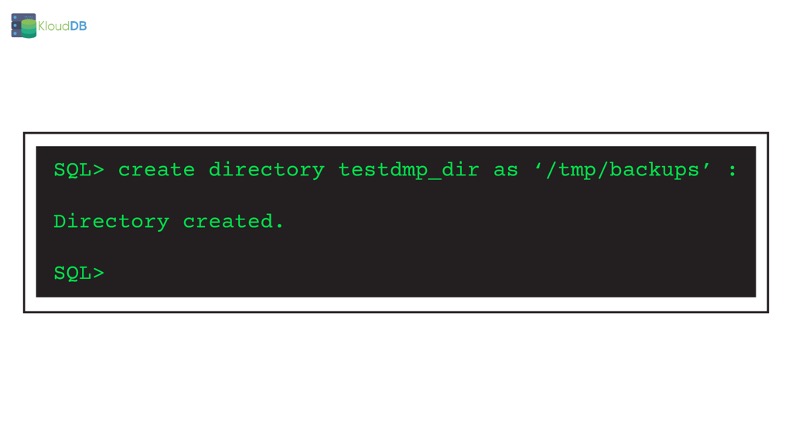
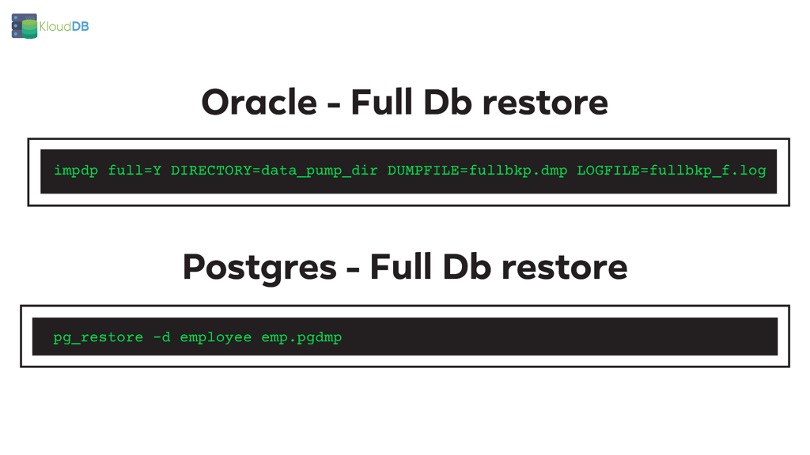
In Oracle you can restore a database using command like below (Provided you took a full logical backup with expdp before)
impdp full=Y DIRECTORY=data_pump_dir DUMPFILE=fullbkp.dmp LOGFILE=fullbkp_f.log
In Postgres you typically use pg_restore command to restore from logical backup . You can also use the psql method if it is in plain text mode . Please see part 4 of this series to learn more about different logical backup formats
pg_restore -d employee emp.pgdmp
In above example we gave the database as employee with -d option. emp.pgdmp is the backup file name
Below is the comparison diagram (for quick reference)
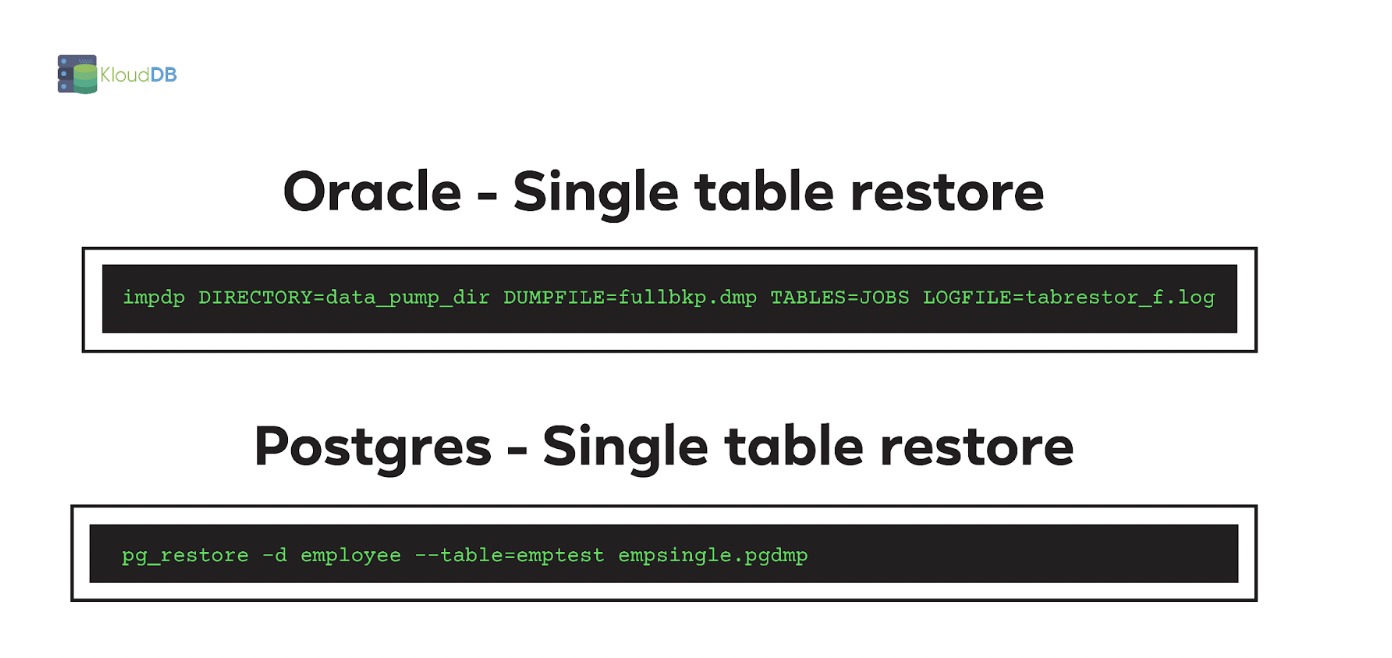
In Oracle you can restore a particular table using below command
impdp DIRECTORY=data_pump_dir DUMPFILE=fullbkp.dmp TABLES=JOBS LOGFILE=tabrestor_f.log
In above example we are restoring only JOBS table
In Postgres you can restore a particular table using below command
pg_restore -d employee –table=emptest empsingle.pgdmp
In above example we are only restoring emptest table and not the entire database. Important gotcha – When you restore a table using pg_restore it does not restore its indexes
Below is the comparison diagram (for quick reference)
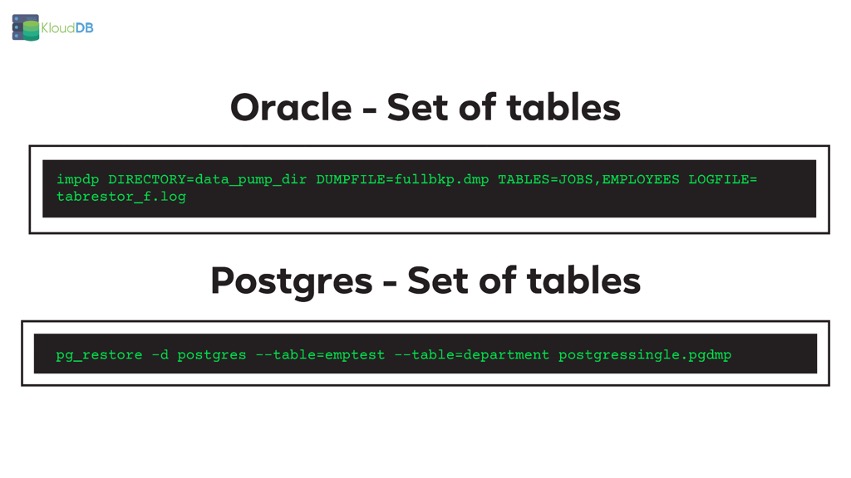
In Oracle you can restore a set of tables using below command. In below example we are restoring two tables JOBS and EMPLOYEES
impdp DIRECTORY=data_pump_dir DUMPFILE=fullbkp.dmp TABLES=JOBS,EMPLOYEES LOGFILE=tabrestor_f.log
In Postgres you can restore a set of tables using below command . In below example we are restoring emptest and department tables from full backup
pg_restore -d postgres –table=emptest –table=department postgressingle.pgdmp
Below is the comparison diagram (for quick reference)
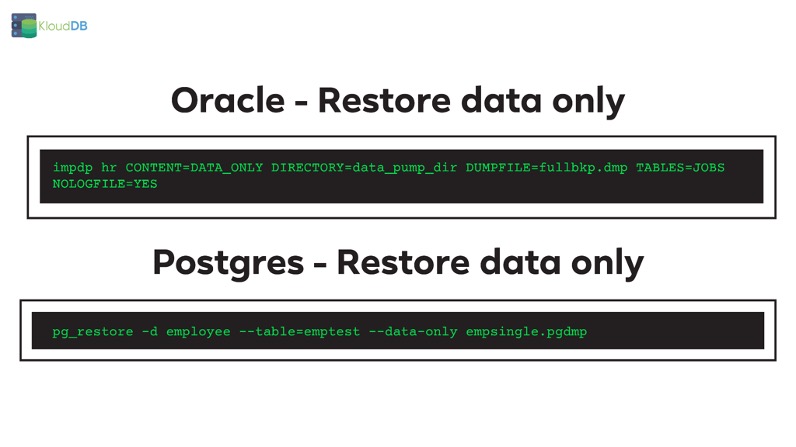
In below example we are restoring JOBS table with only data. We are using the flag CONTENT=DATA_ONLY here
impdp hr CONTENT=DATA_ONLY DIRECTORY=data_pump_dir DUMPFILE=fullbkp.dmp TABLES=JOBS NOLOGFILE=YES
In Postgres you can achieve the same with below command
pg_restore -d employee –table=emptest –data-only empsingle.pgdmp
Note – For only schema (inverse of data only ) you would use –schema-only option. In Oracle the equivalent is CONTENT=metadata_only
Below is the comparison diagram (for quick reference)
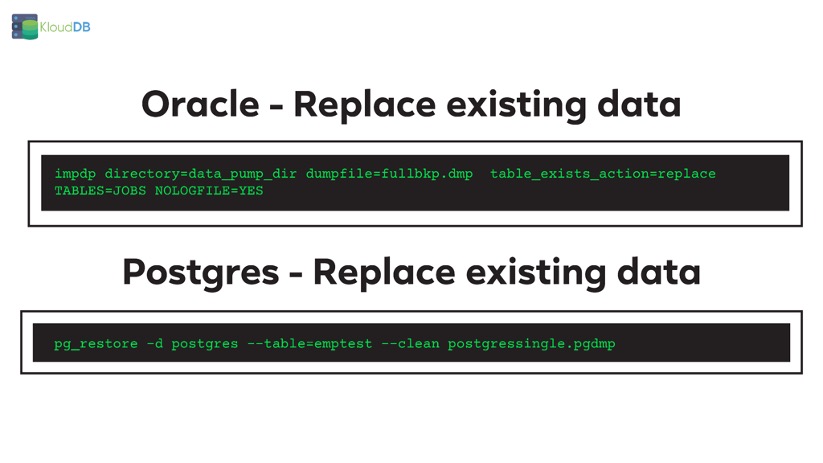
In Oracle you can use the “ table_exists_action=replace “ to replace existing data
impdp directory=data_pump_dir dumpfile=fullbkp.dmp table_exists_action=replace TABLES=JOBS NOLOGFILE=YES
In Postgres If you use the –clean option of pg_restore to replace existing data
pg_restore -d postgres –table=emptest –clean postgressingle.pgdmp
Below is the comparison diagram (for quick reference)
In Oracle you can use remap_schema in impdp to restore into a different schema . Exact equivalent is not available in PG but you can use some workarounds
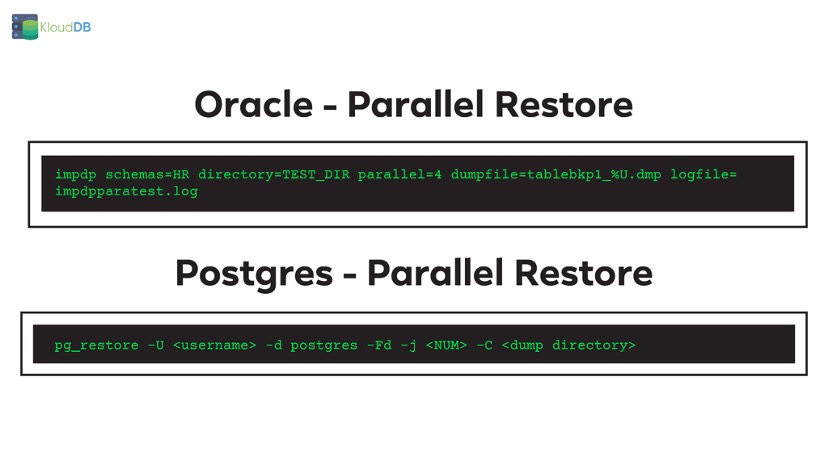
Parallel restore - Oracle Vs PGIn Oracle you can take backup with parallelism using parallel option , you can use parallel=4 (4 is just an example here) and tablebkp1_%U.dmp in the dumpfile . Restore parallelism can be achieved with a command like below
impdp schemas=HR directory=TEST_DIR parallel=4 dumpfile=tablebkp1_%U.dmp logfile=impdpparatest.log
In Postgres you can perform parallel restore using a command like below
pg_restore -U <username> -d postgres -Fd -j <NUM> -C <dump directory>
-j is similar to parallel option in Oracle
-Fd is directory format (Please check part 4 to know more about different backup formats in pg_dump)
Below is the comparison diagram (for quick reference)
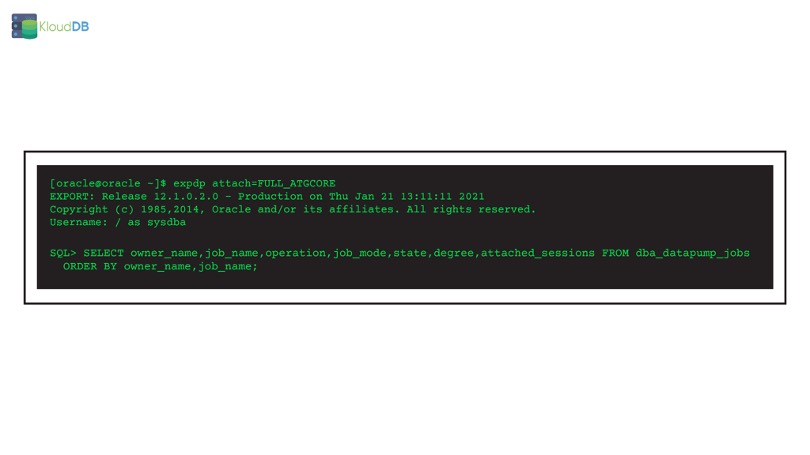
In Oracle you can attach to a datapump job or use the monitoring view dba_datapump_jobs and in Postgres you do not have an equivalent feature . You can use verbose mode to get info but it is nowhere close to the job attachment and status checking feature in Oracle
In Pg_dump you can take plain text backup . When you restore from a plain text backup, you need to use psql (something like psql < emp_backup.sql) . Pg_restore is only applicable for custom , tar and directory formats
Logical restore - Oracle Vs PG ComparisonIn part 5 of the series “Postgres for Oracle DBAs” we compared logical backup restores – impdp vs pg_restore
Also check our performance articles –Pg_fincore and pg_buffercache to troubleshoot performance issues , Pgbouncer multiple instances(How we increased our TPS using multiple instances) , Postgres and temporary files , Pgpool and performance tuning, How we improved Lambda performance by 130x etc..
Want to learn Postgres ? Register for webinar (link on homepage)
Looking for Postgres support ? Please reach us at support@klouddb.io
| # | Наименование новости | Тональность | Информативность | Дата публикации |
|---|---|---|---|---|
| 1 | Postgres for Oracle DBAs – Parameter Changes | 0 | 11.04 | 23-03-2023 |
| 2 | Postgres User Poll Results – Part 1 | 0 | 9.43 | 14-03-2023 |
| 3 | pgBackRest is archived, what now? | 0 | 7.07 | 28-04-2026 |
| 4 | Open source doesn’t die. It gets unfunded. | 0 | 6.45 | 30-04-2026 |
| 5 | PostgreSQL Autovacuum Internals and Benchmark | 0 | 4.74 | 01-07-2026 |
| 6 | Partial physical database restore for MariaDB and MySQL | 0 | 5.64 | 02-07-2024 |
| 7 | Running pgBackRest with pg_tde: A Practical Percona Walkthrough | 0 | 8.66 | 10-03-2026 |
| 8 | Migrate from Oracle to Amazon RDS for MySQL, MariaDB or Amazon Aurora MySQL using Oracle GoldenGate | 0 | 4.53 | 03-11-2023 |
| 9 | Comprehensive Self-Service Backups for Continuous Data Protection in MariaDB Cloud | 0 | 8.56 | 09-06-2026 |