Просмотр новости
Найдите то, что Вас интересует
 Спутники
 РН
РН SpaceX
 Роскосмос
 NASA
NASA
СпутникиРНSpaceXРоскосмосNASATable of Contents Introduction – What is covered here ? “ERROR: integer out of range” : This error can cause a lot of trouble in production environments . We are going to cover this scenario in detail here What is the error ? How to react ? What are sequence gaps ? How to reduce […]
The post Postgres INT out of range – What to do ? first appeared on KloudDB.
Postgres INT out of range – What to do ? appeared first on MariaDB.org
“ERROR: integer out of range” : This error can cause a lot of trouble in production environments . We are going to cover this scenario in detail here
What is the error ? How to react ? What are sequence gaps ? How to reduce your downtime from hours to minutes(in some cases) ? How to proactively monitor to prevent and much more..
Below are the ranges for smallint , int and bigint
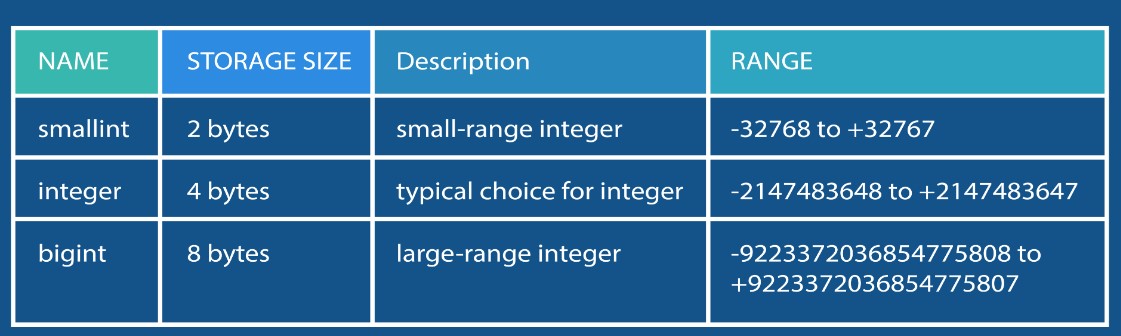
Most common occurrence is with the “ID Serial” column used as primary key in your tables (Serial data type is nothing but an auto incrementing integer) .So when you have SERIAL as your primary key , inserts will start failing as soon as the highest number is reached for the INT range.
How to reproduce this error (For testing this scenario) ?You can use below procedure to test this scenario
CREATE TABLE Towns ( id SERIAL UNIQUE NOT NULL, code VARCHAR(10) NOT NULL, article TEXT, name TEXT NOT NULL, department VARCHAR(4) NOT NULL );
ALTER TABLE Towns ADD PRIMARY KEY (id);
2.You can create a sequence gap using a command like below (Note : You need to get the sequence name for above table – We gave query for the same in another section below)
select setval(‘.towns_id_seq’, 2147483637);
Note – Alternatively you can also load lot of data to trigger the integer overflow
3. Perform insert and trigger the error
insert into towns ( code, article, name, department ) select left(md5(i::text), 10), md5(random()::text), md5(random()::text), left(md5(random()::text), 4) from generate_series(1, 10000) s(i) ;
ERROR: nextval: reached maximum value of sequence “towns_id_seq” (2147483647)
Using above 3 simple steps you can reproduce this scenario
As soon as you see this error you might want to know the table associated with the sequence . For a given sequence name you can find the table using a query like below
					 select seq_ns.nspname as sequence_schema,                                                                                          seq.relname as sequence_name,

       tab_ns.nspname as table_schema,

       tab.relname as related_table

from pg_class seq

  join pg_namespace seq_ns on seq.relnamespace = seq_ns.oid

  JOIN pg_depend d ON d.objid = seq.oid AND d.deptype = 'a'

  JOIN pg_class tab ON d.objid = seq.oid AND d.refobjid = tab.oid

  JOIN pg_namespace tab_ns on tab.relnamespace = tab_ns.oid

where seq.relkind = 'S'

  and seq.relname = 'towns_id_seq'

  and seq_ns.nspname = 'public';

 sequence_schema | sequence_name | table_schema | related_table

-----------------+---------------+--------------+---------------

 public          | towns_id_seq  | public       | towns
Now that you know what the problem is , what should you do if you hit this issue ? There are multiple paths that you can take depending on how your app and tables are designed-
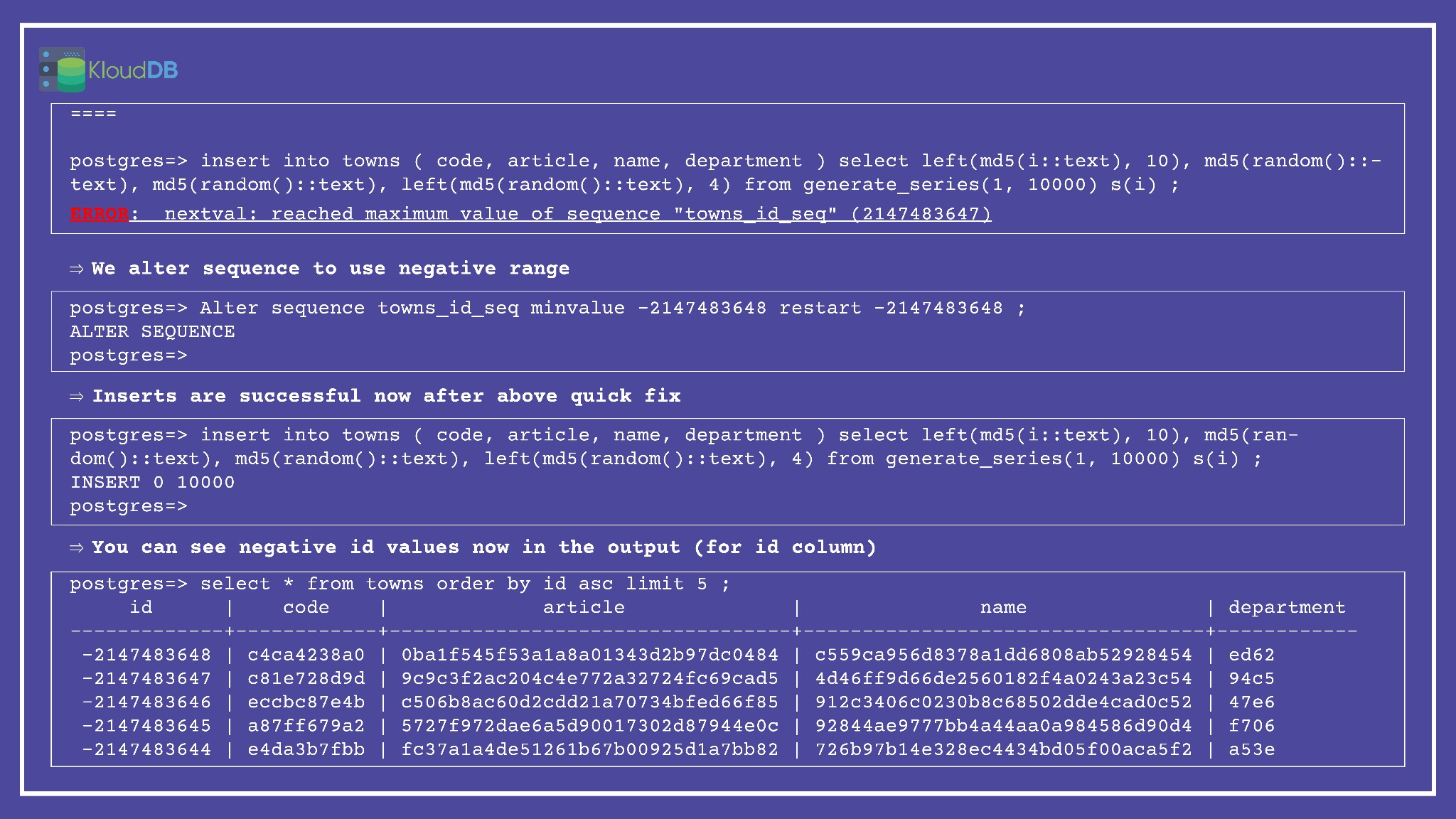
Strategy 1 – Check if using negative range can help in your case. Once you hit the upper limit of positive range it is possible to use negative range to quickly fix this . Warning : Your app has to be validated to make sure it works for negative ranges (if the Serial PK column here is only used to enforce uniqueness and otherwise it is not used/parsed in your app code then you should be fine to use this quick fix)
Below is step by step execution plan (for strategy 1 to use negative range)
Strategy 2
If above quick fix is not possible or if you can take some downtime you can go ahead and alter your column to convert id to BIGINT
Note – This will acquire exclusive lock(table rewrite) during alter and might cause additional down time
Strategy 3
Add a new column (of type BIGINT) that would replace the existing column and follow the process as outlined in the blog below . NOTE – You may need to tweak the procedure according to your requirements . This process can minimize interruption of services
https://engineering.silverfin.com/pg-zero-downtime-bigint-migration/
Below diagram illustrates the problem and possible resolution paths
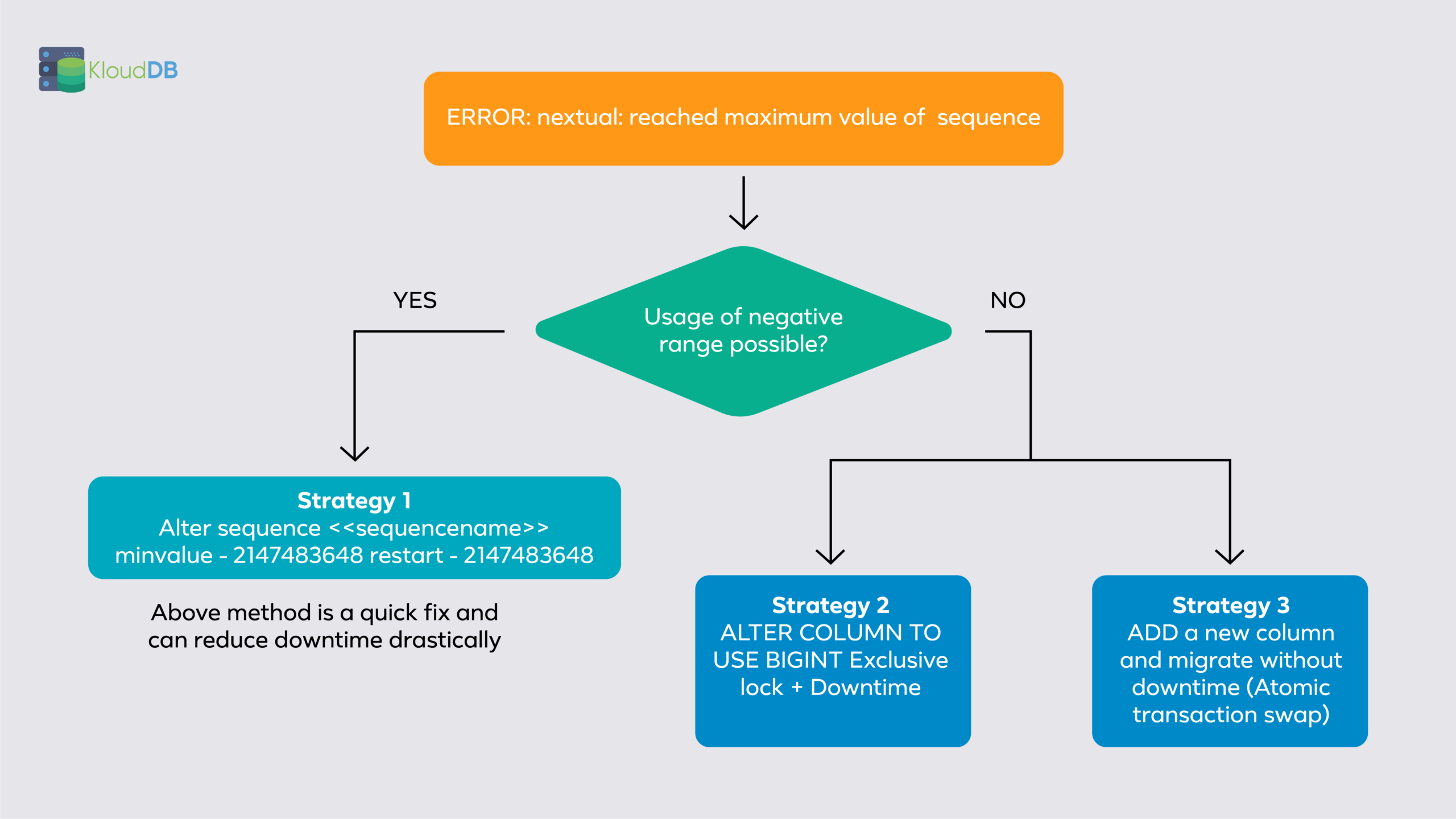
If your app can accept negative range (strategy 1:using negative id numbers) downtime will be reduced drastically . If you go with other approaches it might take hours and would cause interruption to your services (Time is dependent on table size , dependent tables etc..)
Root cause analysis - What happened (Why did you hit the limit) ?Once you resolve the issue you might want to investigate and find the root cause . Sometimes it is due to the rapid data growth , other times it could be sequence gaps . Sequence gaps are a major headache and if you monitor proactively , you could possibly prevent this from happening
Sequence gaps - What are they ?Serial data type generates auto incrementing values but sometimes gaps are possible due to various reasons like rollbacks , crashes , application code issues etc..
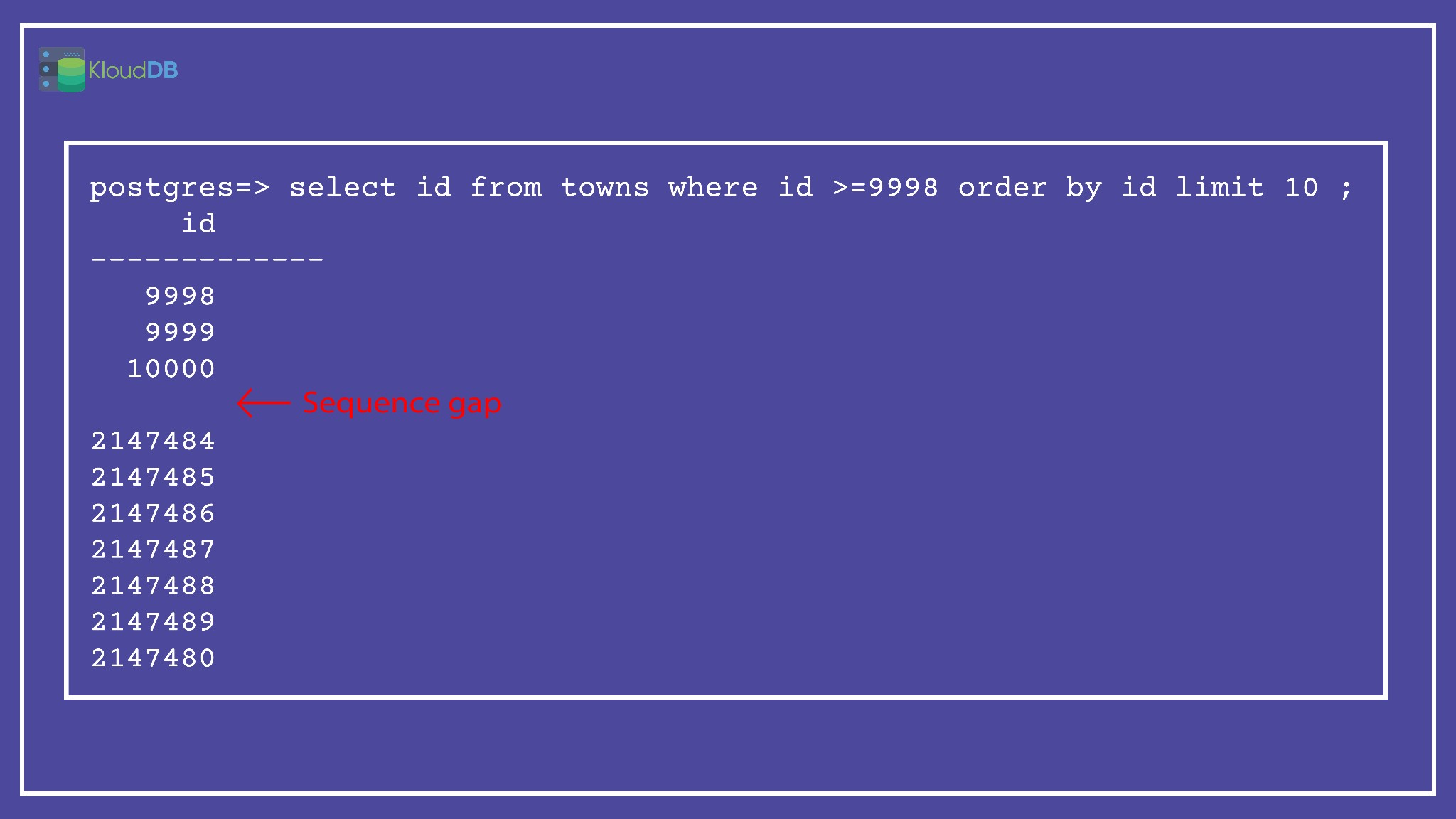
Below is a sample query that can be used to track sequence gaps (Note – You may need to tweak it according to your requirements)
					 SELECT

       gap_start, gap_end FROM (

              SELECT id + 1 AS gap_start,

              next_nr - 1 AS gap_end

              FROM (

                     SELECT id, lead(id) OVER (ORDER BY id) AS next_nr

                     FROM towns

              ) nr

              WHERE nr.id + 1 <> nr.next_nr

       ) AS g

UNION ALL (

       SELECT

              0 AS gap_start,

              id AS gap_end

       FROM

              towns

       ORDER BY

              id

       ASC LIMIT 1

)

ORDER BY

       gap_start ;
We can prevent this issue by proactively monitoring important tables (Or atleast do a periodic review using queries like below)
You can use a simple query like below to get the list of tables with INT PK types
					with table_col as (

   SELECT sch.nspname as schema_name, tab.relname as table_name, col.attname as column_name

         FROM pg_class tab

            JOIN pg_constraint con ON con.conrelid = tab.oid

            JOIN pg_attribute col ON col.attrelid = tab.oid

            JOIN pg_namespace sch ON sch.oid = tab.relnamespace

         WHERE

            col.atttypid = 'integer'::regtype

            AND relkind = 'r'

            AND con.contype = 'p'

            AND array_length(con.conkey, 1) = 1

            AND ARRAY[col.attnum] <@ con.conkey

            AND NOT col.attisdropped

            AND sch.nspname = 'public'

            -- AND tab.relname = 't'

            AND col.attnotnull

            AND col.atthasdef

            AND sch.nspname = 'public'

) select string_agg(format($q$select '%1$s' as schema_name, '%2$s' as table_name, max(abs(%3$s)) as max_val from %1$s.%2$s $q$,

   schema_name,

   table_name,

   column_name), E'UNION ALL \n')

from table_col ;

-- Check if they crossed 80% of the limit

select * from (<<result of above query>>) a

where max_val > 1717986917 order by max_val desc limit 10;

– Example (In below case towns table crossed 80% limit)

 select * from (select 'public' as schema_name, 'towns' as table_name, max(abs(id)) as max_val from public.towns) a

where max_val > 1717986917 order by max_val desc limit 10;

 schema_name | table_name |  max_val

-------------+------------+------------

 public      | towns      | 2000010000

(1 row)
NOTE – Detailed queries will be published in our github repo soon (Above are sample queries that needs to be tweaked to match your use case and requirement)
| # | Наименование новости | Тональность | Информативность | Дата публикации |
|---|---|---|---|---|
| 1 | Postgres for Oracle DBAs – Parameter Changes | 0 | 11.04 | 23-03-2023 |
| 2 | Learn PostgreSQL and SQL Quickly and Free | 0 | 3.51 | 20-05-2024 |
| 3 | A thread through my 2025 Postgres events | 0 | 7.52 | 10-11-2025 |
| 4 | PostgreSQL minor release postponed in Q1’ 2026 | 0 | 8.34 | 18-02-2026 |
| 5 | OIDC error scenarios | 0 | 7.42 | 30-04-2026 |
| 6 | Troubleshoot Amazon RDS for MySQL and Amazon RDS for MariaDB Errors | 0 | 3.75 | 27-09-2024 |
| 7 | CIS Benchmarks for Postgres – KloudDBShield 1.1 | 0 | 11.62 | 28-02-2023 |
| 8 | Say Hello to OIDC in PostgreSQL 18! | 0 | 7.89 | 22-10-2025 |
| 9 | PostgreSQL 18 Upgrades for AI-Era Workloads and Operations | 0 | 11.9 | 20-03-2026 |
| 10 | PGScorecard – PostgreSQL Compatibility Index | 0 | 13.05 | 13-11-2025 |