Просмотр новости
Найдите то, что Вас интересует
 Спутники
 РН
РН SpaceX
 Роскосмос
 NASA
NASA
СпутникиРНSpaceXРоскосмосNASADocker Swarm vs Kubernetes: compare learning curve, scaling, networking, security, cost, and best use cases so you can choose the right orchestrator.
The “Docker Swarm vs Kubernetes” debate can feel overwhelming. Both are popular container orchestration tools, fitting very different realities.
So, which one fits your team? What management platform makes either easier to use?
In this guide, we break it all down. You’ll learn:
Ultimately, you’ll easily make a clear, confident decision based on your goals and setup. But first, let’s do a quick summary.
Docker Swarm vs Kubernetes at a glanceOverview| Docker Swarm | Kubernetes | |
|---|---|---|
| Best for | Small teams, simple apps, fast orchestration | Growing teams, complex apps, long-term scalability |
| Standout feature | Extremely simple setup and native Docker integration | Highly extensible, industry-standard orchestration |
| Price | Free (open source) | Free (open source); managed services add cost |
| Pros | Easy to learn, minimal configuration, quick to deploy | Powerful scheduling, rich ecosystem, strong community |
| Cons | Limited ecosystem, fewer advanced features | Steep learning curve, higher operational overhead |
| Customer support | Community-driven | Large community + vendor-backed support options |
| Docker Swarm | Kubernetes | |
|---|---|---|
| Setup & learning curve | Very low; Docker-native | High; requires Kubernetes expertise |
| Scaling & flexibility | Basic scaling, limited customization | Advanced scaling, highly customizable |
| Ecosystem & integrations | Small ecosystem | Massive ecosystem (CNCF projects, tooling) |
| Operational control | Simple but limited | Deep control, policy-driven operations |
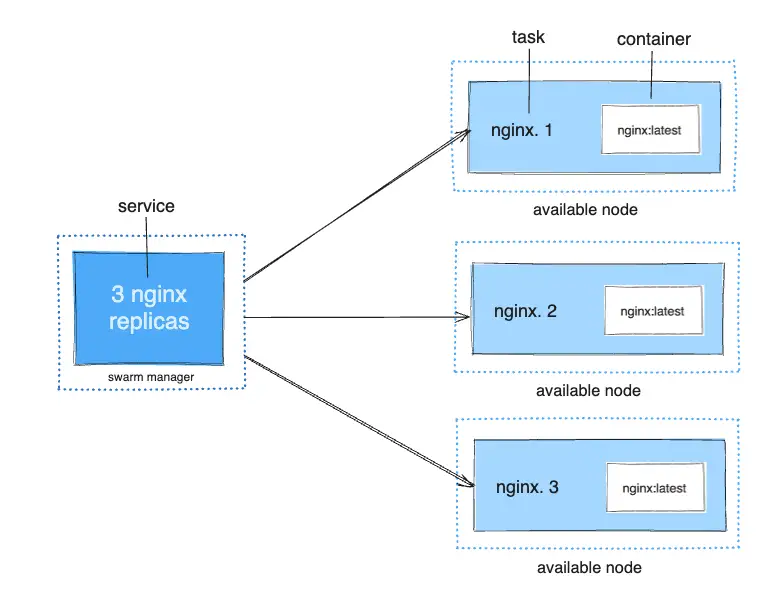
Docker Swarm is Docker’s built-in container orchestrator. So, if your team already uses Docker, then Swarm feels familiar from day one. In such a case, Swarm removes orchestration complexity and aids basic scaling and service management.
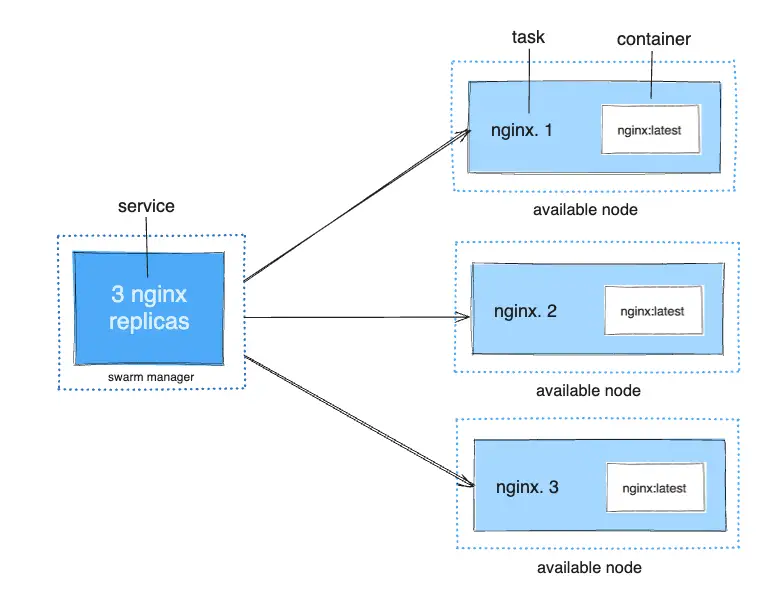
Best suited for:
Related reading: Best Docker Desktop Alternatives for 2026
Who Is Kubernetes Best For?Kubernetes is the industry standard for container orchestration. Built to handle scale and complexity, it shines when applications and teams grow beyond simple setups.
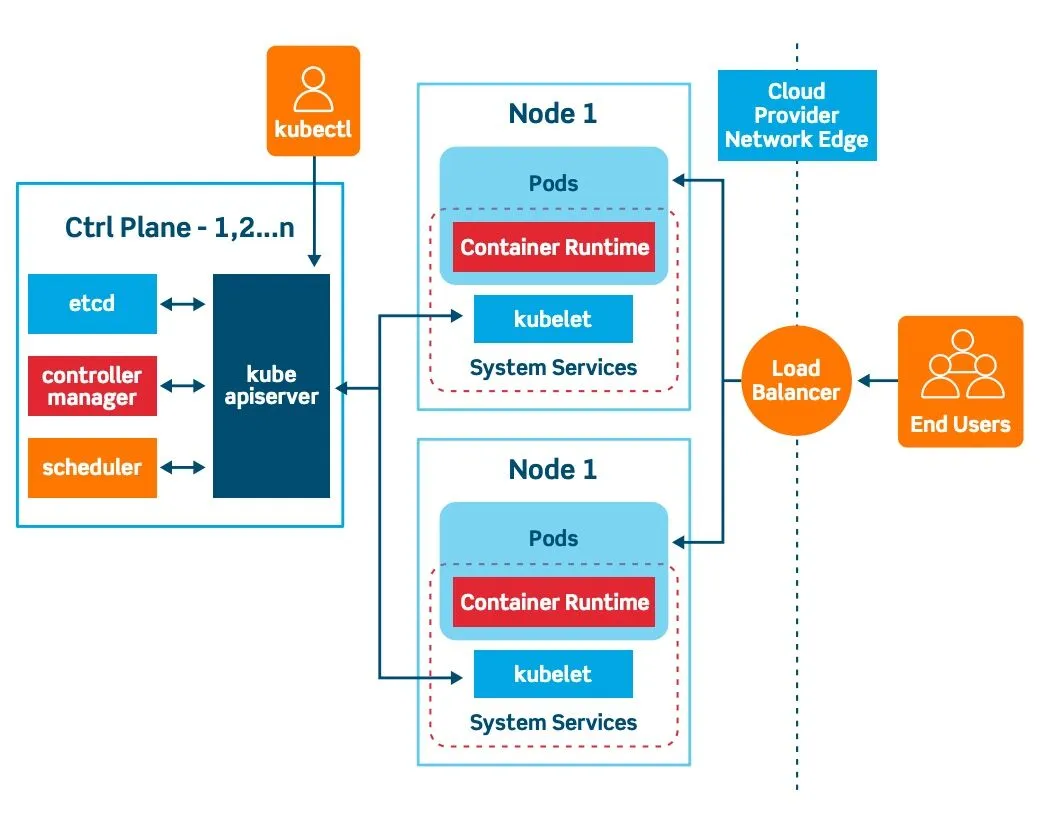
Best suited for:
Orchestrators are powerful but can be user-hostile for many orgs. Hence, the reason teams use management layers like Portainer.
Portainer makes Docker Swarm and Kubernetes operable for broader teams. It improves safety, accountability, and speed, while leaving orchestration exactly where it belongs.
At a glance:
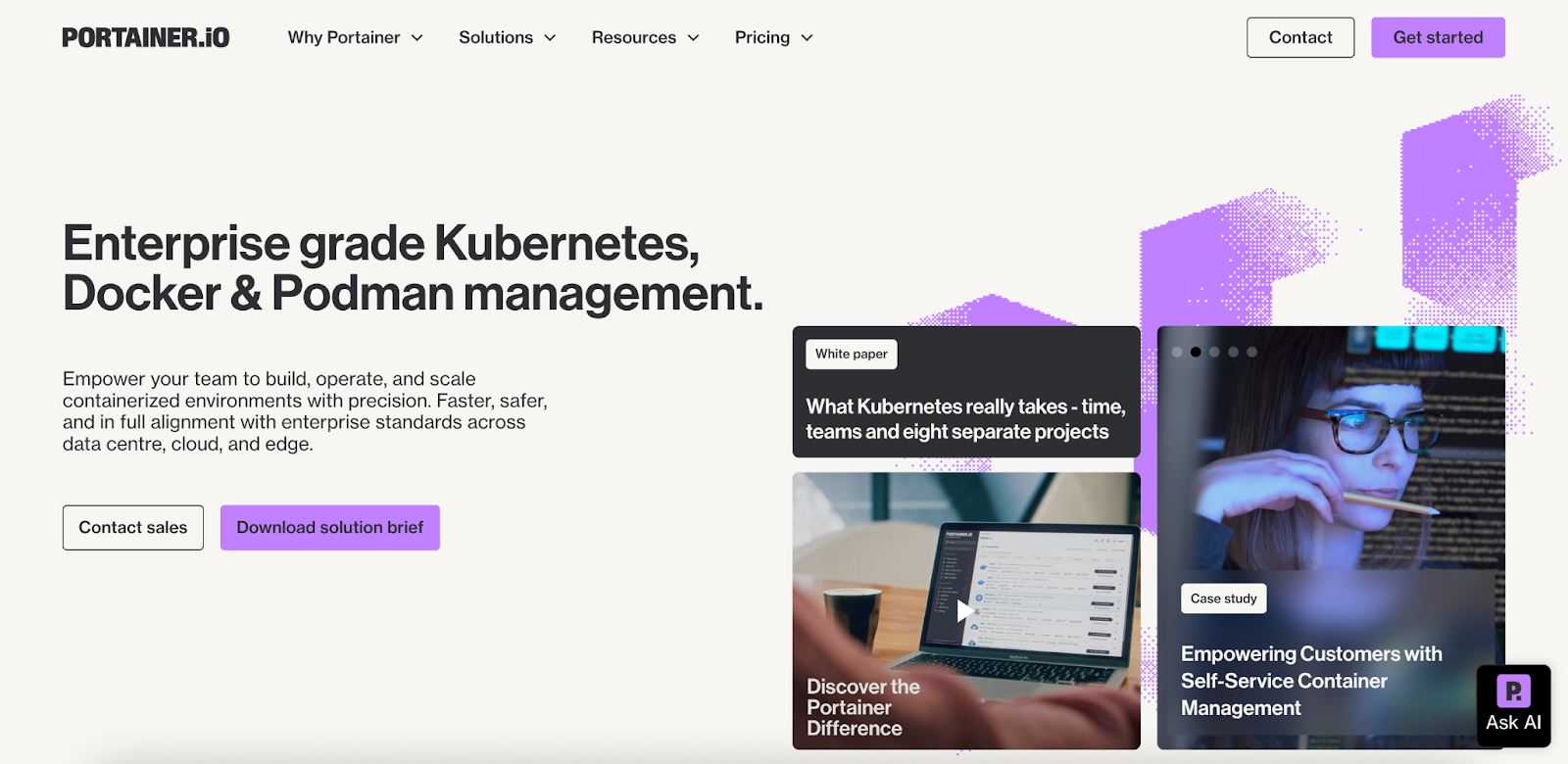
Where it fits architecturally:
Portainer is not a replacement for Docker Swarm or Kubernetes. This is where it fits:
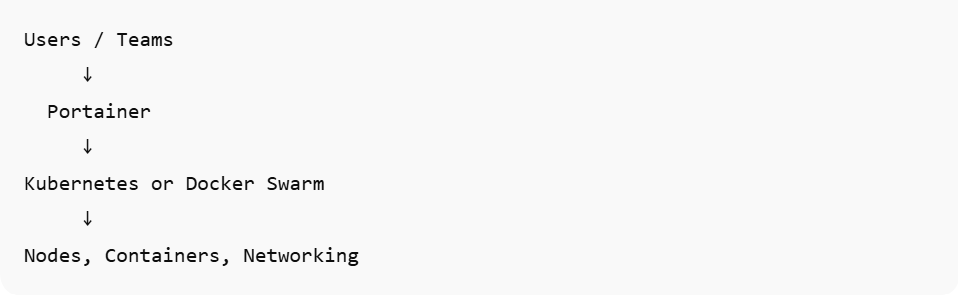
Back to Docker Swarm vs Kubernetes. Let’s compare how the two differ across practical factors such as pricing, ease of use, support, and integration.
PriceDocker Swarm and Kubernetes are open-source, but their “total cost of ownership” looks very different once you factor in setup, tooling, and ongoing operations.
Docker SwarmDocker Swarm is effectively free to run. It’s built into Docker, requires minimal additional tooling, and can often be operated without a specialist. For small teams or simple workloads, infrastructure and operational costs stay low.
KubernetesKubernetes is also free at its core, but usage introduces costs. You’d likely pay for managed services, networking, monitoring, security tools, and specialized expertise. These indirect costs can outweigh savings on infrastructure.
VerdictSwarm is cheaper to adopt and operate upfront. Kubernetes can be cost-effective at scale, but it requires higher investment in tools and skills (meaning high cost).
Ease of useOften, the decision to pick Docker Swarm or Kubernetes comes down to how easy each platform is to use and operate. Below is what users report in reviews and forum threads.
Docker SwarmDocker Swarm is widely praised for its simplicity. Since it’s built into Docker, teams familiar with Docker commands often find Swarm intuitive and easy to operate. This Reddit user put it bluntly:

Kubernetes has a steeper learning curve. New users often struggle with concepts, such as pods, services, and controllers, before they even deploy workloads. This G2 reviewer summarized it:

Docker Swarm wins for “ease of use.” It is ideal for teams that want a quick setup and minimal operational overhead. Kubernetes, on the other hand, offers more control at the cost of a steeper learning curve, which is perfect for scale but complex for beginners.
Customer supportSupport experience is crucial when teams need guidance (and they will). Below is how Docker Swarm and Kubernetes weigh in this regard.
Docker SwarmDocker Swarm doesn’t have a centralized support program. As a result, responses take time. The sentiment among users is that “you might be best served getting help from community forums and GitHub issues.”
This user on Reddit said there is even a massive gap in the available community support:
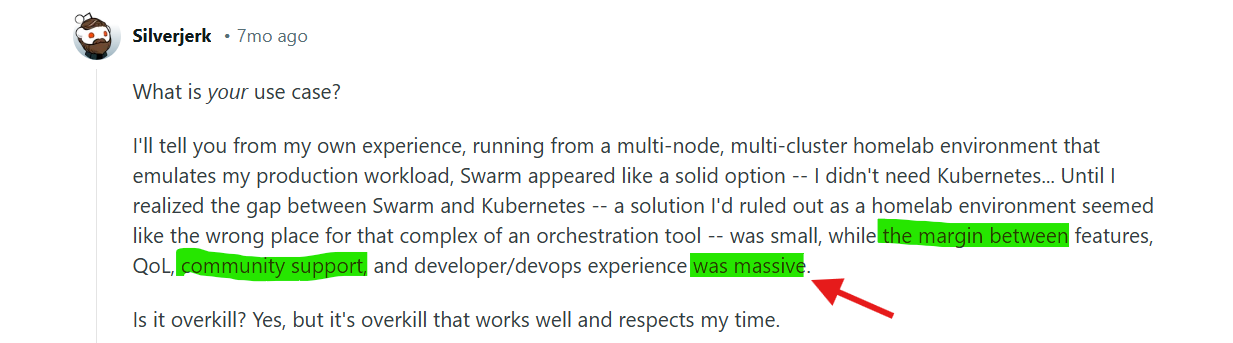
Unlike Docker Swarm, Kubernetes benefits from a huge ecosystem and active community, and multiple vendors offer professional support (Red Hat, Google, AWS, etc.).
VerdictSwarm relies primarily on community support, which can be limited by its smaller user base. Kubernetes, in contrast, has a larger (more active) ecosystem and multiple formal support options. This makes the latter a good option to get timely help at scale.
IntegrationThe way your orchestration tool connects with surrounding platforms affects your workflows, from CI/CD to logging, monitoring, and service meshes. Let’s see how the two tools perform.
Docker SwarmSwarm integrates easily with tools that already support Docker, such as Docker Compose and many CI systems. Because it’s Docker-native, users often find it works out of the box with existing pipelines. However, in broader cloud ecosystems or service mesh setups, integrations can feel limited.
KubernetesKubernetes leads in integrations, thanks to a vast ecosystem. Observability tools (Prometheus, Grafana), CI/CD (ArgoCD, Flux), service meshes (Istio, Linkerd), and cloud provider services all work routinely.
VerdictDocker Swarm integrates smoothly with Docker-centric tooling. Kubernetes offers broad, mature integrations across the cloud-native ecosystem, which makes it a better option for scaling operations.
Related reading: What is Kubernetes On-Premise?
How to Choose a Container Orchestration ToolTL; DR:
Use this table to quickly settle the Docker Swarm vs Kubernetes debate based on your team’s size, skills, and operational goals.
| Docker Swarm | Kubernetes | |
|---|---|---|
| Setup | Very easy | Complex |
| Learning curve | Low | High |
| Scalability | Moderate | Excellent |
| Ecosystem | Small | Massive |
| Production use | Declining | Industry standard |
Below is a deeper look at specific factors to consider.
Operational complexity vs. controlStart by asking: how much complexity can your team handle day-to-day?
If your priority is shipping reliably without building a platform team, simpler orchestration often wins, i.e., Docker Swarm. Say you need fine-grained control, scale, and ecosystem depth. The choice is simple: Kubernetes.
Either way, you need a way to operate safely. This is where Portainer fits naturally. It doesn’t replace Swarm or Kubernetes; it makes either one easier to operate by adding visual management, RBAC, guardrails, and day-to-day visibility.

Book a demo to see how it works!
{{article-cta}}
Team access, safety, and day-to-day operationsBeyond features, ask: who will operate the platform and how safely can they do it?
That question matters because shared clusters can become a risk. Giving too many people “admin access” can lead to unclear ownership and slow down your team.
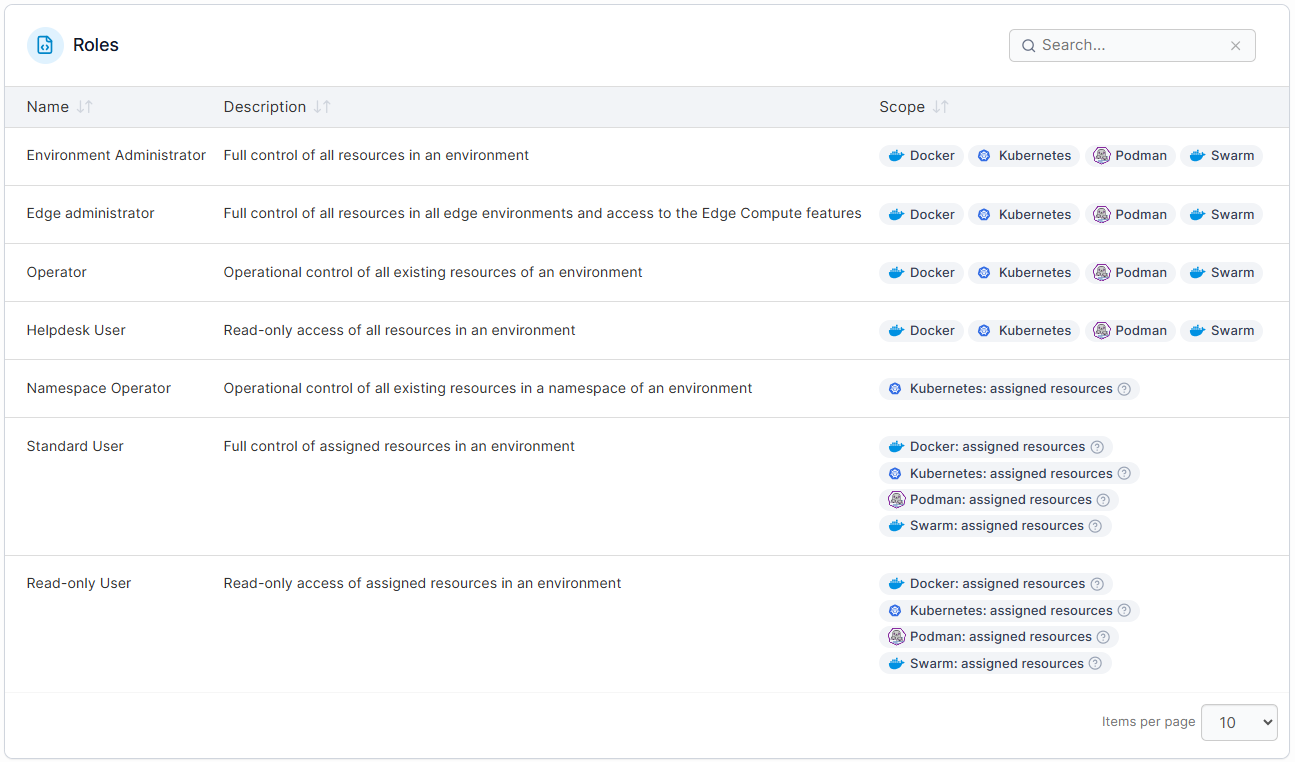
The way out is RBAC:
A management layer, such as Portainer, can help here. It sits above Swarm or Kubernetes and provides a clear operational layer. This way, your team gets safer collaboration and better visibility, without turning every task into a YAML or CLI exercise.
As container environments mature, a common problem emerges: no one has a clear, shared view of what’s running where, or why. Over time, this lack of visibility makes governance, audits, and change management harder than the orchestration itself.
So, what tool best fits this case?
For most teams, Kubernetes might be enough. However, issues of missing data might linger. To fix visibility once and for all, use Portainer.
Portainer provides a centralized, visual control layer across Swarm and Kubernetes environments. This makes workloads, permissions, and changes easy to understand at a glance.
Portainer: Managing Docker Swarm and Kubernetes Without the ComplexityWant management without the operational overhead, steep learning curve, or constant reliance on CLI-heavy workflows? Use Portainer!
It helps organizations max out the value of their orchestration tools, whether Swarm or Kubernetes.
Key featuresPortainer focuses on day-to-day operability, governance, and visibility across container environments.
Centralized UI for management
Portainer provides a single UI to manage Docker Swarm and Kubernetes clusters from one place. Teams can view workloads, namespaces, nodes, and services across multiple environments without switching tools or contexts.
Built-in RBAC and access control
Portainer makes it easy to control who can deploy, modify, or delete resources. Role-based access control, team assignments, and environment-level permissions reduce risk. This way, more people work safely in shared clusters.
Visual workload and application management
Instead of relying solely on YAML and CLI commands, Portainer lets teams deploy and manage applications visually. This lowers the barrier for non-specialist users while still supporting Kubernetes-native and Swarm-native workflows.
PricingPortainer offers 3 nodes for smaller teams on its free tier. But you can extend the trial to 15 nodes up to 45 days. However, for most value, upgrade to the flexible business pricing.
Note: Pricing is based on environments and feature requirements rather than usage complexity.
| Plan | Starting price |
|---|---|
| Enterprise IT | Flexible pricing based on environment needs |
| Edge / IIoT | Flexible pricing for edge-scale deployments |
The common theme in Portainer’s 4.8/5 rating (of 287 reviews) on G2 is its ease of use and visibility. Amer H. explains it in-depth:
“I use Portainer for managing my server and Docker installations, and I really appreciate being able to handle things visually with an intuitive GUI. It's quick to deploy, and everything is clearly organized, which is important to me. The GUI is not only visually appealing but also functional, allowing me to edit code and organize deployments or stacks without having to use the CLI. I find it makes managing Kubernetes and Docker clusters really easy. The initial setup was also very easy, especially with a good tutorial I found on YouTube.”
Who Portainer is best forThere’s no clear winner in the Docker Swarm vs Kubernetes debate. The best fit depends on your team’s size, need for control, and existing workflow.
But, there is a shortcut: basic vs complexity.
In any case, use both with Portainer. It layers on Docker, Kubernetes, and even Podman to provide visibility, control, and governance. And teams using it are seeing results.
ilionx, a European managed‑IT services provider using Docker-in-VM and Kubernetes platforms, subscribed to Portainer’s Business edition. They had previously used Rancher, but with no tangible results.
With Portainer, they got uptime to 99.99%, saving the need to hire 2 FTEs. You can also enjoy similar benefits.
Explore Portainer now to manage your orchestration!
{{article-cta}}
| # | Наименование новости | Тональность | Информативность | Дата публикации |
|---|---|---|---|---|
| 1 | 5 Best Docker Swarm Alternatives & Why You Should Migrate | 0 | 5 | 11-04-2026 |
| 2 | 5 Best Container Monitoring Tools in 2026: Features & More | 0 | 7 | 02-03-2026 |
| 3 | OpenShift vs Kubernetes: Differences & Who it is Best For in 2026 | 0 | 7 | 18-01-2026 |
| 4 | 7 Best Kubernetes Deployment Tools in 2026: In-Depth Review | 5 | 7 | 02-05-2026 |
| 5 | Choosing the best Kubernetes dashboard for your Enterprise | 0 | 5 | 08-01-2026 |
| 6 | 7 Best Kubernetes Managed Service Providers for 2026 | 0 | 7 | 17-03-2026 |
| 7 | Docker Swarm Still Works. But Does It Still Have a Future? | 0 | 5 | 12-03-2026 |
| 8 | Argo CD vs Portainer GitOps: An Implementation-Level Comparison | 0 | 7 | 06-01-2026 |
| 9 | Best Kubernetes Dashboard Alternatives & Competitors in 2026 | 0 | 7 | 02-02-2026 |
| 10 | Portainer vs ArgoCD vs FluxCD: Key Differences & Use Cases | 0 | 7 | 31-01-2026 |