Просмотр новости
Найдите то, что Вас интересует
 Спутники
 РН
РН SpaceX
 Роскосмос
 NASA
NASA
СпутникиРНSpaceXРоскосмосNASASentiment around running Kubernetes on-premise and cloud repatriation has been shifting since 2018. By 2024, it had reached a tipping point, with 83% of CIOs reconsidering their cloud-first strategies.
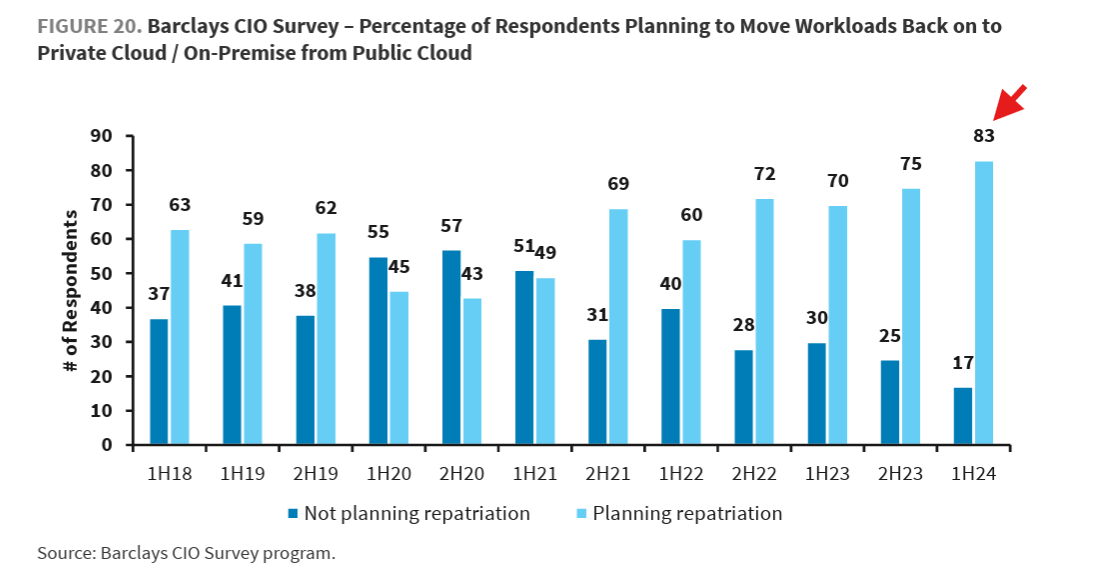
The shift became public when David Heinemeier Hansson, co-owner of 37signals (makers of Basecamp and HEY), announced a move away from the cloud. Around the same time, Rebecca Weekly, VP of platform and infrastructure engineering at GEICO, shared how Kubernetes now underpins containerized compute and storage internally.
Why the switch? What does running Kubernetes on-premise actually involve? And how do teams scale it without operational chaos?
This guide breaks it all down.
Kubernetes on-premise refers to running Kubernetes clusters on infrastructure you own or directly control, such as on-site data centers or private facilities.
In other words, you manage your hardware, networking, and storage while using Kubernetes to orchestrate containerized applications instead of relying on a public cloud provider like AWS.
But how is this different from cloud Kubernetes?
Kubernetes on-premise runs as a self-contained control system inside your own infrastructure. The stages below reveal how it clusters functions day-to-day, from scheduling workloads to maintaining stability.
Here’s a quick overview:
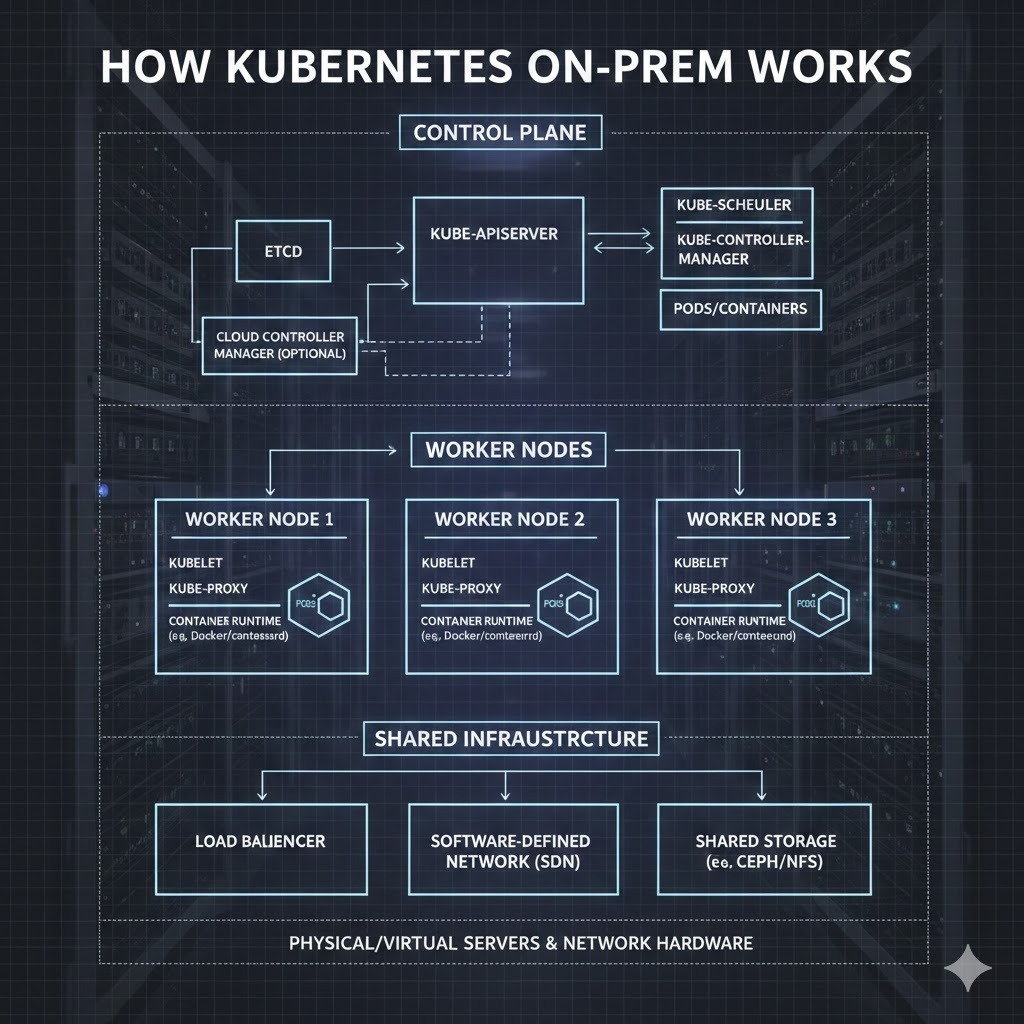
The control plane is the decision-making layer of an on-prem Kubernetes environment. It continuously compares what should be running with what is running, then directs the cluster to close any gaps.
This includes scheduling workloads, tracking node and application health, and maintaining cluster state. In practice, it ensures applications remain available and balanced across infrastructure as conditions change.
Stage 2: Worker nodes run containerized workloadsWorker nodes are where applications actually execute. Each node runs containers grouped into pods and continuously reports health and resource usage back to the control plane.
In on-prem environments, nodes may differ in capacity or location, so Kubernetes dynamically distributes workloads to keep applications running smoothly despite uneven infrastructure.
Stage 3: Networking connects services and componentsThe networking layer handles how traffic flows inside the cluster. It routes requests between pods and services, allowing applications to find and talk to each other as if they were on a single network. As workloads shift between nodes, networking also updates automatically. This keeps communication uninterrupted.
Stage 4: Storage persists application dataThe storage layer makes sure application data remains intact even as containers start, stop, or move. Kubernetes then connects running workloads to persistent volumes so data remains available regardless of where a container runs.
This separation allows applications to continue operating normally while the platform handles data continuity in the background.
Stage 5: Monitoring and self-healing maintain stabilityThe cluster constantly observes what runs and how it behaves. This way, when a container crashes or a node becomes unavailable, Kubernetes reacts automatically by restarting workloads or shifting them elsewhere.
This continuous feedback loop makes sure applications are available without waiting for manual intervention, which is especially important in on-premise environments.
Kubernetes On-Prem vs Cloud vs HybridThe table below compares on-prem, cloud, and hybrid Kubernetes across the criteria that matter most in real-world operations. Use it to understand how each model behaves once workloads are running.
| Criteria | On-Prem Kubernetes | Cloud Kubernetes | Hybrid Kubernetes |
|---|---|---|---|
| Cost model | High upfront capital cost, predictable long-term spend | Pay-as-you-go, variable monthly costs | Mixed CapEx and OpEx |
| Infrastructure control | Full control over hardware, network, and storage | Limited control, provider-managed | Control on-prem, flexibility in cloud |
| Security & compliance ownership | Fully owned and enforced internally | Shared responsibility with provider | Split across on-prem and cloud |
| Latency & performance | Low latency, consistent performance | Variable latency, internet-dependent | Low latency on-prem, burst to cloud |
| Scalability & elasticity | Limited by physical capacity | Highly elastic and on-demand | Elastic with planning |
| Operational overhead | Highest operational responsibility | Lowest, provider handles most ops | Moderate, requires coordination |
| Data residency & sovereignty | Full data locality and sovereignty | Data resides in provider regions | Sensitive data kept on-prem |
| Typical workload fit | Regulated, latency-sensitive, predictable workloads | Cloud-native, bursty, global apps | Mixed workloads and gradual migration |
Verdict: Despite its operational complexity, Kubernetes on-premise remains the best choice for teams that need maximum control over performance, security, and data locality. For organizations where latency, compliance, or predictability is critical, the trade-off is often worth it.
Why Run Kubernetes On-Premise? (Real Benefits)Despite the added operational responsibility, many organizations intentionally choose Kubernetes on-premise for outcomes that cloud platforms can’t always deliver.
Besides, cloud repatriation generally reduces costs. David shared that moving on-prem cut 37signals’ infrastructure spend from $3.2M to $1.3M annually, with projected $10M savings over five years.
Below are additional benefits teams consider when making the switch (and why you should as well).
1. Greater control over infrastructure and costsRunning Kubernetes on-premise gives organizations full control over how infrastructure is sized, funded, and operated. Instead of variable monthly cloud bills, teams can plan capacity upfront and spread costs predictably over time. This makes budgeting easier and reduces financial risk.
More importantly, on-prem Kubernetes delivers lower total cost of ownership for stable, long-running workloads. And while at it, teams get clearer visibility into where their “infrastructure spend” actually goes.
2. Stronger security and compliance postureOrganizations in regulated industries often can’t afford uncertainty around data access or infrastructure control. Running Kubernetes on-premise allows teams to fully own their security model, from network boundaries to access policies. This reduces reliance on shared-responsibility frameworks and third-party controls.
As a result, audits become simpler, compliance requirements easier to meet, and risk exposure lower. These benefits are crucial, especially for workloads involving sensitive, regulated, or mission-critical data.
3. Predictable performance and low latencyFor applications where timing is paramount, inconsistent performance can quickly become a business risk. On-prem Kubernetes reduces this uncertainty by keeping workloads close to users, machines, and data sources. This minimizes network hops and avoids internet-related variability. The result is more predictable performance and lower latency, which is essential for real-time systems, operational platforms, and environments where delays directly impact reliability or customer experience.
4. Data residency and sovereignty assuranceFor organizations operating under strict data protection laws, where data lives is a critical risk factor. Running Kubernetes on-premise ensures sensitive information stays within approved geographic and legal boundaries. This reduces exposure to regulatory violations and simplifies compliance audits.
By keeping data under direct control, teams gain confidence that data handling aligns with local laws, internal policies, and industry-specific requirements across regions.
5. Scalable operations without cloud lock-inKubernetes on-premise allows organizations to scale operations on their own terms, without being tied to a single cloud provider’s pricing, roadmap, or constraints. Teams can modernize incrementally, expand capacity as needed, and retain architectural flexibility.
This independence reduces long-term risk and gives businesses the freedom to adopt hybrid or multi-environment strategies later without costly migrations or platform rework.
How to Deploy and Manage a Kubernetes ClusterThe steps below outline the high-level flow teams follow when standing up and operating a Kubernetes cluster. And don’t fret, we spared you the technical setup details.
Step 1: Define requirements and constraintsHere, you clarify why Kubernetes is needed and what constraints exist. Such clarity revolves around:
These early decisions determine architectural choices, operational responsibility, and cost models later. In essence, make it “first and center” for your workflow.
Step 2: Design the cluster architectureWith requirements defined, proceed to cluster structuring. And while at it, they ask these critical questions:
These choices (your answers) will then guide scaling, security boundaries, and day-to-day operations.
Note: Getting the architecture right early helps you avoid redesigns. Also, it helps clusters grow without introducing unnecessary complexity.
Further reading: Kubernetes Architecture: Components & Best Practices (2026)
Step 3: Establish operational responsibilitiesBefore the cluster is in active use, define who is responsible for day-to-day operations. This includes ownership of upgrades, security controls, access management, and incident response.
This way, you create clear accountability, and that prevents gaps once workloads are running and reduces operational risk. Done right, you (and your team) can respond faster to issues and maintain consistent operations as the cluster evolves.
Step 4: Deploy workloads and supporting servicesOnce responsibilities and structure are defined, begin running applications and supporting services. The focus here is consistency and repeatability.
Together, this approach reduces risk during updates, making day-to-day operations stable as clusters handle real workloads.
Step 5: Monitor, maintain, and evolve the clusterAfter workloads are running, your focus should shift from output to reliability. How do you make clusters stay reliable over time?
In short, the bulk of the work here is monitoring Kubernetes performance, applying updates, responding to incidents, and adjusting capacity to meet demands. But not that this isn’t a one-time event. Kubernetes is not a one-time project; it’s an operational system that evolves with the business.
Now that you understand the benefits of on-premise Kubernetes and how teams deploy it, let’s look at the challenges (and how to address them).
Common Kubernetes On-Prem Challenges (and How Real Teams Address Them)Running Kubernetes on-premise gives teams control, but that control comes with real operational trade-offs. The challenges (and solutions) below are what real teams face.
1. Scaling beyond initial capacityOn-prem Kubernetes doesn’t scale infinitely by default. In other words, teams are limited by available hardware, which makes growth slower and more deliberate than in the cloud.
As workloads increase, this constraint can lead to resource contention and rushed infrastructure decisions. To manage this, teams use centralized visibility and workload control.

Platforms like Portainer help here. They help teams understand resource usage across clusters, prioritize workloads, and scale capacity in a controlled way.
An example of this done right: Cummins standardized container management across 100,000+ edge devices. This helped their team understand resource usage and scale predictably across distributed environments.
{{article-cta}}
2. Operational complexity over timeKubernetes operations become difficult to manage once your clusters multiply across environments. What was once a simple setup turns into a maze of namespaces, workloads, and configurations.
This complexity slows down teams and increases the chance of errors. A unified management layer helps reduce this burden. Portainer provides that.
3. Dependence on specialized skillsOn-prem Kubernetes often concentrates knowledge in a few experienced engineers. When those individuals are unavailable, even routine tasks are delayed. This creates operational risk and limits team autonomy. Reducing this dependency requires tooling that lowers the Kubernetes learning curve.
To solve this, Koton used Portainer’s UI-driven workflows to enable more engineers to manage Kubernetes safely. This reduced reliance on deep YAML expertise while maintaining control over production workloads.
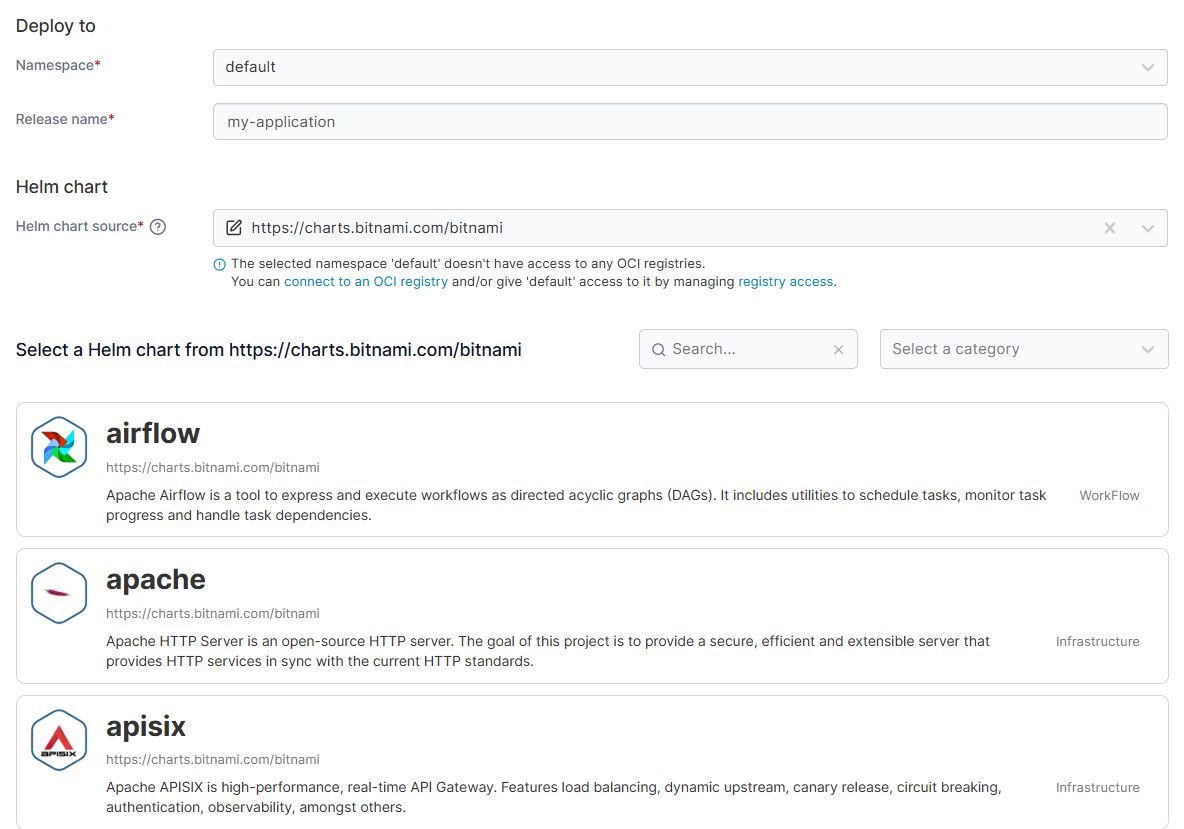
Keeping on-prem Kubernetes secure and up to date is an ongoing responsibility. Upgrades, patches, and configuration changes must be handled carefully to avoid downtime.
Over time, this maintenance burden competes with feature delivery and business priorities. Centralized management platforms help teams plan and execute changes effectively. By leveraging the right Kubernetes management tools through Portainer, teams gain visibility into environments and workloads while making maintenance activities more controlled and less disruptive.
5. Maintaining visibility and control at scaleWhen organizations add more clusters and workloads, visibility fragments. As a result, teams struggle to answer basic questions about what’s running, where it lives, and who owns it.
This lack of clarity increases operational risk and weakens governance. A centralized control plane solves this problem.
An example: A leading energy company unified Docker and Kubernetes visibility using Portainer. This helped them increase productivity by 15% and hit the 99.99% uptime target.
More companies are moving to Kubernetes on-premise for cost control, performance, and data ownership. And they are seeing clear gains.
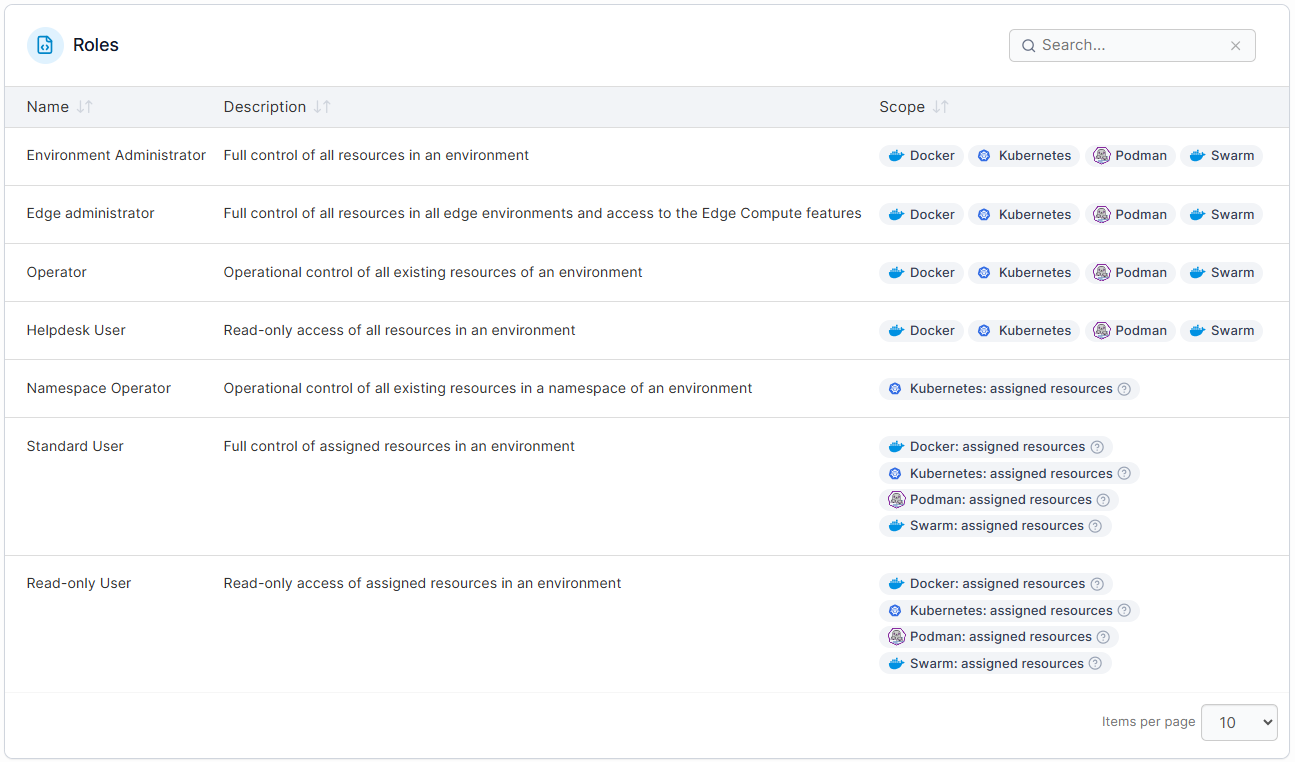
However, on-prem Kubernetes adds operational complexity. This is where Portainer comes in. Teams like Koton’s are using it for centralized visibility and control for on-prem clusters. You should, too.
Book a demo today to see how it simplifies Kubernetes on-premise management!
| # | Наименование новости | Тональность | Информативность | Дата публикации |
|---|---|---|---|---|
| 1 | Managed Kubernetes: What It Is, How It Works, and Use Cases | 0 | 8 | 10-03-2026 |
| 2 | Kubernetes Support: Services, Tiers & What Enterprises Need | 0 | 7 | 16-03-2026 |
| 3 | What Is Kubernetes Orchestration: Tradeoffs & Management Advice | 0 | 7 | 16-02-2026 |
| 4 | Before you scale Kubernetes, check your foundations. | 0 | 7 | 29-04-2026 |
| 5 | 2026 Kubernetes Deployment Guide: How to, Solutions & More | 5 | 8 | 03-05-2026 |
| 6 | Kubernetes Lifecycle Management: Challenges & Solutions | 0 | 7 | 16-03-2026 |
| 7 | Your Top Kubernetes Questions Answered by Portainer | 0 | 5 | 11-03-2026 |
| 8 | 7 Best Kubernetes Deployment Tools in 2026: In-Depth Review | 5 | 7 | 02-05-2026 |
| 9 | 7 Best Kubernetes Managed Service Providers for 2026 | 0 | 7 | 17-03-2026 |
| 10 | Kubernetes Fleet Management: Your 2026 Optimization Guide | 0 | 5 | 12-04-2026 |