Просмотр новости
Найдите то, что Вас интересует
 Спутники
 РН
РН SpaceX
 Роскосмос
 NASA
NASA
СпутникиРНSpaceXРоскосмосNASALearn what managed Kubernetes is, how it works, what providers manage, and how teams operate Kubernetes clusters in production environments.
Imagine your Kubernetes cluster goes down in the middle of an urgent release, or an upgrade is delayed because only one engineer knows the control plane.
That’s the reality for many teams running self-managed Kubernetes.
Managed Kubernetes solves problems like this by shifting infrastructure ownership to a cloud provider, allowing your team to focus on shipping software instead of babysitting clusters.
This guide covers exactly what managed Kubernetes is, how it works operationally, what providers handle versus what stays with your team, and when outsourcing cluster management makes more sense than going it alone.
Managed Kubernetes is a service where a cloud provider operates the Kubernetes control plane for you. The provider installs, runs, patches, and maintains core cluster components.
You still run standard Kubernetes, i.e., deploy containers, use kubectl, and manage workloads normally. The difference is that the provider maintains the cluster infrastructure, so you focus on applications rather than running Kubernetes itself.
What Kubernetes Managed Providers Typically HandleA Kubernetes managed service provider operates the infrastructure that keeps the cluster running. Most managed Kubernetes services handle:
A managed Kubernetes service does not remove operational responsibility for the workloads running inside the cluster.
You’ll still manage:
Note: A managed Kubernetes cluster removes infrastructure complexity; it doesn't remove Kubernetes complexity. You still need to understand how Kubernetes works to use it effectively.
Further reading: Kubernetes Architecture: Components and Best Practices
Managed Kubernetes Vs. Self-Managed KubernetesThe primary difference is operational ownership.
Neither model is universally better. The right choice depends on your team’s Kubernetes expertise, infrastructure requirements, and the operational overhead you’re willing to accept.
Let’s see the differences:
| Area | Managed Kubernetes | Self-Managed Kubernetes |
|---|---|---|
| Control plane management | Provider installs, runs, and patches control plane components such as the API server and etcd | Your team installs and maintains control plane nodes |
| Infrastructure setup | Provider provisions cluster infrastructure automatically | Engineers design and configure infrastructure manually |
| Upgrades and patching | Provider handles control plane upgrades and security patches | You schedule and execute upgrades yourself |
| Operational complexity | Lower. Infrastructure management is abstracted | Higher. Teams manage every layer of the cluster |
| Flexibility and customization | Limited to provider capabilities | Full control over cluster configuration |
| Maintenance overhead | Reduced. Core Kubernetes operations handled by the provider | High. Requires in-house Kubernetes expertise |
Self-managed clusters give you full control over every configuration decision. That flexibility comes at a cost.
On the other hand, managed Kubernetes trades some of that flexibility for significantly lower maintenance overhead. For most teams, that tradeoff is worth it.
Further Reading: Managed Vs. Unmanaged Kubernetes
How Does Managed Kubernetes Work?Here’s the managed Kubernetes workflow in practice:
Step 1: Provision Your ClusterStart by opening your provider’s console, CLI, or infrastructure-as-code tool and defining your cluster configuration:
Submit the request. The provider automatically provisions the control plane, configures etcd, sets up the API server, and connects it to your chosen network. This process typically completes in 3–10 minutes, depending on the provider.
Step 2: Configure Your Node PoolsWith the control plane live, define the worker nodes that will actually run your workloads:
The provider automatically registers each node with the control plane. At this stage, your team focuses on capacity planning rather than node registration mechanics.
Step 3: Authenticate and ConnectOnce your cluster is running, download the kubeconfig file directly from your provider’s console or CLI:
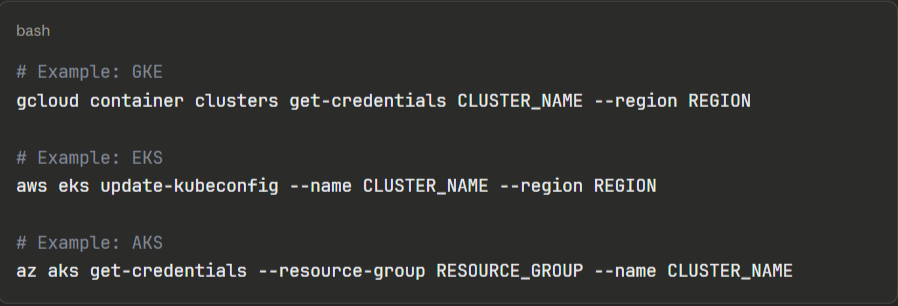
Add this kubeconfig to your CI/CD pipelines, local development environment, and any tooling that needs cluster access. From here, your cluster behaves like any standard Kubernetes cluster.
Step 4: Deploy Your WorkloadsDeploy applications using your standard Kubernetes workflow, i.e., manifests, Helm charts, Kustomize, or a GitOps tool such as Argo CD or Flux. The managed layer is completely transparent at this stage.
A typical first deployment looks like:

Your team owns all application configuration, resource requests and limits, health checks, and rollout strategies. The provider’s managed layer does not interact with your workloads.
Step 5: Set Up ObservabilityBefore running production workloads, connect monitoring and logging:
Most teams skip this step during initial setup and pay for it later. Get Kubernetes observability running before your first production Kubernetes deployment.
Step 6: Manage Ongoing UpgradesThe provider notifies your team when new Kubernetes versions are available and when your current version approaches end-of-life. Upgrades follow a two-step process:
Always test workloads on the new version in a staging cluster before upgrading production. Node pool upgrades cause pod rescheduling, so workloads need proper pod disruption budgets configured to avoid downtime during the process.
Main Benefits of Managed KubernetesHere are some reasons engineers switch from self-managed to managed Kubernetes:
Your Engineers Stop Babysitting InfrastructureReddit’s software engineer, Harvey Xia, said,
“It would take 30+ hours for an engineer to spin up a cluster, including over 100 steps, including those of configuring a network, provisioning hardware or picking a cloud vendor, installing a control plane, and adding on tools for observability and autoscaling.”
With a managed Kubernetes service, cluster provisioning drops to under 10 minutes. Most importantly, control plane management, patching, and availability monitoring shift entirely to the provider.
A Redditor shared the relief he and his team felt after switching from self-managed to managed Kubernetes. In the comment section, another user noted the pain of managing Kubernetes in-house compared to outsourcing to a managed service provider.
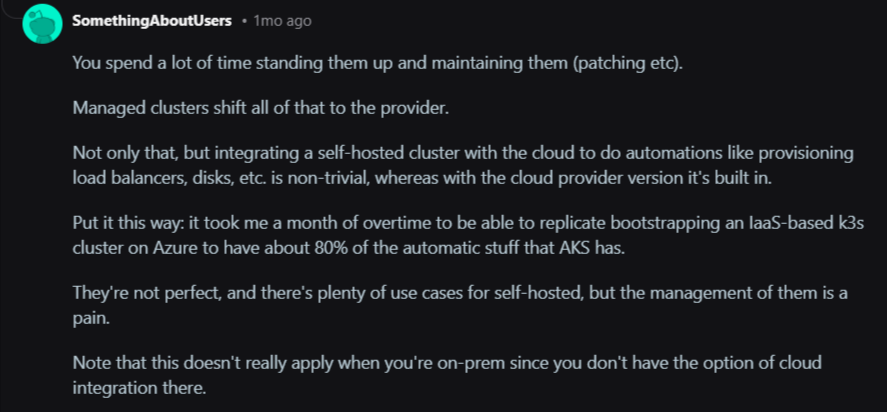
Image: Reddit
Your engineers can spend the recovered time on product work rather than on infrastructure archaeology.
Faster Deployments Without Extra HeadcountA report by the Global Journal of Engineering and Technology Advances shows that managed services can accelerate the deployment of new services by 30-40%. Some organizations report even higher gains, such as a 61% reduction in time-to-market for new services or a reduction in build-to-deliver cycles from two months to two weeks.
That speed comes from removing the dependency on infrastructure setup before every deployment. Teams push to a cluster that’s already running, already monitored, and already hardened rather than provisioning environments before every release cycle.
Lower Total Cost of Ownership Than It AppearsThe most common objection to managed Kubernetes is the price tag. A Redditor posted that managed K8s is more expensive than spinning up raw VMs.
That comparison ignores the biggest cost line: people.
In response to the Reddit thread, a user shared the reality of the scarcity and high cost of hiring an experienced Kubernetes expert.

Image: Reddit thread stating the high cost of hiring experienced K8s experts
Kubernetes experts earn between $120,000 and $180,000 per year. And you need a team of three to five engineers to cover a self-managed cluster around the clock properly. That’s $360,000–$900,000 in annual salaries before a single workload deploys.
Managed Kubernetes significantly reduces the total cost of ownership. According to a case study published in the Global Journal of Engineering and Technology Advances report, organizations that migrated to cloud-native architectures with managed Kubernetes saw infrastructure costs drop by 60% and maintenance costs fall by 42%.
Container Management at Genuine Production ScaleCummins, the global powertrain manufacturer, faced exactly the problem that managed Kubernetes services solve.
Their legacy telematics system had fragmented into 35 separate software versions, each tied to a specific vendor’s hardware. Every new feature required separate integration and testing across dozens of suppliers.
They containerized their edge software, standardized deployment with Portainer Business Edition, and worked with Portainer’s managed services team.
In return, Cummins reduced 35 separate software variants down to one, delivered their new platform on time, and established a future-proof architecture now being adopted as an industry reference model.
Contact the Portainer managed services team to build and operate your Kubernetes platform while you focus on what moves your product forward.
Security Hardening Without a Dedicated Security TeamSecuring a Kubernetes cluster requires configuring RBAC, network policies, secret encryption, audit logging, and CIS benchmark compliance. That can be a tedious ongoing workload for your team.
Managed Kubernetes services automatically apply security patches to the control plane while your team still owns application-level security.
{{article-cta}}
When to Outsource the Management of Your Kubernetes EnvironmentRunning Kubernetes in-house makes sense when you have the team, the expertise, and the workload complexity to justify it.
So, outsource Kubernetes management when:
A managed Kubernetes service removes the complexity of the control plane. But what it doesn’t solve is the operational layer above that, which requires managing multiple clusters, enforcing access controls, giving developers a safe way to deploy, and maintaining visibility across environments.
That’s the gap the Portainer platform fills.
Portainer acts as a unified control plane across your Kubernetes clusters (whether they run on EKS, AKS, GKE, on-premises, or at the edge) without requiring a dedicated platform engineering team at every touch point or vendor lock-in.
Concretely, that means:
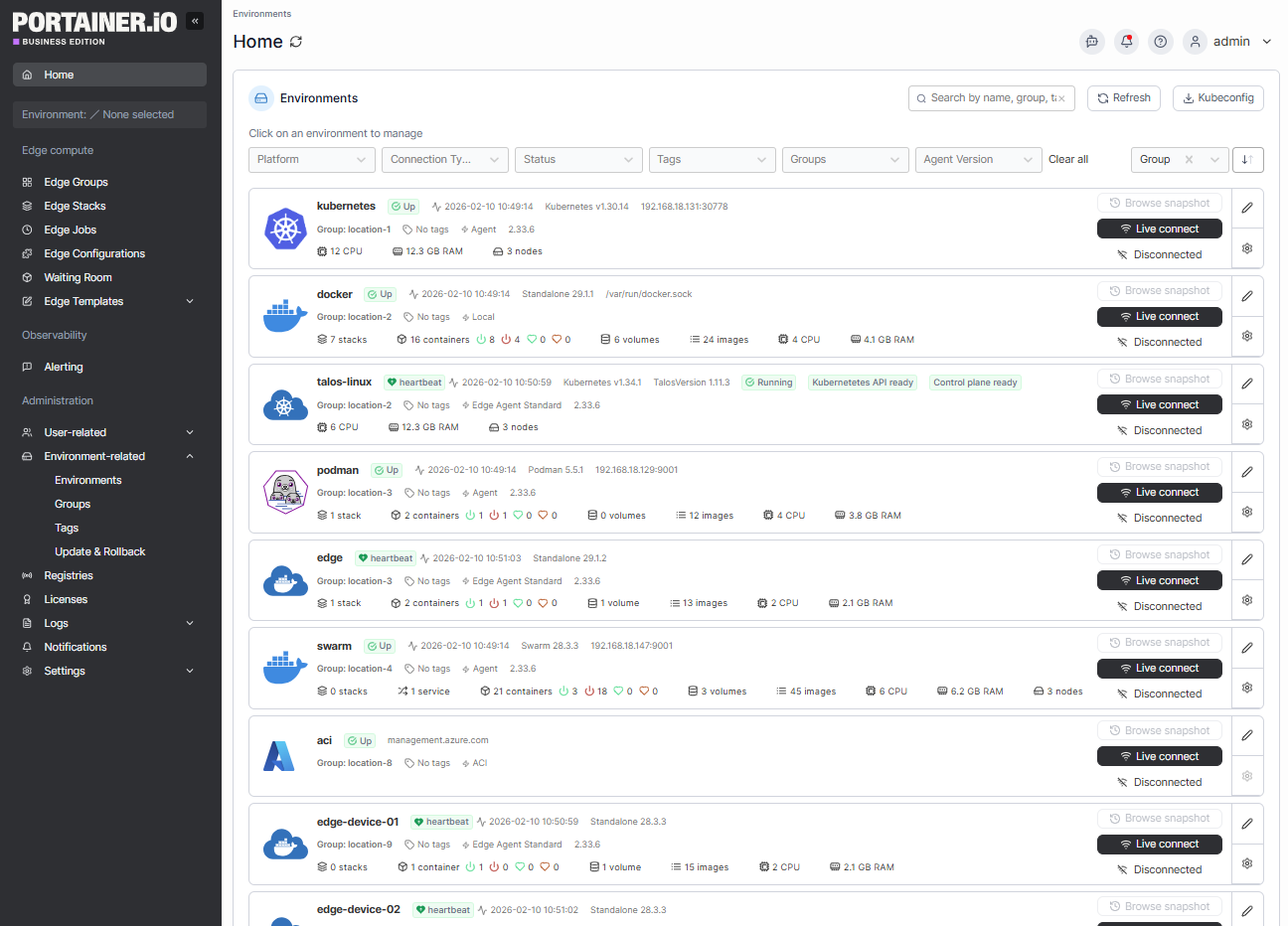
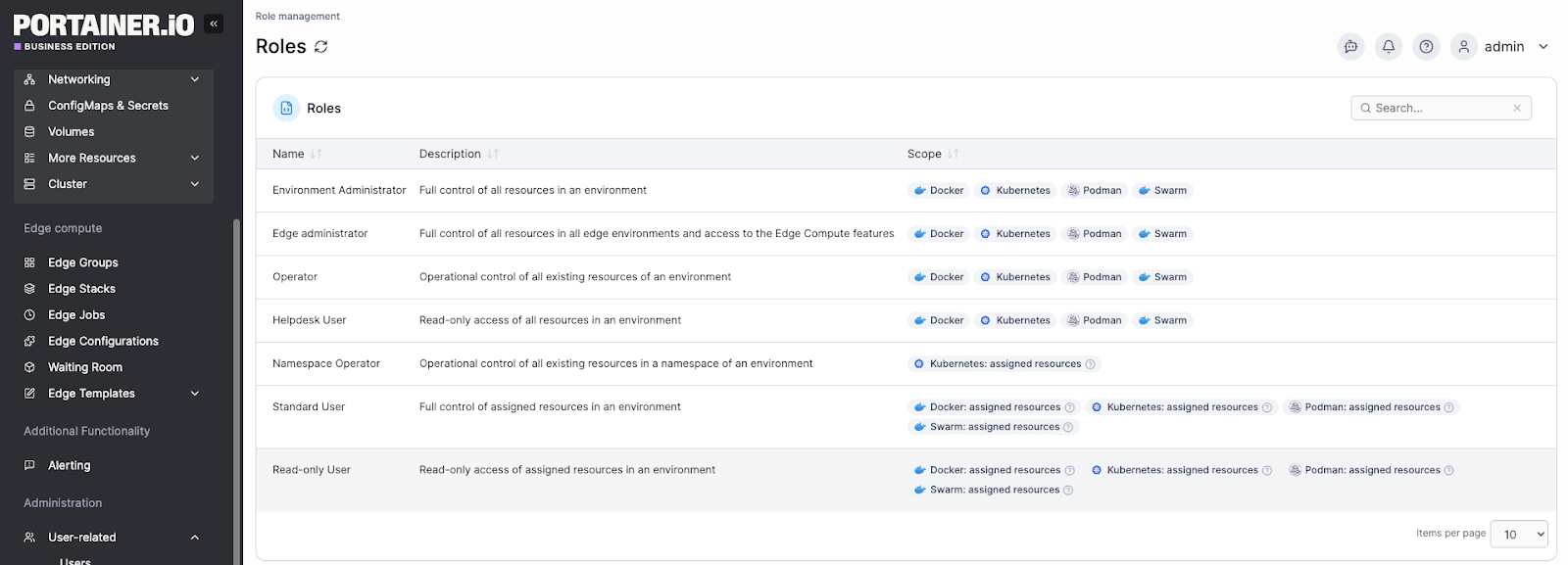
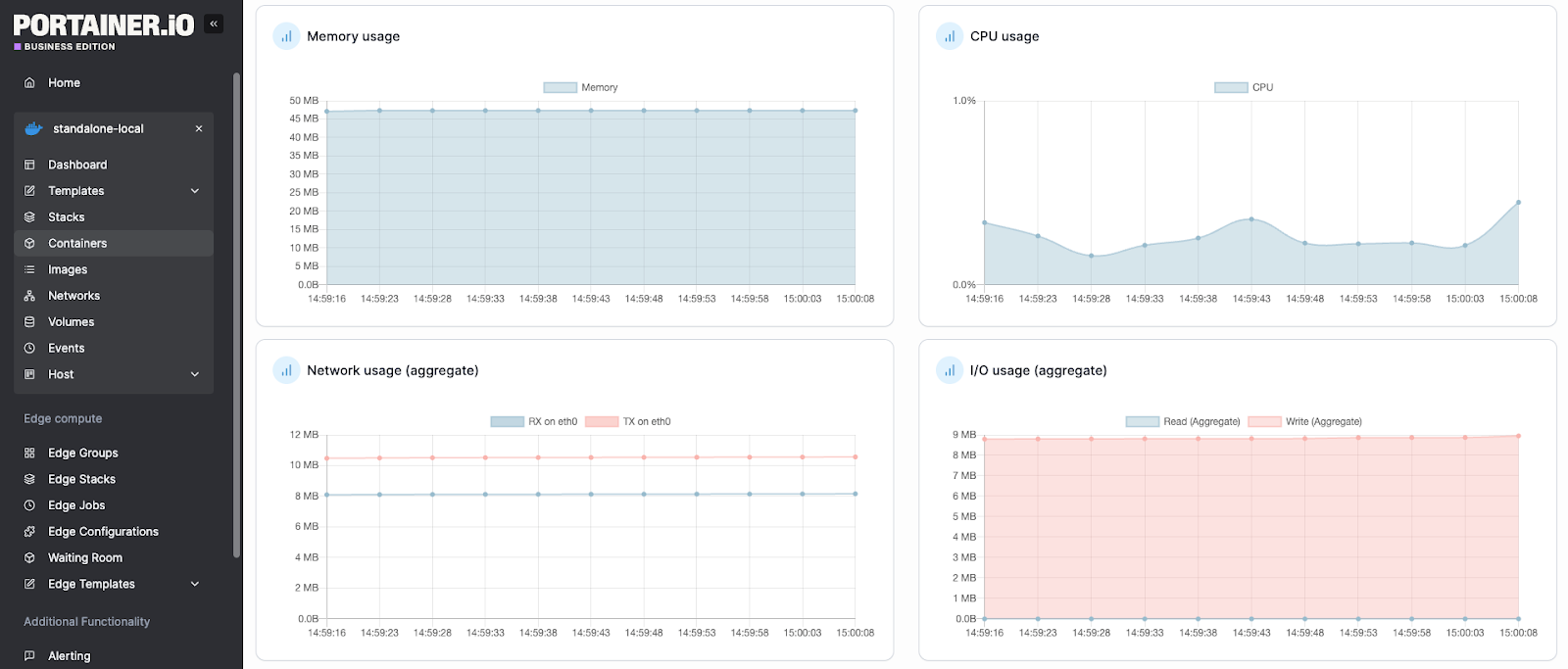
Book a demo to learn why enterprises across industries use Portainer to manage their Kubernetes platforms.
A Better Way to Manage Kubernetes with Portainer Managed ServicesManaged Kubernetes removes the hardest parts of running Kubernetes, but operating clusters across environments, teams, and workloads still requires the right tooling and expertise.
Portainer bridges that gap, giving your team the platform to manage existing clusters and the option to bring in experienced Kubernetes engineers when you need them. And that’s from initial setup through ongoing maintenance, security hardening, and support.
Talk to our Kubernetes managed services team to see how Portainer’s engineers reduce Kubernetes management workloads for teams.
| # | Наименование новости | Тональность | Информативность | Дата публикации |
|---|---|---|---|---|
| 1 | What Is Kubernetes Orchestration: Tradeoffs & Management Advice | 0 | 7 | 16-02-2026 |
| 2 | Kubernetes Support: Services, Tiers & What Enterprises Need | 0 | 7 | 16-03-2026 |
| 3 | Kubernetes Lifecycle Management: Challenges & Solutions | 0 | 7 | 16-03-2026 |
| 4 | Kubernetes On-Premise: What It Is, Benefits, Setup & Use Cases | 0 | 7 | 26-02-2026 |
| 5 | 2026 Kubernetes Deployment Guide: How to, Solutions & More | 5 | 8 | 03-05-2026 |
| 6 | Kubernetes Fleet Management: Your 2026 Optimization Guide | 0 | 5 | 12-04-2026 |
| 7 | Kubernetes RBAC: Roles, Permissions & Best Practices (2026) | 5 | 8 | 16-02-2026 |
| 8 | 7 Best Kubernetes Managed Service Providers for 2026 | 0 | 7 | 17-03-2026 |
| 9 | Before you scale Kubernetes, check your foundations. | 0 | 7 | 29-04-2026 |
| 10 | Which Kubernetes distros does Portainer work with? | 5 | 7 | 17-03-2026 |