Просмотр новости
Найдите то, что Вас интересует
 Спутники
 РН
РН SpaceX
 Роскосмос
 NASA
NASA
СпутникиРНSpaceXРоскосмосNASAThe Android operating system has officially introduced automatic cloud backup functionality for locally stored documents, enabling users to automatically save files from internal phone storage directly to Google Drive. Rolling out broadly through Google Play Services version 26.26, this system feature addresses a long-standing data management gap, making it significantly easier for users to safeguard critical local files against potential device loss, theft, or sudden hardware failure. Users can configure […]
The Android operating system has officially introduced automatic cloud backup functionality for locally stored documents, enabling users to automatically save files from internal phone storage directly to Google Drive.
Rolling out broadly through Google Play Services version 26.26, this system feature addresses a long-standing data management gap, making it significantly easier for users to safeguard critical local files against potential device loss, theft, or sudden hardware failure.

Users can configure the new feature by navigating to Settings > Accounts and backup > Google Backup on their Android smartphones. Within this menu, a new Documents category appears positioned between Photos and videos and Other device data. By default, the toggle switch remains disabled.
Activating the feature immediately displays available cloud storage capacity alongside direct shortcuts to manage quota allocations or purchase additional Google One storage plans.
When activated, the system automatically creates a dedicated root directory named “Android backups” within “My Drive”. Inside this directory, a subfolder labeled with the specific smartphone model name stores the captured files. The backup functionality supports an extensive range of file formats. Beyond conventional document formats such as .PDF, .DOC, .XLS, and .PPT, practical tests confirm that the process also backs up .ZIP compressed archives and .APK installer packages originating from the device’s main Downloads folder.
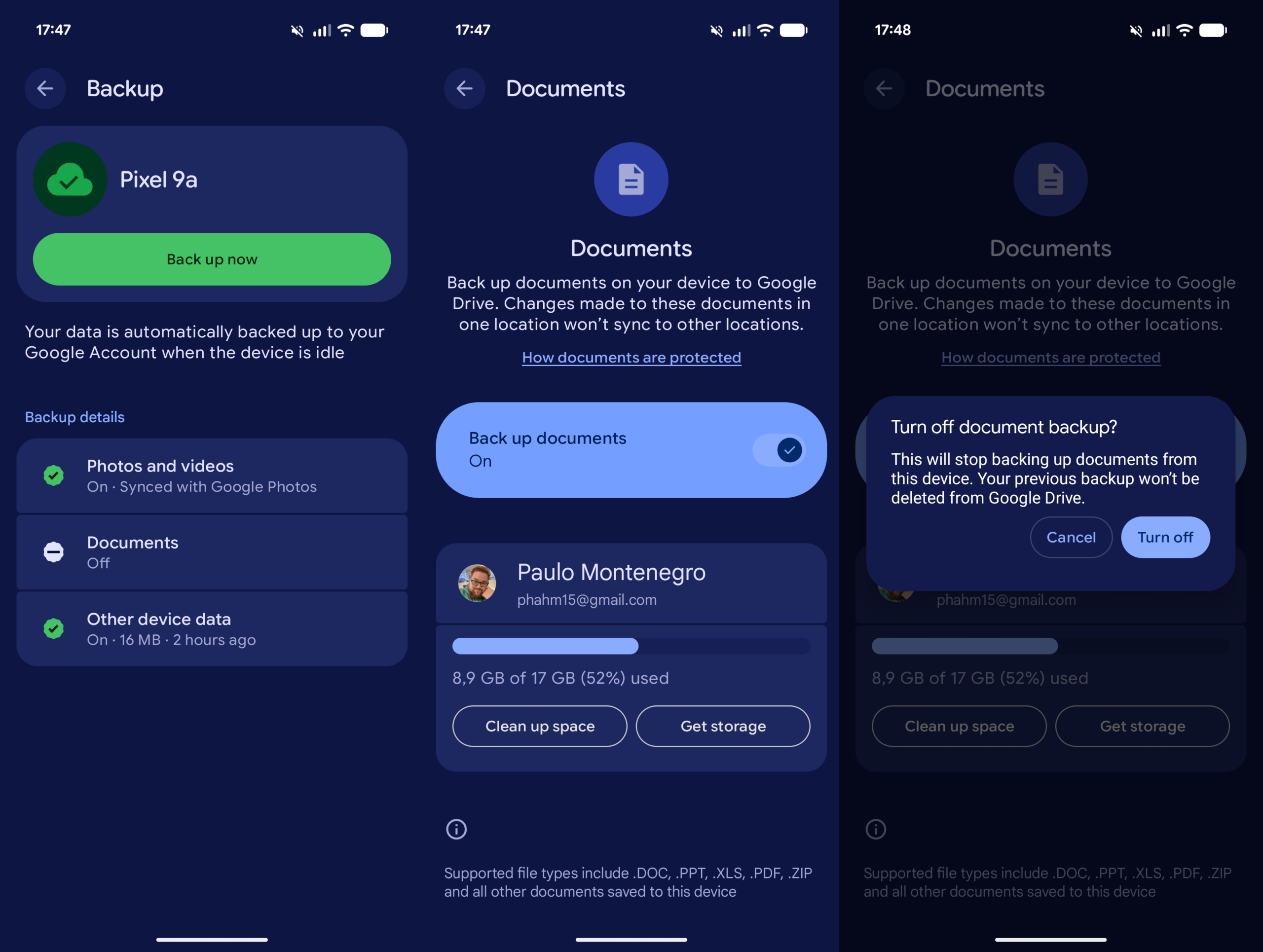
It’s possible to enable the Documents folder backup by going to Settings > Accounts and backup > Google backup
Users should carefully monitor their cloud capacity, as all uploaded documents count directly against their total Google Drive storage quota. If the feature is turned off later, previously backed-up cloud files will not be deleted automatically.
Crucially, the tool operates as a static security copy rather than a bi-directional real-time sync service. Edits made to a local document will not reflect in the cloud copy, nor will cloud changes modify local files. Overall, this feature provides essential protection for local receipts, contracts, and installers.
Filed in . Read more about Android, Backups and Google Drive.
| # | Наименование новости | Тональность | Информативность | Дата публикации |
|---|---|---|---|---|
| 1 | Android To Introduce Automatic Downloads Folder Backup | 0 | 8.84 | 24-02-2026 |
| 2 | Android rolls out local ‘Documents’ backup that syncs to Google Drive | 0 | 11.48 | 30-07-2026 |
| 3 | All Android backup data now counts toward your Google Account storage [Update: Email] | 0 | 11.6 | 18-07-2026 |
| 4 | Google starts rolling out local Documents backup on Android, lets you turn off SMS & RCS | 0 | 9.27 | 09-07-2026 |
| 5 | Your instant Android backup upgrade | 0 | 6.63 | 22-07-2026 |
| 6 | Android получит автоматическое копирование файлов на ПК, но не для Samsung | 0 | 5 | 10-07-2026 |
| 7 | All Android backup data now counts toward your Google Account storage, but it won’t take up much space | 0 | 5 | 06-07-2026 |
| 8 | Google Drive for Desktop Ends Google Photos Backup Sync on August 10 | 0 | 6.66 | 07-08-2026 |
| 9 | Google rolling out per-app controls for Android Backups | 0 | 5 | 29-06-2026 |
| 10 | Android : Google décompte désormais toutes les données de sauvegarde de votre stockage | 0 | 5 | 07-07-2026 |