Просмотр новости
Найдите то, что Вас интересует
 Спутники
 РН
РН SpaceX
 Роскосмос
 NASA
NASA
СпутникиРНSpaceXРоскосмосNASALearn how to manage shared code across projects using Git submodules. Prevent version drift, maintain reproducible workflows, and support team collaboration with practical examples.
Data science teams often develop reusable code for preprocessing, feature engineering, and model utilities that multiple projects need to share. Without proper management, these shared dependencies become a source of inconsistency and wasted effort.
Consider a fintech company with three ML teams in separate repositories due to different security clearances and deployment pipelines:
All three teams need the same calculate_risk_score() utility, but they can’t merge repositories due to security policies and different release cycles. Copying the utility creates version drift:
Week 1: All teams copy the same utility
Fraud Detection: calculate_risk_score() v1.0
Credit Scoring: calculate_risk_score() v1.0
Trading Algorithm: calculate_risk_score() v1.0

Week 3: Trading team fixes a critical bug but others don't know
Fraud Detection: calculate_risk_score() v1.0 (✗ still broken)
Credit Scoring: calculate_risk_score() v1.0 (✗ still broken)
Trading Algorithm: calculate_risk_score() v1.1 (✓ bug fixed)

Week 5: Each team has different versions
Fraud Detection: calculate_risk_score() v1.2 (≠ different optimization)
Credit Scoring: calculate_risk_score() v1.0 (✗ original broken version)
Trading Algorithm: calculate_risk_score() v1.3 (≠ completely different approach)
Git submodules provide the solution to this version drift problem.
Key TakeawaysHere’s what you’ll learn:
Easy-to-digest articles on Python, AI, and open-source tools. Delivered twice a week.
Git submodules let you embed one Git repository inside another as a subdirectory. Instead of copying code between projects, you reference a specific commit from a shared repository, ensuring all projects use identical code versions.
your-project/
├── main.py
└── shared-utils/        # ← Git submodule
    └── features.py
This ensures every team member gets the same shared code version, preventing the version drift shown in the example above.
Using Git Submodules in Practice📚 For comprehensive Git fundamentals and production-ready workflows that complement Git submodule techniques, check out Production-Ready Data Science.
Consider our fintech company with fraud detection, credit scoring, and trading projects that all need shared ML utilities for risk calculation and feature engineering.
The shared ml-utils repository contains common ML functions:
ml-utils/
├── __init__.py
├── features.py
└── README.md
# features.py
def calculate_risk_score(data):
    return data['income'] / max(data['debt'], 1)

def extract_time_features(df, time_col):
    df['hour'] = pd.to_datetime(df[time_col]).dt.hour
    df['is_weekend'] = pd.to_datetime(df[time_col]).dt.dayofweek.isin([5, 6])
    ...
    return df

def calculate_velocity(df, user_col, time_col):
    df = df.copy()
    df['transaction_count_1h'] = df.groupby(user_col)[time_col].transform('count')
    ...
    return df
Imagine your fraud detection project looks like this:
fraud-detection/
├── main.py
└── README.md
To add the shared utilities to your fraud detection project, you can run:
git submodule add https://github.com/khuyentran1401/ml-utils.git ml-utils
This will transform the structure of your project to:
fraud-detection/
├── main.py
├── README.md
├── .gitmodules
└── ml-utils/           # ← Submodule directory
    ├── features.py     #   Shared ML functions
    ├── __init__.py
    └── README.md
The .gitmodules file tracks the submodule configuration:
[submodule "ml-utils"]
    path = ml-utils
    url = https://github.com/khuyentran1401/ml-utils.git
Now you can use the shared utilities in your fraud detection pipeline:
# fraud_detection/train_model.py
from ml_utils.features import extract_time_features, calculate_velocity

def prepare_fraud_features(transactions_df):
    # Extract time-based features for fraud detection
    df = extract_time_features(transactions_df, 'transaction_time')

    # Calculate transaction velocity features
    df = calculate_velocity(df, 'user_id', 'transaction_time')

    return df

# Fraud detection model uses consistent utilities
fraud_features = prepare_fraud_features(raw_transactions)
When a new team member joins the fraud detection team, they get the complete setup including shared ML utilities:
# Clone the fraud detection project with all ML utilities
git clone --recurse-submodules https://github.com/khuyentran1401/fraud-detection.git
cd fraud-detection
Alternatively, initialize submodules after cloning:
git clone https://github.com/khuyentran1401/fraud-detection.git
cd fraud-detection
git submodule update --init --recursive
When the code of the shared utilities is updated, you can update the submodule to the latest version:
# Update to latest ML utilities
git submodule update --remote ml-utils
This updates your local copy but doesn’t record which version your project uses. Commit this change so teammates get the same utilities version:
# Commit the submodule update
git add ml-utils
git commit -m "Update ML utilities: improved risk calculation accuracy"
For comprehensive version control of both code and data in ML projects, see our DVC guide.
Managing Submodules Through VS CodeTo simplify the process of managing submodules, you can use VS Code’s Source Control panel.
To manage submodules through VS Code’s Source Control panel:
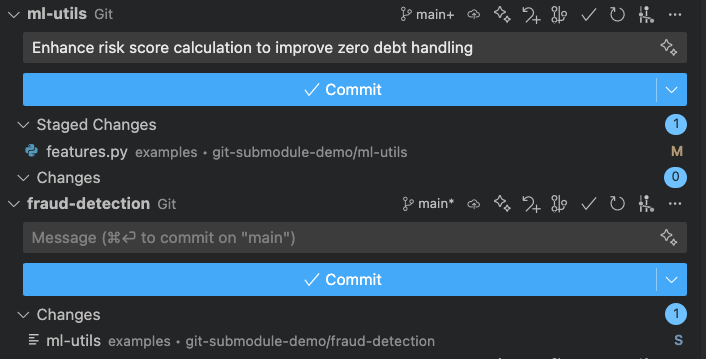
The screenshot shows VS Code’s independent submodule management:
Python packaging lets you distribute shared utilities as installable packages:
pip install company-ml-utils==1.2.3
This works well for stable libraries with infrequent changes. However, for internal ML utilities that evolve rapidly, packaging creates bottlenecks:
Git submodules work differently by making the source code directly accessible in your project for immediate access, full debugging visibility, and precise version control.
ConclusionGit submodules provide an effective solution for managing shared ML code across data science projects, enabling source-level access while maintaining reproducible workflows.
Use submodules when you need direct access to shared utility source code, frequent iterations on internal libraries, or full control over dependency versions. For stable, external dependencies, traditional Python packaging remains the better choice.
📚 Want to go deeper? Learning new techniques is the easy part. Knowing how to structure, test, and deploy them is what separates side projects from real work. My book shows you how to build data science projects that actually make it to production. Get the book →
Easy-to-digest articles on Python, AI, and open-source tools. Delivered twice a week.
| # | Наименование новости | Тональность | Информативность | Дата публикации |
|---|---|---|---|---|
| 1 | Git for Data Scientists | 0 | 8.43 | 27-07-2026 |
| 2 | pytest-tia: Run Only the Tests Your Git Diff Actually Affects | 0 | 20 | 12-07-2026 |
| 3 | Git Worktree: Секретное оружие ML-инженера | 0 | 11.14 | 21-01-2026 |
| 4 | 5 Essential Itertools for Data Science | 0 | 13.29 | 19-02-2026 |
| 5 | What Every Python Developer Should Know About the CPython ABI | 0 | 10 | 19-07-2026 |
| 6 | OpenDocs - Turn Your README Into Documentation | 0 | 10 | 20-03-2026 |
| 7 | Analyst Notes: Five foundational concepts for understanding data | 0 | 9.18 | 18-06-2026 |
| 8 | Turn Datadog findings into automated code fixes with Bits Code | 0 | 7.97 | 09-06-2026 |
| 9 | AI Data Pipelines: Architecture, Stages, and Orchestration | 0 | 6.29 | 29-07-2026 |
| 10 | What Is MDM? Everything you need to know about Mobile Device Management | 0 | 5 | 26-12-2025 |