Просмотр новости
Найдите то, что Вас интересует
 Спутники
 РН
РН SpaceX
 Роскосмос
 NASA
NASA
СпутникиРНSpaceXРоскосмосNASAAn update to One UI 9 makes clever use of the Galaxy S26 Ultra’s Privacy Display. Picture-in-picture videos from apps like YouTube now get to use Privacy Display filtering while playing on the Galaxy S26 Ultra’s homescreen.
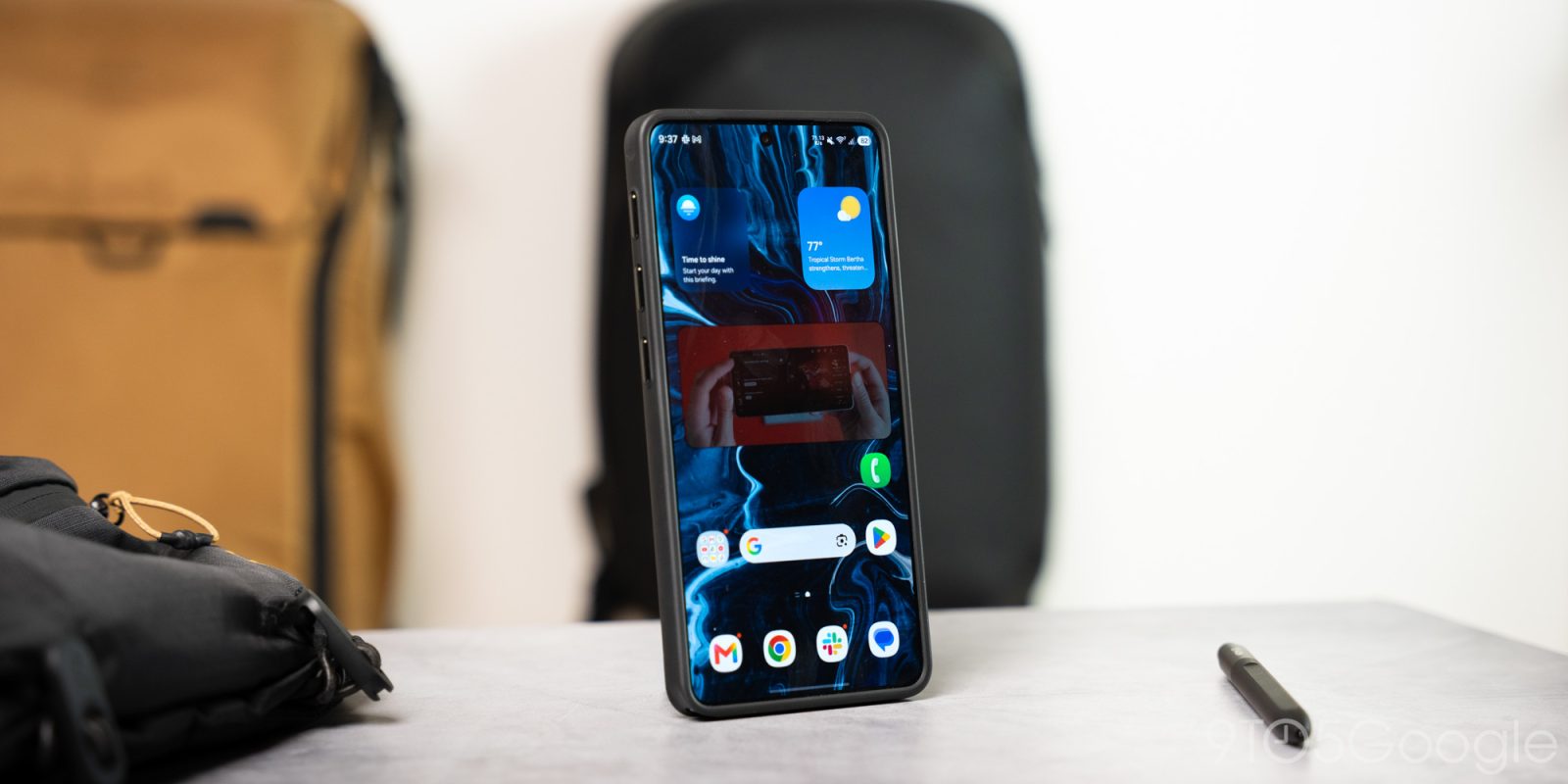
An update to One UI 9 makes clever use of the Galaxy S26 Ultra’s Privacy Display. Picture-in-picture videos from apps like YouTube now get to use Privacy Display filtering while playing on the Galaxy S26 Ultra’s homescreen.
Even if the initial hype has died down, the Galaxy S26 Ultra’s display is really cool. With something called Privacy Display, individual parts of the display can be filtered so that only one user can see. It can be applied to the entire screen, of course, but the magic trick’s “wow” factor comes from the ability to keep notifications and more sensitive information away from prying eyes.
In a recent One UI 9 beta update, Samsung altered how PiP (picture-in-picture) videos act while Privacy Display is enabled for individual apps (via @universeice on Twitter/X). When an app like YouTube is dismissed while a video is playing, the small media player that appears on the Galaxy S26 Ultra‘s homescreen is filtered for off-angle viewers using the Privacy Display. The rest of the homescreen is left unaffected.
— Ice Universe (@UniverseIce) July 21, 2026Heads up! Samsung has introduced a very useful upgrade to the Privacy Display feature on the Galaxy S26 Ultra in One UI 9.
For example, if you've enabled Privacy Display only for YouTube, when you minimize the video into Picture in Picture (PiP) and return to the home screen,… pic.twitter.com/ck1IqxUppo
There are a couple of conditions to this feature. First, specific apps need to be selected in the apps section of Privacy Display settings. Second, Privacy Display can’t need to be on for the entire display, or nothing will change.
It’s a small but significant change for users who rely on the Galaxy S26 Ultra’s Privacy Display for certain apps. It’s also a good reminder that the feature can be turned on per app, making it more useful than a simple notification filter. The display isn’t perfect, so others can still see from certain angles. Better than nothing, though, and it might be something we see on future Galaxy devices.
The update appears to be live in One UI 9 beta. It’s currently available on one of our Galaxy S26 Ultras running One UI 9 beta version ending in BZG4.
More:


FTC: We use income earning auto affiliate links. More.
| # | Наименование новости | Тональность | Информативность | Дата публикации |
|---|---|---|---|---|
| 1 | Samsung releases new One UI 9 beta update for Galaxy S26 devices | 0 | 11.25 | 28-08-2026 |
| 2 | Samsung’s One UI 9 update forces Android’s lockdown mode when you open the power menu | 0 | 12.27 | 01-06-2026 |
| 3 | Samsung начала обновлять Galaxy S26 до One UI 9 | 0 | 8.81 | 16-09-2026 |
| 4 | Avvistata la versione stabile di One UI 9 per Samsung Galaxy S26 | 0 | 5 | 16-07-2026 |
| 5 | Samsung Galaxy S26 Ultra: un fix software per eliminare la macchia rossa dal display | 0 | 5 | 16-07-2026 |
| 6 | Galaxy Z Fold 8 gives apps new scaling options for its large displays | 0 | 15.07 | 29-07-2026 |
| 7 | The Galaxy Z Fold 8’s display crease is a huge improvement [Gallery] | 0 | 13 | 22-07-2026 |
| 8 | [Galaxy S26 Ultra] How to use APV Codec for maximum video quality | 0 | 6.3 | 06-07-2026 |
| 9 | Samsung aggiorna sette Galaxy tra smartphone e tablet, anche in Italia: ecco le novità | 0 | 5.49 | 23-07-2026 |
| 10 | Aggiornamenti per tre smartphone e tre tablet Samsung Galaxy, vediamo le novità | 0 | 5.53 | 28-07-2026 |