Просмотр новости
Найдите то, что Вас интересует
 Спутники
 РН
РН SpaceX
 Роскосмос
 NASA
NASA
СпутникиРНSpaceXРоскосмосNASAMeta this week launched its own AI image model integrated into the Instagram app. While this might sound useful, it comes with rather a big privacy issue: by default, anyone can use your profile photo and posts as prompts for generative images.
You can fix this by flipping two toggles, but they’re pretty well hidden …

Meta this week launched its own AI image model integrated into the Instagram app. While this might sound useful, it comes with rather a big privacy issue: by default, anyone can use your profile photo and posts as prompts for generative images.
You can fix this by flipping two toggles, but they’re pretty well hidden …
Meta announced Muse Image on Tuesday.
Muse Image acts as the creative partner that knows your world, making it easy to turn your ideas into high-quality visuals that you can download and share anywhere, including directly to your feed, story, or chat […]
You can use more than 30 new AI-powered effects for Instagram Stories and generate images in your direct chats with Meta AI on WhatsApp […] Whether you’re starting from scratch or working with an existing photo, you can describe what you want in simple, conversational language, and Meta AI handles the rest
Wired spotted rather a big privacy risk with this.
As part of this update, public Instagram profiles are now automatically opted into being fodder for generative AI remixes. All someone has to do is tag your account’s profile in a prompt—if it’s public—and they can use Meta AI to generate an image using your likeness.
Yep, Meta strikes again, making this opt-out rather than opt-in. You’ll need to flip two toggles to switch it off.
Inside the Instagram app, tap your photo bottom-right then the hamburger menu icon top-right. Scroll down to Sharing and Reuse. There’s a section headed “Allow people to create with and reuse your content.” There are separate toggles for Posts and Reels, and you’ll want to flip both of them off.
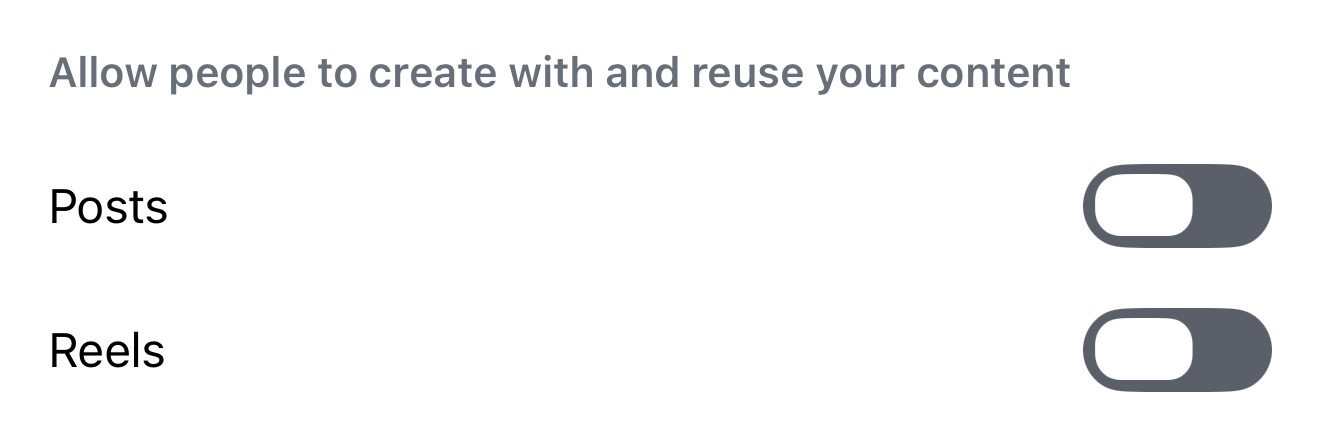 These toggles are on by default …


FTC: We use income earning auto affiliate links. More.
| # | Наименование новости | Тональность | Информативность | Дата публикации |
|---|---|---|---|---|
| 1 | Hackers tricked Instagram AI into letting them take over 20,000 accounts [U] | -2 | 7 | 08-06-2026 |
| 2 | How to stop other users and Instagram AI from using your photos | 0 | 19.43 | 10-07-2026 |
| 3 | It’s not just Apple – WhatsApp has to allow competing AIs too | 0 | 5 | 10-06-2026 |
| 4 | Meta* прекратила работу функции создания ИИ-изображений по открытым профилям Instagram** | -2 | 6 | 11-07-2026 |
| 5 | Meta Is Adding AI Image Creation to Instagram, WhatsApp and More | 5 | 6 | 07-07-2026 |
| 6 | Amid criticism, Meta reins in new AI tool that automatically accessed public Instagram images | -2 | 6 | 12-07-2026 |
| 7 | An accessibility paywall on Meta Glasses could be good news for Apple Glasses | -3 | 6 | 01-07-2026 |
| 8 | Нейросеть Meta* сгенерирует фото любого человека с открытым аккаунтом Instagram* | 0 | 7 | 09-07-2026 |
| 9 | Muse Image: Metas KI-Bildgenerator kann Bilder von Instagram-Konten verändern | 0 | 5 | 08-07-2026 |
| 10 | CBC: ИИ Meta больше не может генерировать контент на базе фотографий из Instagram | 0 | 5 | 11-07-2026 |