Просмотр новости
Найдите то, что Вас интересует
 Спутники
 РН
РН SpaceX
 Роскосмос
 NASA
NASA
СпутникиРНSpaceXРоскосмосNASAIn reply to <a href="https://devblogs.microsoft.com/cppblog/segment-heap-support-for-c-projects-in-visual-studio/#comment-2776">Simon Felix</a>.
A significant amount of performance work has been done on Segment Heap in Windows 11. Currently, segment heap is the fastest and the most memory-efficient heap available on Windows. The legacy heap is in maintenance mode. Windows recommends that all applications opt-into the segment heap. This will not only improve performance, scalability and footprint, but also ensure support for future hardware-based security features like memory tagging.
Visual Studio 2026 version 18.6 makes it easier to take advantage of modern Windows memory management improvements. Segment Heap is a modern heap implementation in Windows that delivers stronger protection against common memory vulnerabilities, higher allocation throughput, lower memory fragmentation, better scalability across cores, and more predictable performance under load. Starting with this release, new C++ projects are now configured to use Segment Heap by default.
Onboarding your project to use the Segment HeapNew C++ projects come with Segment Heap enabled by default. For existing projects, follow the steps below to enable it.
For MSBuild solution-based C++ projects, the project property is located at Project -> Properties -> Manifest Tool -> Input and Output -> Enable Segment Heap. You can opt into the segment heap on a per-project basis, allowing you to onboard at your own pace.
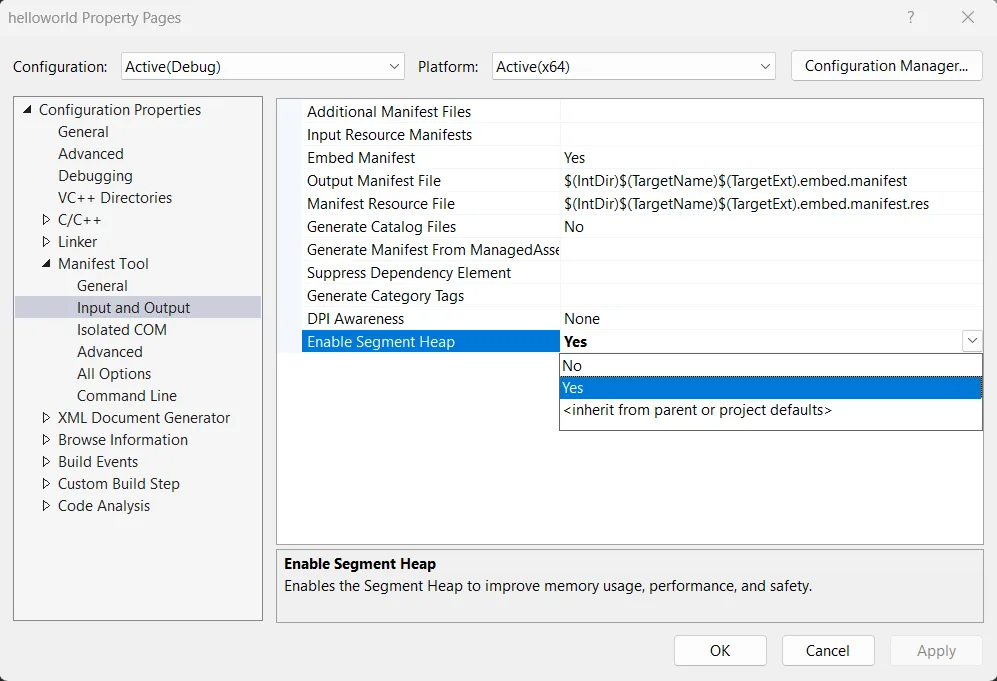
For CMake users, Visual Studio provides a helper script, SegmentHeap.cmake, that integrates Segment Heap into your build automatically. If you manage your configuration through CMakePresets, you can enable Segment Heap by setting CMAKE_PROJECT_TOP_LEVEL_INCLUDES. Optionally, you can use the VS_SEGMENT_HEAP_ALLOWLIST and VS_SEGMENT_HEAP_EXCLUDE environment variables in the same preset to control which targets opt in:
{
    "name": "foo",
    "displayName": "Foo",
    "inherits": "",
    "environment": {
        "VS_SEGMENT_HEAP_ALLOWLIST": "target1;target2;",
        "VS_SEGMENT_HEAP_EXCLUDE": "target3;"
    },
    "cacheVariables": {
        "CMAKE_PROJECT_TOP_LEVEL_INCLUDES": "$env{VSINSTALLDIR}Common7/IDE/CommonExtensions/Microsoft/CMake/cmake/Microsoft/SegmentHeap.cmake"
    }
}
In this example, the optional VS_SEGMENT_HEAP_ALLOWLIST variable limits Segment Heap to target1 and target2, while the optional VS_SEGMENT_HEAP_EXCLUDE variable keeps it disabled for target3. This gives you fine-grained control over which targets in the project use Segment Heap when you need it.
Segment Heap integration is designed to coexist cleanly with existing toolchains and build configurations. It integrates into the standard linker + manifest tool flow, and it avoids introducing custom build steps or requiring changes to your toolchain configuration. This design ensures that Segment Heap adoption is low-risk and does not interfere with existing build logic.
How to check if Segment Heap is enabledYou can verify whether Segment Heap is enabled by checking the final application manifest embedded in your executable. Open the executable directly in Visual Studio, inspect the RT_MANIFEST resource for the following entry:
<heapType>SegmentHeap</heapType>This indicates that the Segment Heap is active for your application.
Alternatively, you can open a Developer Command Prompt for Visual Studio, extract the embedded manifest with mt, and then open the generated manifest file in Visual Studio, and locate the same entry there.
For example:
mt.exe -inputresource:YourApp.exe;#1 -out:YourApp.manifestBecause Segment Heap is enabled via manifest embedding, the presence of this declaration in the final binary confirms that the feature is in effect.
Get started and share your feedbackWe encourage you to download Visual Studio 2026 version 18.6 Stable to start using Segment Heap in your C++ projects. Whether you’re creating a new project or onboarding an existing one, we’d love to hear how it goes. You can reach us through Help > Send Feedback in the Visual Studio IDE or by posting on Developer Community.