Просмотр новости
Найдите то, что Вас интересует
 Спутники
 РН
РН SpaceX
 Роскосмос
 NASA
NASA
СпутникиРНSpaceXРоскосмосNASAUbuntu 26.10 brings a faster way to tile windows, Entra ID passkey login, PDF signatures and a full set of Rust-based core utilities. Here's what’s new.
You're reading Ubuntu 26.10 is out with GNOME 51, Linux 7.3 & new tiling trick, a blog post from OMG! Ubuntu. Do not reproduce elsewhere without permission.
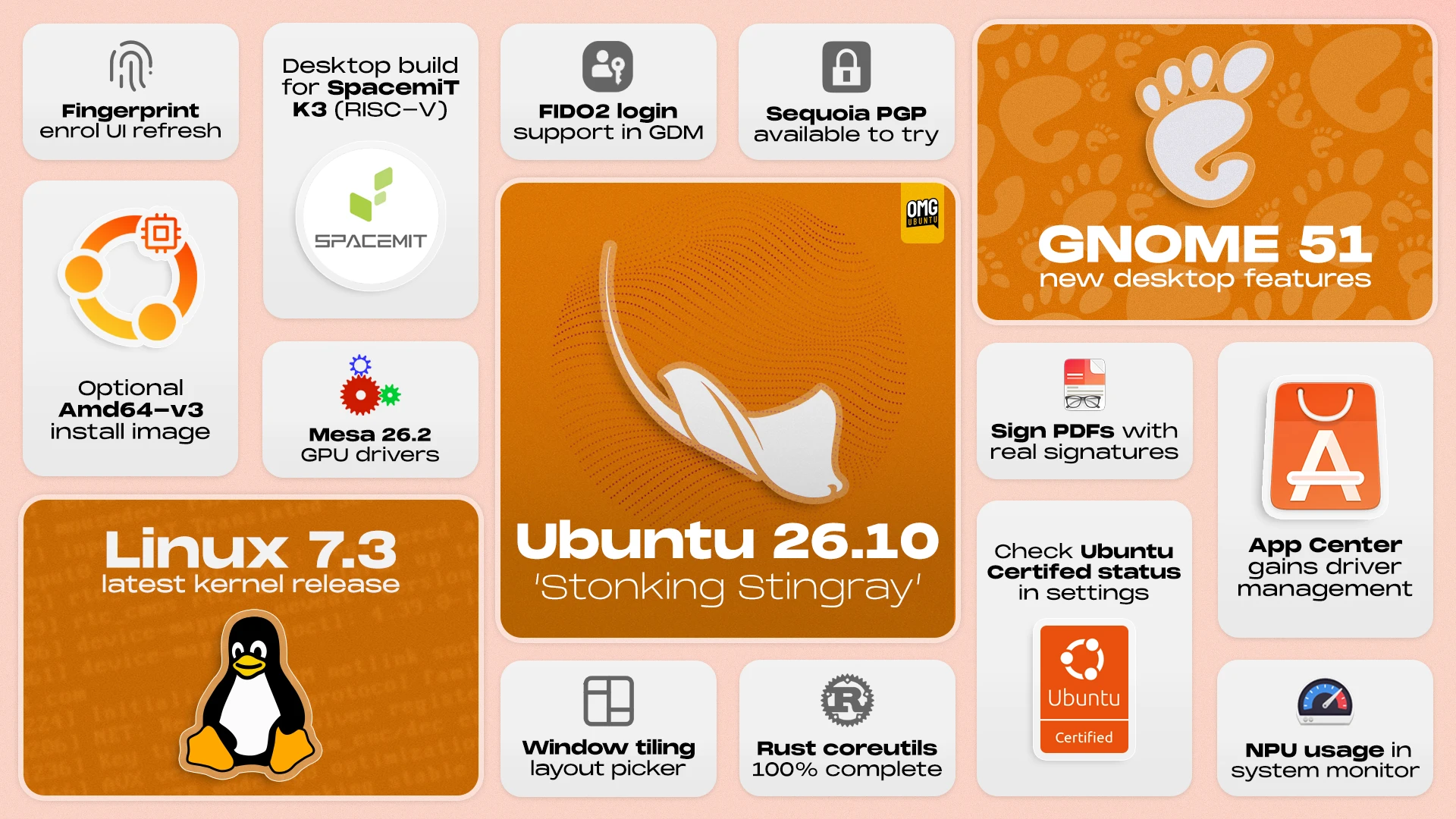
Ubuntu 26.10 has been released, with a faster way to tile windows, passkey sign-in at the login screen and a full set of Rust-based core utilities.
The newest interim release, supported for the next 9 months, ships GNOME 51, Mesa 26.2 and the Linux 7.3 kernel. Plus, a more capable App Center, new desktop ISOs for RISC-V hardware and expanded TPM-backed full-disk encryption.
Keen to know more? Here’s a rundown of what’s new, and what’s worth knowing before you install or upgrade to 26.10.
Ubuntu 26.10: What’s New?Window tiling gets a drag-up layout pickerVideo shows the new layout pickerUbuntu 26.10 debuts a newer, faster way to tile windows mid-drag.
When you start moving a window a layout picker peeks in from the top of the screen. Drag a window up towards it to expose the layout picker. Move a window over a zone to see a ghost preview of where the window will land. If happy, release to snap it in place.
Nifty? Sure, but also potentially annoying. Ubuntu doesn’t surface an easy way to turn it off out-of-the-box, but if you find the layout picker flitting in and out distracting on every window drag, this command disables the pop-up:
gsettings set org.gnome.shell.extensions.tiling-assistant enable-layout-picker false
To turn it back on, run the same command again, but put true in place of false.
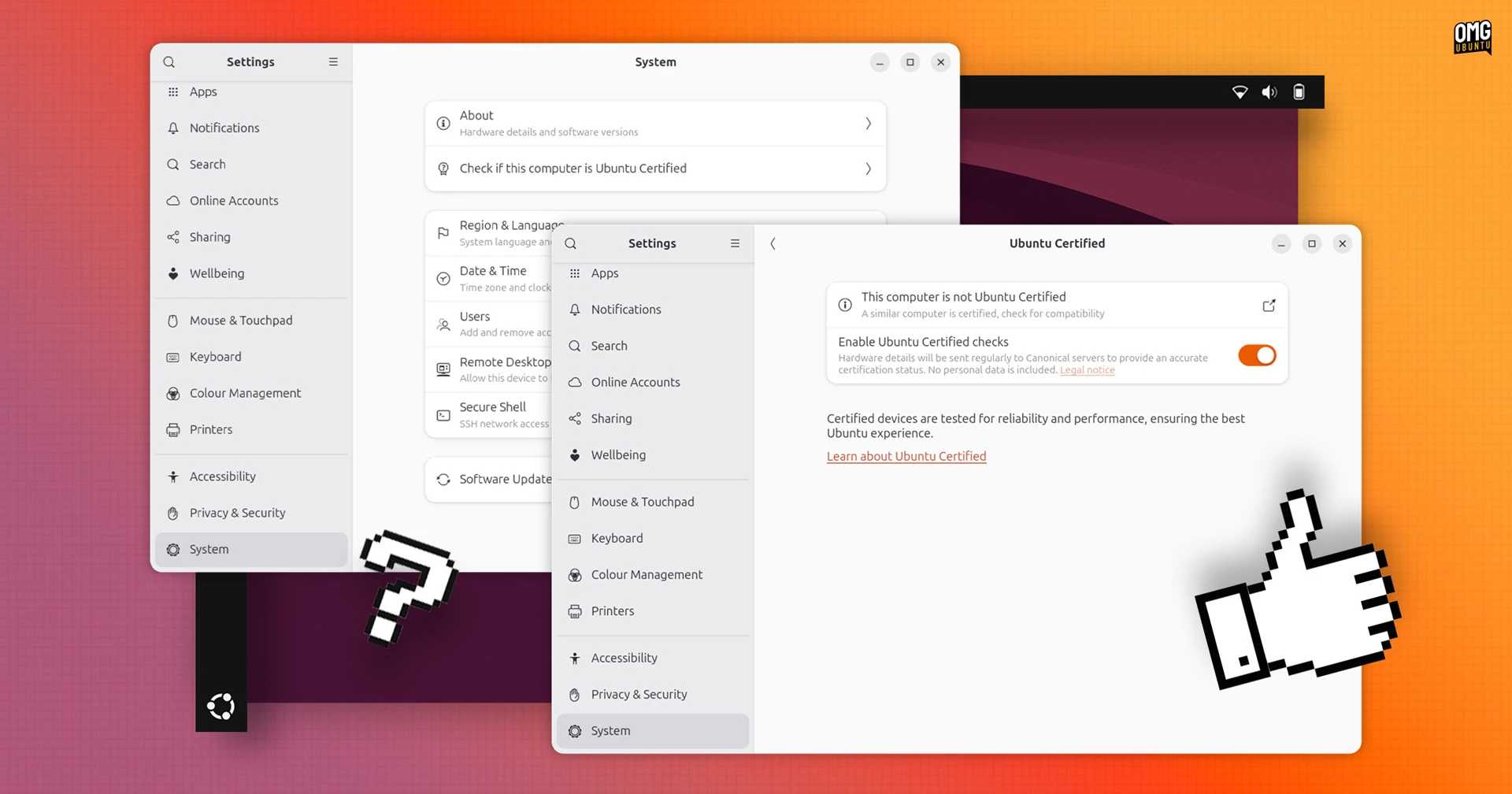 Checking device certification in 26.10
Checking whether your laptop or PC is Ubuntu Certified is easier in 26.10: open Settings > System and find out.
Status checks go through the Ubuntu Hardware API via the hwctl client, which became a snap package in this release.
If your computer matches a certified device, the new Ubuntu Certified page says so. If it doesn’t, it says that too. And if it’s a close but not exact match, it tells you that as well and gives a link to a device listing page on the Ubuntu website to learn more.
Don’t fret if your device isn’t certified: most aren’t. The label is only given to devices whose OEM paid Canonical to test and maintain support for a specific version of Ubuntu.
Sign PDFs with your real signature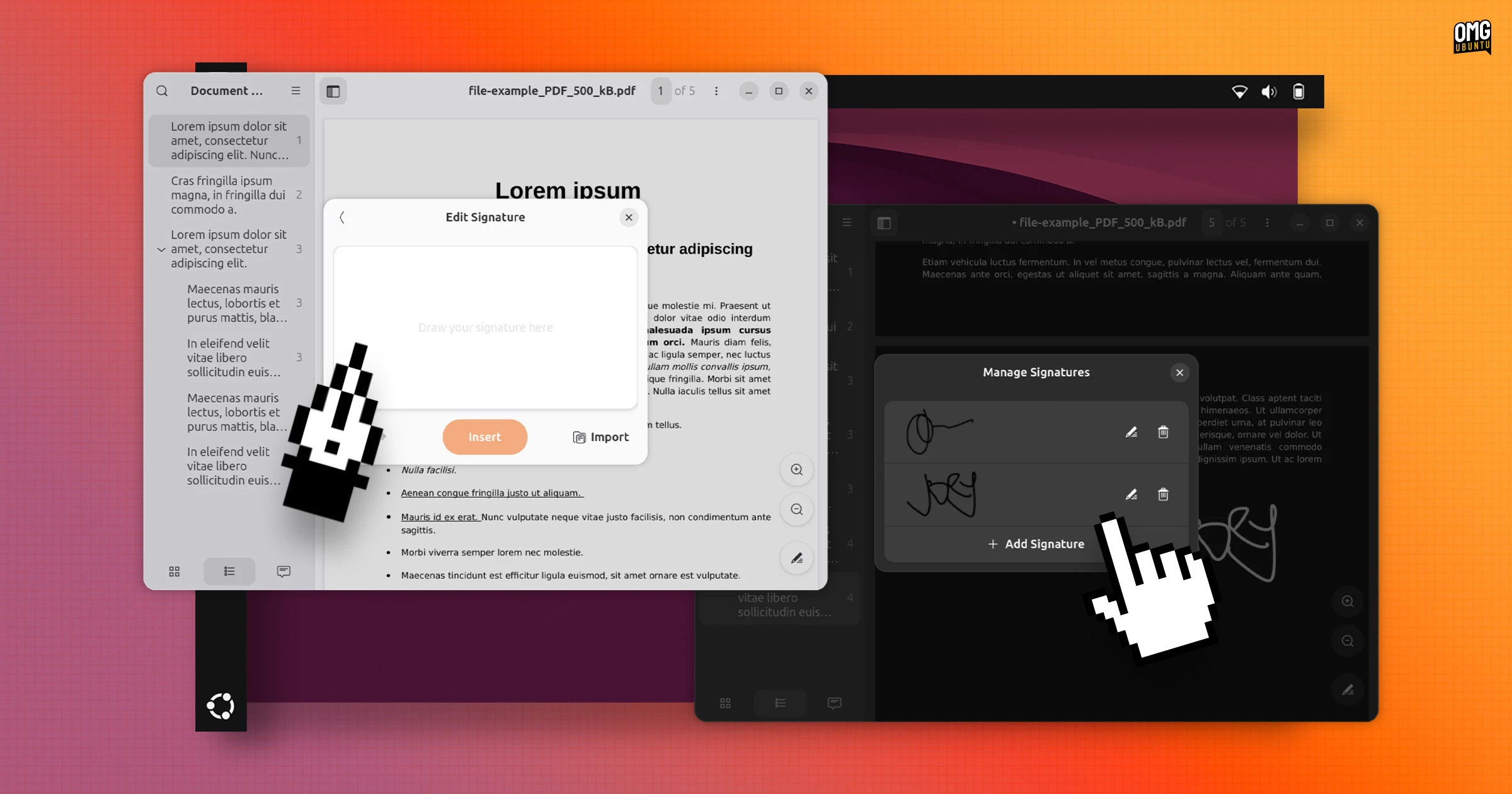 Scribble your real signature on PDFs
Document Viewer (aka Papers) lets you add handwritten signatures to PDFs and save them for future use. Draw one with your mouse, stylus/graphics tablet or touchscreen via the new canvas, or import a photo of your signature and let the app remove the background.
Signatures are stored so you can quickly apply them again, and they work like other annotations so you can reposition and resize them on the page.
Other changes include more descriptive names for paper sizes in document properties and free text annotations added to documents are now printed out by default.
Keyboard control for screenshots & new shutter sound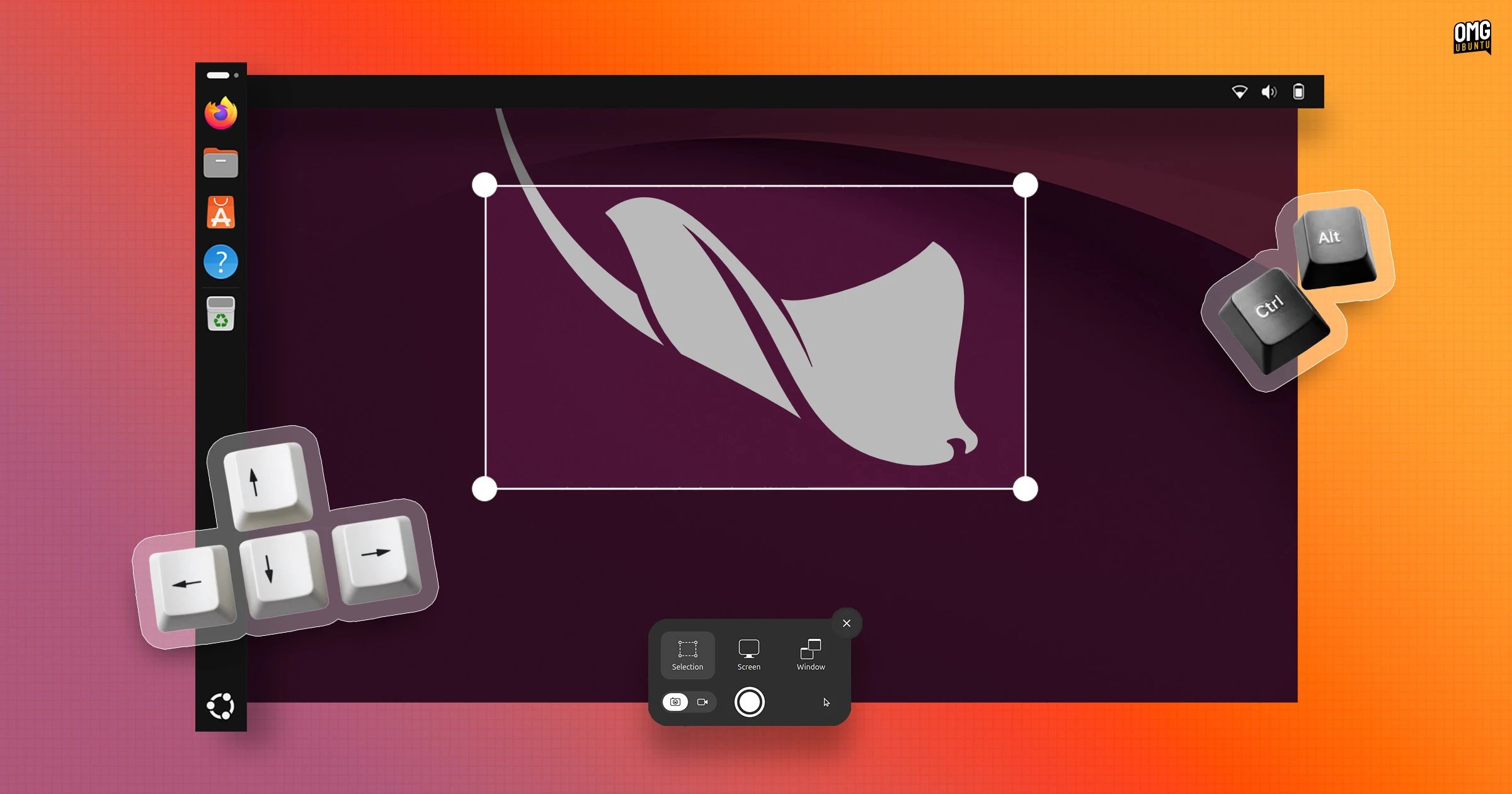 Screenshot UI is now keyboard-friendly
Screenshot selections can be adjusted from the keyboard.
Draw an area out, then press a keyboard arrow key to pick a side of the selection – keep tapping to make it bigger or smaller, or hold Shift to move in larger steps or Ctrl in smaller ones. Hold Alt with your arrow to move the entire selection area.
If you lose track of what you’re doing, tap R to reset and start over.
A new sound plays when taking screenshots. GNOME chose to replace the “inappropriate” camera shutter sound issue and save the blushes of those netting weird stares when screen-snapping in public.
Nautilus gets a drag counter and tab overview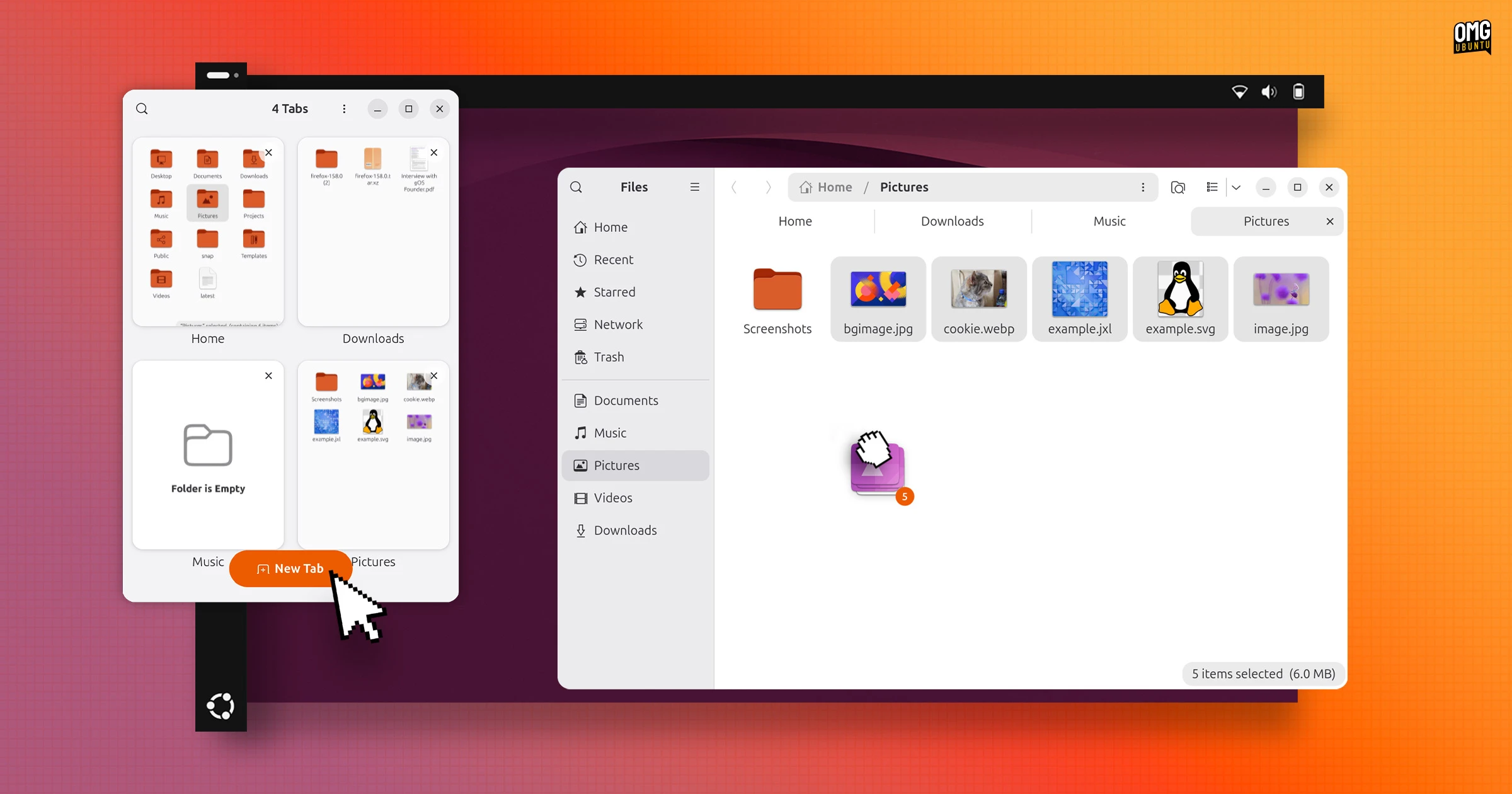 The default file manager has learned a few new tricks
Nautilus now shows a file count as you drag multiple files to a new folder or drive. This makes it easier to be know you absolutely did rubber-band select the right number of files from a folder.
Backend changes also mean files in large folders load faster during refreshes. At small widths a new tab overview button appears to make it easier to see and switch between tabs – useful in tiled setups.
Desktop icons ported to GTK4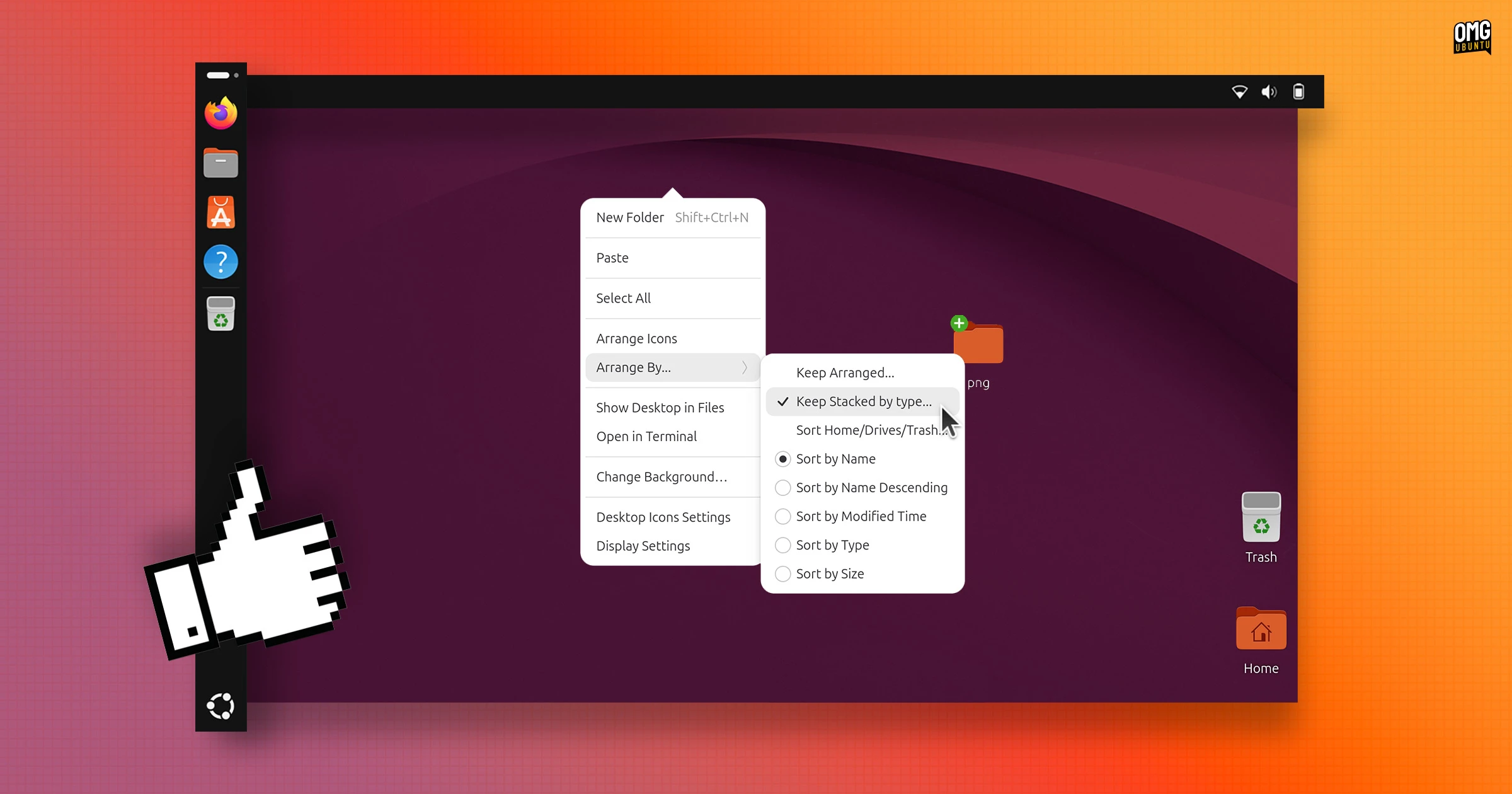 DING has a less dated look in 26.10
DING, the desktop icons GNOME Shell extension Ubuntu preinstalled by default, moved to GTK4 earlier this year. That change buffs the visual style of context menus and dialogs so they match the rest of the desktop.
You’ll also find the desktop right-click menu opens a fraction faster. There used to be a slight pause in appearing while DING checked the system clipboard for any content to paste. Clipboard checks now run asynchronously to speed things up.
Desktop icon stacks can be opened and closed from the keyboard now too, and the Open With dialog no longer shows an option to ‘Find new apps’ for the associated file since it tried to open GNOME Software and, well, Ubuntu doesn’t use that…
Sign in with a passkey or Entra ID More ways to login to an Ubuntu desktop session
The GDM login and lock screens now let you sign in with FIDO2 passkeys or web-based sign-in flows (smart cards were already supported).
It will mainly benefits users on corporate and managed devices, and a unified authentication framework will allow more sign-in methods to be added in future.
Additionally, if your workplace or school uses Microsoft Entra ID, you can sign in to Ubuntu using your Entra password and approve the MFA prompt with Microsoft Authenticator or a one-time code. It works on desktop, terminal and SSH.
App Center now offers driver management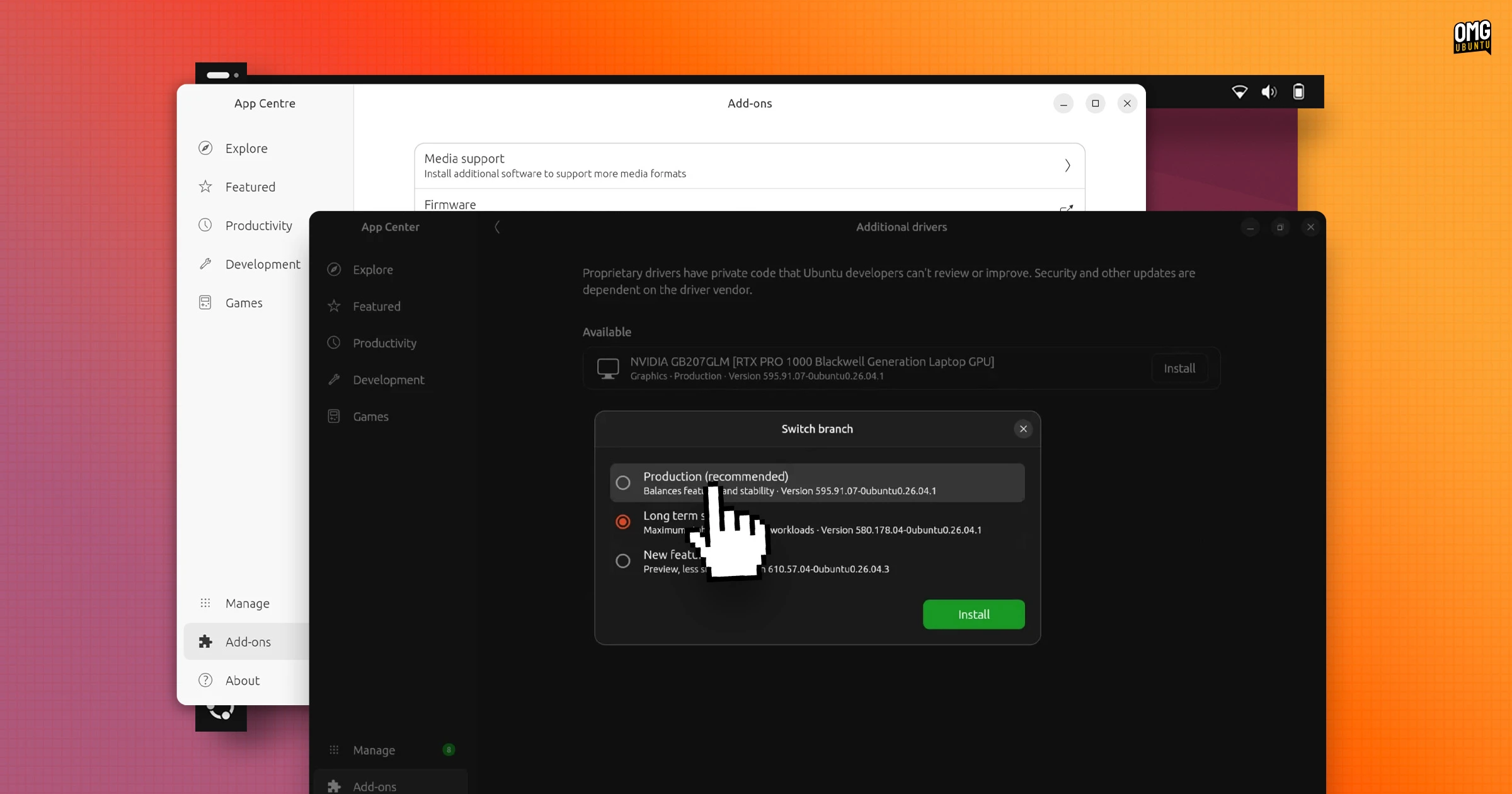 Codecs, drivers and firmware in one place
App Center gains an Add-ons section with new pages: Additional Drivers, to enable or switch drivers (only appears on devices with hardware needing them, e.g., NVIDIA GPUs); Media Support to install codecs needed by some music and video formats.
Ubuntu’s default GUI software tool is also now better at matching the Snap and Debian versions of the same app.
For apps available in both formats, a unified details page shows download size, publisher, permissions and version number, so you can pick the one you want.
Updating software via App Center has been made more reliable, with apps no longer lingering in the update queue immediately after being updated. And if you install third-party Debs, it finally lets you install newer builds of apps you previously installed.
Separate amd64v3 installer for newer CPUsUbuntu 26.10 is available in download in more ways than before, with a separate amd64v3 ISO newly spun up for this release, albeit only available to download from the cdimage server, which houses ‘alternative’ downloads, and not the Ubuntu website.
The amd64v3 image installs Ubuntu with packages optimised for CPUs supporting x86-64-v3 feature level. Most Intel and AMD chips from 2015 onwards do, but some budget and embedded processors lack the required features so can’t boot from a -v3 image.
Benchmarks show modest performance gains (~1%), most noticeable in software that makes use of the newer CPU instructions the amd64-v3 ISO is optimised for, thinks like scientific computing or heavy video processing.
Settings gains a set of new toggles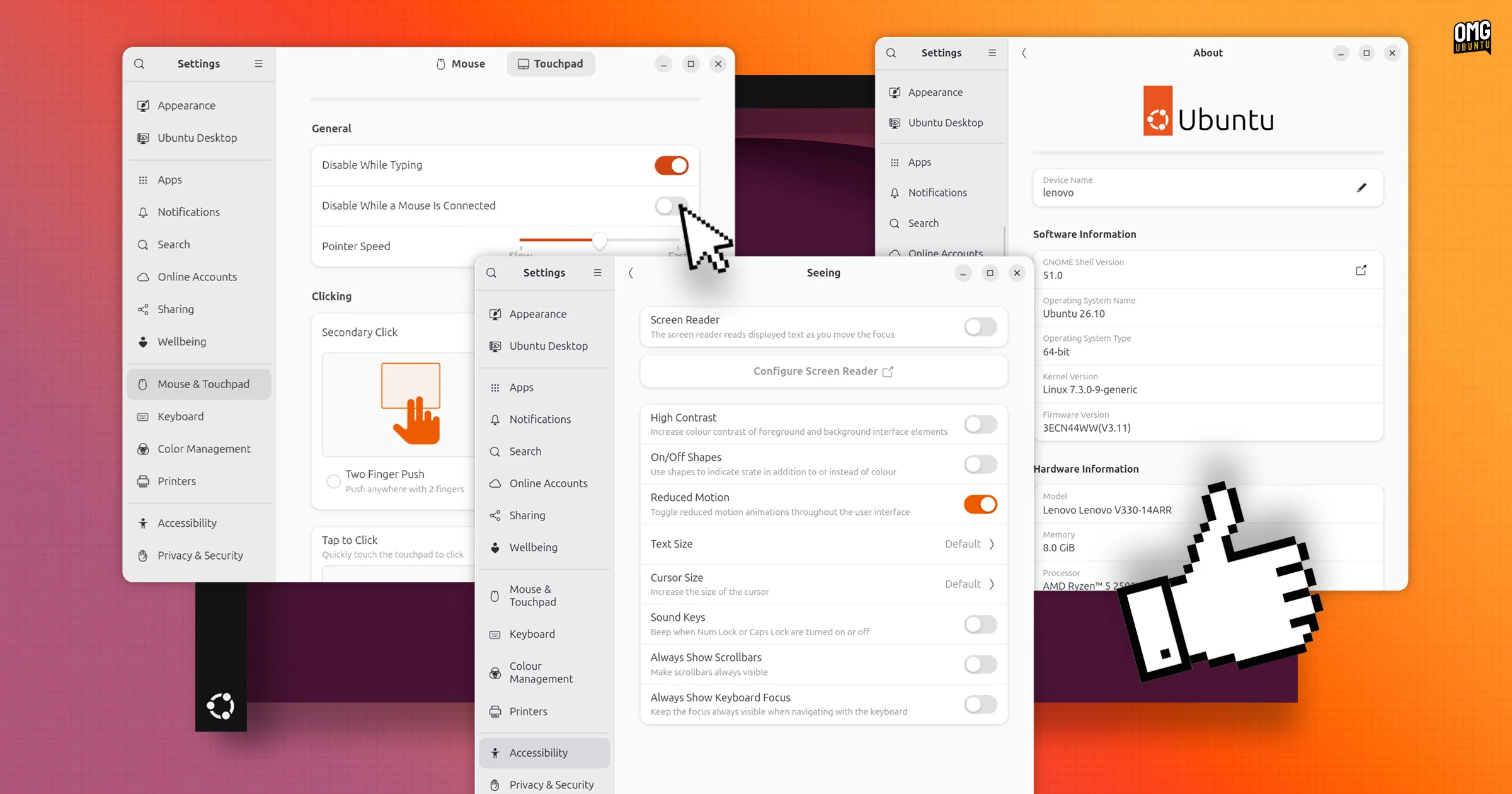 More customisation and better presentation in Settings
Settings has more options, toggles and switches to poke around with.
In Mouse & Touchpad, a toggle lets you choose to disable the touchpad if a mouse is plugged in, while system details on the About page are now listed as a single page with reordered information (and a link to view the GNOME release notes).
On a touchscreen? Displays has a toggle to control auto-rotation …Which, is self-explanatory. When arranging the position of multiple monitors, the display squares now snap at centre alignment with the main monitor when you move them around.
The Network pane gains DNS domain search settings, but support for WEP wireless security is gone from Wi-Fi configuration because of how outdated and insecure it is.
And the Reduce Motion setting in Accessibility now does what it says and dials down animations, albeit not everywhere: the app picker and overview zoom are unaffected when it’s enabled.
Memory killer tries to keep your desktop aliveWhen memory runs out, Ubuntu 26.10 now tries to kill apps before any services that hold the session together. This means that a rogue browser tab or background process running out of control is less likely to cause a desktop crash, and you being punted back to the login screen.
GNOME remembers each monitor’s brightnessGNOME Shell now remembers each of your monitor’s brightness level, along with any colour mode setting (e.g., HDR) and restores them between reboots. ‘How is that a change?’, you wonder.
Previously, the kernel was relied on to remember display brightness. But power-saving modes can adjust that, so a dimmed value might reapply on the next boot. GNOME now remembers brightness for each monitor, and tells them apart by their EDID.
APT help is now genuinely helpful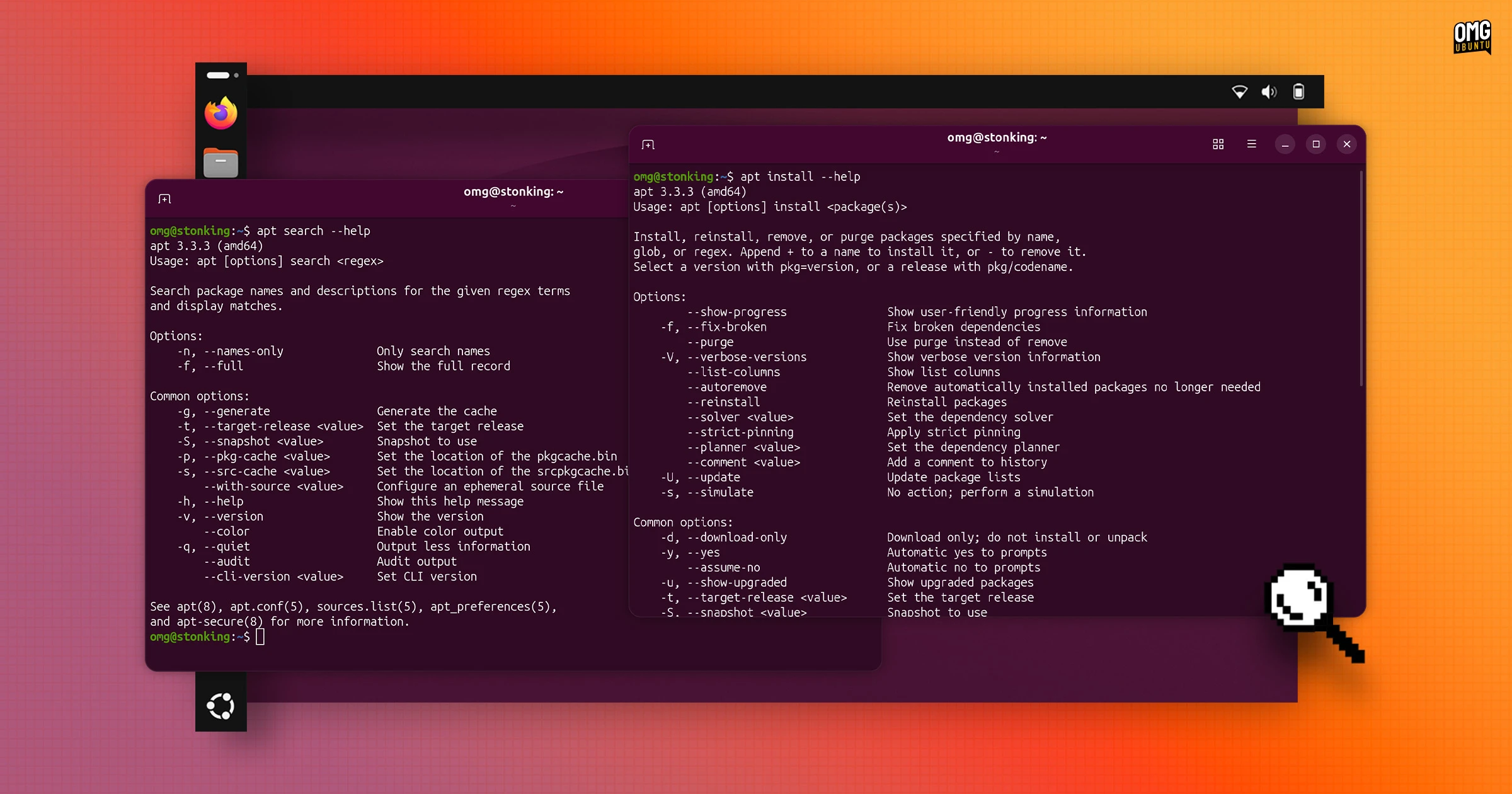 Finding out how apt commands work is easier
Ubuntu 26.10 ships with APT 3.3.3, a modest update with a major benefit: --help is now specific to the command you ran (the release notes call this “interactive” help).
In earlier versions, adding --help to a subcommand would tell you… little. For example, apt install --help got you the same output as running apt --help. If you wanted to know which flags install accepted, you’d have to open the man page.
In 26.10, the help flag is now specific to the subcommand so apt install --help now lists the options that apply to install. Other subcommands work the same way (not all, so keep that in mind). It should reduce visits to Google to find an option or syntax construction.
Ubuntu 26.10 can be installed with TPM-backed full disk encryption (FDE) on devices that lack a hardware root of trust (hardware that lets the OS verify firmware hasn’t been meddled with).
The catch is you’ll need to set a PIN or passphrase during installation, but PCs made since 2021 have one and unlock automatically, so no PIN will be needed.
Resources tracks NPU usage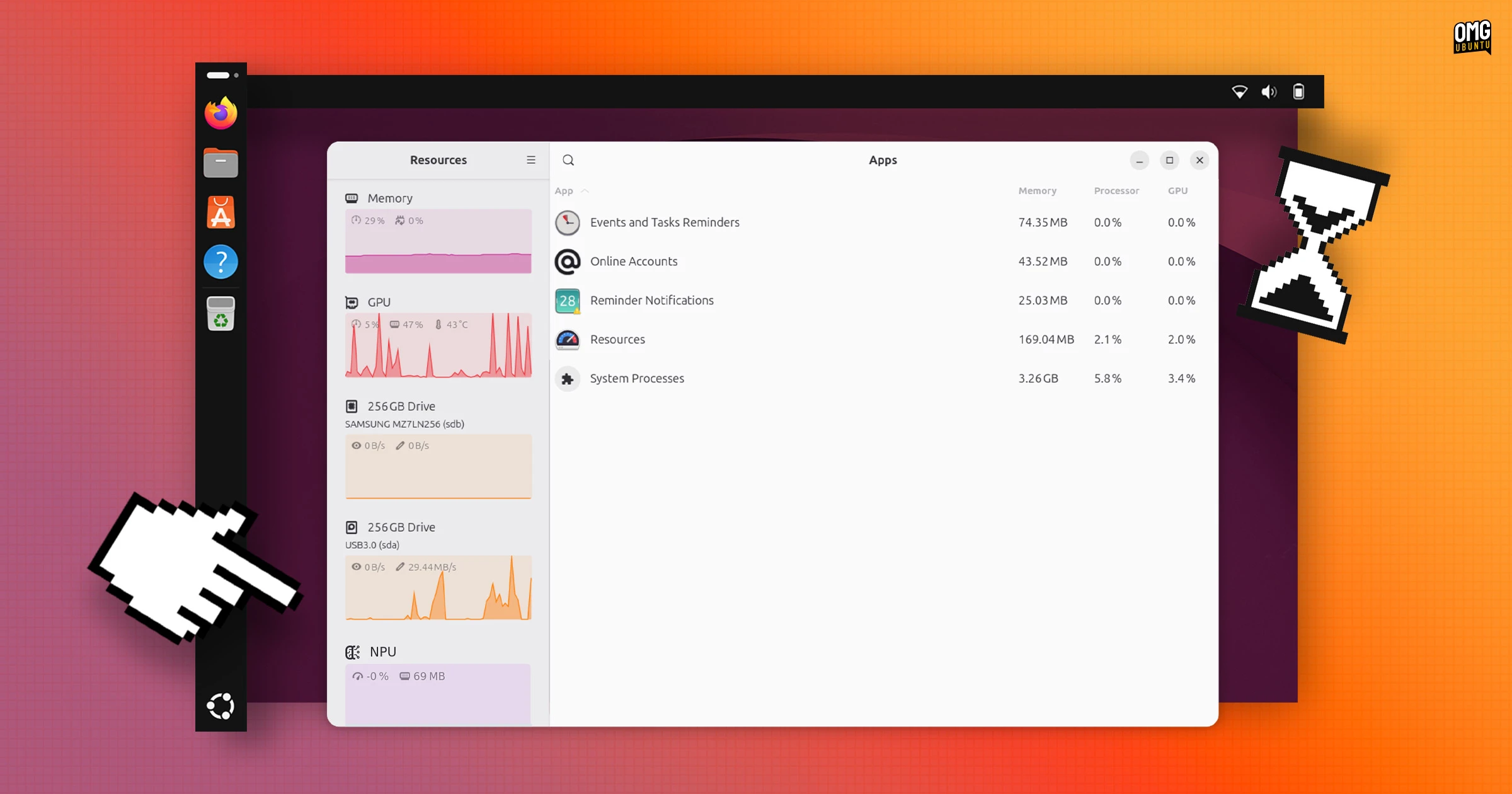 Monitor your device’s on-board neural processing chip
 Resources, the system monitor Ubuntu adopted in 26.04, can report NPU activity for AMD Ryzen 7040, 8040 and Ryzen AI 300/400-series chips, including real-time power and performance stats.
Usage numbers now appear over the graphs in the sidebar instead of beneath them, and a tap of F9 will show or hide the sidebar (saves clicking the button to do it). Also, the app is better at tracing and reporting Steam games and Snap apps too.
First official RISC-V desktop imageAn official, but entirely experimental, desktop image for modern RISC-V boards is available for the first time.
The RISC-V desktop images come in GNOME and minimal Xubuntu flavours, aimed at the SpacemiT K3 and QEMU, respectively. No official support is provided (updates do arrive, ofc) and the GNOME ISO lacks a few desktop snaps, including App Center.
Linux 7.3 included (as a release candidate)Ubuntu 26.10 ships with Linux 7.3 but—dramatic piano stab—it’s not a stable kernel version.
Ubuntu ships with Linux 7.3, even though the stable version is not yet out
Linux 7.3 is still in development, on course for release at the end of October. The kernel baked in to the ISO is a release candidate build. Users of 26.10 will be updated to the stable kernel via software updates.
Among Linux 7.3 highlights is early support for Snapdragon X2 Elite machines, including the Asus Zenbook A14, as well as more bits of hardware working on X Elite models, including webcams.
EXT4 gets a streamlined multi-block allocator to make file space pre-allocations faster during large downloads, while FUSE with io_uring also gets zero-copy support, so a FUSE server can read client data directly.
There’s also a KSM fix to reduce UI micro-stutters under heavy memory loads while VRAM management is notably improved on lower-end graphics cards with under 8GB of video memory, delivering an appreciable uptick in gaming performance.
Mesa 26.2 & NVIDIA 615 landGraphics get a bump. Mesa 26.2 delivers mesh shader support to NVK, the open-source NVIDIA Vulkan driver, and low-latency Vulkan Video encode and decode for AMD GPUs.
NVIDIA’s 615 driver series replaces 595 and 610 series, and now only ships the open kernel modules, which cover Turing and newer GPUs. Older cards will need the 580 series.
Core utilities finish the move to RustUbuntu’s move to Rust-based core utilities is now complete, with cp, mv and rm coming from uutils. Rust-based OpenPGP tooling (Sequoia) is preinstalled but not default (Canonical plans to make it the default in 27.04).
Further down the stack, dbus-broker replaces dbus-daemon as the system’s message bus, improving the reliability and security of how desktop apps and services talk to each other. There’s little change to notice, though it should mean fewer desktop features misbehave under heavy load.
Package updates & other changes in 26.10On the package side, Ubuntu 26.10 make sure of the following out of the box:
Among others, while notable software bumps in the 26.10 repos (some may see minor updates in the coming months, so what’s listed are the versions available at the time of release) include:
Developer toolchains available or preinstalled include OpenJDK 25 (with OpenJDK 27 also available to install), .NET 10, Python 3.14.7, LLVM 22.1.8 and Rust 1.97.
If an app you regularly install from the Ubuntu repos has issued an update since April, there’s a good chance it is packaged and present in the stonking repos!
You can download Ubuntu 26.10 desktop for Intel/AMD devices from the Ubuntu website, or from the Ubuntu release server (which is where the official website fetches ISOs from), from today, 15 October 2026.
For the x86-64-v3, RISC-V, Raspberry Pi or WSL images, head to the cdimage sever to download those.
Ubuntu 26.10 runs on most modern 64-bit Intel/AMD computers, as well as Arm64 devices like Raspberry Pi and Snapdragon laptops, and on RVA23 RISC-V developer boards like the SpacemiT K3 and SiFive BigSky platform.
How long is Ubuntu 26.10 support?Ubuntu 26.10 was released Thursday, 15 October, 2026 and is supported with ongoing updates for 9 months (so until July 2027). Upgrades to the next release, Ubuntu 27.04, will be available in April.
Can I upgrade to Ubuntu 26.10?Most devices that run Ubuntu 26.04 LTS can upgrade to 26.10. The upgrade is in place, keeping your files, apps and settings.
But as LTS releases are configured to only upgrade to new LTS releases by default, you’ll need to opt in to be notified of non-LTS upgrades:
sudo sed -i 's/^Prompt=lts$/Prompt=normal/' /etc/update-manager/release-upgrades
Ubuntu 26.04 LTS systems using TPM-backed FDE can not upgrade to Ubuntu 26.10. It is a temporary restriction; Canonical says it will enable upgrades at some point during the support window for this release.
If you use Ubuntu 25.10, 24.04 LTS or any other version, you cannot upgrade to 26.10 directly. Instead, you must first upgrade to the next in-series release, then the next, and so on, until you end up on 26.10. In those instances, it is easier to do a fresh install.
Which of these changes will you notice first? Tell me in the comments!
| # | Наименование новости | Тональность | Информативность | Дата публикации |
|---|---|---|---|---|
| 1 | Ubuntu 26.10 snapshot 4 released ahead of next week’s beta | 0 | 16.28 | 17-09-2026 |
| 2 | What’s new in the Ubuntu 26.10 flavours? | 0 | 15.66 | 16-10-2026 |
| 3 | Tiling Shell now supports mouse button layout activation | 0 | 16.71 | 18-10-2026 |
| 4 | GNOME 51 released with passkey login and smoother UX | 0 | 17.98 | 16-09-2026 |
| 5 | Ubuntu 26.10 stops low memory from killing your desktop session | 0 | 17.09 | 20-09-2026 |
| 6 | Ubuntu 26.10 Snapshot 2 Released For Monthly Testing | 0 | 5 | 26-06-2026 |
| 7 | Ubuntu now has official desktop images for RISC-V | 0 | 17.35 | 10-10-2026 |
| 8 | Linux App Release Roundup (July 2026) | 0 | 14.78 | 02-08-2026 |
| 9 | Ubuntu 27.04 codename revealed as ‘Tenacious T-Rex’ | 0 | 19.79 | 12-10-2026 |
| 10 | Ubuntu’s App Center makes it easy to install missing media codecs | 0 | 15.44 | 11-10-2026 |