Просмотр новости
Найдите то, что Вас интересует
 Спутники
 РН
РН SpaceX
 Роскосмос
 NASA
NASA
СпутникиРНSpaceXРоскосмосNASADecember’s Linux Mint 27 release will include a brand new system monitor tool preinstalled. The app is called Superlight (well, that’s the project and package name; the user-facing label is just System Monitor). It shows hardware, app and process usage, relays battery stats and has an interactive storage page to find out what files and folders are using the most space. It’s still under active development, but I took it for a spin to see how it fares and what it offers. Keep in mind that more features may be added or changed between now and when it gets its […]
You're reading Linux Mint’s new system monitor does more than you’d expect, a blog post from OMG! Ubuntu. Do not reproduce elsewhere without permission.
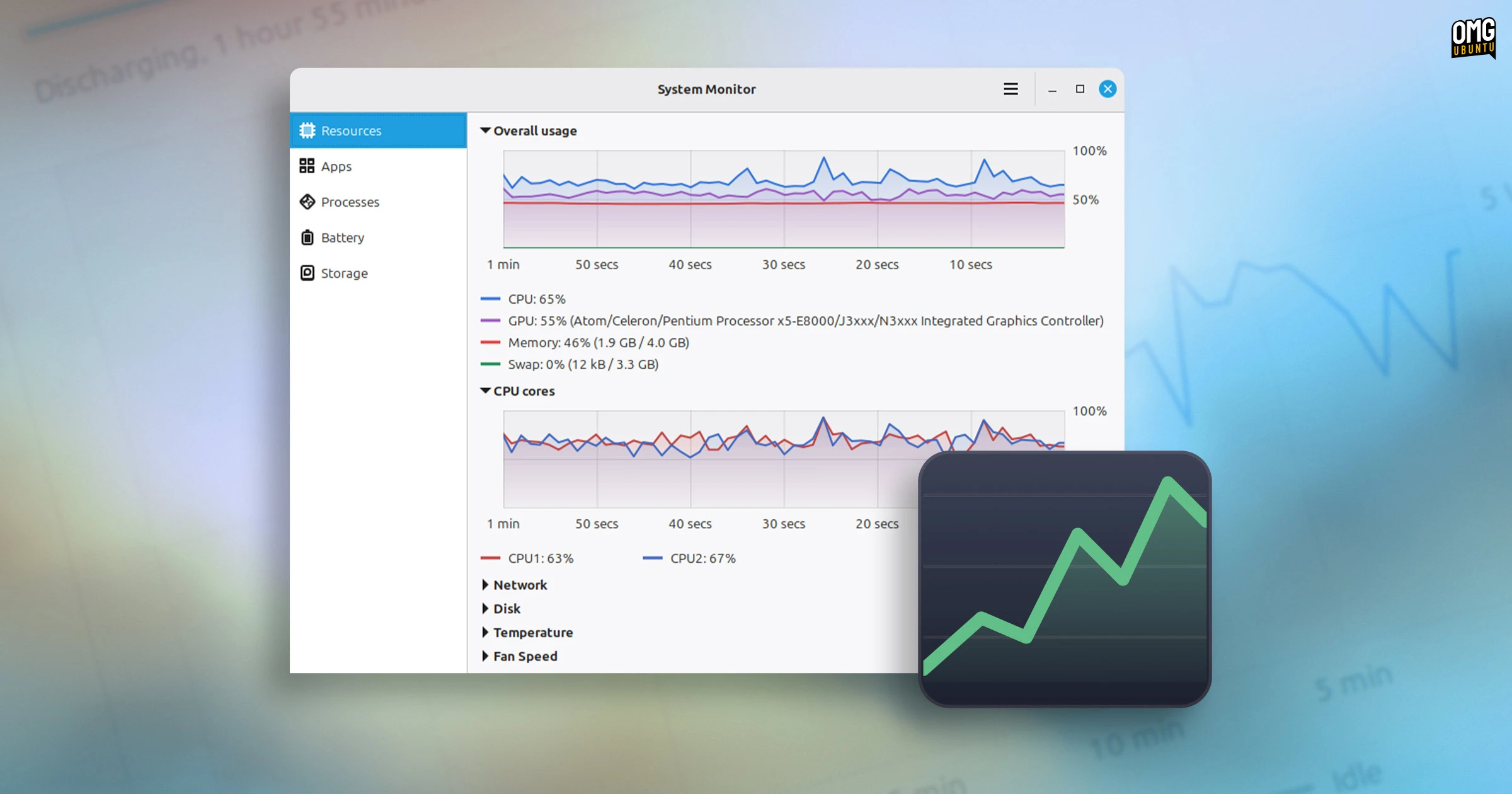
December’s Linux Mint 27 release will include a brand new system monitor tool preinstalled.
The app is called Superlight (well, that’s the project and package name; the user-facing label is just System Monitor). It shows hardware, app and process usage, relays battery stats and has an interactive storage page to find out what files and folders are using the most space.
It’s still under active development, but I took it for a spin to see how it fares and what it offers. Keep in mind that more features may be added or changed between now and when it gets its first stable release.
Linux Mint’s Superlight is super nice Hardware resources usage
Superlight shows the Resources page each time you open it.
At the top is an “overall usage” graph. This plots CPU, GPU, RAM and Swap usage over the past 60 seconds on the same chart. Having a unified view makes it trivial to see what the machine is doing as a whole, at a glance.
It also has separate graphs tracking CPU core usage and network and storage activity, as well as ones for system temperature(s) and fan speed(s). Graphs are collapsible; when only one graph is visible, it’s larger.
 See and manage processes
There are separate views for viewing running apps and their respective process count, CPU usage and memory. Click a column header to sort items by value, or dragged to reposition them into an order you prefer.
Both the Apps and Processes pages have a search bar to filter by name. The Processes page also lets you filter by all, user, or system processes, and show them in a tree to reveal the parent–child relationships.
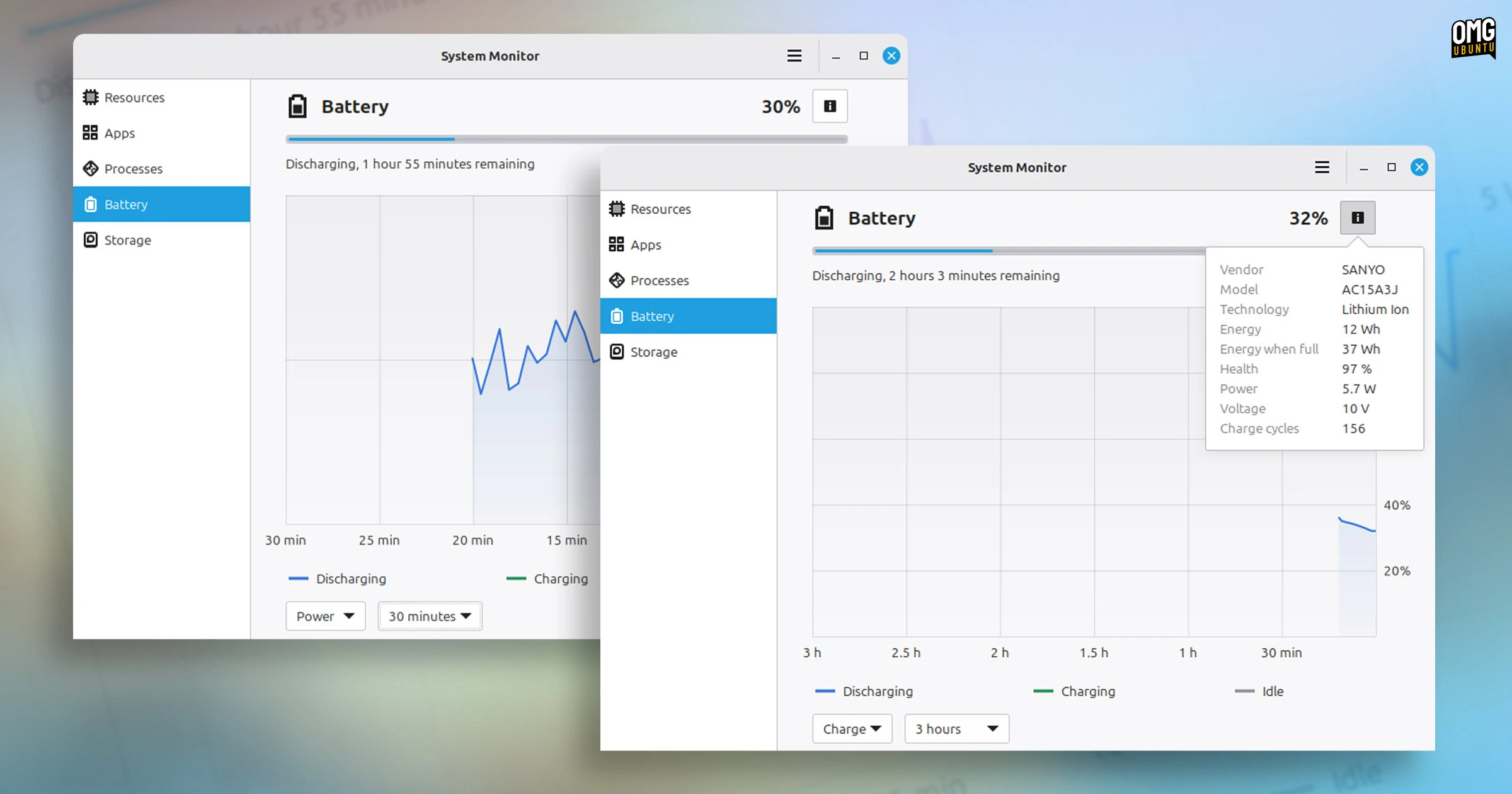 Swot – or sweat – over your battery stats
On laptops, Mint’s new system monitor app surfaces battery and power usage on a graph, along with estimated charging/discharging time and info, including make, model, technology, capacity, charge cycles and overall battery health.
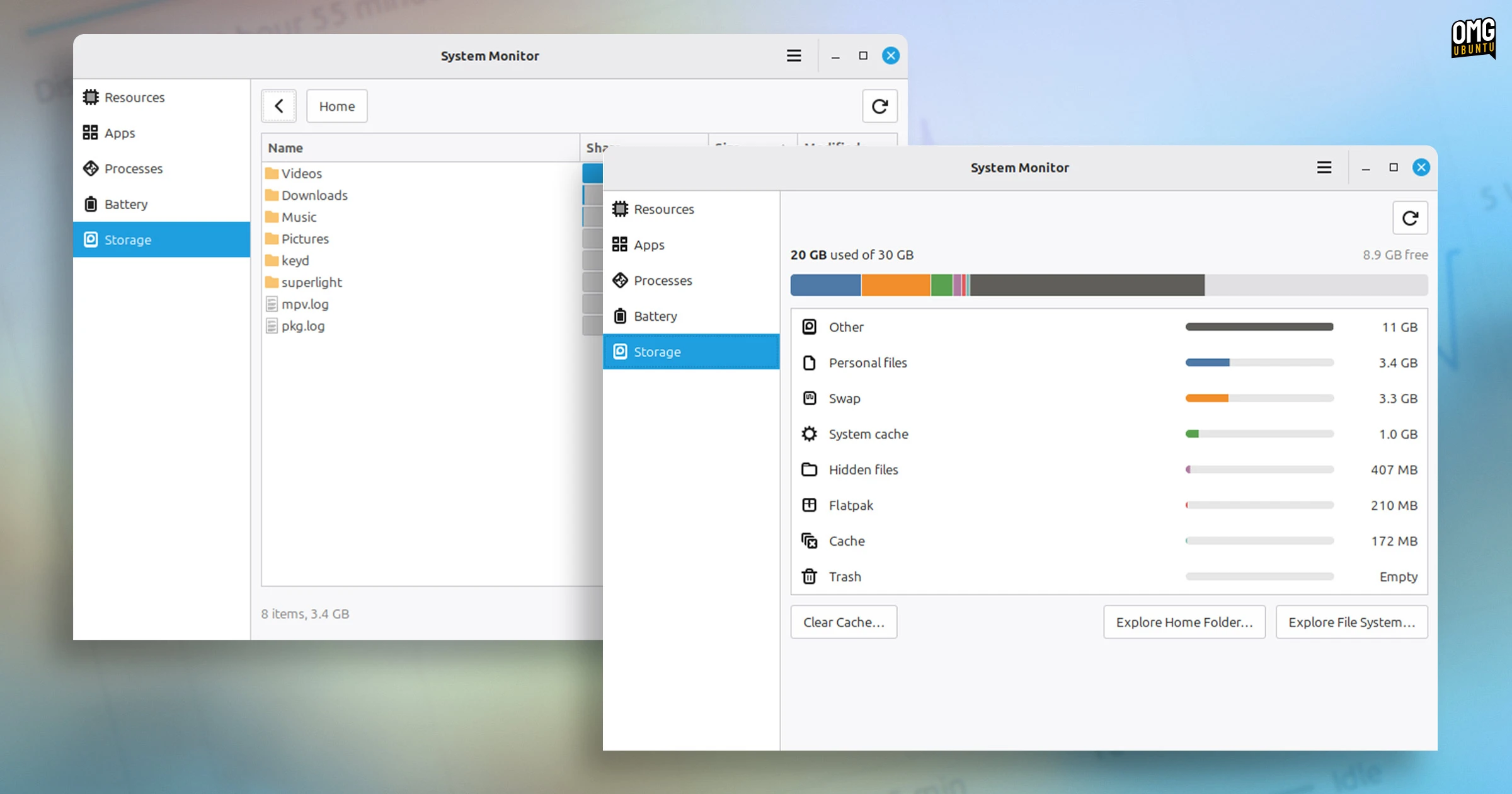 Get an overview of storage usage too
The Storage page is something I didn’t expect to see in this app but, truth be told, it’ll be the one page I use the most as like a faster and more intuitive Disk Usage Analyser, making it easier to see what’s eating up space on a disk – local or external.
Storage also doubles up as a simple system cleaning tool. The “clear cache” button freed up 900MB of cruft on my test device’s internal 32GB eMMC (it’s a converted Chromebook).
Performance is goodIn my test with the current development version, Superlight didn’t feel noticeably heavier than the out-going GNOME System Monitor in what it does1, though when the Resources page is in view with lots of graphs visible, they do spike upward.
GNOME System Monitor is functional, but looks somewhat anachronistic among newer, modern-looking apps. Ubuntu chose to replace it with Resources, and other desktop environments have user-friendly offerings too – even COSMIC has its own.
Linux Mint’s homegrown option is just as promising.
The team plan to add system log viewing in a future update. I think there’s scope to add some basic configuration options (interval times, being a main one), as right now there are zero options.
One thing this app doesn’t do (yet) which other modern system monitors like Resources and Mission Center do, is list component details, e.g., CPU model, cache size, socket, or memory timings, banks, and so on.
Does it need to? Probably not as some hardware spec minutiae is viewable via Linux Mint’s System Information tool.
New terminal, archive and calendar apps comingSuperlight is not the only brand new app Linux Mint is working on. A new calendar and clock utility, ebook reader and archive manager are in the mix. And Velocitty is Linux Mint’s new terminal emulator, inspired by Ghostty and Pytxis2.
All of Mint’s new software is developed as part of the XApp Project. Other apps, like Pix, Thingy and Library are part of this. The aim is to develop a set of software that works well across any Linux desktop environment, not just Cinnamon.
| # | Наименование новости | Тональность | Информативность | Дата публикации |
|---|---|---|---|---|
| 1 | Linux Mint 27 ‘Adrien’ due this Christmas with MORE new apps | 0 | 15.12 | 13-10-2026 |
| 2 | Microsoft Defender is now available on Linux desktops | 0 | 16.8 | 16-10-2026 |
| 3 | Linux Mint Improves Kernel Management & Setting System-Wide Environment Variables | 0 | 13.05 | 10-08-2026 |
| 4 | Linux 7.3 is out, speeds up ext4 and low-VRAM AMD GPUs | 0 | 20.03 | 19-10-2026 |
| 5 | Linux Mint 27 Continues Working Toward Christmas Release With Many Features | 0 | 8.88 | 13-10-2026 |
| 6 | Ubuntu 26.10 stops low memory from killing your desktop session | 0 | 17.09 | 20-09-2026 |
| 7 | all-smi – monitor GPUs, NPUs, and other system resources | 0 | 12.33 | 27-08-2026 |
| 8 | Now Playing Card shows media info for multiple apps at a time | 0 | 13.04 | 18-10-2026 |
| 9 | This ultra-lightweight Linux OS just saved my Windows 10 laptop from the scrapheap | 0 | 18.09 | 18-05-2026 |
| 10 | Linux для новичков: знакомимся с Linux Mint 19. Часть 1: установка | 7 | 7 | 27-02-2019 |