Просмотр новости
Найдите то, что Вас интересует
 Спутники
 РН
РН SpaceX
 Роскосмос
 NASA
NASA
СпутникиРНSpaceXРоскосмосNASAMiracle-wm v0.11.0 gains a fancy new overview mode inspired by GNOME Shell. For those unfamiliar with miracle-wm, it’s a tiling window manager built around the Wayland compositor Mir, created to be a “hackable and flashy” alternative to other tiling WMs, like hyprland and sway. The overview mode gives users an easy way to select windows and workspaces. One tap of the action key (configured in the config file) enters a window selector, while a double tap of the action key will enter a workspace selector. Once open, windows and workspaces can be navigated using keyboard shortcuts, mouse scroll wheel or […]
You're reading Miracle-wm v0.11 adds a fancy new overview mode, a blog post from OMG! Ubuntu. Do not reproduce elsewhere without permission.
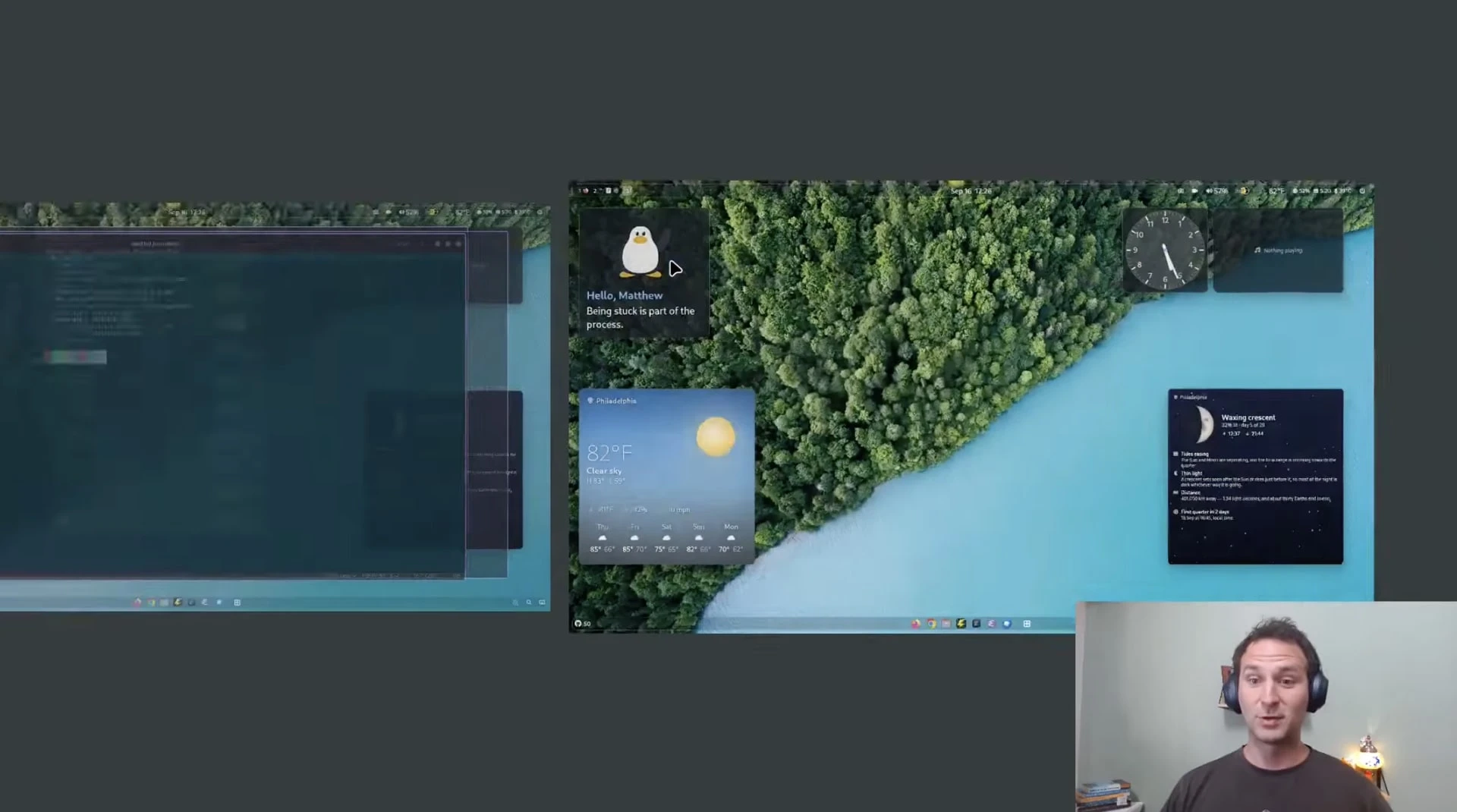
Miracle-wm v0.11.0 gains a fancy new overview mode inspired by GNOME Shell.
For those unfamiliar with miracle-wm, it’s a tiling window manager built around the Wayland compositor Mir, created to be a “hackable and flashy” alternative to other tiling WMs, like hyprland and sway.
The overview mode gives users an easy way to select windows and workspaces. One tap of the action key (configured in the config file) enters a window selector, while a double tap of the action key will enter a workspace selector.
Once open, windows and workspaces can be navigated using keyboard shortcuts, mouse scroll wheel or direct clicks.
Users can also now set a custom GL clear colour for the background. This is useful since the new overview mode has the background visible behind workspace cards.
Miracle-wm v0.11 supports screen sharing tooMiracle v0.11 adds the GET_KEYBINDS command to the Inter-Process Communication (IPC) system. This lists all keybindings active in a miracle session, giving users a “shortcuts cheatsheet” of sorts.
Support for window urgency was also added. This enables status bars like Waybar to indicate to users if a window on a non-focused workspace needs attention.
Plugins – added in v9.0 back in April – can now publish IPC events and handle IPC commands.
Mir protocol support was expanded in this update to include:
ext_image_copy_capture_manager_v1ext_output_image_capture_source_manager_v1ext_foreign_toplevel_list_v1ext_data_control_manager_v1ext_input_trigger_action_manager_v1ext_input_rigger_registration_manager_v1And, image-copy-capture allows screen sharing and image streaming software (like xdg-desktop-portal-wlr) to work out-of-the-box under miracle.
As ever, Canonical’s Matthew Kosarek, the creator of miracle-wm, demoed the many new features – including that ‘flashy’ new overview – in a video posted on his YouTube channel:
For more details on the changes, and how to use or configure them, refer to the updated miracle-wm documentation.
Install miracle on UbuntuMiracle-wm is free, open-source software. Get the latest release from GitHub, install it from the Snap Store (sudo snap install miracle-wm --classic) or use Deb builds available in the miracle-wm PPA for Ubuntu 26.04 LTS (the PPA is often behind in updates, FYI).
If you decide to try it out, keep in mind Miracle is window manager, not a desktop environment. Pick the miracle-wm session via the cog menu at the login screen.
But you won’t see much on login: you must create a configuration file in a text editor to specify the tools, utilities and apps you want to use alongside it. If you login and nothing loads, you can log out of miracle-wm using super + shift + e .
| # | Наименование новости | Тональность | Информативность | Дата публикации |
|---|---|---|---|---|
| 1 | Выпуск miracle-wm 0.10, композитного менеджера на базе Wayland и Mir | 0 | 7 | 22-06-2026 |
| 2 | Выпуск miracle-wm 0.11, композитного менеджера на базе Wayland и Mir | 0 | 11.86 | 17-09-2026 |
| 3 | Wallpapi gives you a cooler way to change wallpaper on GNOME | 0 | 14.9 | 22-09-2026 |
| 4 | Add multiple picture widgets to your Ubuntu desktop | 0 | 9.92 | 14-08-2026 |
| 5 | Ubuntu 26.10 stops low memory from killing your desktop session | 0 | 17.09 | 20-09-2026 |
| 6 | Ubuntu 26.10 snapshot 4 released ahead of next week’s beta | 0 | 16.28 | 17-09-2026 |
| 7 | Ubuntu wiki gets its first overhaul in 16 years | 0 | 18.57 | 22-09-2026 |
| 8 | Laser is a new, modern CD ripper for Linux | 0 | 16.85 | 19-09-2026 |
| 9 | Wayfire Wayland Compositor Closing In On v1.0 Release | 0 | 12.77 | 27-07-2026 |