Просмотр новости
Найдите то, что Вас интересует
 Спутники
 РН
РН SpaceX
 Роскосмос
 NASA
NASA
СпутникиРНSpaceXРоскосмосNASAGoogle is sharing five ways it’s helping to protect you from scammers this tax season.
Mar 19, 2026
|
We’re sharing how we help keep you safe with AI-powered scam detection, text-vetting via Circle to Search, real-time Safe Browsing, Gmail warning banners and transparency tools to help you unmask fake tax services before you click.
Eugene Liderman
Director, Android Security & Privacy
Your browser does not support the audio element.
Listen to article
[[duration]] minutes
This content is generated by Google AI. Generative AI is experimental
It’s tax season, and while you’re dreaming about your refund, scammers are, too. Cybercriminals are using the urgency of tax filing to target consumers via texts, phone calls, ads and more.
Leading into 2026, fraud industry professionals are already reporting a 67% increase in fraud attempts, with tax-related refund update scams leading the surge. That could be why Google Search saw terms like “secure tax” hit an all-time high, and “tax identity shield” rose over 120% in just the past month. Today, we’re sharing five ways Google is helping to protect you from scammers this tax season.
1. Screen those “too good to be true” calls on PixelRemember, the IRS will never call you out of the blue to offer a discount. But to make doubly sure you don’t fall for a fake phone call, Pixel phones offer several layers of protection including Call Screen, which detects and filters out spam calls for you. 1 On average, Pixel users with Call Screen have experienced 70% fewer spam calls. 2
To help further protect you from sophisticated fraud while keeping your privacy top of mind, Pixel owners can also opt-in for real-time Scam Detection alerts in their Phone app. 1 Your Pixel will use on-device AI to alert you when it detects conversation patterns commonly associated with scams (like urgent requests for money due to an account breach). You’ll then get a notification, sound, and vibration to warn you that this request has high scam potential.
2. Fact check fraud in secondsOne trending tactic among scammers involves sending fraudulent text messages to your phone or through messaging apps and social media sites. During tax season, many of these scams claim to have information about a potential refund or pose as the IRS. While Android already helps protect you from suspicious texts in Google Messages with built-in Scam Detection 1 , with Circle to Search and Lens, it’s now easier to spot a potential scam message. And most importantly, you can check for scams with Circle to Search in any messaging or social media app.
On your Android device, just long-press your home button and circle the message that looks suspicious. Our systems will use AI to assess whether the message is likely a scam. You’ll see an overview with guidance and insights including suggested next steps. This capability is also available through Lens via the Google app (Android and iOS) with three short steps: take a screenshot of the message, open Lens in the Google app and tap the screenshot.
Scammers have a long and lucrative history of building fake tax service sites that look identical to the real thing, simply for the purpose of stealing your login details. Google Safe Browsing acts as your personal digital guard, checking websites in real time against a massive database of known threats.
If you’re about to wander into a trap, you’ll get an instant warning to turn back before your data becomes their property.
4. Look out for Gmail alerts, and enroll in PasskeysGoogle protects users by combining proactive alerts with security barriers that block 99.9% of spam and malware, and disarm dangerous attachments. When a potential scam reaches your inbox — such as a fraudulent tax notice — Gmail displays high-visibility warning banners to flag suspicious senders and links.
Always pay attention to Gmail’s red or yellow warning banners; they are your first line of defense against phishing. For maximum security, take a Security Checkup which will help boost your protections and enable tools like Passkeys, enable 2-Step Verification, setup Google Password Manager and more.
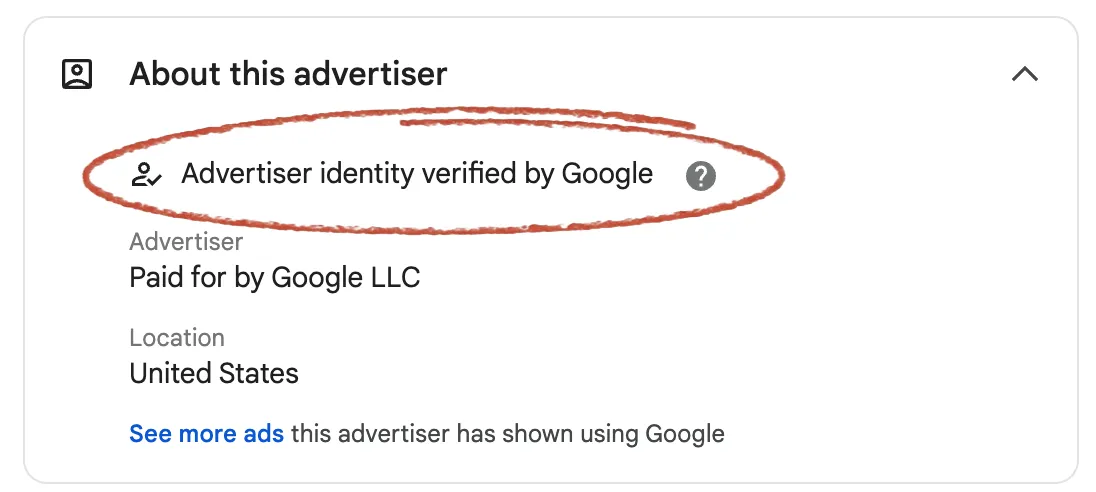
5. Know who is behind the ads you seeFor years, we've deployed our most advanced technologies to safeguard our ads platforms from bad actors. We also know that people like to verify the source of ads. When you’re looking for help with your taxes, it's important to know who you're working with. Google’s ads transparency tools can help you verify the advertiser behind an ad you see. To learn more about an advertiser’s name, location and verification status, you can click the three-dot icon next to a Search ad and go to the “About this advertiser” section.
Tax season is stressful enough without the added weight of cyber threats. By using these tools to shore up your digital defenses today, you can focus on what really matters: getting your filing done right and keeping your refund exactly where it belongs — with you. Visit our Safety Center to learn about more ways that we’re making every day Safer with Google.
Sign up for our newsletters with product updates, event information, special offers, and more.
Your information will be used in accordance with Google's privacy policy. You may opt out at any time.
| # | Наименование новости | Тональность | Информативность | Дата публикации |
|---|---|---|---|---|
| 1 | How we're combatting AI scams with security, legislation and more | 0 | 12.5 | 12-06-2026 |
| 2 | Our latest fraud and scams advisory | 0 | 14.76 | 08-06-2026 |
| 3 | Google has signed the Industry Accord Against Online Scams and Fraud. | 0 | 7.49 | 16-03-2026 |
| 4 | Our fight against fraud: 5 ways we’re keeping you safer | 0 | 15.15 | 13-05-2026 |
| 5 | Pixel users are about to get more protection from scammers | 0 | 5.62 | 15-08-2026 |
| 6 | 5 helpful tools from Google to keep your accounts safe | 0 | 11.68 | 07-05-2026 |
| 7 | Expanding financial advertiser verification across Europe | 0 | 9.66 | 23-06-2026 |
| 8 | How Google Does It: An inside look at cybersecurity | 0 | 11.16 | 27-03-2026 |
| 9 | New ways Google is helping local news | 0 | 8.06 | 08-06-2023 |
| 10 | What to Do If Your Parents Fall Victim to a Scam | 0 | 5.51 | 23-09-2026 |