Просмотр новости
Найдите то, что Вас интересует
 Спутники
 РН
РН SpaceX
 Роскосмос
 NASA
NASA
СпутникиРНSpaceXРоскосмосNASAA Windows 11 Insider Experimental Preview build adds a more detailed AI Components page to the Settings app that displays information about local AI models and
Thank you for being a Ghacks reader. The post Windows 11 Insider Build Adds AI Model Management Page With Limited Uninstall Support appeared first on gHacks.
A Windows 11 Insider Experimental Preview build adds a more detailed AI Components page to the Settings app that displays information about local AI models and allows users to uninstall some of them.
The feature was uncovered in build 26300.8553 by researchers at Pureinfotech. It is relevant primarily for Copilot+ PCs, which run local AI models.
The page is not officially available yet. Pureinfotech had to manually enable it on a test PC to access the uninstall option, indicating it is still in development.
What the AI Components Page Shows And Limited Uninstall Support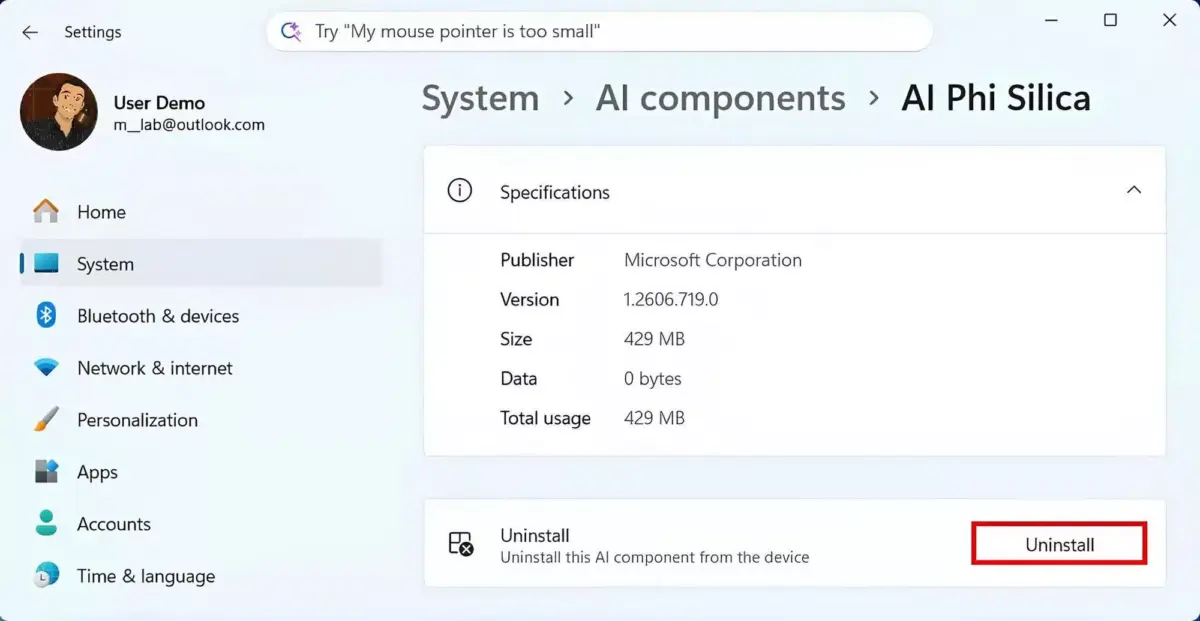
(Source: Pureinfotech)
Windows 11's Settings app now includes a dedicated AI Components page where users can view details about local AI models.
The latest version of this feature provides more comprehensive information for each installed model, including the publisher, version, installation date, size, and total usage. This detailed view aims to increase transparency around the AI models integrated into Windows 11.
The new interface reportedly allows users to uninstall certain AI models. Currently, the only AI component that can be removed is Phi Silica, an on-device language model designed to handle local AI workloads on Copilot+ PCs.
It is unclear whether Microsoft plans to expand uninstall options to other AI components or if some models will remain non-removable due to system dependencies.
Other Changes in Build 26300.8553 And Why This MattersThe build released last week includes several new features and fixes, such as expanded customization options for the Start menu, improved search with substring matching, and support for touch swipe gestures to reveal the Taskbar when it is docked in an alternative position.
Microsoft has faced criticism for rolling out AI features through automatic Windows updates without giving users clear options, including the silent installation of local AI models on Copilot+ PCs.
A management page that displays details such as purpose, size, data usage, and installation date for these models helps address some of those concerns by improving transparency.
The option to uninstall AI components, currently limited to Phi Silica, responds to a common user complaint that some bundled AI models are unnecessary and that users want to free up storage and system resources.
The AI model management page that includes uninstall support is not yet officially enabled in the current Insider build and requires manual activation to access.
Its presence indicates that Microsoft may plan to roll it out more widely in a future update, but the company has not officially announced the feature nor provided a timeline for when it might become generally available.
