Просмотр новости
Найдите то, что Вас интересует
 Спутники
 РН
РН SpaceX
 Роскосмос
 NASA
NASA
СпутникиРНSpaceXРоскосмосNASA
A single habit change turned Keep into a one-tap capture hub with voice, image OCR, and pinned essentials

Published Aug 20, 2026, 6:00 AM EDT
Dhruv Bhutani has covered the Android ecosystem since 2010, with a focus on smartphones, connected devices, and home networking. His reporting is informed by hands-on experience reviewing hundreds of smartphones and testing a wide range of smart home and audio products over more than a decade. He has attended Mobile World Congress eight times since 2011 and IFA Berlin five times, alongside regular coverage of launch events and industry briefings from companies including Google, Xiaomi, Oppo, and Qualcomm. This on-ground access and long-term exposure to product cycles inform how he evaluates hardware, software direction, and ecosystem shifts.
First-Hand Experience
Reviewed and tested hundreds of smartphones since 2009
Tested smart home, audio, and connected devices across multiple categories
Attended Mobile World Congress (8 times, first in 2011)
Attended IFA Berlin (5 times)
Covered industry events including Qualcomm Summit and launch events from Google, Xiaomi, Oppo, and Vivo
Career History
CNET — Freelance Editor
May 2024 – Present
Android Police — Freelance Editor
July 2023 – Present
Android Authority — Contributor
November 2022 – Present
Android Authority — Editor
January 2019 – October 2022
FoneArena — Editor
February 2010 – January 2018
PhoneReport.info — International Correspondent
February 2010 – May 2011
Nokia Mobile Talk — Writer
June 2009 – October 2009
I'll be honest, Google Keep isn't the first app I think of when it comes to productivity.
For me, it's the app I go to when I need to jot down a quick note or list and not much more. The app has plenty of features, but the gap was in how I approached note-taking.
But recently, to cut down the number of apps I used, I revisited Google Keep with a fresh perspective. I added its Quick Capture widget to my home screen, started using voice notes, and began saving photos to notes instead of copying information.
Turns out, Google Keep can be a capable productivity tool if you use many of its somewhat undiscovered features.
That small change in how I use the app has made Google Keep an intrinsic part of my productivity stack and an app that I use all day long instead of only as a scratchpad.
Pinned notes keep information within reach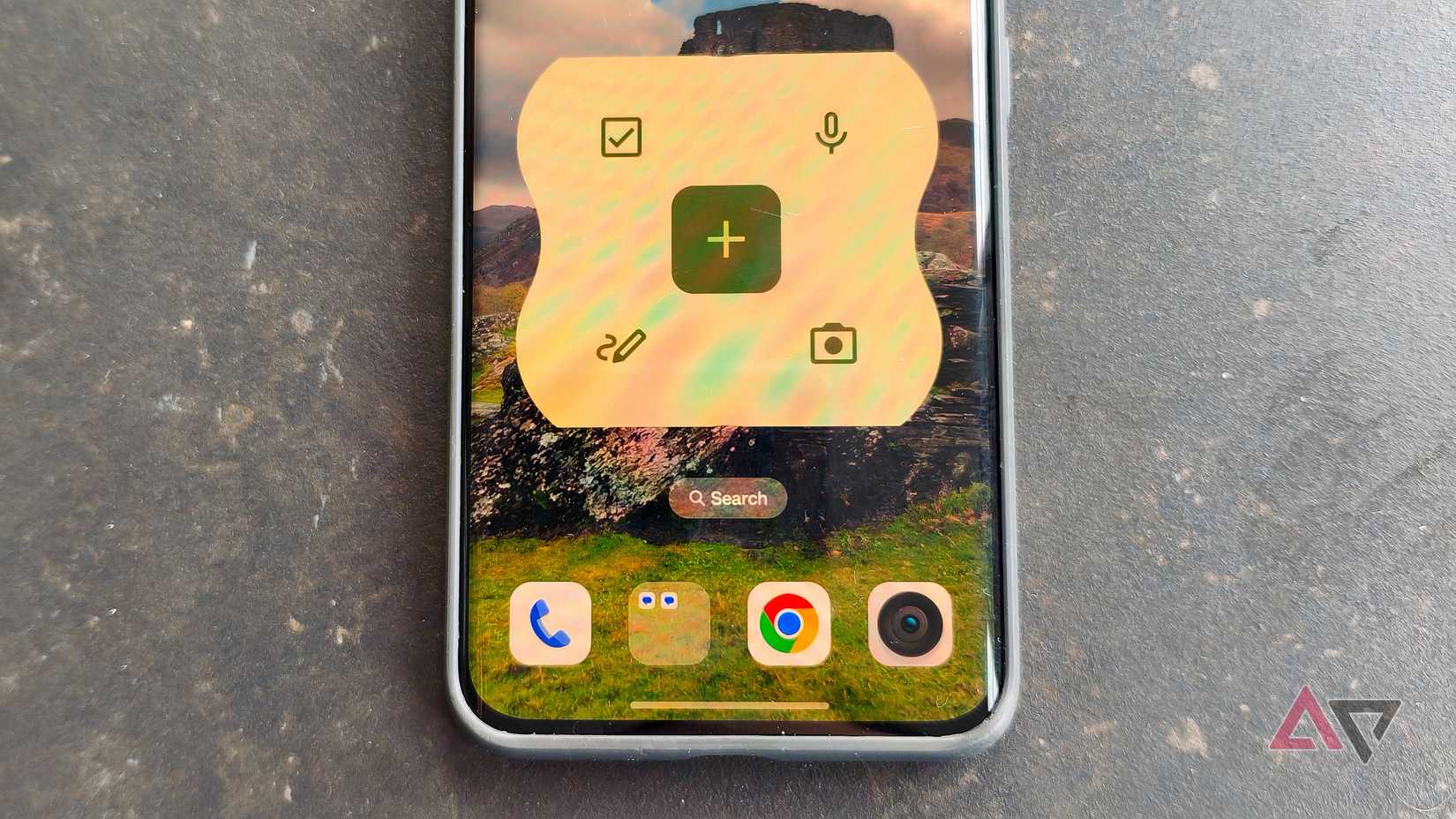
In my experience, the biggest improvement in making Keep your productivity tool of choice comes from removing the friction between having an idea and saving the idea.
To solve this, I added Google Keep's Quick Capture widget on my home screen. This means I no longer have to open the Google Keep app whenever I want to add a new note.
I don't even need to decide what kind of note I want to add to Keep before getting started. Google's widget lets you tap the notes or lists button and opens that kind of note in Google Keep.
When I'm on the go, I'm not looking for Obsidian-level organization. I'm looking for quick access to notes and lists, and the quick access widget lets me get to that without interruptions.
While we're on the topic of quick access to notes, the other feature I use a lot is pinned notes. The idea is simple.
Essential notes that I reference shouldn't be multiple scrolls down the list. I keep them pinned so that the first thing I see when I open Keep is one of these notes.
The pinned note feature also comes in handy for notes that are updated frequently. For example, when I'm traveling, I make a fresh note for the trip and keep a running tab of expenses in that pinned note.
Even if I'm making additional notes or editing others, this one stays on top for ease of access.
When I'm back from the trip and done working with the document, I tap archive. It's still in the system, only hidden from view.
Voice notes and taking an image make capturing information effortless I use voice notes when typing gets in the wayThe other change I've made to my workflow has been to use Google Keep in ways that wouldn't always fit as text.
Many of my ideas come to me while I'm on the treadmill at the gym or doing chores around the house. Typing is possible, but not always convenient.
Lately, I've used voice to fill in these entries. If an idea comes to me while I'm walking around the house, I speak into Google Keep.
On Android, Google Keep lets me create a note with a voice recording. Keep doesn't only embed the audio recording in the note, but also transcribes it for me. That makes it immensely useful to record voice notes in the note-taking app and review them as text files later.
This is one feature I've come to rely on in my daily workflow. When I'm outlining an article or a story I'm working on, I find it much faster to voice out my thoughts instead of typing everything.
The other relatively unknown feature I rely on is the ability to save images to Google Keep as notes.
I tend to use this to store receipts or product serial numbers, even handwritten notes that would take too long to transcribe.
Text recognition can parse this information and keep it searchable, but if I need to see the original image, that's available.
It's useful for grabbing quick information on the go, without the hassle of stopping to write it down.
You can now take a photo, add a note later explaining why you took it, and carry on. When you need it again, you can search for the relevant word instead of scrolling through the camera roll.
Keep is my daily capture layerAfter all these changes, it's become clear to me that Keep works beautifully as my capture layer.
What was missing was how I interacted with it, and the realization that not every note needs to be manually structured.
Search can comfortably help me find what I'm looking for no matter how I enter the information.
Keep becomes more effective when I treat it as the place where information goes first. Whether it's ideas, reminders, lists, or voice notes and photos, I can add them from the home screen without much organization.
The home screen widget reduces friction, and switching to voice gives you speed.
For larger projects, I might still fall back on a more fleshed-out productivity tool like Notion, but for everyday use, Google Keep has earned back my trust as my daily go-to.
| # | Наименование новости | Тональность | Информативность | Дата публикации |
|---|---|---|---|---|
| 1 | Google Keep update tweaks the homescreen widget on Android | 0 | 20.83 | 17-09-2026 |
| 2 | You can thank AI for Google Keeps’s new large FAB on Android | 0 | 3 | 04-06-2026 |
| 3 | This Google Photos feature finally fixed my biggest post-vacation headache | 0 | 16.25 | 20-08-2026 |
| 4 | I finally stopped missing critical Gmail notifications by changing this one simple setting | 0 | 10 | 20-08-2026 |
| 5 | New ways to create and get things done in Google Workspace | 5 | 7 | 19-05-2026 |
| 6 | I am unable to switch from Google to the Proton ecosystem because of this single app | 0 | 8.19 | 19-08-2026 |
| 7 | Never lost: rumors claim a 'Pixel Tag' is on the way from Google to keep tabs on your stuff | 0 | 4.66 | 01-08-2026 |
| 8 | I had 500 Obsidian clips rotting in my inbox — Claude found the 50 that actually mattered | 0 | 13.67 | 13-08-2026 |
| 9 | What’s left to fix on the Google Health app roadmap | 0 | 7.53 | 28-07-2026 |
| 10 | Android rolls out local ‘Documents’ backup that syncs to Google Drive | 0 | 11.48 | 30-07-2026 |