Просмотр новости
Найдите то, что Вас интересует
 Спутники
 РН
РН SpaceX
 Роскосмос
 NASA
NASA
СпутникиРНSpaceXРоскосмосNASA
AirTag users will want the latest firmware for the item tracker. Here’s everything you can do to get it, and then be sure it’s installed.
(via Cult of Mac - Your source for the latest Apple news, rumors, analysis, reviews, how-tos and deals.)
Apple is rolling out a firmware update for the AirTag 2. The new version 3.0.49 is a simple bug fix update, though, without new features.
Still, you’ll probably want it, but it turns out that updating the AirTag’s software is both easy and hard. You don’t need to jump through hoops, but neither do you have much control.
Here’s what you need to do.
AirTag firmware update: Stopping stalkersMany people like to keep their gear up to date, and that applies to Apple’s tiny trackers as well as iPhones. If Apple adds new features, you don’t want to miss out on them. And that means keeping up with AirTag firmware updates, which Apple releases sporadically.
Apple’s release notes for the new AirTag Firmware Update 3.0.49 say it includes “bug fixes and other improvements.”
This firmware update is for AirTag 2 onlyThis latest firmware update reportedly only applies to AirTag 2, which launched in January. The accessory debuted running firmware version 3.0.41 and was updated to 3.0.45 in the spring.
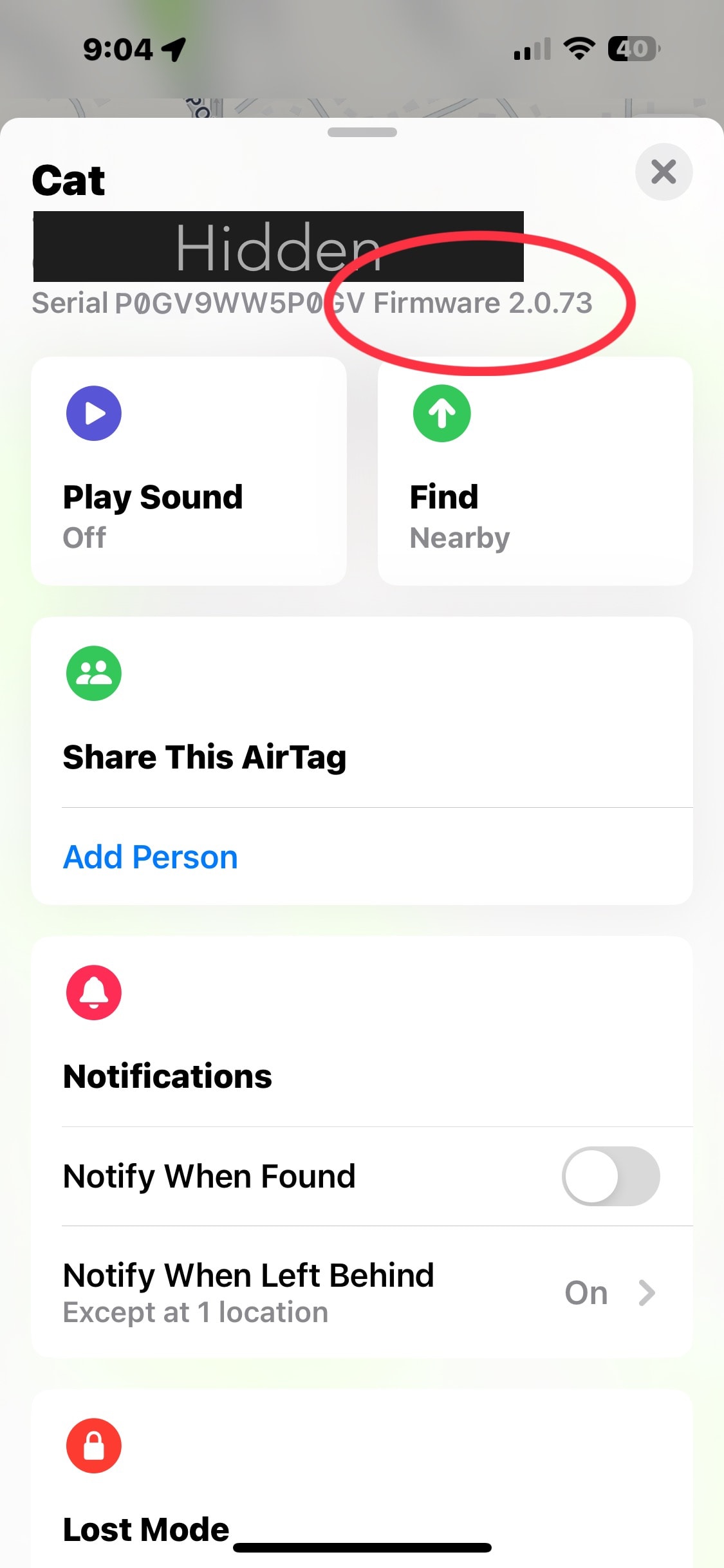
That means the original AirTag is staying on firmware version 2.0.73 from 2024.
Step 1: Be patientYou can’t manually start a firmware update on an AirTag. All you can do is put the tracker near the iPhone it’s paired with and wait.
Keep this in mind with AirTags on items in storage, like luggage. Or if you keep one at the gym or anyplace remote. You need to put them near your iPhone long enough to install the new firmware. Just being in the same house/apartment/etc. isn’t close enough to guarantee that.
Although Apple released the first AirTag several years ago, no one has figured out if there’s some trick to getting the latest firmware more quickly. It’s unlikely such a method exists.
AirPods headphones also make users be patient. Apple earbuds receive software updates the same way — put them near an iPhone and wait. And no one has ever found a trick for speeding up the process.
How to check on AirTag firmware updatesAirTag users can at least easily find out if they have the latest firmware.
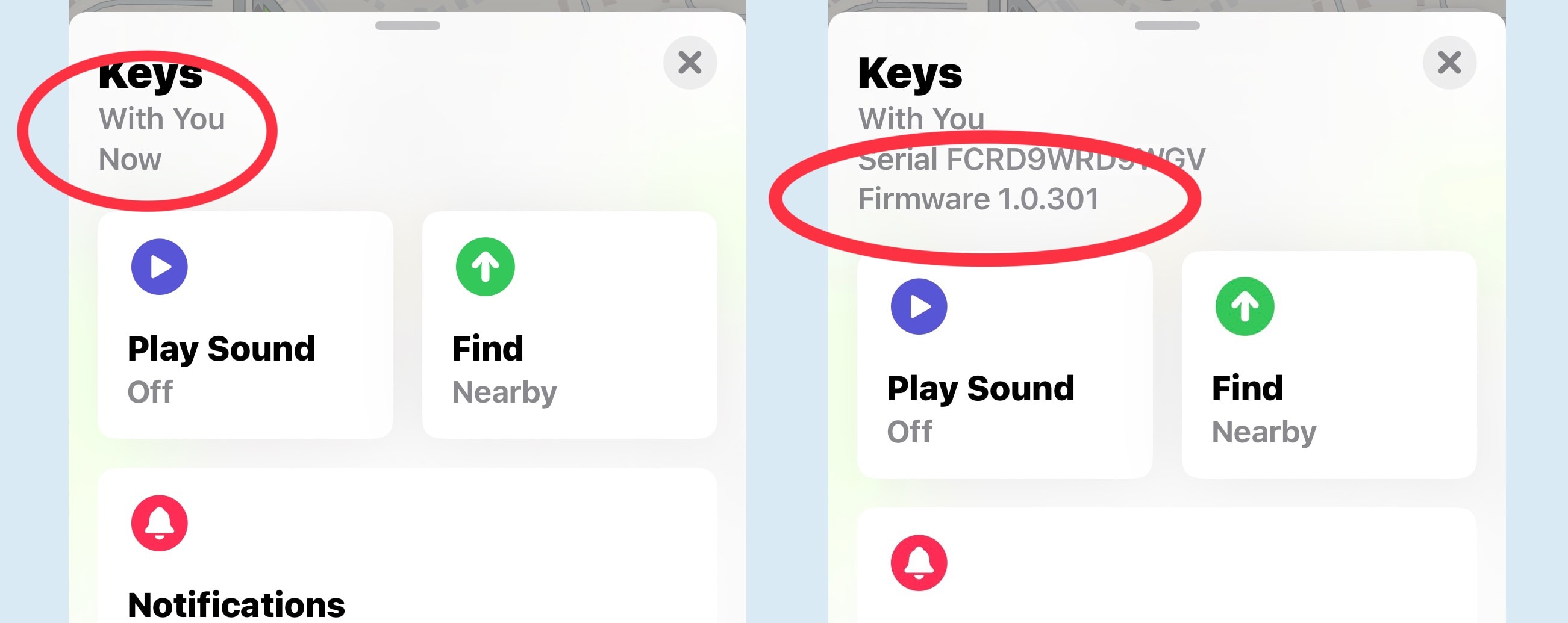 Tap on “With You Now” to see the firmware version.
For more, read Apple’s guide to setting up AirTags.
More firmware update guides:We first published this article on updating AirTag firmware in June 2021. We periodically update it whenever Apple releases new AirTag firmware.
| # | Наименование новости | Тональность | Информативность | Дата публикации |
|---|---|---|---|---|
| 1 | How to share your AirTag location with an airline to find lost luggage | 0 | 7 | 17-07-2026 |
| 2 | Apple’s AirTag 2 just dropped back to the best price ever | 0 | 17.07 | 19-08-2026 |
| 3 | 3 exercise tips every Apple Watch wearer should know | 0 | 21.89 | 04-06-2026 |
| 4 | 8 built-in editing tools to glow up your pictures on your iPhone | 0 | 24.6 | 30-05-2026 |
| 5 | 7 mind-blowing Continuity features every Apple user should know | 0 | 24.34 | 12-08-2026 |
| 6 | Regret installing iOS 27 beta? Here’s how to get back to iOS 26. | 0 | 24.41 | 10-07-2026 |
| 7 | Apple just released new AirPods Max 2 firmware | 0 | 16.85 | 05-05-2026 |
| 8 | Apple releases new AirPods Max 2 firmware update | 0 | 18.97 | 31-03-2026 |
| 9 | AirPods with cameras are real, and Apple just showed how they’ll work | 0 | 26.55 | 18-08-2026 |
| 10 | iPhone 18 Pro and Pro Max rumors: What we know about Apple’s next flagship iPhones | 0 | 21.11 | 17-08-2026 |