Просмотр новости
Найдите то, что Вас интересует
 Спутники
 РН
РН SpaceX
 Роскосмос
 NASA
NASA
СпутникиРНSpaceXРоскосмосNASAFirst introduced in April as the WordPress Core Dev Environment Toolkit, the WordPress Contributor Toolkit is an experimental desktop app that guides first-time contributors through setting up a full wordpress-develop environment. Git, Node.js, and npm are still involved under the hood, but the app provides and runs them for you. You do not have to […]
First introduced in April as the WordPress Core Dev Environment Toolkit, the WordPress Contributor Toolkit is an experimental desktop app that guides first-time contributors through setting up a full wordpress-develop environment. Git Git is a free and open source distributed version control system designed to handle everything from small to very large projects with speed and efficiency. Git is easy to learn and has a tiny footprint with lightning fast performance. Most modern plugin and theme development is being done with this version control system.
https://git-scm.com/, Node.js, and npm are still involved under the hood, but the app provides and runs them for you. You do not have to install Git, Node.js, npm, or Docker on your machine.
WordPress Contributor Toolkit 1.0 is now available for Windows, macOS (Apple Silicon) and Linux.
The first releases concentrated on getting a newcomer from a fresh computer to a running WordPress development site You can keep a copy of your live site in a separate environment. Maintaining a development site is a good practice that can let you make any changes and test them without affecting the live/production environment.. Version 1.0 carries that work through the contribution itself: link a TRAC An open source project by Edgewall Software that serves as a bug tracker and project management tool for WordPress. ticket Created for both bug reports and feature development on the bug tracker. and see its details, pull requests, and patches; apply existing work and test it on the running site; create a diff or open a pull request directly from the app; and keep that first site current with the latest trunk A directory in Subversion containing the latest development code in preparation for the next major release cycle. If you are running "trunk", then you are on the latest revision., fetching only what changed instead of repeating a full clone and install.
A first Core Core is the set of software required to run WordPress. The Core Development Team builds WordPress. contribution, from start to finishHere is what the workflow looks like now.
1. Create the development environmentClick Create WordPress Core site and choose a folder. The app clones wordpress-develop, installs the dependencies, and runs the first build as one continuous setup. When setup finishes, click Start dev server and finish the wizard to complete the WordPress installation wizard that opens in your browser, and you are ready to start contributing.
The interface draws attention to the next action with a yellow outline, and completed actions produce an accessible confirmation.
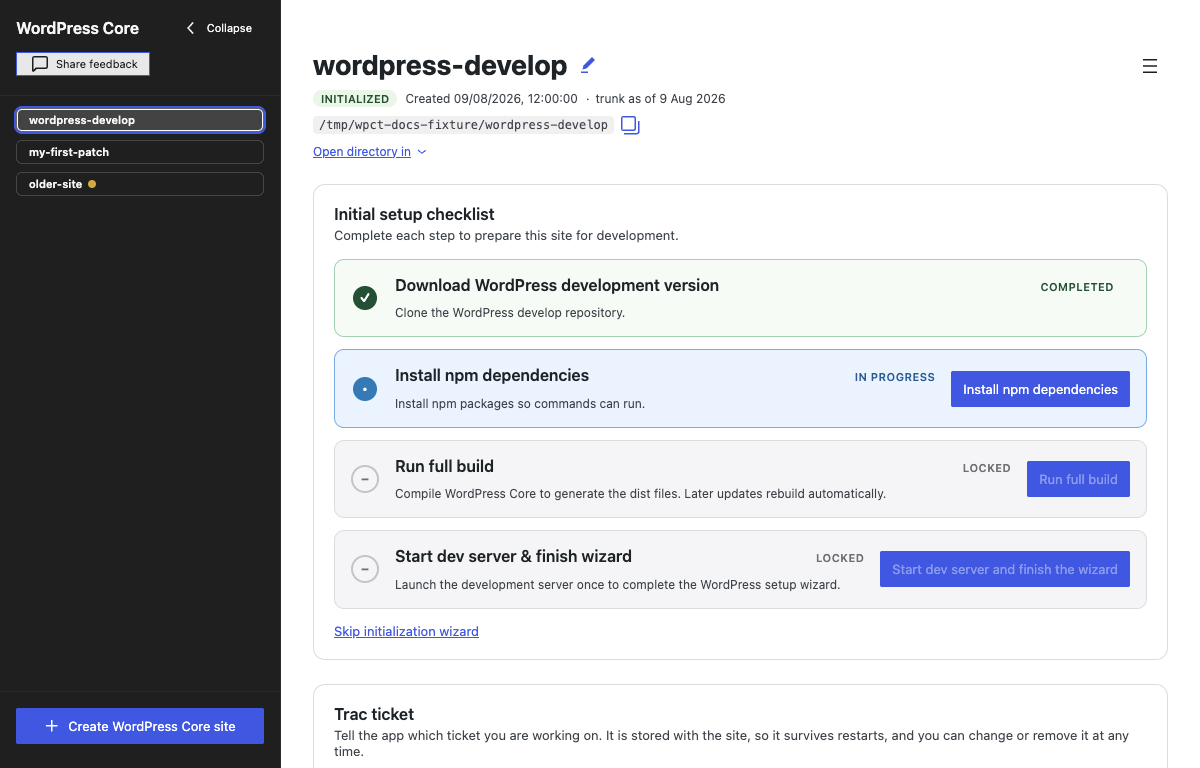 2. Link the site to a Trac ticket
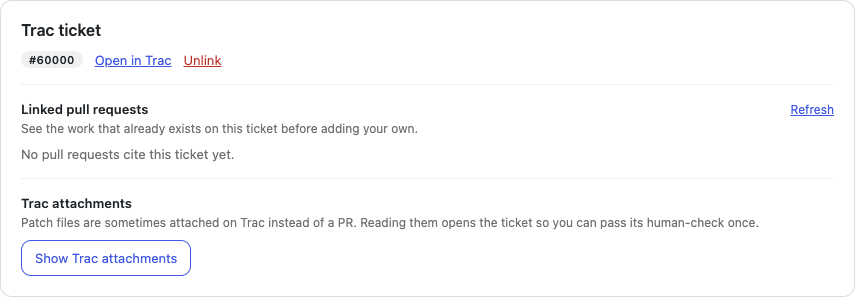
You can link a Trac ticket when creating the site or at any time afterwards. Enter its ticket number or paste its Core Trac URL A specific web address of a website or web page on the Internet, such as a website’s URL www.wordpress.org to bring its details, related pull requests, and attached patches into the Toolkit.
The app reads the ticket’s details: summary, status and resolution, type, milestone, component, keywords, and age. These details help you understand the ticket before you start working: how long ago it was opened, whether it is still open or has already been resolved, and which part of WordPress Core it belongs to.
If you do not have a ticket yet, the app links to the good first bugs report on Trac.
3. Check the work that already existsA linked ticket shows the work that already exists:
WordPress/wordpress-develop that reference the ticket, including their open, closed, or merged state.The newest work is marked Latest, based on the date of the newest commit. You can preview and apply a pull request or Trac patch from the same screen.
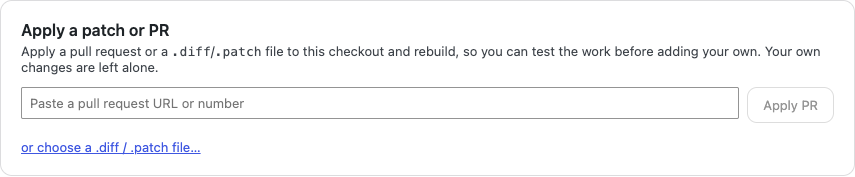
 4. Apply and test an existing patch
Before applying a patch or a PR, the Toolkit previews the files a patch will touch, warns about collisions with your edits, identifies binary files it cannot apply, and checks whether a dependency install will be needed. “Apply and rebuild” then adds the changes and runs any required install or rebuild steps.
If a patch cannot be applied, the app leaves the checkout unchanged and explains what failed so you can decide what to do next.
Applied work keeps the patch or pull request’s identity attached to it. You can make your own changes on top and later remove that layer, but the app will not let you submit somebody else’s patch as if you wrote it.
 5. Edit and debug the change
The site can be opened in a detected editor, another application of your choice, or the system file manager. The build watcher now has its own control, status, and log. Starting the development server starts the watcher too, but stopping the server leaves compile-on-save running if you still need it.
The Toolkit also exposes the parts of a development environment that are useful in Core testing and development:
wp-admin beside the site URL.debug.log tab with PHP The web scripting language in which WordPress is primarily architected. WordPress requires PHP 7.4 or higher notices, warnings, deprecations, stack traces, and fatal errors.The development server can remain up while a patch is applied or trunk is updated. The app pauses and resumes the build watcher only when an operation needs exclusive access to the build or dependencies.
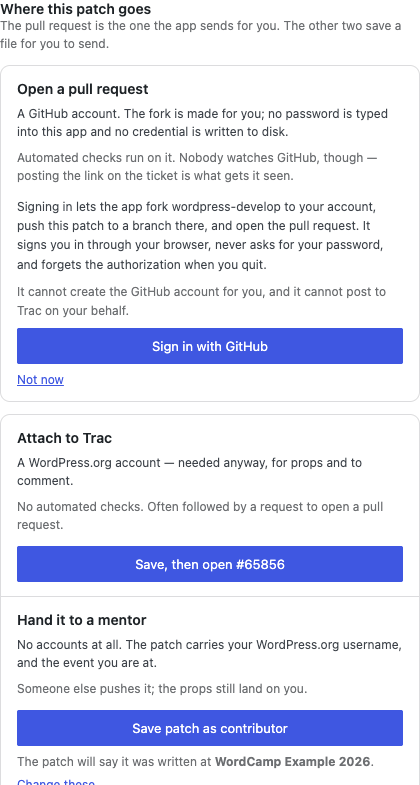
6. Review and send the contributionClick Review & submit changes to inspect the complete diff, then choose who will send it:
The diff comes first on this screen. The destinations sit beside it, grouped by whether you or a mentor will do the sending.
 One site can hold work for many tickets
Creating a site is the expensive part: cloning wordpress-develop, installing its dependencies, and running the first build. Starting another ticket should not repeat all of that.
In 1.0, every linked ticket gets its own branch inside the site. Unlinking a ticket parks its changes, and linking another swaps the files in seconds. The site shows the tickets that have work stored in it, so returning to one does not depend on remembering its number. Each ticket contains only that ticket’s changes.
 Keep the environment without keeping an old copy of trunk
A site no longer has to stay on the snapshot of trunk it cloned. Update to latest trunk fetches current Core code, installs dependencies only if they changed, and rebuilds the site. Sites more than 14 days old show a warning that patches created from them may no longer apply cleanly.
The Toolkit uses its own built-in Git implementation, so Git does not need to be installed on your computer. To keep the initial download small, it creates a depth-one shallow clone. If you do have Git installed and run it inside the site folder, history-based commands will be limited: git log sees only the current snapshot, while git blame and git bisect cannot work normally.
Updating trunk does not silently rebase ticket work. The app parks the active ticket, updates the site, and returns to it on its original base. If trunk has moved since that ticket started, the Toolkit says so and explains the safe path to recreate the ticket on a fresh base.
 Made for Contributor Days
Version 1.0 is available just in time for WordCamp US Contributor Day on August 16. If you are a first-time contributor planning to work with the Core team, the Test team, or another Contributor Day Contributor Days are standalone days, frequently held before or after WordCamps but they can also happen at any time. They are events where people get together to work on various areas of https://make.wordpress.org/ There are many teams that people can participate in, each with a different focus. https://make.wordpress.org/support/handbook/getting-started/getting-started-at-a-contributor-day/ team working in wordpress-develop, download the app and create your first site before Sunday if you can. The Toolkit can help you find the pull requests and patches linked to a ticket, apply them, and test the result on a running site, even if you are not writing the fix yourself. The installer is self-contained, but the initial clone and dependency installation still need an internet connection and some time.
For Contributor Day facilitators, the Toolkit is a simpler way to introduce people to Core contributions without spending the session on environment setup. Newcomers and testers can get straight to a ticket, try existing work, and contribute feedback with experienced contributors nearby.
Downloads are available for:
Download WordPress Contributor Toolkit 1.0, then follow the getting started guide for installation and a first contribution walkthrough.
Your feedback shapes the next updateThe app has no telemetry. Bug reports, release downloads, and direct feedback are the only signals about where it helps and where contributors still get stuck.
You can share feedback through this form, open an issue in the repository, use the feedback button in the app, comment on this post, or ping The act of sending a very small amount of data to an end point. Ping is used in computer science to illicit a response from a target server to test it’s connection. Ping is also a term used by Slack users to @ someone or send them a direct message (DM). Users might say something along the lines of “Ping me when the meeting starts.” @JuanMa in the #core channel on WordPress Slack.
Feedback from WordCamp WordCamps are casual, locally-organized conferences covering everything related to WordPress. They're one of the places where the WordPress community comes together to teach one another what they’ve learned throughout the year and share the joy. Learn more. Contributor Days is particularly helpful, especially on whether the Toolkit enabled you to complete a contribution independently, where you still needed a facilitator, and what could have made the process easier.
ResourcesProps to @greenshady,@bph and @softglaze for review and feedback
| # | Наименование новости | Тональность | Информативность | Дата публикации |
|---|---|---|---|---|
| 1 | New public repo: core release tools | 0 | 10.41 | 23-09-2026 |
| 2 | New WordPress Playground UI | 0 | 7.03 | 06-08-2026 |
| 3 | WordPress 7.1 Release Candidate Phase | 0 | 11.72 | 05-08-2026 |
| 4 | WordPress 7.0.1 RC1 is now available | 0 | 5 | 01-07-2026 |
| 5 | Guidelines for Syncing Code From Gutenberg Into WordPress Develop | 0 | 7 | 30-06-2026 |
| 6 | Adding an MCP Server to the WordPress Core Development Environment | 0 | 6.56 | 08-04-2026 |
| 7 | prefect-deployments-toolkit 0.1.3 | 0 | 5 | 10-07-2026 |
| 8 | picodev 0.1.5 | 0 | 5 | 10-07-2026 |
| 9 | Ubuntu Workshop Tool: Spectacular Developer Upgrades | 5 | 7 | 27-05-2026 |
| 10 | shappetrack 1.0.6 | 0 | 5 | 10-07-2026 |