Просмотр новости
Найдите то, что Вас интересует
 Спутники
 РН
РН SpaceX
 Роскосмос
 NASA
NASA
СпутникиРНSpaceXРоскосмосNASAMacworld
It’s a table-stakes feature for almost all headphones, but for some reason Apple has resisted adding it to AirPods. Until now. With iOS 27, Apple is adding a simple equalizer to its AirPods controls, after years of user complaints.
Here’s how to use it.
How to find and use the custom EQ for AirPods
With your AirPods connected to your iPhone, enabling and adjusting the custom EQ is simple once you know where to look.
Open the Settings app.
Tap your AirPods name at the top of the screen.
Select Audio and Routing.
Tap Equalizer and then select Custom.
Foundry
The EQ is a very simple three-band adjustment that only lets you increase or decrease the lows, mids, and highs. But if you find your new AirPods are too bass-heavy or that your hearing needs a little help with bright high frequencies, it gets the job done.
This is a new iOS 27 feature and requires you to run both iOS 27 and have a related firmware update to your AirPods. If you’re using the beta, you’ll need to enable Beta Updates for your AirPods.
To do this, open Settings, tap your AirPods name, then scroll to the bottom and select AirPods Beta Updates. Make sure Beta Updates is enabled, then put your AirPods back in the case and plug them in to charge. It can sometimes take hours or more for new firmware to be delivered to your AirPods, and there’s not much you can do to make it go faster. You’ll need firmware newer than 8B41. The first beta firmware to support this feature was 9A292e.
@macworld.com Apple finally added EQ to AirPods Pro. #tech #howto #ios27 #airpods ♬ original sound – Macworld – Macworld
When you purchase through links in our articles, we may earn a small commission. This doesn't affect our editorial independence.

It’s a table-stakes feature for almost all headphones, but for some reason Apple has resisted adding it to AirPods. Until now. With iOS 27, Apple is adding a simple equalizer to its AirPods controls, after years of user complaints.
Here’s how to use it.
With your AirPods connected to your iPhone, enabling and adjusting the custom EQ is simple once you know where to look.
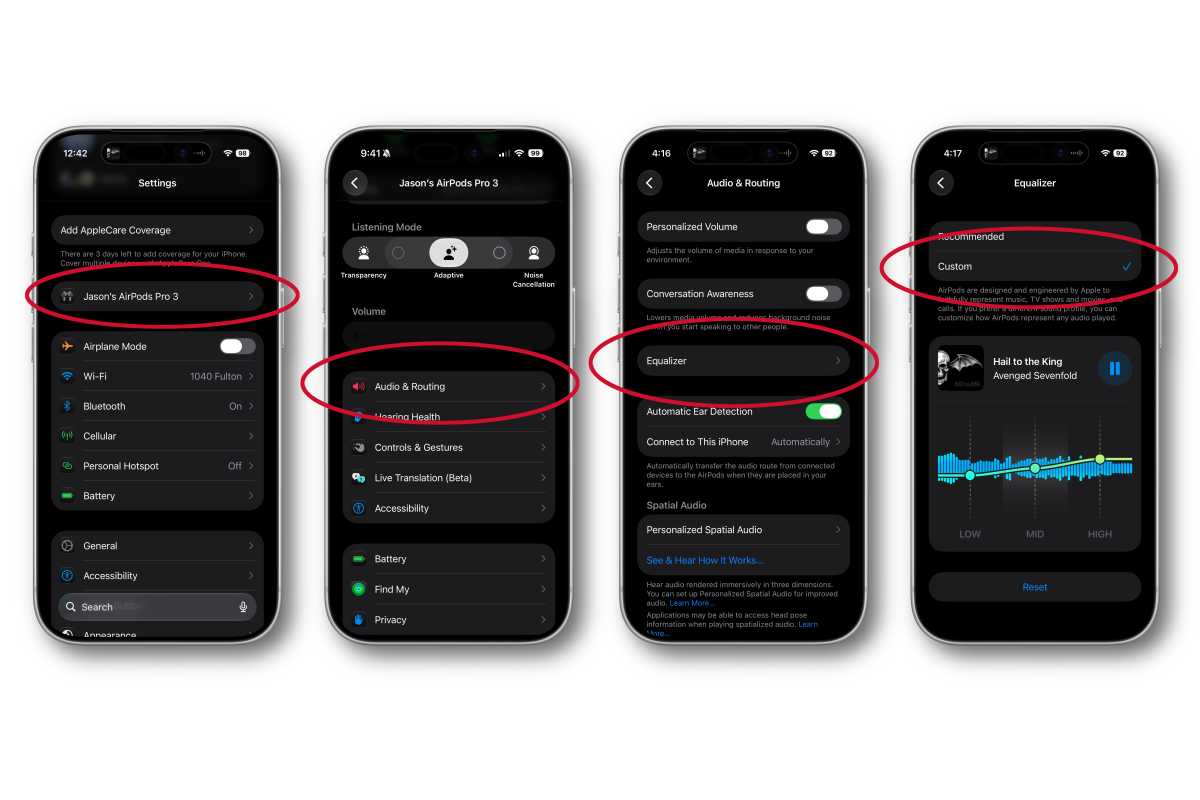
Foundry
The EQ is a very simple three-band adjustment that only lets you increase or decrease the lows, mids, and highs. But if you find your new AirPods are too bass-heavy or that your hearing needs a little help with bright high frequencies, it gets the job done.
This is a new iOS 27 feature and requires you to run both iOS 27 and have a related firmware update to your AirPods. If you’re using the beta, you’ll need to enable Beta Updates for your AirPods.
To do this, open Settings, tap your AirPods name, then scroll to the bottom and select AirPods Beta Updates. Make sure Beta Updates is enabled, then put your AirPods back in the case and plug them in to charge. It can sometimes take hours or more for new firmware to be delivered to your AirPods, and there’s not much you can do to make it go faster. You’ll need firmware newer than 8B41. The first beta firmware to support this feature was 9A292e.
| # | Наименование новости | Тональность | Информативность | Дата публикации |
|---|---|---|---|---|
| 1 | iOS 27 gives AirPods custom EQ and heart rate sync | 0 | 5 | 08-06-2026 |
| 2 | AirPods just got a long-requested feature in new public beta | 0 | 12.88 | 16-07-2026 |
| 3 | Versteckt in iOS 27: So aktiviert ihr den geheimen Equalizer für eure AirPods | 0 | 10.41 | 25-09-2026 |
| 4 | This $20 AirPods Pro upgrade will save you from buying a new pair | 0 | 17.9 | 13-08-2026 |
| 5 | Hands-on: iOS 27 makes AirPods even better with these new features [Video] | 0 | 12.46 | 12-06-2026 |
| 6 | iOS 27 revamps AirPods settings in a big way, here’s the new design | 0 | 13.89 | 08-06-2026 |
| 7 | New Beta Firmware for AirPods Released | 0 | 13.33 | 21-08-2026 |
| 8 | iOS 27 beta 5 is out now with further refinements and fixes | 0 | 13.87 | 10-08-2026 |
| 9 | AirPods Ultra could beat Apple’s smart glasses to market | 0 | 5 | 06-07-2026 |
| 10 | Deals: AirPods 4 for $99, AirPods Pro 3 for $199, 4-pack of AirTags 2 for $89 | 0 | 15.57 | 28-07-2026 |