Просмотр новости
Найдите то, что Вас интересует
 Спутники
 РН
РН SpaceX
 Роскосмос
 NASA
NASA
СпутникиРНSpaceXРоскосмосNASA

A JupyterLab extension for version control using Git
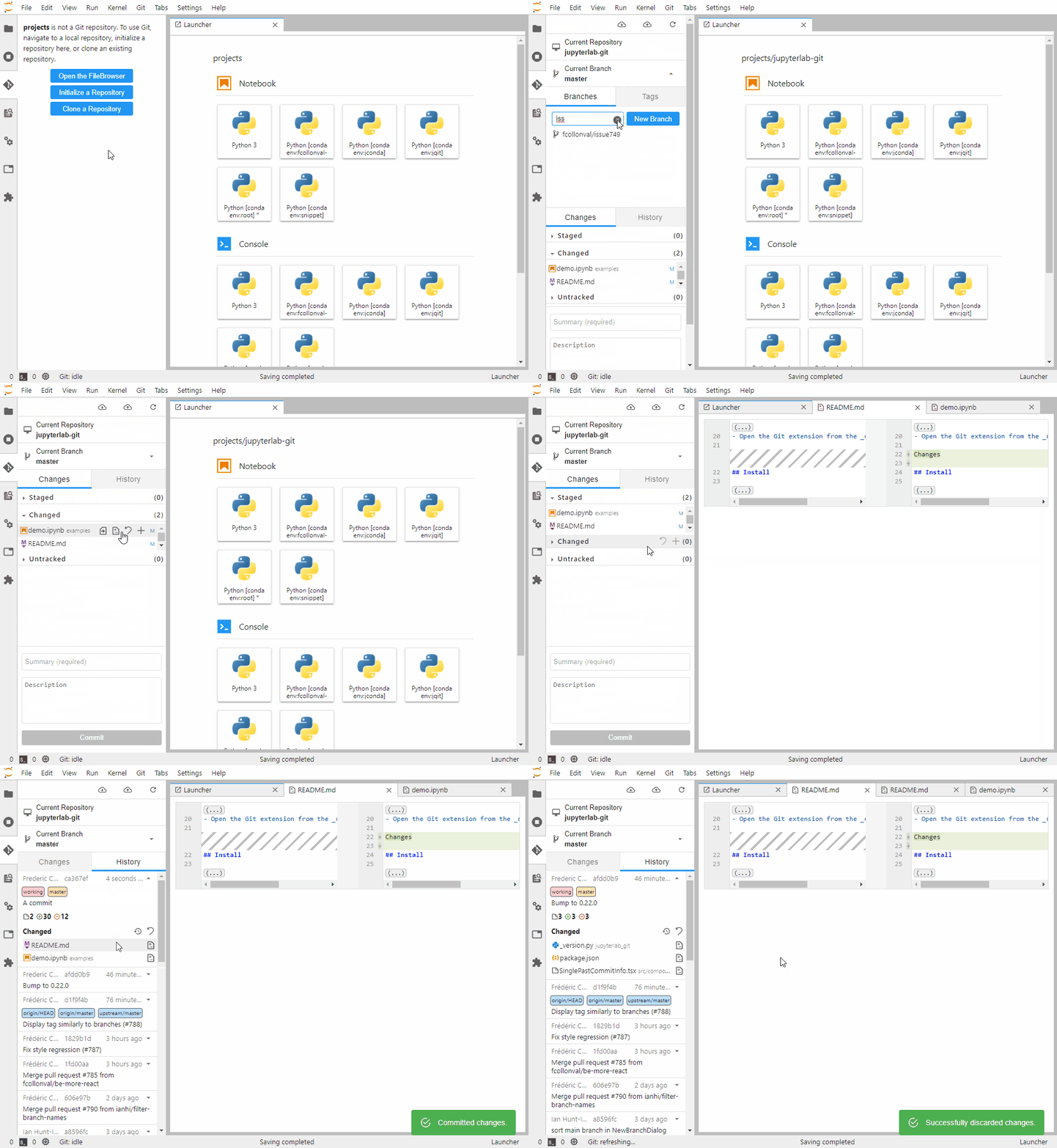
To see the extension in action, open the example notebook included in the Binder demo.
Requirements>=2.x)For older versions of JupyterLab, go to:
UsageWith jupyter-server backend (standard)Note for users upgrading from a previous version: Starting with the split into
jupyterlab-git-coreandjupyterlab-git, the JupyterLab frontend extension (@jupyterlab/git) is now bundled in and owned byjupyterlab-git-core. Runningpip install --upgrade jupyterlab-gitwill automatically install the correct version ofjupyterlab-git-core.
The standard installation includes the Tornado/jupyter-server backend:
pip install --upgrade jupyterlab jupyterlab-git
or with conda:
conda install -c conda-forge jupyterlab jupyterlab-git
To use jupyterlab-git with jupyverse (FastAPI-based, no Tornado dependency), install the core package — it includes the frontend labextension but no Tornado/jupyter-server dependency. The backend routes are provided by the fps-jupyterlab-git jupyverse plugin:
pip install --upgrade jupyterlab-git-core
pip install --upgrade fps-jupyterlab-git
In this mode, jupyter_server and Tornado are not required.
To remove the extension, execute:
pip uninstall jupyterlab-git
or with conda:
conda remove jupyterlab-git
pip uninstall jupyterlab-git-core fps-jupyterlab-git
If you are seeing errors similar to [E yyyy-mm-dd hh:mm:ss ServerApp] 500 POST /git/<clone|push|pull|status> on the console which is running the JupyterLab server, you probably need to set up a credentials store for your local Git repository.
This extension tries to handle credentials for HTTP(S) connections (if you don't have set up a credential manager). But not for other SSH connections.
HTTP(S) protocolFor Windows users, it is recommended to install git for windows. It will automatically set up a credential manager. In order to connect to a remote host, it is recommended to use SSH.
The extension can cache temporarily (by default for an hour) credentials. To use the caching, you will need to check the option Save my login temporarily in the dialog asking your credentials.
You can set a longer cache timeout; see Server Settings.
SSH protocolThis is a new feature since v0.37.0
Here are the steps to follow to set up SSH authentication (skip any that is already accomplished for your project):
You should now be able to pull and push committed changes to and from your remote repository using the respective buttons on the top of the extension's panel.
UI SettingsOnce installed, extension behavior can be modified via the following settings which can be set in JupyterLab's advanced settings editor:
blockWhileCommandExecutes: suspend JupyterLab user interaction until Git commands (e.g., commit, pull, reset, revert) finish executing. Setting this to true helps mitigate potential race conditions leading to data loss, conflicts, and a broken Git history. Unless running a slow network, UI suspension should not interfere with standard workflows. Setting this to false allows for actions to trigger multiple concurrent Git actions.
cancelPullMergeConflict: cancel pulling changes from a remote repository if there exists a merge conflict. If set to true, when fetching and integrating changes from a remote repository, a conflicting merge is canceled and the working tree left untouched.
commitAndPush: Whether to trigger or not a push for each commit; default is false.
disableBranchWithChanges: disable all branch operations, such as creating a new branch or switching to a different branch, when there are changed/staged files. When set to true, this setting guards against overwriting and/or losing uncommitted changes.
displayStatus: display Git extension status updates in the JupyterLab status bar. If true, the extension displays status updates in the JupyterLab status bar, such as when pulling and pushing changes, switching branches, and polling for changes. Depending on the level of extension activity, some users may find the status updates distracting. In which case, setting this to false should reduce visual noise.
fileClickAction: what happens when you click or double-click a file in the Git panel file list. One of:
"open-on-double" (default): double-click opens the file in an editor."diff-on-double": double-click opens a diff of the file (no-op when no diff is available)."diff-on-single": single-click opens a diff (or the file itself when no diff is available, e.g. for untracked or remote-changed files)."select-only": clicking only selects the file; no other action is triggered.This setting replaces the previous boolean doubleClickDiff. User settings using the old key are migrated automatically on load (doubleClickDiff: true → "diff-on-double").
historyCount: number of commits shown in the history log, beginning with the most recent. Displaying a larger number of commits can lead to performance degradation, so use caution when modifying this setting.
promptUserIdentity: Whether to prompt for user name and email on every commit.
refreshIfHidden: whether to refresh even if the Git tab is hidden; default to false (i.e. refresh is turned off if the Git tab is hidden).
refreshInterval: number of milliseconds between polling the file system for changes. In order to ensure that the UI correctly displays the current repository status, the extension must poll the file system for changes. Longer polling times increase the likelihood that the UI does not reflect the current status; however, longer polling times also incur less performance overhead.
simpleStaging: enable a simplified concept of staging. When this setting is true, all files with changes are automatically staged. When we develop in JupyterLab, we often only care about what files have changed (in the broadest sense) and don't need to distinguish between "tracked" and "untracked" files. Accordingly, this setting allows us to simplify the visual presentation of changes, which is especially useful for those less acquainted with Git.
JupyterLabGit.actions.post_init: Set post git init actions.
It is possible to provide a list of commands to be executed in a folder after it is initialized as Git repository.JupyterLabGit.credential_helper: Git credential helper to set to cache the credentials.
The default value is cache --timeout=3600 to cache the credentials for an hour. If you want to cache them for 10 hours, set cache --timeout=36000.JupyterLabGit.excluded_paths: Set path patterns to exclude from this extension. You can use wildcard and interrogation mark for respectively everything or any single character in the pattern.JupyterLabGit.git_command_timeout_s: Set the timeout for git operations. Defaults to 20 seconds.In $HOME/.jupyter/jupyter_notebook_config.py (on Windows %USERPROFILE%/.jupyter/jupyter_notebook_config.py):
c.JupyterLabGit.actions = {"post_init": ["touch dummy_init.dat"]}
c.JupyterLabGit.credential_helper = 'cache --timeout=3600'
Or equivalently in $HOME/.jupyter/jupyter_notebook_config.json (on Windows %USERPROFILE%/.jupyter/jupyter_notebook_config.json):
{
  "JupyterLabGit": {
    "actions": {
      "post_init": ["touch dummy_init.dat"]
    },
    "credential_helper": "cache --timeout=3600"
  }
}If you are seeing the frontend extension, but it is not working, check that the server extension is enabled:
jupyter server extension list
If the server extension is installed and enabled, but you are not seeing the frontend extension, check the frontend extension is installed:
jupyter labextension list
If they do not match or one is missing, please reinstall the package.
the Git panel does not recognize that you are in a Git repository.Possible fixes:
Be sure to be in a Git repository in the filebrowser tab
Check the server log. If you see a warning with a 404 code similar to:
[W 00:27:41.800 LabApp] 404 GET /git/settings?version=0.20.0
Explicitly enable the server extension by running:
jupyter server extension enable --py jupyterlab_gitIf you are using JupyterHub or some other technologies requiring an initialization script which includes the jupyterlab-git extension, be sure to install both the frontend and the server extension before launching JupyterLab.
Possible fixes:
Check that the JupyterLab extension is installed:
```bash
jupyter labextension list
```

If you don't see `@jupyterlab/git v... enabled OK` in the list, explicitly install the jupyter labextension by running:

```bash
jupyter labextension install @jupyterlab/git
```

If you see `@jupyterlab/git` under `Uninstalled core extensions: `, your installation may have been corrupted. You can run `jupyter lab clean --all` and
reinstall all your extensions.
If you would like to contribute to the project, please read our contributor documentation.
JupyterLab follows the official Jupyter Code of Conduct.
Development installNote: You will need NodeJS to build the extension package.
The jlpm command is JupyterLab's pinned version of
yarn that is installed with JupyterLab. You may use
yarn or npm in lieu of jlpm below.
This is a monorepo with two Python packages: packages/core (pure Git logic + labextension) and packages/jupyterlab (Tornado/jupyter-server extension).
# Clone the repo to your local environment
git clone https://github.com/jupyterlab/jupyterlab-git.git
# Change directory to the jupyterlab-git directory
cd jupyterlab-git
# Install both packages in development mode (recommended: uv)
uv sync
# or with pip
pip install -e "packages/core[dev]" -e "packages/jupyterlab[dev,test]"
pre-commit install
# Link your development version of the extension with JupyterLab
jupyter-builder develop packages/core --overwrite
# Server extension must be manually installed in develop mode
jupyter server extension enable jupyterlab_git
# Rebuild extension Typescript source after making changes
jlpm run build
You can watch the source directory and run JupyterLab at the same time in different terminals to watch for changes in the extension's source and automatically rebuild the extension.
# Watch the source directory in one terminal, automatically rebuilding when needed
jlpm run watch
# Run JupyterLab in another terminal
jupyter lab
With the watch command running, every saved change will immediately be built locally and available in your running JupyterLab. Refresh JupyterLab to load the change in your browser (you may need to wait several seconds for the extension to be rebuilt).
By default, the jlpm run build command generates the source maps for this extension to make it easier to debug using the browser dev tools. To also generate source maps for the JupyterLab core extensions, you can run the following command:
jupyter lab build --minimize=False
# Server extension must be manually disabled in develop mode
jupyter server extension disable jupyterlab_git
pip uninstall jupyterlab-git jupyterlab-git-core
In development mode, you will also need to remove the symlink created by jupyter-builder develop
command. To find its location, you can run jupyter labextension list to figure out where the labextensions
folder is located. Then you can remove the symlink named @jupyterlab/git within that folder.
This extension is using Pytest for Python code testing.
Install test dependencies (needed only once):
pip install -e "packages/core[test]" -e "packages/jupyterlab[test]"
# Each time you install the Python package, you need to restore the front-end extension link
jupyter-builder develop packages/core --overwrite
To execute them, run:
# Core tests (no tornado/jupyter-server dependency)
pytest packages/core/tests/

# JupyterLab server extension tests
pytest packages/jupyterlab/tests/
This extension is using Jest for JavaScript code testing.
To execute them, execute:
Integration testsThis extension uses Playwright for the integration tests (aka user level tests). More precisely, the JupyterLab helper Galata is used to handle testing the extension in JupyterLab.
More information are provided within the ui-tests README.
Packaging the extensionSee RELEASE
Contributors ✨The Jupyter Git extension is part of Project Jupyter and is developed by an open community of contributors. To see who has been active recently, please look at the "Contributors" tab. Below we list the people and entities who contributed in different ways to the project (emoji key):
This project follows the all-contributors specification. Contributions of any kind are welcomed!
To add yourself, or someone else, to this list you can either use the bot (@all-contributors please add <username> for <contributions>) or the CLI (jlpm all-contributors add <username> <contributions>).
If you manually edit the .all-contributorsrc config file, run yarn run contributors:generate.
| # | Наименование новости | Тональность | Информативность | Дата публикации |
|---|---|---|---|---|
| 1 | graphqlite: Graph Database SQLite Extension | 0 | 10 | 23-01-2026 |
| 2 | syrupy: The Sweeter pytest Snapshot Plugin | 0 | 10 | 03-04-2026 |
| 3 | vit - Git for Video Editing | 0 | 10 | 18-05-2026 |
| 4 | WebAssembly as a Python Extension Platform | 0 | 10 | 10-01-2026 |
| 5 | Pyre: New JIT Python interpreter written in Rust | 0 | 10 | 06-04-2026 |
| 6 | cinderx: High-Performance Python Runtime Extensions | 0 | 30 | 12-03-2026 |
| 7 | pytest-tia: Run Only the Tests Your Git Diff Actually Affects | 0 | 20 | 12-07-2026 |
| 8 | dj-celery-panel: Celery Task Inspector for Django Admin | 0 | 24.29 | 05-02-2026 |
| 9 | miniword: A WYSIWYG Word Processor in Python | 0 | 10 | 07-05-2026 |
| 10 | flake8-lazy: Detect Lazy-Importable Modules in Python 3.15+ | 0 | 52.86 | 01-06-2026 |


