Просмотр новости
Найдите то, что Вас интересует
 Спутники
 РН
РН SpaceX
 Роскосмос
 NASA
NASA
СпутникиРНSpaceXРоскосмосNASAThis article explores three Python tools for PDF table extraction: Docling, Marker, and LlamaParse. Learn which handles merged cells and multi-level headers best.
Have you ever copied a table from a PDF into a spreadsheet only to find the formatting completely broken? These issues include cells shifting, values landing in the wrong columns, and merged headers losing their structure.
This happens because PDFs do not store tables as structured data. They simply place text at specific coordinates on a page.
For example, a table that looks like this on screen:
┌───────┬───────┐
│ Name  │ Score │
├───────┼───────┤
│ Alice │  92   │
│ Bob   │  85   │
└───────┴───────┘
is stored in the PDF as a flat list of positioned text:
"Name"  at (x=72,  y=710)
"Score" at (x=200, y=710)
"Alice" at (x=72,  y=690)
"92"    at (x=200, y=690)
"Bob"   at (x=72,  y=670)
"85"    at (x=200, y=670)
A table extraction tool must analyze those positions, determine which text belongs in each cell, and rebuild the table structure.
The challenge becomes even greater with multi-level headers, merged cells, or tables that span multiple pages. Many tools struggle with at least one of these scenarios.
While doing research, I came across three Python tools for extracting tables from PDFs: Docling, Marker, and LlamaParse. To compare them fairly, I ran each tool on the same PDF and evaluated the results.
In this article, I’ll walk through what I found and help you decide which tool may work best for your needs.
💻 Get the Code: Open the notebook in Google Colab to run it in your browser, or grab the source from GitHub.
Easy-to-digest articles on Python, AI, and open-source tools. Delivered twice a week.
All examples use the same PDF: the Docling Technical Report from arXiv. This paper contains tables with the features that make extraction difficult:
source = "https://arxiv.org/pdf/2408.09869"
Some tools require a local file path instead of a URL, so let’s download the PDF first:
import urllib.request

# Download PDF locally (used by Marker later)
local_pdf = "docling_report.pdf"
urllib.request.urlretrieve(source, local_pdf)
Docling is IBM’s open-source document converter built specifically for structured extraction. It ships with two pipelines:
The default pipeline is fast, but it can struggle with complex layouts like multi-level headers and merged cells. The VLM pipeline trades some speed for better accuracy on tricky tables, which is what we want for this comparison.
We’ll use GraniteDocling, IBM’s vision model built specifically for documents.
PDF page with mixed content
┌─────────────────────┐
│ Text paragraph...   │
│ Name  Score         │
│ Alice  92           │
│ Bob    85           │
│ (figure)            │
└─────────────────────┘
         │
         ▼
AI reads the whole page
and extracts the table
         │
         ▼
┌───────┬───────┐
│ Name  │ Score │
├───────┼───────┤
│ Alice │  92   │
│ Bob   │  85   │
└───────┴───────┘
The result is a pandas DataFrame for each table, ready for analysis.
For Docling’s full document processing capabilities beyond tables, including chunking and RAG integration, see Transform Any PDF into Searchable AI Data with Docling.
To install Docling, pick the variant that matches your hardware:
| Platform | Install command | Model spec |
|---|---|---|
| Apple Silicon (M1+) | pip install "docling[vlm]" mlx-vlm | GRANITEDOCLING_MLX |
| Linux / Windows (CUDA or CPU) | pip install "docling[vlm]" | GRANITEDOCLING_TRANSFORMERS |
This article uses docling v2.93.0.
Table ExtractionTo use the VLM pipeline, we configure DocumentConverter with VlmPipeline and select GraniteDocling as the model:
from docling.datamodel import vlm_model_specs
from docling.datamodel.base_models import InputFormat
from docling.datamodel.pipeline_options import VlmPipelineOptions
from docling.document_converter import DocumentConverter, PdfFormatOption
from docling.pipeline.vlm_pipeline import VlmPipeline

pipeline_options = VlmPipelineOptions(
    vlm_options=vlm_model_specs.GRANITEDOCLING_MLX,           # Apple Silicon
    # vlm_options=vlm_model_specs.GRANITEDOCLING_TRANSFORMERS,  # Linux / Windows
)

converter = DocumentConverter(
    format_options={
        InputFormat.PDF: PdfFormatOption(
            pipeline_cls=VlmPipeline,
            pipeline_options=pipeline_options,
        )
    }
)
Now we can convert the PDF and measure how long it takes:
%%time
result = converter.convert(source)
Output
Wall time: 1min 50s
Once we have the Docling document, we can loop through all detected tables and export each one as a pandas DataFrame:
for i, table in enumerate(result.document.tables):
    df = table.export_to_dataframe(doc=result.document)
    print(f"Table {i + 1}: {df.shape[0]} rows × {df.shape[1]} columns")
Table 1: 6 rows × 8 columns
Table 2: 12 rows × 6 columns
The PDF contains 5 tables, but Docling detected only 2 with the VLM pipeline.
Let’s look at the first table. Here’s the original from the PDF:
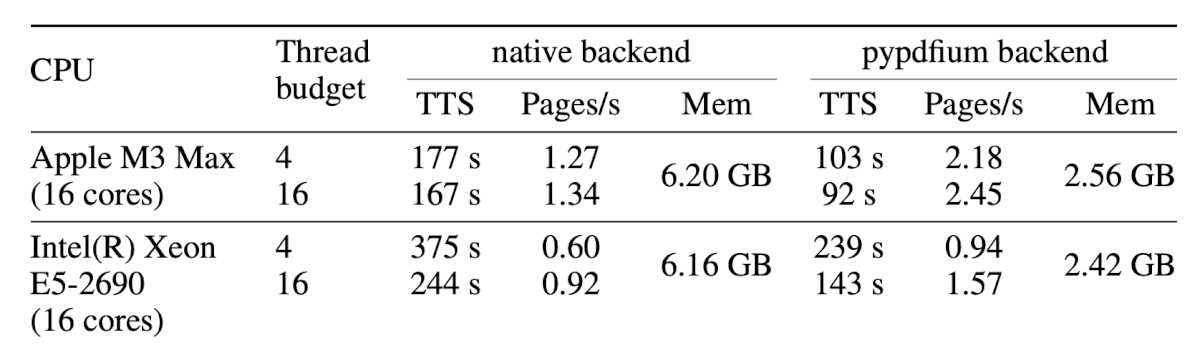
And here’s what Docling extracted:
# Export the first table as a DataFrame
table_1 = result.document.tables[0]
df_1 = table_1.export_to_dataframe(doc=result.document)
df_1
| 0 | 1 | 2 | 3 | 4 | 5 | 6 | 7 | |
|---|---|---|---|---|---|---|---|---|
| 0 | CPU | Thread budget | native backend | native backend | native backend | pypdfium backend | pypdfium backend | pypdfium backend |
| 1 | TTS | Pages/s | Mem | TTS | Pages/s | Mem | ||
| 2 | Apple M3 Max | 4 | 177 s | 1.27 | 6.20 GB | 103 s | 2.18 | 2.56 GB |
| 3 | (16 cores) | 16 | 167 s | 1.34 | 92 s | 92 s | 2.45 | 2.56 |
| 4 | Intel(R) Xeon | 4 | 375 s | 0.60 | 6.16 GB | 239 s | 0.94 | 2.42 GB |
| 5 | E5-2690 | 16 | 244 s | 0.92 | 143 s | 1.57 | 1.57 | 2.42 |
The VLM pipeline handled values well but tripped on structure.
Worked:
Didn’t work:
Now the second table. Here’s the original from the PDF:
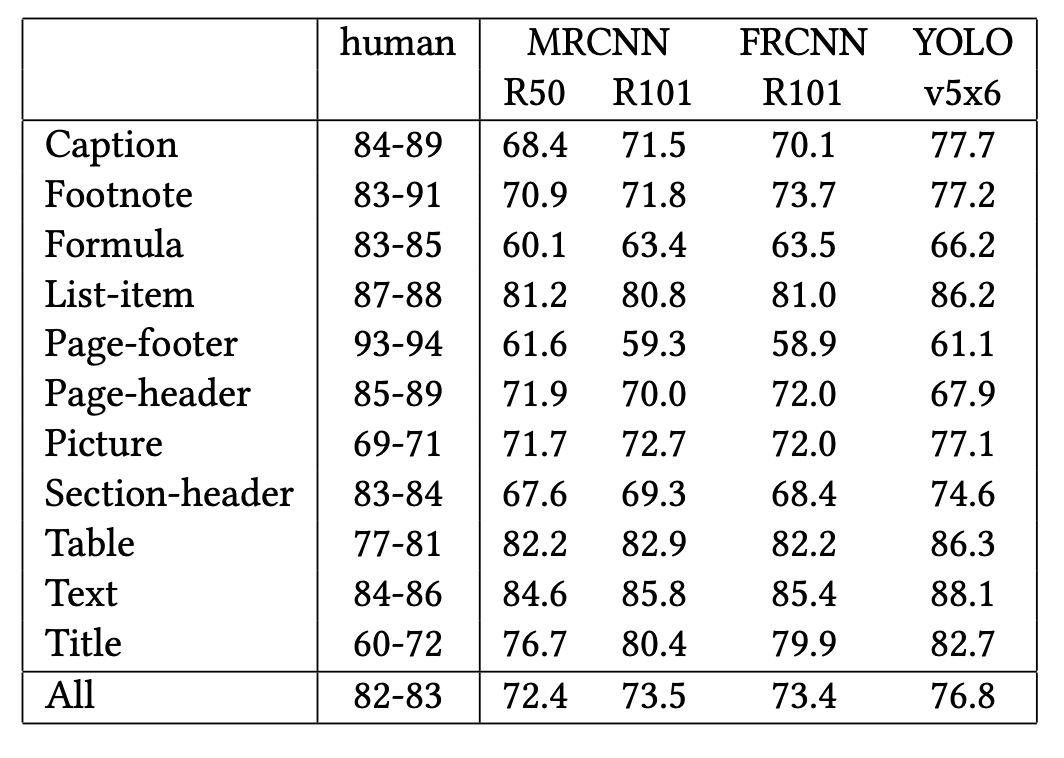
And here’s what Docling extracted:
# Export the second table as a DataFrame
table_2 = result.document.tables[1]
df_2 = table_2.export_to_dataframe(doc=result.document)
df_2
| 0 | 1 | 2 | 3 | 4 | 5 | |
|---|---|---|---|---|---|---|
| 0 | Caption | human | R-CNN | R-CNN10-FPRN 3x | V1S | V2S |
| 1 | Footnote | 70.1 | 70.1 | 70.1 | 70.1 | 70.1 |
| 2 | Formula | 73.8 | 73.7 | 73.7 | 72.2 | 72.2 |
| 3 | List-item | 81.8 | 81.8 | 81.8 | 80.1 | 80.1 |
| 4 | Page-footer | 61.9 | 61.9 | 61.9 | 59.7 | 59.7 |
| 5 | Page-header | 64.4 | 64.4 | 64.4 | 64.4 | 64.4 |
| 6 | Picture | 69.8 | 69.8 | 69.8 | 64.4 | 64.4 |
| 7 | Section-header | 68.7 | 68.7 | 68.7 | 64.4 | 68.7 |
| 8 | Table | 82.8 | 82.8 | 82.8 | 64.4 | 82.8 |
| 9 | Text | 85.8 | 85.8 | 85.8 | 64.4 | 85.8 |
| 10 | Title | 86.8 | 86.8 | 86.8 | 64.4 | 86.8 |
| 11 | All | 86.8 | 86.8 | 86.8 | 64.4 | 86.8 |
The VLM pipeline struggled badly with this denser table.
Worked:
Didn’t work:
This happens because the VLM writes cells one at a time, similar to how ChatGPT writes a response word by word. When the table has many similar-looking numbers, the model can get stuck and keep repeating the same value, which is why “64.4” appears 7 times in a row.
Conclusion: Docling’s VLM pipeline handles simple tables well, but produces unreliable results on dense numeric data, where it can hallucinate column names, repeat values across rows, and lose track of merged cells.
PerformanceDocling took about 1 minute 50 seconds for the full 6-page PDF on an Apple M5 Pro (64 GB RAM). Most of that time is spent on the GPU: GraniteDocling reads each page as an image and generates the table structure one token at a time, which pins the GPU at near-full utilization.
Marker: Vision Transformer PipelineMarker is an open-source PDF-to-Markdown converter built on the Surya layout engine. Unlike Docling’s two-stage pipeline, Marker runs five stages for table extraction:
Here is how the five stages work together:
PDF page
┌─────────────────────┐
│ Text paragraph...   │
│ Name  Score         │
│ Alice  92           │
│ Bob    85           │
└─────────────────────┘
         │
         ▼
1. Layout detection → finds [TABLE] region
2. OCR error detection → fixes misread text
         │
         ▼
3. Bounding box detection
┌──────────────────┐
│ [Name]  [Score]  │
│ [Alice] [92]     │
│ [Bob]   [85]     │
└──────────────────┘
         │
         ▼
4. Table recognition → maps cells to rows/columns
5. Text recognition → extracts final text
         │
         ▼
| Name  | Score |
|-------|-------|
| Alice | 92    |
| Bob   | 85    |
To install Marker, run:
pip install marker-pdf
This article uses marker v1.10.2.
Table ExtractionMarker provides a dedicated TableConverter that extracts only tables from a document, returning them as Markdown:
from marker.converters.table import TableConverter
from marker.models import create_model_dict
from marker.output import text_from_rendered

models = create_model_dict()
converter = TableConverter(artifact_dict=models)
Convert the PDF and measure how long it takes:
%%time
rendered = converter(local_pdf)
table_md, _, images = text_from_rendered(rendered)
Since TableConverter returns all tables as a single Markdown string, we split them on blank lines:
tables = table_md.strip().split("\n\n")
print(f"Tables found: {len(tables)}")
Tables found: 3
Let’s look at the first table. Here’s the original from the PDF:
And here’s what Marker extracted:
print(tables[0])
| CPU | Thread<br>budget | native backend | pypdfium backend | ||||
|---|---|---|---|---|---|---|---|
| TTS | Pages/s | Mem | TTS | Pages/s | Mem | ||
| Apple M3 Max<br>(16 cores) | 4<br>16 | 177 s<br>167 s | 1.27<br>1.34 | 6.20 GB | 103 s<br>92 s | 2.18<br>2.45 | 2.56 GB |
| Intel(R) Xeon<br>E5-2690<br>(16 cores) | 4<br>16 | 375 s<br>244 s | 0.60<br>0.92 | 6.16 GB | 239 s<br>143 s | 0.94<br>1.57 | 2.42 GB |
Marker handled this table well.
Worked:
<br> tags (e.g., “Apple M3 Max<br> separators (e.g., “177 sDidn’t work:
Let’s look at the second table. Here’s the original from the PDF:
And here’s what Marker extracted:
print(tables[1])
| human | MRCNN | FRCNN YOLO | |||
|---|---|---|---|---|---|
| R50 R101 | R101 | v5x6 | |||
| Caption | 84-89 68.4 71.5 | 70.1 | 77.7 | ||
| Footnote | 83-91 70.9 71.8 | 73.7 | 77.2 | ||
| Formula | 83-85 60.1 63.4 | 63.5 | 66.2 | ||
| List-item | 87-88 81.2 80.8 | 81.0 | 86.2 | ||
| Page-footer | 93-94 61.6 59.3 | 58.9 | 61.1 | ||
| Page-header | 85-89 71.9 70.0 | 72.0 | 67.9 | ||
| Picture | 69-71 71.7 72.7 | 72.0 | 77.1 | ||
| Section-header 83-84 67.6 69.3 | 68.4 | 74.6 | |||
| Table | 77-81 82.2 82.9 | 82.2 | 86.3 | ||
| Text | 84-86 84.6 85.8 | 85.4 | 88.1 | ||
| Title | 60-72 76.7 80.4 | 79.9 | 82.7 | ||
| All | 82-83 72.4 73.5 | 73.4 | 76.8 |
Marker struggled with this denser table.
Worked:
Didn’t work:
Let’s look at the third table. Here’s the original from the PDF:
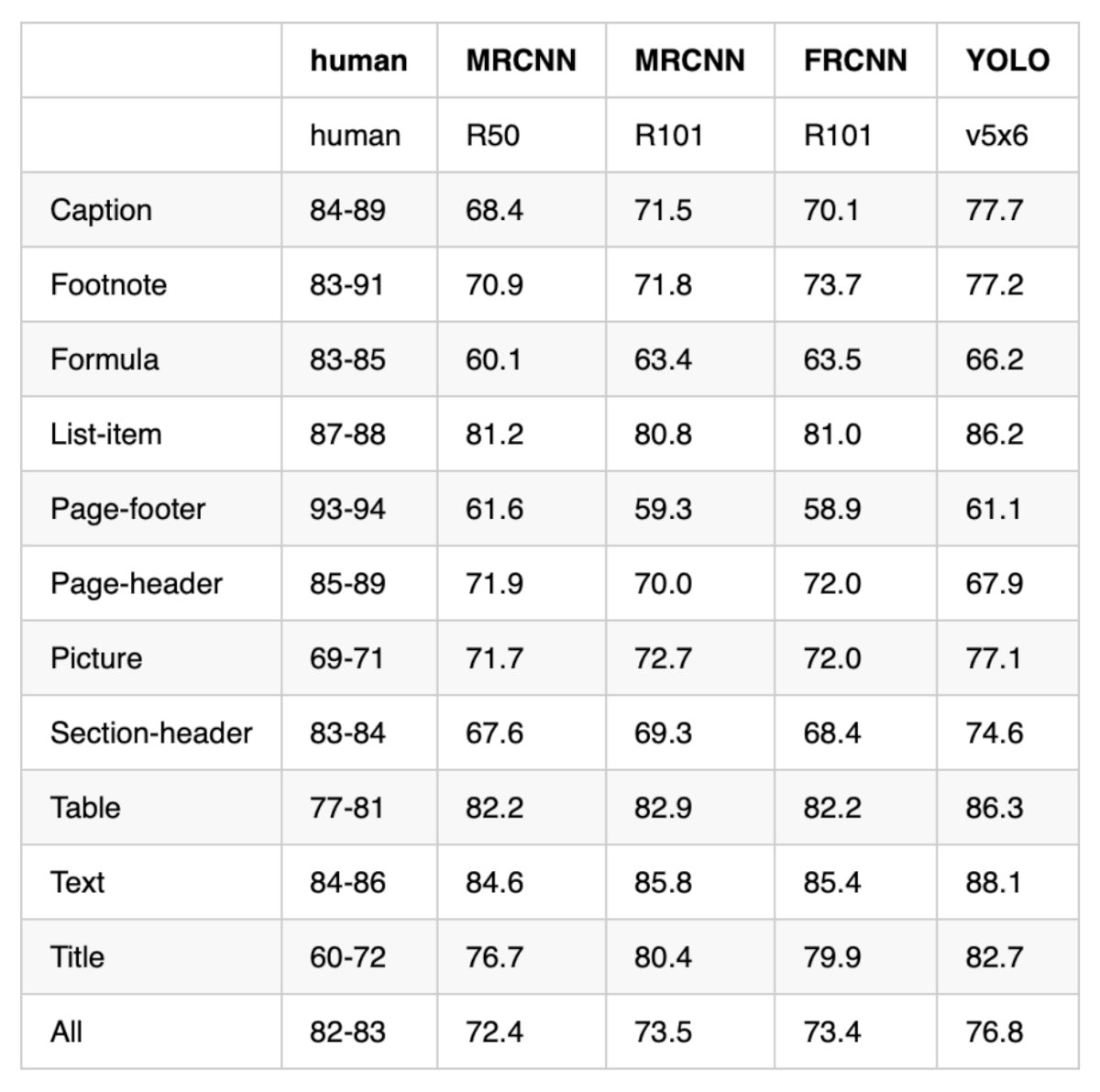
And here’s what Marker extracted:
print(tables[2])
| human | MRCNN | MRCNN | FRCNN | YOLO | |
|---|---|---|---|---|---|
| human | R50 | R101 | R101 | v5x6 | |
| Caption | 84-89 | 68.4 | 71.5 | 70.1 | 77.7 |
| Footnote | 83-91 | 70.9 | 71.8 | 73.7 | 77.2 |
| Formula | 83-85 | 60.1 | 63.4 | 63.5 | 66.2 |
| List-item | 87-88 | 81.2 | 80.8 | 81.0 | 86.2 |
| Page-footer | 93-94 | 61.6 | 59.3 | 58.9 | 61.1 |
| Page-header | 85-89 | 71.9 | 70.0 | 72.0 | 67.9 |
| Picture | 69-71 | 71.7 | 72.7 | 72.0 | 77.1 |
| Section-header | 83-84 | 67.6 | 69.3 | 68.4 | 74.6 |
| Table | 77-81 | 82.2 | 82.9 | 82.2 | 86.3 |
| Text | 84-86 | 84.6 | 85.8 | 85.4 | 88.1 |
| Title | 60-72 | 76.7 | 80.4 | 79.9 | 82.7 |
| All | 82-83 | 72.4 | 73.5 | 73.4 | 76.8 |
This table has clear visual separation between rows and columns, while the previous one did not. The visible gaps give Marker’s vision model exact boundaries to read, so all 12 rows and 5 columns extract correctly.
Conclusion: Marker’s pipeline handles tables with clear visual separation well, but struggles when rows and columns are packed close together without visible borders.
PerformanceMarker took about 47 seconds for the full 6-page PDF on an Apple M5 Pro (64 GB RAM), more than twice as fast as Docling’s VLM pipeline. The speed difference comes down to architecture:
LlamaParse is a cloud-hosted document parser by LlamaIndex that takes a different approach:
Here is how it works:
PDF file
┌─────────────────────┐
│ Name  Score         │
│ Alice  92           │
│ Bob    85           │
└─────────────────────┘
         │
         ▼ upload
┌─────────────────────┐
│     LlamaCloud      │
│                     │
│  LLM reads the page │
│  and identifies     │
│  table structure    │
└─────────────────────┘
         │
         ▼ response
┌───────┬───────┐
│ Name  │ Score │
├───────┼───────┤
│ Alice │  92   │
│ Bob   │  85   │
└───────┴───────┘
For extracting structured data from images like receipts using the same LlamaIndex ecosystem, see Turn Receipt Images into Spreadsheets with LlamaIndex.
To install LlamaParse, run:
pip install llama-parse
This article uses llama-parse v0.6.54.
LlamaParse requires an API key from LlamaIndex Cloud. The free tier includes 10,000 credits per month (basic parsing costs 1 credit per page; advanced modes like parse_page_with_agent cost more).
Create a .env file with your API key:
LLAMA_CLOUD_API_KEY=llx-...
from dotenv import load_dotenv

load_dotenv()
To extract tables, we create a LlamaParse instance with two key settings:
parse_page_with_agent: tells LlamaCloud to use an LLM agent that reads each page and returns structured items (tables, text, figures)output_tables_as_HTML=True: returns tables as HTML instead of Markdown, which better preserves multi-level headersfrom llama_cloud_services import LlamaParse
parser = LlamaParse(
parse_mode="parse_page_with_agent",
output_tables_as_HTML=True,
)
Now let’s convert the PDF and measure how long it takes:
%%time
result = parser.parse(local_pdf)
We can then iterate through each page’s items and collect only the tables:
all_tables = []
for page in result.pages:
    for item in page.items:
        if item.type == "table":
            all_tables.append(item)

print(f"Items tagged as table: {len(all_tables)}")
Items tagged as table: 5
Not every item LlamaParse tagged as a table is actually a table. The second item is the paper’s title page, and the fourth is a figure. We’ll filter both out and keep only the real tables.
incorrect_table_indices = (1, 3)

tables = [t for i, t in enumerate(all_tables) if i not in incorrect_table_indices]
print(f"Actual tables: {len(tables)}")
Actual tables: 3
Let’s look at the first table. Here’s the original from the PDF:
And here’s what LlamaParse extracted:
print(tables[0].md)
| CPU | Thread budget | native backend<br/>TTS | native backend<br/>Pages/s | native backend<br/>Mem | pypdfium backend<br/>TTS | pypdfium backend<br/>Pages/s | pypdfium backend<br/>Mem | pypdfium backend<br/>Mem |
|---|---|---|---|---|---|---|---|---|
| Apple M3 Max<br/>(16 cores) | 4 | 177 s | 1.27 | 6.20 GB | 103 s | 2.18 | 2.56 GB | |
| 16 | 167 s | 1.34 | 92 s | 2.45 | ||||
| Intel(R) Xeon<br/>E5-2690<br/>(16 cores) | 4 | 375 s | 0.60 | 6.16 GB | 239 s | 0.94 | 2.42 GB | |
| 16 | 244 s | 0.92 | 143 s | 1.57 |
LlamaParse handled this table well, with one minor quirk.
Worked:
Didn’t work:
Let’s look at the second table. Here’s the original from the PDF:
And here’s what LlamaParse extracted:
print(tables[1].md)
| human | MRCNN R50 | MRCNN R101 | FRCNN R101 | YOLO v5x6 | |
|---|---|---|---|---|---|
| Caption | 84-89 | 68.4 | 71.5 | 70.1 | 77.7 |
| Footnote | 83-91 | 70.9 | 71.8 | 73.7 | 77.2 |
| Formula | 83-85 | 60.1 | 63.4 | 63.5 | 66.2 |
| List-item | 87-88 | 81.2 | 80.8 | 81.0 | 86.2 |
| Page-footer | 93-94 | 61.6 | 59.3 | 58.9 | 61.1 |
| Page-header | 85-89 | 71.9 | 70.0 | 72.0 | 67.9 |
| Picture | 69-71 | 71.7 | 72.7 | 72.0 | 77.1 |
| Section-header | 83-84 | 67.6 | 69.3 | 68.4 | 74.6 |
| Table | 77-81 | 82.2 | 82.9 | 82.2 | 86.3 |
| Text | 84-86 | 84.6 | 85.8 | 85.4 | 88.1 |
| Title | 60-72 | 76.7 | 80.4 | 79.9 | 82.7 |
| All | 82-83 | 72.4 | 73.5 | 73.4 | 76.8 |
LlamaParse handled this table perfectly:
Let’s look at the third table. Here’s the original from the PDF:
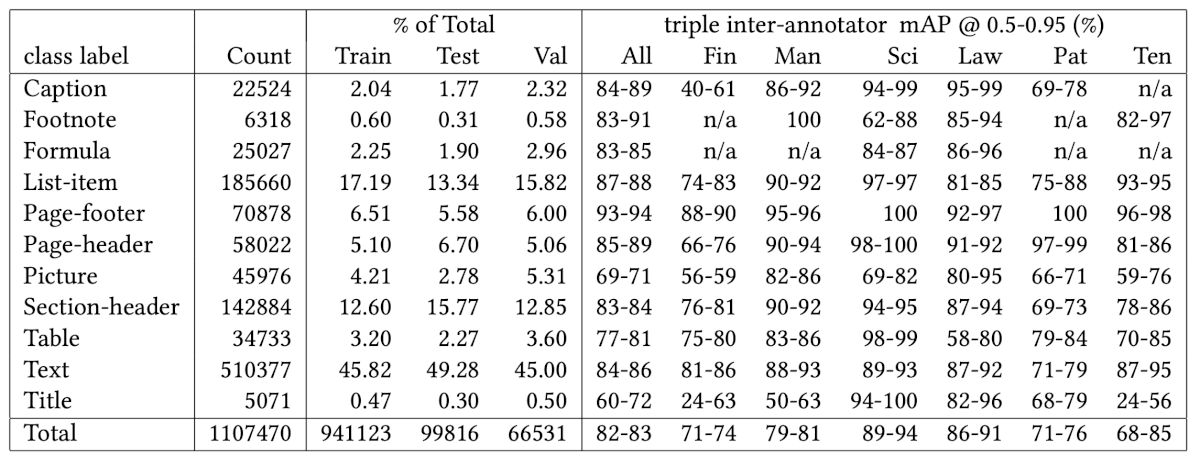
And here’s what LlamaParse extracted:
print(tables[2].md)
| class label | Count | % of Total<br/>Train | % of Total<br/>Test | % of Total<br/>Val | triple inter-annotator mAP @ 0.5-0.95 (%)<br/>All | triple inter-annotator mAP @ 0.5-0.95 (%)<br/>Fin | triple inter-annotator mAP @ 0.5-0.95 (%)<br/>Man | triple inter-annotator mAP @ 0.5-0.95 (%)<br/>Sci | triple inter-annotator mAP @ 0.5-0.95 (%)<br/>Law | triple inter-annotator mAP @ 0.5-0.95 (%)<br/>Pat | triple inter-annotator mAP @ 0.5-0.95 (%)<br/>Ten |
|---|---|---|---|---|---|---|---|---|---|---|---|
| Caption | 22524 | 2.04 | 1.77 | 2.32 | 84-89 | 40-61 | 86-92 | 94-99 | 95-99 | 69-78 | n/a |
| Footnote | 6318 | 0.60 | 0.31 | 0.58 | 83-91 | n/a | 100 | 62-88 | 85-94 | n/a | 82-97 |
| Formula | 25027 | 2.25 | 1.90 | 2.96 | 83-85 | n/a | n/a | 84-87 | 86-96 | n/a | n/a |
| List-item | 185660 | 17.19 | 13.34 | 15.82 | 87-88 | 74-83 | 90-92 | 97-97 | 81-85 | 75-88 | 93-95 |
| Page-footer | 70878 | 6.51 | 5.58 | 6.00 | 93-94 | 88-90 | 95-96 | 100 | 92-97 | 100 | 96-98 |
| Page-header | 58022 | 5.10 | 6.70 | 5.06 | 85-89 | 66-76 | 90-94 | 98-100 | 91-92 | 97-99 | 81-86 |
| Picture | 45976 | 4.21 | 2.78 | 5.31 | 69-71 | 56-59 | 82-86 | 69-82 | 80-95 | 66-71 | 59-76 |
| Section-header | 142884 | 12.60 | 15.77 | 12.85 | 83-84 | 76-81 | 90-92 | 94-95 | 87-94 | 69-73 | 78-86 |
| Table | 34733 | 3.20 | 2.27 | 3.60 | 77-81 | 75-80 | 83-86 | 98-99 | 58-80 | 79-84 | 70-85 |
| Text | 510377 | 45.82 | 49.28 | 45.00 | 84-86 | 81-86 | 88-93 | 89-93 | 87-92 | 71-79 | 87-95 |
| Title | 5071 | 0.47 | 0.30 | 0.50 | 60-72 | 24-63 | 50-63 | 94-100 | 82-96 | 68-79 | 24-56 |
| Total | 1107470 | 941123 | 99816 | 66531 | 82-83 | 71-74 | 79-81 | 89-94 | 86-91 | 71-76 | 68-85 |
LlamaParse correctly extracted this complex table:
<br/> to preserve the parent-child relationship (e.g., “% of TotalConclusion: LlamaParse produces the most accurate extraction of the three tools across simple and complex tables alike, with only occasional column hallucinations.
PerformanceLlamaParse finished in 8.54 seconds, the fastest of the three tools (Docling took 1 min 50s, Marker took 47s).
Unlike Docling and Marker, LlamaParse runs no models on your machine. It uploads the PDF to LlamaCloud, an LLM agent reads each page, and the result comes back:
%%{init: {"theme": "dark"}}%%
sequenceDiagram
    participant A as Your Machine
    participant B as LlamaCloud
    A->>B: Upload PDF
    B-->>A: Return extracted tables
The runtime is mostly network upload time and server processing, so it depends on your internet speed and current LlamaCloud load rather than your local hardware.
SummaryThe table below summarizes the key differences we found after testing all three tools on the same PDF:
| Feature | Docling | Marker | LlamaParse |
|---|---|---|---|
| Table detection | Vision-language model (local) | 5-stage specialized pipeline (local) | LLM agent (cloud) |
| Multi-level headers | Returns integer column names; mishandles parent groups | Keeps as separate rows with <br> tags | Flattens with <br/> tags, preserves grouping |
| Dense numeric tables | Hallucinates values, repetition loops | Merges columns, packs values into single cells | Extracts all values correctly |
| Speed (6-page PDF) | ~1 min 50s | ~47s | ~8.54s |
| Dependencies | docling[vlm] + mlx-vlm (Apple) or transformers | marker-pdf | API key |
| Pricing | Free (MIT) | Free (GPL-3.0) | Free tier (10k credits/month) |
In short:
When to use each:
These benchmarks are based on a single academic PDF tested on an Apple M5 Pro (64 GB RAM). Table complexity, document length, and hardware all affect the results. The best way to pick the right tool is to run each one on a sample of your own PDFs.
Docling and Marker are completely free, and LlamaParse’s free tier gives you 10,000 credits per month to experiment with.
Related Tutorials📚 Want to go deeper? My book shows you how to build data science projects that actually make it to production. Get the book →
Easy-to-digest articles on Python, AI, and open-source tools. Delivered twice a week.
| # | Наименование новости | Тональность | Информативность | Дата публикации |
|---|---|---|---|---|
| 1 | x-ray: A Tool to Detect Whether a PDF Has a Bad Redaction | 0 | 13.89 | 01-01-2026 |
| 2 | Azur Air направит резервный борт вместо жестко севшего в Барнауле пассажирского Boeing | 0 | 0 | 25-09-2019 |
| 3 | Nano-PDF - Edit PDF files with Nano Banana | 0 | 22.5 | 03-01-2026 |
| 4 | Tory minister Jacob Rees-Mogg backs anti-gay hate preacher Franklin Graham | 0 | 0 | 19-02-2020 |
| 5 | Круглый магнит Круглые магниты 7*7см. с вашими фотографиями 😍 Цена ... | 0 | 0 | 27-02-2025 |
| 6 | Iran says U.S. bears blame for Iranian forces shooting down plane | 0 | 0 | 14-01-2020 |
| 7 | [VK] M. G. Dr. Abdulaziz Bahaj on Twitter | 0 | 0 | 29-07-2019 |
| 8 | 20 февраля 1985 года – «Зенит» вышел в финал IV ... | 0 | 0 | 20-02-2025 |
| 9 | Вот подборка интересных и неочевидных фактов о митохондриях, которые вас ... | 0 | 0 | 22-02-2025 |
| 10 | No son historias, es Historia | 0 | 0 | 07-11-2024 |