Просмотр новости
Найдите то, что Вас интересует
 Спутники
 РН
РН SpaceX
 Роскосмос
 NASA
NASA
СпутникиРНSpaceXРоскосмосNASALearn how SlimToolkit can reduce a Python Docker image by analyzing what your app actually uses at runtime. This tutorial walks through slimming a Chainlit LLM chatbot image, shows where container bloat comes from, and explains how to avoid breaking lazily loaded Python frameworks.
slim xrayMost Docker images contain far more than a Python application actually needs at runtime. They include full OS layers with shells, compilers, and utilities that often go completely unused, leading to unnecessarily large images that consume storage and slow deployment pipelines.
SlimToolkit analyzes your container at runtime, identifies which files are actually used, and builds a minimal image with only those dependencies.
This article walks through slimming a Chainlit LLM chatbot, but the same approach works on any Python container.
Easy-to-digest articles on Python, AI, and open-source tools. Delivered twice a week.
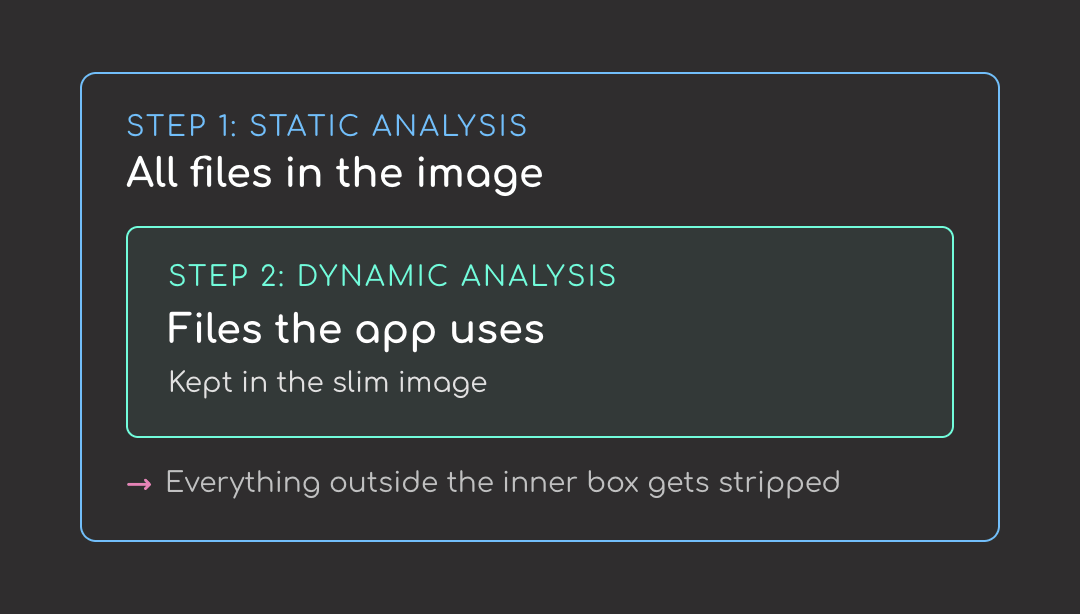
SlimToolkit is a command-line tool that strips unused files from a container image without touching your Dockerfile. It works in two steps:
The first step lists everything in the image. The second narrows that list to what the app actually needs. Everything outside the second list gets stripped.
Install it via the official install script (works on Linux and macOS):
curl -sL https://raw.githubusercontent.com/slimtoolkit/slim/master/scripts/install-slim.sh | sudo -E bash -
Or with Homebrew on macOS:
brew install docker-slim
Verify the install:
slim --version
Output
mint version darwin/arm64|Aurora|1.41.8|latest|latest
Build the Chatbot Image💻 Get the Code: The complete source code and Jupyter notebook for this tutorial are available on GitHub. Clone it to follow along!
To test SlimToolkit, build a small Chainlit chatbot image first. We’ll write a small Chainlit chatbot, package it with a Dockerfile, and build it.
The Chainlit AppThe chatbot app uses two libraries:
gpt-4o-mini for responses# app.py
import os
import chainlit as cl
from openai import AsyncOpenAI
client = AsyncOpenAI(api_key=os.environ.get("OPENAI_API_KEY"))
@cl.on_chat_start
async def start():
cl.user_session.set("messages", [])
@cl.on_message
async def main(message: cl.Message):
messages = cl.user_session.get("messages")
messages.append({"role": "user", "content": message.content})
response = await client.chat.completions.create(
model="gpt-4o-mini",
messages=messages,
)
reply = response.choices[0].message.content
messages.append({"role": "assistant", "content": reply})
cl.user_session.set("messages", messages)
await cl.Message(content=reply).send()
Here’s what happens when someone uses the chatbot:
AsyncOpenAI reads the OPENAI_API_KEY environment variable and constructs the client@cl.on_chat_start initializes an empty message list for that session@cl.on_message appends it to the history, sends the whole conversation to gpt-4o-mini, stores the reply, and displays itBefore containerizing, let’s test it locally first. Export your OpenAI key:
export OPENAI_API_KEY=sk-...
Then run the app:
chainlit run app.py
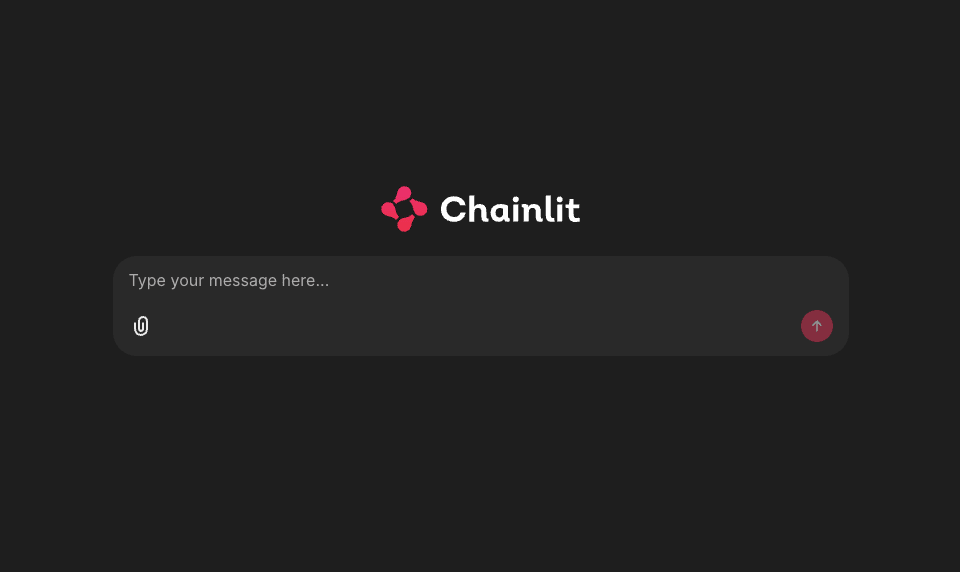
Open http://localhost:8000, you should see the Chainlit welcome screen.
Pin every dependency in a requirements.txt so the build is reproducible:
# requirements.txt
chainlit==2.11.1
openai==2.16.0
Create a Dockerfile to build the image:
# Dockerfile
FROM python:3.11-slim

WORKDIR /app

COPY requirements.txt .
RUN pip install --no-cache-dir -r requirements.txt

COPY app.py .

EXPOSE 8000
CMD ["chainlit", "run", "app.py", "--host", "0.0.0.0", "--port", "8000", "-h"]
Here’s what each step does:
python:3.11-slim as the base imagerequirements.txtapp.pyBuild the image:
docker build -t llm-chatbot:fat .
Verify the image size:
docker images llm-chatbot:fat
Output
IMAGE             ID             DISK USAGE   CONTENT SIZE   EXTRA
llm-chatbot:fat   e8de32dd85d4        308MB             0B
Around 300 MB. Let’s see if we can shrink it with SlimToolkit.
Slim the ImageTo slim the image, start with the basic command:
slim build \
    --target llm-chatbot:fat \
    --tag llm-chatbot:slim \
    --env OPENAI_API_KEY=$OPENAI_API_KEY
Each flag plays a role in the slim build:
--target llm-chatbot:fat: tells slim which image to minify--tag llm-chatbot:slim: names the output image--env OPENAI_API_KEY=$OPENAI_API_KEY: sets the env var inside slim’s probe container so the module-level AsyncOpenAI() can construct at import timeHere’s what happens when you run the command:
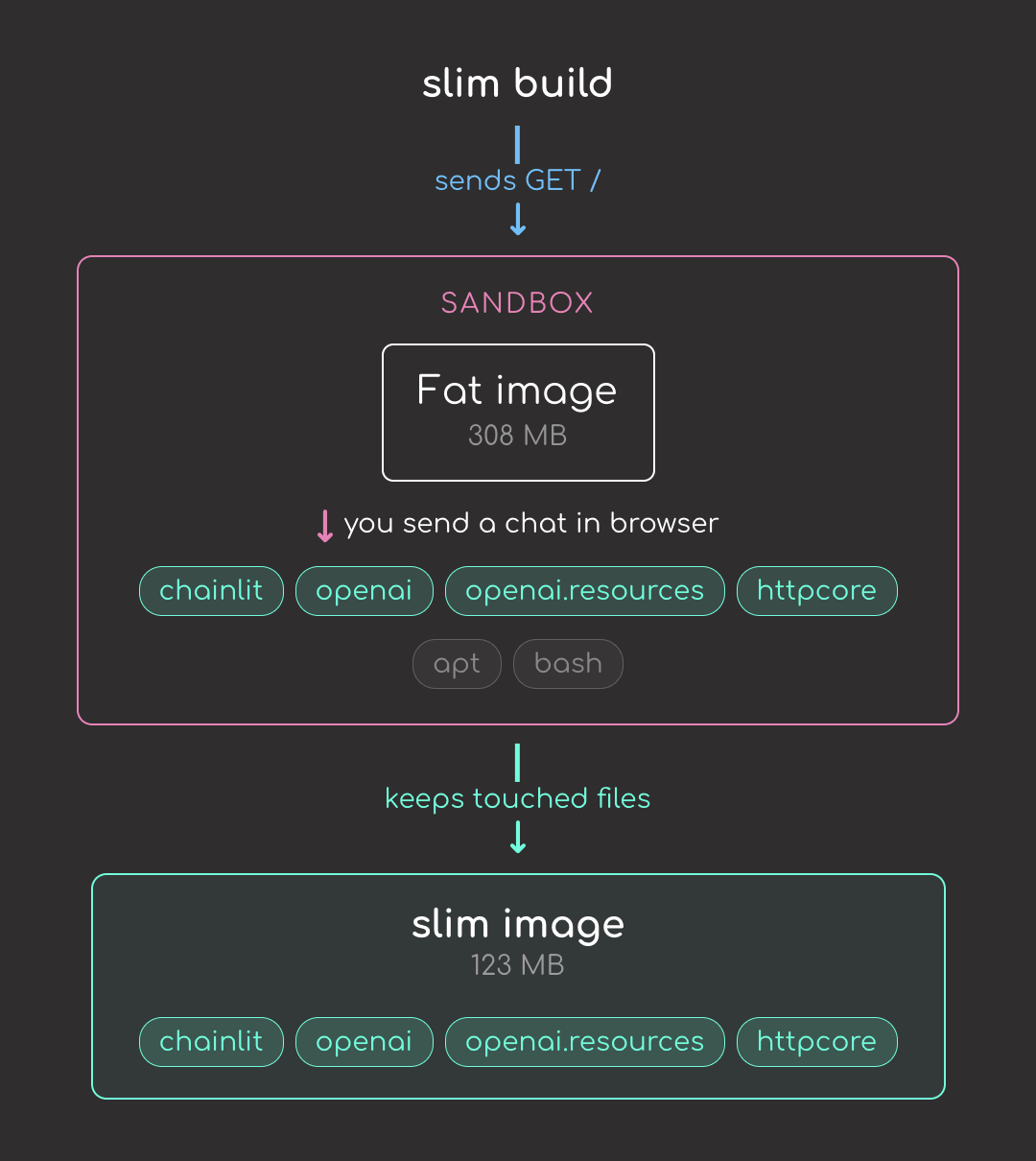
GET / probe and records every file the container touches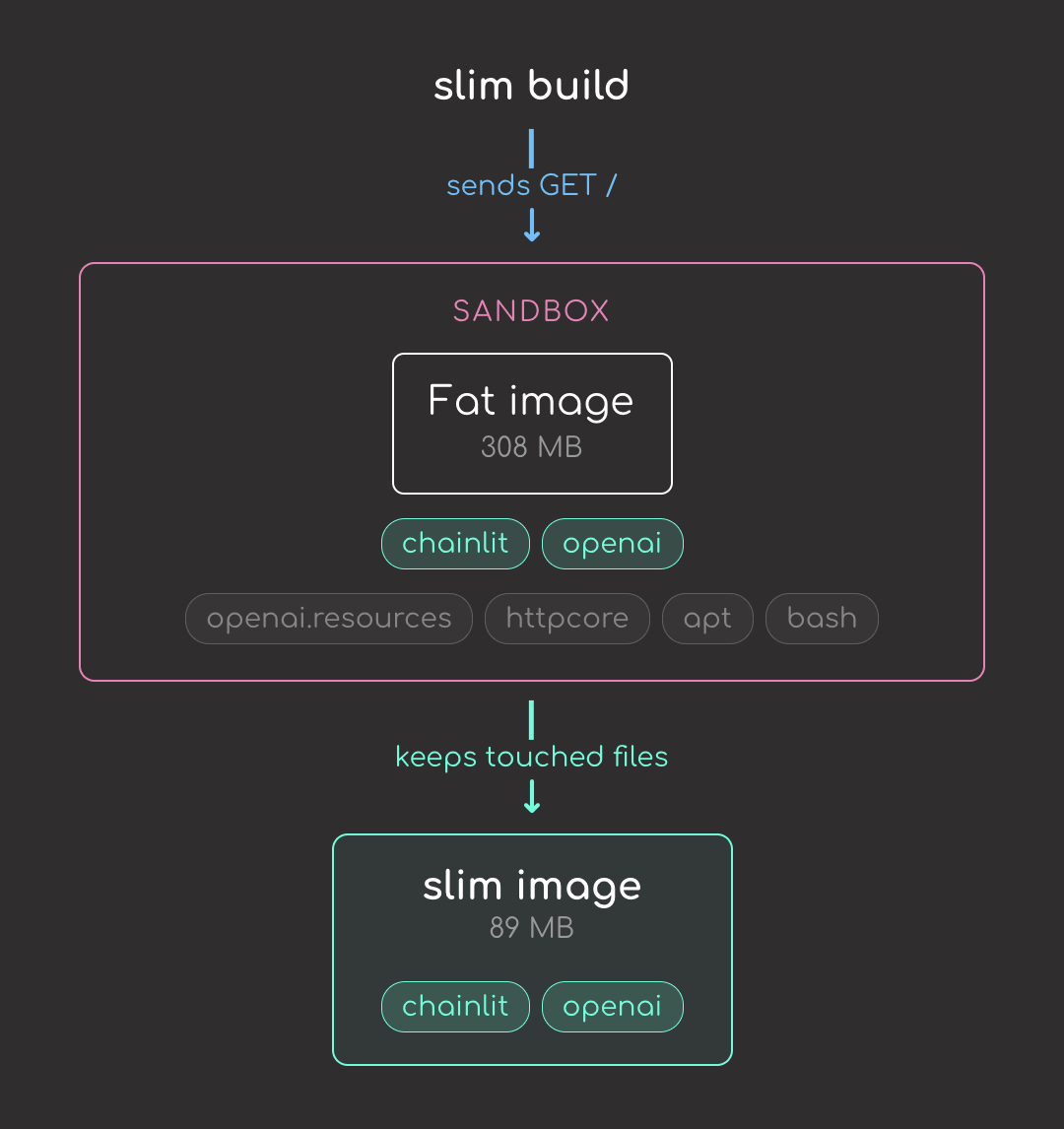
But the default GET / only loads the chat UI shell. It doesn’t actually send a chat message, so files needed for the chat path (OpenAI’s lazy submodules, httpcore, etc.) get stripped. To trace the chat path too, add --continue-after enter:
slim build \
    --target llm-chatbot:fat \
    --tag llm-chatbot:slim \
    --env OPENAI_API_KEY=$OPENAI_API_KEY \
    --continue-after enter
--continue-after enter pauses slim after the default probe so you can open the chatbot in a browser and send a message; this tells slim what files the chat actually needs.
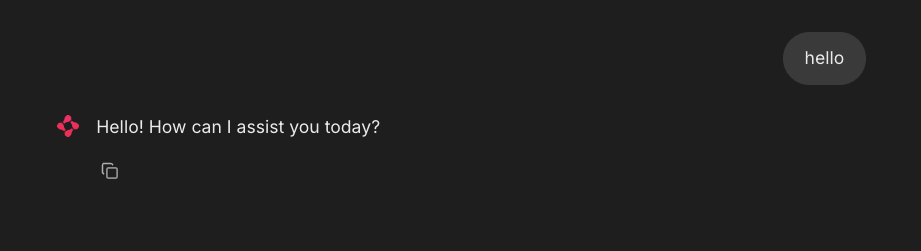
Now that the chat path runs during the probe, slim keeps openai.resources and httpcore in the final image:
Let’s compare both images:
docker images llm-chatbot
Output
IMAGE              ID             DISK USAGE   CONTENT SIZE   EXTRA
llm-chatbot:fat    e8de32dd85d4        308MB             0B    U
llm-chatbot:slim   e1f5e9b31e53        123MB             0B
Nice! We reduced the image size from 308 MB to 123 MB, about a 2.5x reduction.
Let’s run the slim image with the environment variable and see what happens.
docker run -p 8000:8000 -e OPENAI_API_KEY=$OPENAI_API_KEY llm-chatbot:slim
Output
File "/usr/local/lib/python3.11/site-packages/chainlit/server.py", line 181, in get_build_dir
    raise FileNotFoundError(f"{local_target} built UI dir not found")
FileNotFoundError: libs/copilot built UI dir not found
The error comes from a mismatch between Chainlit and slim:
chainlit/copilot/ to exist when the server starts--continue-after enter, slim removed chainlit/copilot/ because the chat you exercised in the browser only loaded the main chat UI. The Copilot widget is a separate Chainlit feature; no file inside chainlit/copilot/ was opened during the probe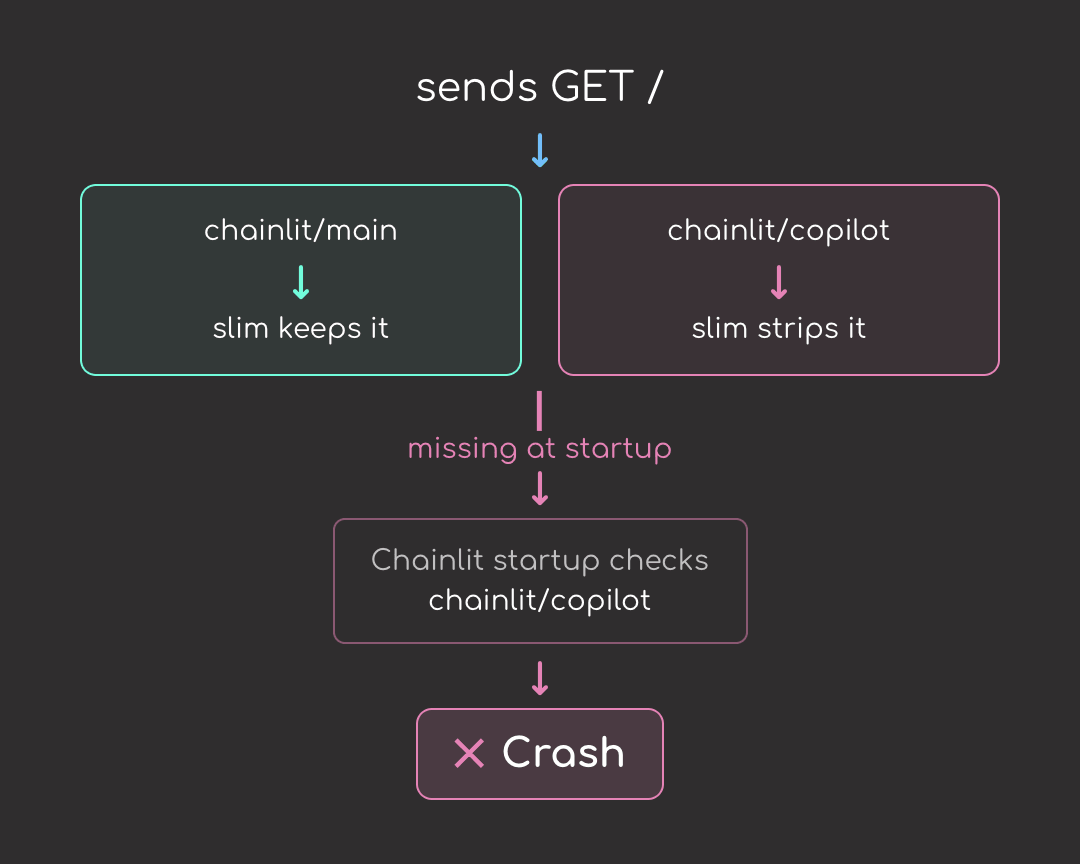
This is not unique to Chainlit or chat-UI frameworks. Any framework that loads features lazily but checks for them at startup is vulnerable. Django’s admin, FastAPI apps with multiple routers, ML serving frameworks with embedded UIs, and plugin systems all hit the same problem.
Add--include-path for the Chainlit PackageThe fix is --include-path, which tells SlimToolkit to preserve a path regardless of whether probing touched it. The path that matters is the whole Chainlit package directory, which contains every feature bundle Chainlit ships:
slim build \
    --target llm-chatbot:fat \
    --tag llm-chatbot:slim \
    --include-path /usr/local/lib/python3.11/site-packages/chainlit \
    --continue-after enter \
    --env OPENAI_API_KEY=$OPENAI_API_KEY
Compare the images again:
docker images llm-chatbot
Output
IMAGE              ID             DISK USAGE   CONTENT SIZE   EXTRA
llm-chatbot:fat    e8de32dd85d4        308MB             0B    U
llm-chatbot:slim   952b6b44df9f        163MB             0B    U
Re-run the image to confirm it works:
docker run -p 8000:8000 -e OPENAI_API_KEY=$OPENAI_API_KEY llm-chatbot:slim
With the chainlit directory preserved, the slim container starts and runs as expected.
slim xrayTo see exactly which files slim stripped, run slim xray against both images. It reverse-engineers a built image into a JSON report listing every file, its size, and the layer it came from. Slim always writes its output to slim.report.json, so rename the first report before the second run overwrites it:
slim xray --target llm-chatbot:fat
mv slim.report.json fat.report.json

slim xray --target llm-chatbot:slim
Each report is several megabytes of JSON, which makes manual comparison painful. To handle that, I packaged the diff and summary steps into compare.sh:
bash compare.sh
Here are the biggest deletions, grouped by bucket:
| Removed | Size | Bucket |
|---|---|---|
/usr/bin/perl | 3.8 MB | OS cruft |
libapt-pkg.so | 2.4 MB | OS cruft (apt) |
ensurepip/pip-24.0.whl | 2.1 MB | Python build leftover |
libdb-5.3.so | 1.8 MB | OS cruft (apt) |
/usr/bin/sqv | 1.6 MB | OS cruft (apt’s PGP verifier) |
/usr/bin/bash | 1.4 MB | OS cruft |
ensurepip/setuptools-79.0.1.whl | 1.3 MB | Python build leftover |
multidict/_multidict.so | 923 kB | Unused part of aiohttp |
jiter/jiter.so | 880 kB | Unused part of openai |
pydoc_data/topics.py | 775 kB | Python build leftover |
aiohttp/_http_writer.so | 600 kB | Unused part of aiohttp |
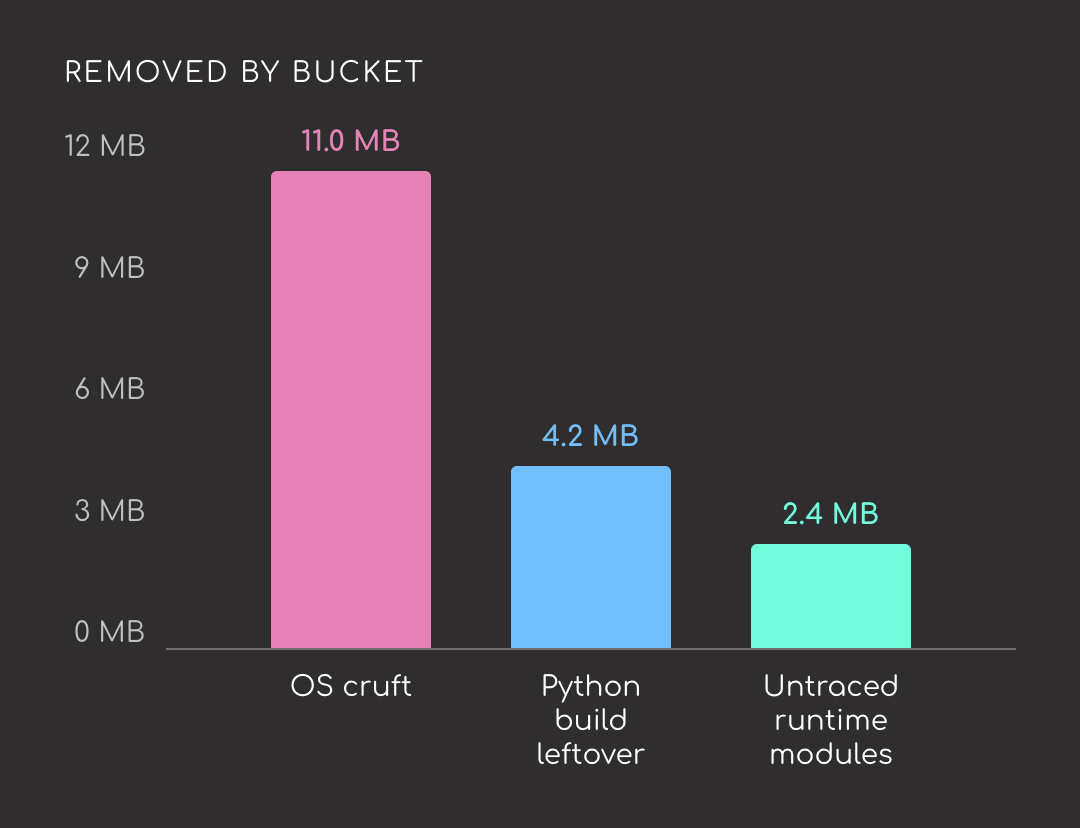
The biggest savings come from the Debian base image, not from the Python packages. Of the top 11 deletions:
perl, bash, libapt-pkg, libdb-5.3, sqvpydoc help-text databaseaiohttp/_http_writer, multidict, jiterEasy-to-digest articles on Python, AI, and open-source tools. Delivered twice a week.
A single slim build command took this chatbot from 308 MB to 163 MB. That is one data point on one image. Your numbers will likely look different. The wider the gap between what your image installs and what it actually runs at runtime, the bigger the reduction tends to be. Give it a try on your own images and see what kind of improvement you get.
📚 Want to go deeper? Learning new techniques is the easy part. Knowing how to structure, test, and deploy them is what separates side projects from real work. My book shows you how to build data science projects that actually make it to production. Get the book →
| # | Наименование новости | Тональность | Информативность | Дата публикации |
|---|---|---|---|---|
| 1 | Минус 500 MB: оптимизируем Docker-образ Django-приложения | -1 | 17.23 | 15-06-2026 |
| 2 | Оптимизация сборки Python Docker образа: размер меньше на -43% (-57%) | 0 | 7.48 | 27-03-2026 |
| 3 | Собираем Docker-шаблон для Python с Poetry: шаг за шагом | 0 | 18.17 | 06-01-2026 |
| 4 | Choosing the Right Python Docker Image for Finance Workloads | 0 | 10 | 27-12-2025 |
| 5 | Docker Sandboxes: isolierte Einweg-Umgebungen für KI-Agenten | 0 | 18.06 | 10-08-2026 |
| 6 | LangChain Python Tutorial: 2026’s Complete Guide | 0 | 8.22 | 21-02-2026 |
| 7 | DevOps Containers: A Practical Guide for DevOps Teams in 2026 | 0 | 7 | 03-03-2026 |
| 8 | TileRT - Tile-Based Runtime for Ultra-Low-Latency LLM Inference | 0 | 35 | 28-06-2026 |
| 9 | headroom - Compress tool outputs | 0 | 8.57 | 16-06-2026 |
| 10 | Надоел Celery? Не нужен K8s? Как мы сделали легковесный оркестратор на Python | 0 | 7.6 | 22-02-2026 |