Просмотр новости
Найдите то, что Вас интересует
 Спутники
 РН
РН SpaceX
 Роскосмос
 NASA
NASA
СпутникиРНSpaceXРоскосмосNASAIs it just us, or is Claude starting to feel like home? 🏡 We thought it would be even more comfortable if you could use Fantastical directly from Claude, and that’s why we are excited to introduce our newest feature on the Mac: Fantastical’s Model Context Protocol (MCP) Connector for Claude! With our new MCP server, […]

March 17, 2026 by Chrissie
Feature Spotlight: Introducing the Fantastical Connector (MCP) for Claude
Is it just us, or is Claude starting to feel like home? 🏡
We thought it would be even more comfortable if you could use Fantastical directly from Claude, and that’s why we are excited to introduce our newest feature on the Mac: Fantastical’s Model Context Protocol (MCP) Connector for Claude!
With our new MCP server, we’re bringing scheduling right into your Claude conversation so now it’s possible to plan and schedule without having to switch between apps!
How it worksOnce you install the Fantastical Connector in Claude, Claude will be able to perform these actions using your current calendar set in Fantastical:
Best of all, the same natural language entry that you are used to with the Fantastical parser works perfectly when chatting with Claude. It understands natural phrases like “next week,” “end of the day,” “after lunch,” and even vague requests like “sometime Thursday.”
Plus, if something’s unclear, it’ll ask a quick follow-up instead of guessing. Think of it like texting a polite, well-organized assistant!
Ready to jump in?
We’ll get you started with a couple of quick examples of the magic that is now at your fingertips. 🪄
Ask Claude to give you an overview of your schedule for the week to receive a clear and concise report of what’s coming up.
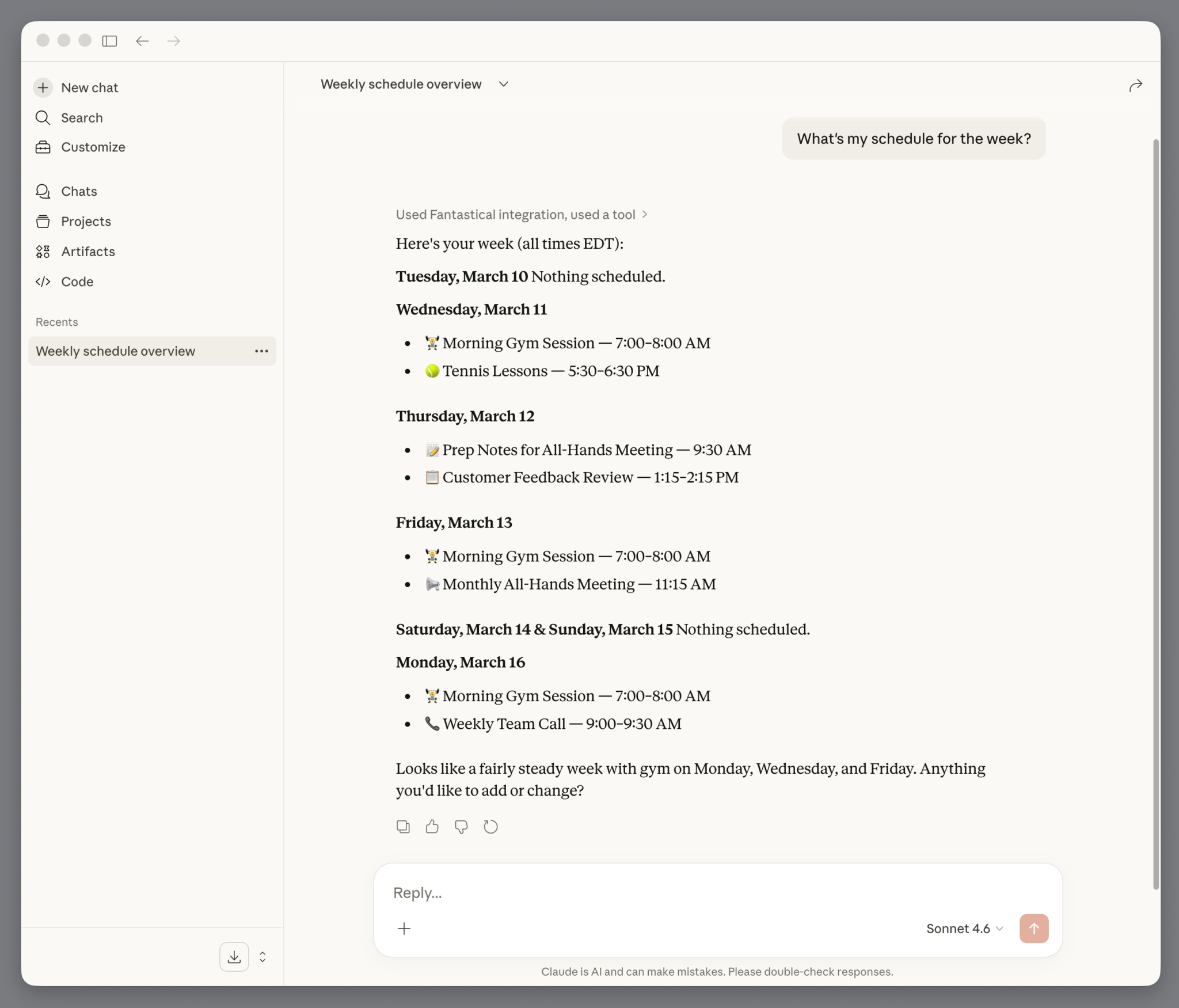 You can then add or change items on the existing schedule if you see something that isn’t quite right.
Let Claude help you find the best time in your schedule for an upcoming meeting by asking something like “Find a 1.5-hour slot for an app design meeting in the next two weeks”.
You’ll get a list of dates/times and can choose the one that works best for your needs.

Then, once the meeting has been created, you’ll get a notification in Fantastical with the information.
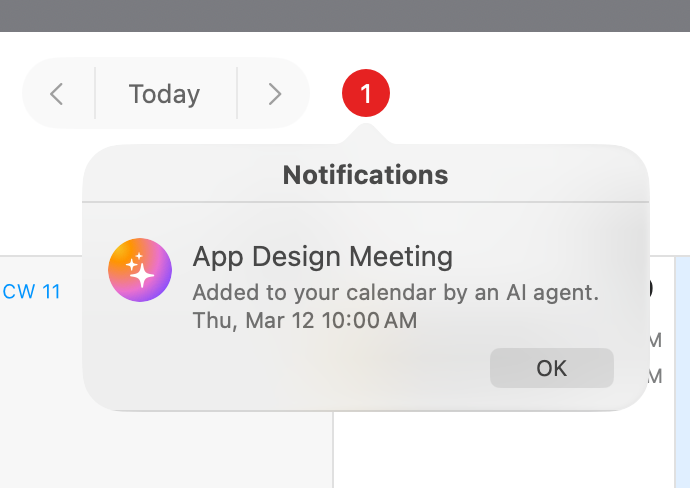
If you’re already using the Claude Desktop app, you can connect Fantastical in minutes. If not, go ahead and download that directly from Claude. Then, make sure you have Fantastical version 4.1.10 installed on your Mac, and check out our Fantastical Connector (MCP) for Claude setup guide in the help center to get started.
This is just the beginning of what AI can do inside your calendar. Stay tuned for more!
Have feedback or ideas for what you’d like Claude to help with next? We’d love to hear from you – drop our Support team a note.
| # | Наименование новости | Тональность | Информативность | Дата публикации |
|---|---|---|---|---|
| 1 | New Feature Roundup: You Asked, We Built | 0 | 13.16 | 28-07-2026 |
| 2 | nextcloud-mcp-server 0.133.1 | 0 | 7 | 10-07-2026 |
| 3 | clipmaster-mcp 0.1.1 | 0 | 16.8 | 14-08-2026 |
| 4 | Even Better Simplenote MCP Server | 0 | 10.35 | 08-05-2026 |
| 5 | Paste launches MCP support to connect your clipboard history to AI tools | 0 | 8.54 | 02-06-2026 |
| 6 | [Перевод] Аутентификация в MCP в 2026: как было, как есть и как будет | 0 | 7 | 07-07-2026 |
| 7 | Datadog MCP Apps: Interactive experiences in AI workflows | 0 | 7.28 | 09-06-2026 |
| 8 | Data Tables Generator Now Supports AI via MCP (Claude, Cursor IDE) | 0 | 9.18 | 14-03-2026 |
| 9 | Anthropic’s Claude Tag brings shared AI collaboration to Slack Teams | 0 | 13.82 | 24-06-2026 |
| 10 | Bring live Datadog telemetry into your AI agents with native integrations | 0 | 5.99 | 09-06-2026 |