Просмотр новости
Найдите то, что Вас интересует
 Спутники
 РН
РН SpaceX
 Роскосмос
 NASA
NASA
СпутникиРНSpaceXРоскосмосNASAProxy vs VPN! Many people think a proxy and a VPN do the same job. At first glance, they might look similar. However, the main difference between a proxy and a VPN is that a proxy routes internet traffic through another server, while a VPN encrypts the entire internet connection. Proxies are good for tasks like changing IP addresses and SEO tracking, while VPNs are ideal for secure browsing, online privacy, and protection on public Wi-Fi. Proxy vs VPN (Comparison Table) Feature Proxy VPN Hides IP Address Yes Yes Encrypts Traffic No (Usually) Yes Protects Entire Device No Yes Browser-Only
Proxy vs VPN: What’s the Difference and Which You Should Use (2026) is a post from Techiezlounge - Tech Blog.
Related posts:
Best Free VPN Apps For iPhone To Protect Online Privacy And Access Geo-Locked Content
Best No Logs VPN For Crypto- Enhance Privacy
VPN 101 – What Are They and How Can They Help You
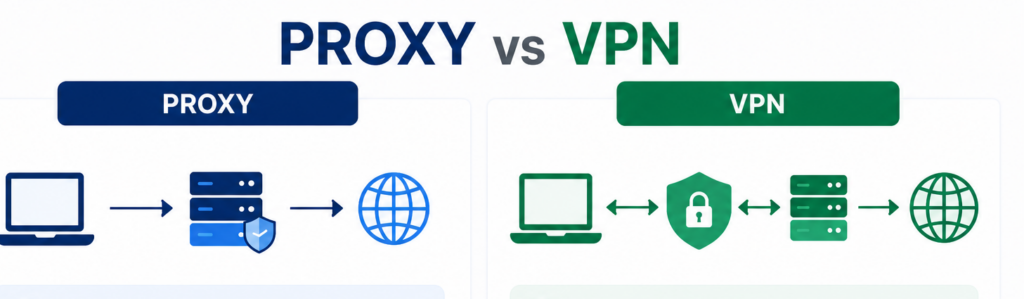
Proxy vs VPN! Many people think a proxy and a VPN do the same job. At first glance, they might look similar. However, the main difference between a proxy and a VPN is that a proxy routes internet traffic through another server, while a VPN encrypts the entire internet connection. Proxies are good for tasks like changing IP addresses and SEO tracking, while VPNs are ideal for secure browsing, online privacy, and protection on public Wi-Fi.
Proxy vs VPN (Comparison Table)
| Feature | Proxy | VPN |
|---|---|---|
| Hides IP Address | Yes | Yes |
| Encrypts Traffic | No (Usually) | Yes |
| Protects Entire Device | No | Yes |
| Browser-Only Usage | Common | No |
| Public Wi-Fi Security | Limited | Excellent |
| Privacy Protection | Basic | High |
| Speed | Usually Faster | Slightly Slower |
| Setup Difficulty | Easy | Easy |
| Cost | Often Free | Usually Paid |
| Best For | Testing & IP Changes | Privacy & Security |
A proxy server works like a middle layer between you and the internet. When you try to open a website, your request is first sent to the proxy. The proxy then forwards it to the website. Once the website sends back the data, the proxy receives it and passes it on to you
Because of this setup, the website does not see your real IP address. It only sees the IP of the proxy server.
Most people use HTTP or HTTPS proxies. These usually work inside a browser or a browser extension. That means only your browser traffic goes through the proxy. Other apps on your device continue to use your normal internet connection.
Key point: A proxy usually does not encrypt your traffic. It simply redirects it.
Types of Proxies:
HTTP Proxy – For Web browsing
HTTPS Proxy – For Secured Web Traffic
SOCKS5 Proxy – For gaming, web scraping
What is a VPN?A VPN, or Virtual Private Network, does more than just change your IP address. It creates a secure and private connection between your device and a VPN server.
When you turn on a VPN:
This protection is important because it keeps your data safe. Even if someone tries to see what you’re doing online, they won’t be able to read it. Whether you’re browsing, using apps, or streaming, everything goes through this secure connection.
Types of VPN ProtocolsA VPN protocol is a set of rules that guides how your data is transmitted from your device to the internet while keeping it private and secure.
The most common VPN protocols are WireGuard, OpenVPN, IKEv2 / IPsec, L2TP / IPsec, and PPTP. Open VPN is one of the most used VPN protocols, while WireGuard offers great speed and stability.
VPN Protocols (Comparison Table)
| VPN Protocol | Security Level | Speed | Best Use Case |
|---|---|---|---|
| WireGuard | Very High | Very Fast | Streaming, gaming, daily browsing |
| OpenVPN | Very High | Fast | General-purpose VPN usage |
| IKEv2/IPSec | High | Fast | Mobile devices and switching networks |
| L2TP/IPSec | Medium-High | Moderate | Legacy VPN setups |
| PPTP | Low | Very Fast | Legacy systems only |
The main difference between Proxy and VPN is simple:
A proxy changes how your request reaches a website. A VPN protects your entire connection while doing that. Let’s understand the difference between these two in a clear way:
1. Encryption and SafetyA VPN protects your data by encrypting it. This means your online activity is turned into a coded form while it travels across the internet. Even if someone tries to access it, they won’t be able to understand what it contains.
A proxy, in most cases, does not do this. It only passes your data along. If the connection is not secure, your information can still be seen. So, if safety matters, a VPN is the better option.
2. Coverage and ControlA proxy usually works on one app, mostly your browser. If you open another app, like a game or email client, it will not use the proxy unless you set it up manually.
A VPN works differently. Once you turn it on, it covers your entire device. All apps automatically use the VPN connection. Because of this, a VPN is easier for everyday use since you don’t have to set things up again and again for each app.
3. Privacy LevelA proxy can hide your IP address from the website you visit. That’s helpful, but it does not stop others from tracking your activity.
A VPN gives better privacy. It hides your IP and also limits what others can see while your data travels across the network. However, keep one thing in mind:
You still need to trust your VPN provider because your data passes through their server.
4. Speed and PerformanceA proxy can feel faster. Since it does not encrypt data, there is less processing involved.
A VPN may add a small delay because of encryption. But in real life, the speed depends more on the provider, server location, and network quality.
A good VPN service can still offer smooth browsing, streaming, and downloads.
5. Ease of UseProxies are often simple to set up in a browser. You just add the proxy address and start using it. VPNs are also easy today. Most services provide apps where you just click “connect,” and everything works automatically.
So, both are easy to use, but VPNs offer more features with minimal effort.
When Should You Use a Proxy?A proxy is useful when your needs are simple and limited.
Using a proxy will be best in situations like these:
For example, a developer testing website access from different regions may prefer a proxy. It is quick and does the job without affecting the rest of the system.
When Should You Use a VPN?A VPN is the better choice when you care about privacy and security.
You should use a VPN when:
A VPN is ideal for everyday use. It protects your data without requiring constant setup.
Real-Life Examples of Proxy vs VPN| Example | Best Choice |
|---|---|
| Public Wi-Fi | VPN |
| Streaming | VPN |
| SEO Monitoring | Proxy |
| Web Scraping | Proxy |
| Gaming | VPN |
| Website Testing | Proxy |
| Business Security | VPN |
| Daily Browsing | VPN |
Let’s make this even clearer with simple examples.
Case 1: Watching region-based content
If you just want to open a website that is limited to a certain country, a proxy may be enough.
Case 2: Using public Wi-Fi at a café
A VPN is the better option. It protects your data from people on the same network.
Case 3: Testing a website
A proxy is useful for checking how a site behaves in different regions.
Case 4: Daily browsing and apps
A VPN is better because it covers everything, not just your browser.
Case 5: Downloading files on public networks
If you are downloading files while connected to public Wi-Fi, a VPN is the safer choice.
Limitations You Should KnowNo tool is perfect. Both proxies and VPNs have limits.
Proxy limitations:
VPN limitations:
Understanding these limits helps you choose wisely.
Can I Use a Proxy and a VPN Together?
Yes, a Proxy and a VPN can be used together for IP masking and privacy. Once configured, a VPN will encrypt your internet connection, while a Proxy provides an additional layer of anonymity for tasks like SEO tracking and web scraping. One of the major drawbacks of using a proxy and a VPN together is the impact on connection speed.
Final Thoughts: Which One Should You Use?When comparing proxy vs. VPN, the right choice depends on your requirements. If your goal is simple, like changing your IP for a single website, then a proxy can do the job.
But if you want better privacy, stronger protection, and coverage across your whole device, a VPN is the clear choice. In short:
The difference is not just technical. It affects how safe and private your online experience really is. So before you choose, think about what matters more to you: speed and simplicity, or security and peace of mind.
Frequently Asked Questions (FAQs)
Q1. Is a VPN better than a proxy?
A. Yes, a VPN is better for most users. It not only hides your IP address but also encrypts your internet traffic, which gives you more privacy and security than a proxy.
Q2. Can I use a proxy instead of a VPN?
A. You can use a proxy for simple tasks like changing your IP in a browser. But it does not protect your data, so it is not a good replacement for a VPN when security matters.
Q3. Does a VPN slow down internet speed?
A. A VPN can slightly reduce speed because of encryption. However, a good VPN service usually keeps the speed stable for browsing, streaming, and daily use.
Q4. Can a VPN hide my browsing history?
Yes, a VPN hides your browsing history from your Internet provider, but not from the websites you log into.
Q5. Can a Proxy hide my online activity?
A. A proxy hides your IP address from websites but does not encrypt your data. Your online activity can be visible to your internet provider.
Q6. Is a free VPN better than a free Proxy?
A. A VPN from a trusted provider is better than a free proxy. A free VPN can, however, log data or limit performance
| # | Наименование новости | Тональность | Информативность | Дата публикации |
|---|---|---|---|---|
| 1 | How To Block Someone on TikTok (Complete Guide) | 0 | 8.98 | 23-07-2026 |
| 2 | Best AI Tools for Students Free (Top 10) | 0 | 8.59 | 09-06-2026 |
| 3 | Best Image to Video AI Tools 2026: The Most Practical Platforms for Creators, Marketers, and Builders | 0 | 5.02 | 05-06-2026 |
| 4 | The 5 Best VPN Extensions for Chrome | 0 | 11.9 | 30-07-2026 |
| 5 | Best Low-end PC Multiplayer Games | 0 | 9.01 | 26-06-2026 |
| 6 | 10 Best Free AI Tools For Bloggers To Grow Your Blog | 0 | 8 | 17-06-2026 |
| 7 | How To Speed Up Windows 11 Without Software | 0 | 9.59 | 29-07-2026 |
| 8 | Shadowsocks Proxy by ChangeMyIp: A Complete Review #software #onlineservice | 0 | 8.92 | 19-07-2024 |
| 9 | 10 Best Steam Games Under 2GB to Play Now | 0 | 8.8 | 07-07-2026 |
| 10 | Best Split-Screen Games for PC You Must Play | 0 | 9.71 | 18-07-2026 |